How to install Boei on your Square Online website
You can install Boei effortlessly on your Square Online site, and you won't even need a developer.
Just grab a cup of coffee ☕️, and you can do the installation in 5-mins yourself.
⚠️ Heads up: Square Online is not the same as Squarespace. Square Online is Square's website builder (often used for restaurants and retail), while Squarespace is a separate company. If you're on Squarespace, see installation-squarespace instead.
Step 1. Create an account
Create a Boei account if you don't have one yet. The onboarding trains your AI chatbot on your website content. You can also add other ways customers can reach you, like WhatsApp, email, or phone.
Step 2. Copy installation code
In your Boei dashboard, open your widget and click the Install tab. Select Square Online and copy the installation code.
Step 3. Open Tracking tools
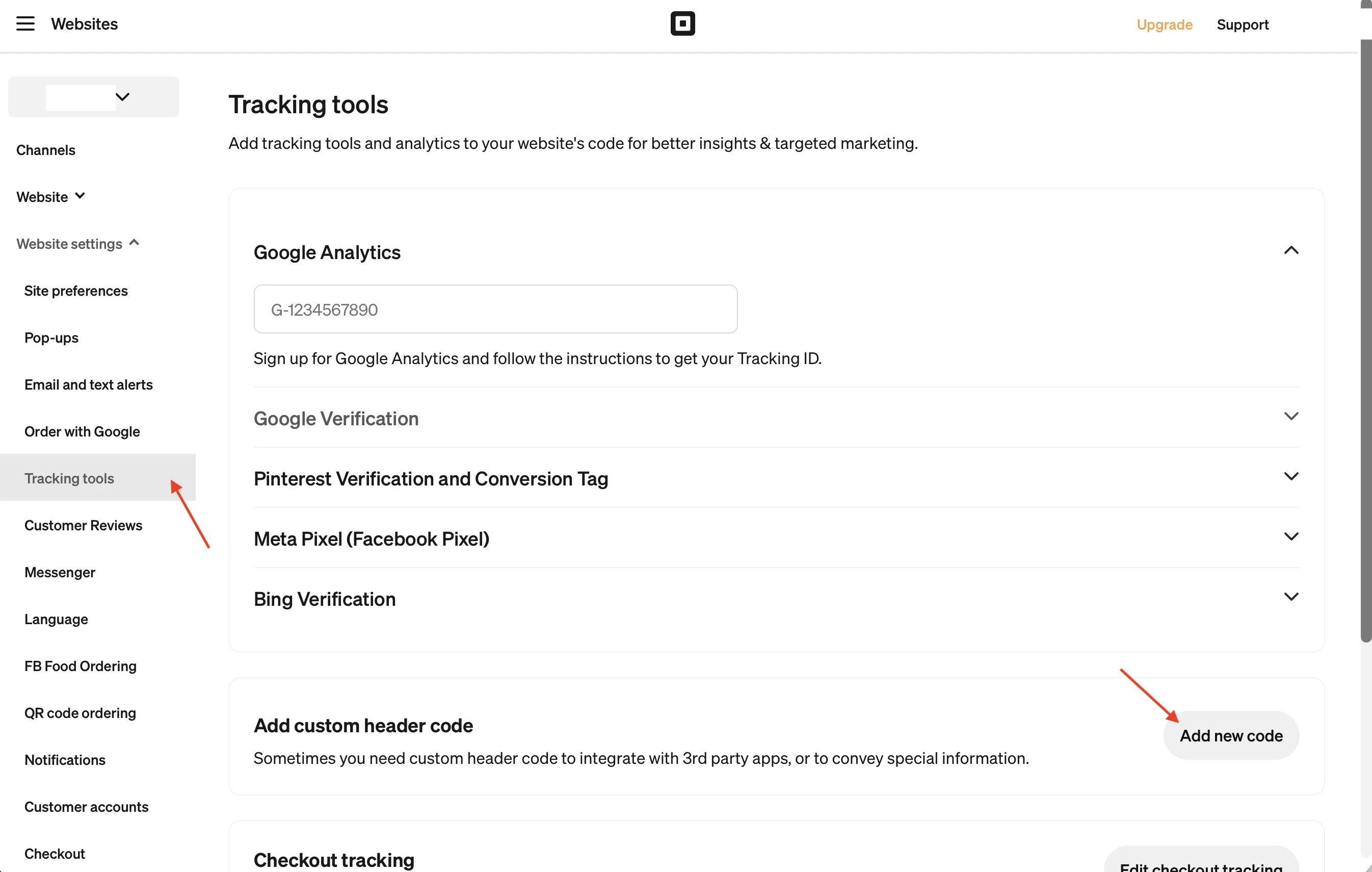
In your Square dashboard, go to Websites, then open Website settings in the left sidebar and click Tracking tools.
Step 4. Add custom header code
Scroll down to the Add custom header code section and click Add new code.
Step 5. Paste Code & Save
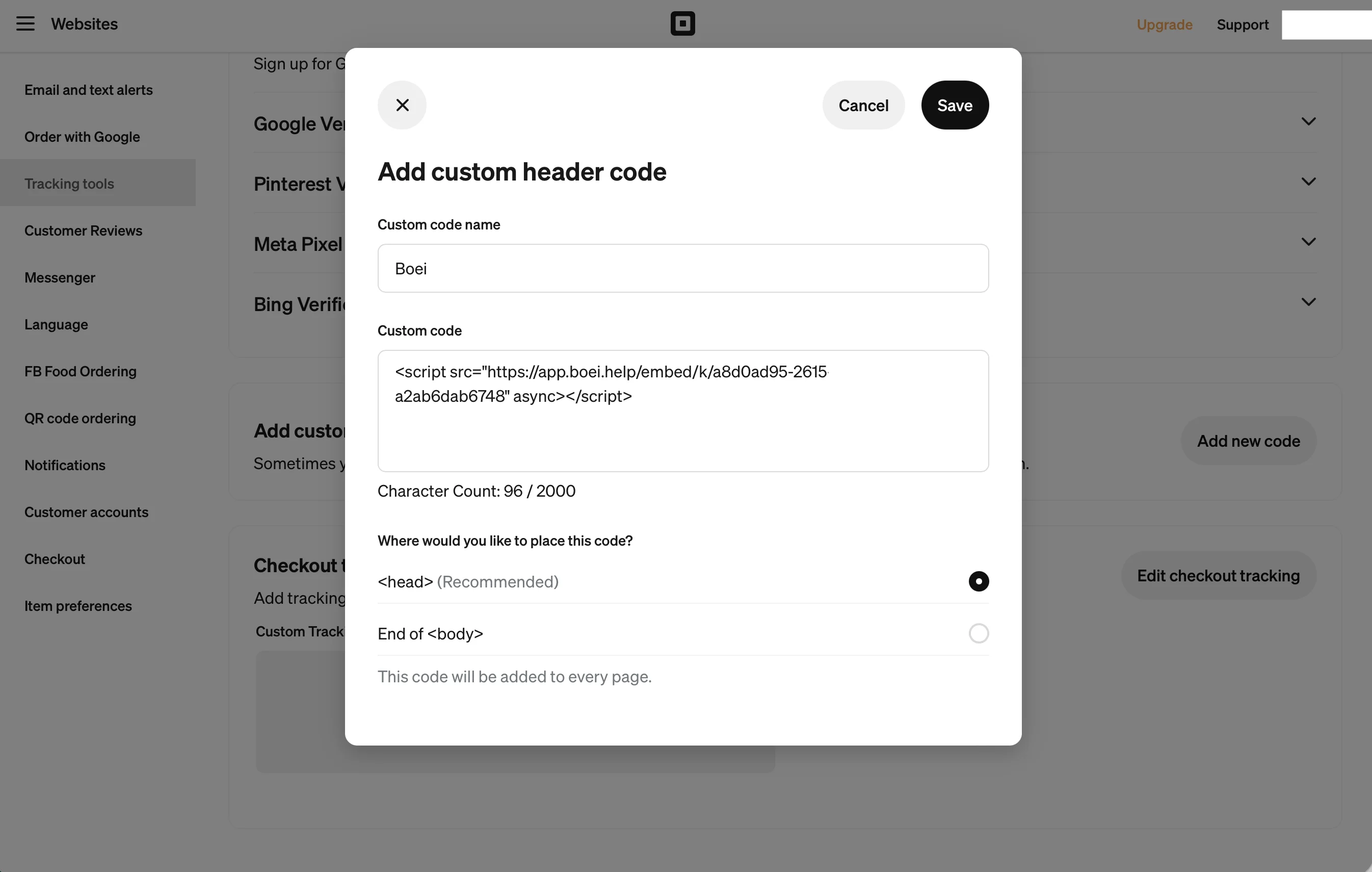
In the dialog, give your code a name (e.g. "Boei"), paste the Boei installation code into the Custom code field, and keep the placement set to <head> (Recommended). Click Save.
The Boei chatbot will now appear on all pages of your Square Online site. Congrats, you are done!
Troubleshooting
If the Boei chatbot doesn't appear on your site:
- Hard-refresh the page (Cmd+Shift+R on Mac, Ctrl+Shift+R on Windows) to bypass browser cache.
- Disable ad blockers in your test browser. Some block third-party scripts.
- Publish your site: changes only appear on your live site after you publish from the Square dashboard.
Common questions
Will it slow down my site? No, Boei loads asynchronously after your page renders.
Does it work on mobile? Yes, the chatbot is fully responsive.
Can I show it only on certain pages? Yes, set page rules in your Boei dashboard.
- Install on AdPage
- Install on Adobe Muse
- Install on BigCommerce
- Install on Blogger
- Install on carrd
- Install on Divi
- Install on Drupal
- Install on Ecwid
- Install on Elementor
- Install on Framer
- Install on Ghost
- Install on Google Tag Manager
- Install on HTML
- Install on Hostinger
- Install on Jimdo
- Install on Joomla
- Install on JouwWeb
- Install on Kajabi
- Install on Lightspeed
- Install on Magento
- Install on OpenCart
- Install on Phoenix
- Install on Prestashop
- Install on Shopify
- Install on Squarespace
- Install on Strato
- Install on Tilda
- Install on Umbraco
- Install on Webflow
- Install on Webnode
- Install on Weebly
- Install on Wix
- Install on WordPress
- Other