 AI assistant for Wix websites
AI Chatbot for Wix
Boei is a Wix AI assistant that learns from your Wix pages, answers visitor questions with the source shown, and captures leads while you are away.
- Wix Editor and Wix Studio
- One code snippet, live in 5 minutes
- Answers in 95+ languages



Live demo
Ask it anything about Boei. It learned this website on its own.
This is the same AI assistant you get for your Wix site, trained on boei.help instead of your pages. Nothing to install and no signup needed to try it.
- How does Boei learn my Wix site?
- Can it collect email addresses?
- Does it work in Dutch?
Every answer shows where it came from. Ask something that is not on this site and it will tell you it does not know.
What changes on your Wix site
Your Wix site already has the answers. Boei puts them in front of every visitor.
Answer Wix visitor questions
Opening hours, prices, delivery, what is included. Visitors get an instant answer with the source page, in their own language, instead of leaving to find it.
Capture qualified leads
The assistant asks for a name, email or phone number at the right moment in the conversation. Leads arrive by email, in your inbox or in your CRM, with the full chat attached.
Reduce repetitive support
The same five questions stop landing in your mailbox. When a visitor needs a person, the assistant hands over to you with a summary of what was already discussed.
How it works
Three steps. No developer, no Wix app to install.
Boei reads your public Wix pages the way a visitor would. Update your site and the assistant re-learns on a schedule you set.
Add your Wix URL
Sign up and paste your site address. You can add PDFs, price lists and extra instructions later.
Boei learns your content
Every page becomes an answer with the source page attached. Nothing to write or configure.
Test answers and go live
Ask it a few real customer questions in your dashboard, correct anything with an exact answer, then install it on your Wix site.
Built for Wix websites
Works with the way your Wix site is built.
Wix Editor and Wix Studio
The same Custom Code install on both. The widget floats above your layout and never edits your design.
Wix Stores product questions
Sizes, materials, shipping and returns answered from your product and policy pages. Connect a product sheet to show product cards with price and availability.
Wix Bookings service questions
Explains your services, schedules, prices and cancellation rules from your Bookings pages, then collects the visitor's details so you can confirm.
Mobile first
Full-screen chat on phones, tap-friendly quick replies, and a position you can move so it never covers your Wix mobile menu.
Matches your brand
Your colours, welcome text, avatar and launcher style. Dark mode follows the visitor's device. Custom CSS when you want full control.
Speaks your visitors' language
A visitor asks in German or Spanish and gets the answer in German or Spanish, from your English pages. 95+ languages, nothing to configure.
Installation
Install on Wix in 5 minutes
Wix allows custom code on Premium plans only. If your site is on a paid plan with its own domain, you are ready.
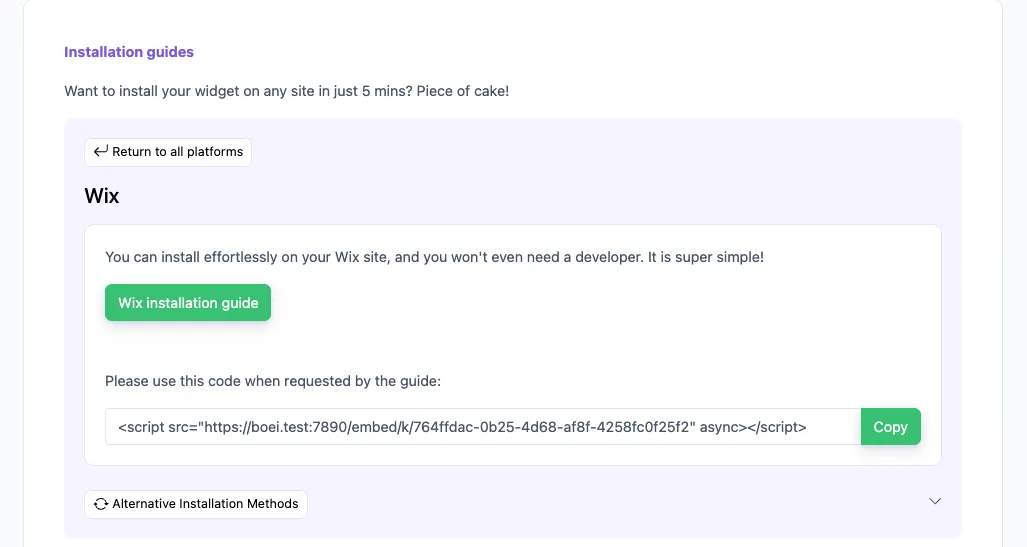
Copy the code from Boei
Open your chatbot, click the Install tab, choose Wix and copy the snippet.
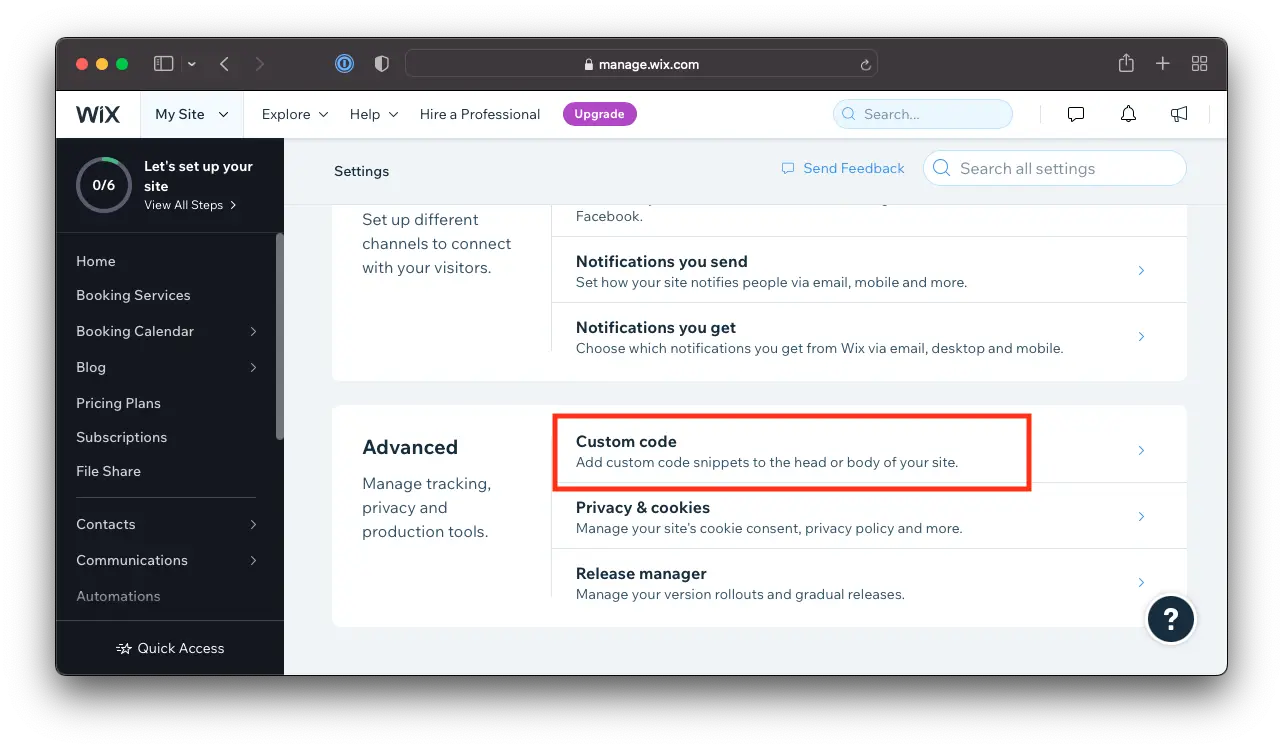
Open Custom Code in Wix
In your Wix dashboard go to Settings, then Custom Code under Advanced, and click Add Custom Code.
Paste and set two options
Paste the snippet, give it a name, choose All pages and place it in Body - end. Click Apply.
Publish your site
Custom code only goes live after you publish. Open your site, click the launcher and ask your first question.
From people who installed it themselves
Set up without a developer, answering from day one
"Boei is an AI that learns and continues improving by using our website's information to best answer user questions and guide them on our site. I was able to have it running on our website in less than 30 minutes even with full customization. If I were to grade the setup ease on a scale of 1 to 10, I would give it an 11."
"Boei is pretty straight-forward to setup. It is lightweight and converts website visitors into leads without over-effort. It simply works on autopilot. After setting it up, I just have more leads. Simple."
"We initially installed Boei on our agency website to test its capabilities, and the results were so impressive that we've now implemented it across approximately 10 client sites. The AI chatbot learns from each website's unique content."
Questions
Wix AI chatbot FAQ
How do I add the Boei AI chatbot to my Wix site?
Copy the installation code from the Install tab in your Boei dashboard. In Wix, open Settings, then Custom Code, click Add Custom Code, paste the snippet, choose All pages and Body - end, and click Apply. Publish your site and the chatbot is live.
Do I need a paid Wix plan?
Yes. Wix only allows custom code on Premium plans. A free wixsite.com site cannot run the Boei snippet. Any paid Wix plan with a connected domain works.
Does it work with Wix Editor and Wix Studio?
Yes. Both use the same Custom Code panel in the site dashboard, so the installation is identical. The widget floats above your design and works with every Wix template.
Can I use it on more than one Wix site?
Each plan includes a set number of domains: one on Starter, three on Growth and ten on Business. Extra domains can be added to any plan. Every site gets its own chatbot trained on its own content.
Is this the same as Wix's own AI or Wix Chat?
No. Boei is an independent product and is not built or endorsed by Wix. You add it to your Wix site with one code snippet. It trains on your content, captures leads, and lands every conversation in a shared inbox alongside WhatsApp, email and other channels.
Will the AI make up answers?
It answers from your Wix content only, shows the source page with each reply, and says so when it does not know. For questions that need an exact wording, you can define fixed answers that always win.
How do I receive the leads?
By email, in the Boei inbox, or through a webhook to your CRM. Each lead includes the full conversation, so you know what the visitor asked before you reply.
Will it slow down my Wix site?
No. The snippet loads after your page has rendered, so your Wix pages load and score the same as before.
Which AI models power the chatbot?
You choose. Boei supports models from OpenAI, Anthropic, Google and Mistral, and you can switch at any time from your dashboard. Every model uses the same training on your content.
Is it GDPR compliant?
Yes. Boei is hosted on EU servers, does not use cookies, and does not train AI models on your conversations. A data processing agreement is available in your account.
Give your Wix visitors an answer before they leave.
Add your Wix URL, let Boei learn your pages, paste one snippet. Your assistant is answering and collecting leads this afternoon.
Boei is an independent product and is not affiliated with, made by or endorsed by Wix.com Ltd. Wix is a trademark of its owner.