Joomla logo

Instagram DM for Joomla Organizations

Instagram DM for Joomla

Your Joomla site serves your community. But younger visitors live on Instagram. Schools, nonprofits, local businesses, and community organizations can now add an Instagram DM button to their Joomla site. No extensions to install. One line of code. Works on Joomla 3, 4, and 5.

Trusted by 17,000+ websites

No Joomla extensions required

Andrew Lee David S. Vance W. Grant Nitesh Manav
from 159 reviews

Also available for:

Try the Joomla Instagram DM AI

Your Joomla Site Is Solid. Your Messaging Is Stuck in 2010

Joomla has powered websites since 2005. It is reliable, flexible, and trusted by millions. Schools run their entire web presence on Joomla. Nonprofits manage events, newsletters, and member areas. Local businesses keep their information up to date.

But the Joomla extension ecosystem has not kept up with modern messaging. Finding a quality Instagram DM plugin for Joomla is nearly impossible. Most social extensions just add profile links. They do not open actual DM conversations. And installing extensions on Joomla means compatibility checks, updates, and security monitoring.

Boei skips all of that. One line of JavaScript in your Joomla template. No extension to install. No compatibility issues across Joomla versions. No updates to track. Works on Joomla 3, 4, and 5. Your visitors get an Instagram DM button that opens a real conversation.

This matters because your younger audience is on Instagram. Students, young professionals, community members under 35. They prefer DMs over forms and email. An Instagram DM button on your Joomla site speaks their language.

No Extension Install. No Compatibility Headaches

Joomla administrators know the pain of extension conflicts, version compatibility, and security patches. Boei avoids all of it. One line of code works across every Joomla version and template.

  • Paste one script tag in your Joomla template (index.php before </body>)
  • Or use a Custom HTML module for non-developers
  • Works with Joomla 3.x, 4.x, and 5.x with zero changes
  • No extension to install, update, or patch
  • Compatible with all Joomla templates, components, and SEO extensions
Boei Instagram DM button on a Joomla community website

How Joomla Organizations Use Instagram DM

Schools and Universities

Prospective students browse your Joomla website for program info, campus details, and admissions requirements. They follow your school on Instagram for campus life content. An Instagram DM button lets them ask questions the way they communicate: through DMs. Admissions inquiries, event questions, and campus visit bookings flow through a channel students actually prefer.

Nonprofits and Community Organizations

Your Joomla site lists programs, events, and volunteer opportunities. Your Instagram shows the impact: photos from events, stories from beneficiaries, calls for volunteers. When someone visits your Joomla site and wants to get involved, the DM button connects them to the conversation your Instagram already started.

Local Businesses

Restaurants, gyms, salons, and service businesses that run Joomla sites often have active Instagram accounts. Customers see your food photos on Instagram, visit your Joomla site for the menu, and want to make a reservation or ask about specials. DM is faster than calling.

Associations and Member Organizations

Professional associations, sports clubs, and hobby groups use Joomla for member management. Instagram reaches potential new members. The DM button on your Joomla site gives prospective members a quick way to ask about joining, fees, and events.

Quick Setup

Add Instagram DM to Joomla

One line of code. No extensions. Works on Joomla 3, 4, and 5

1

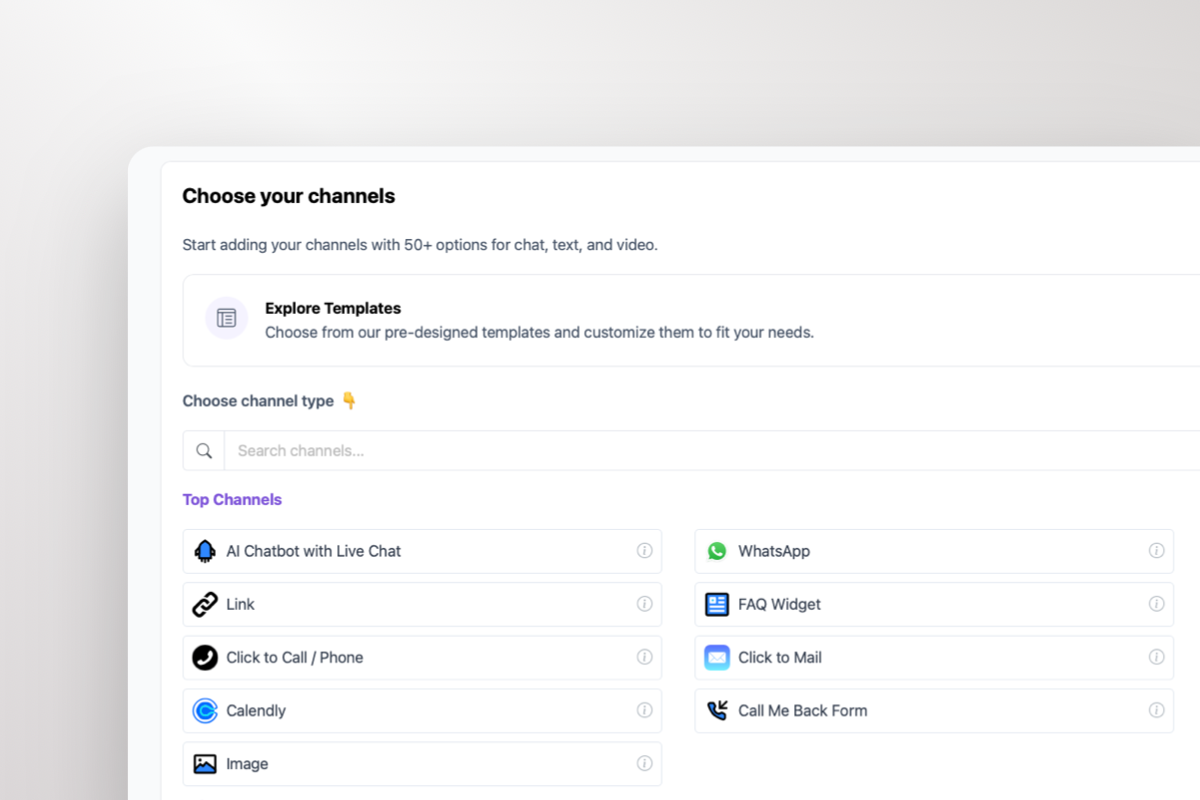
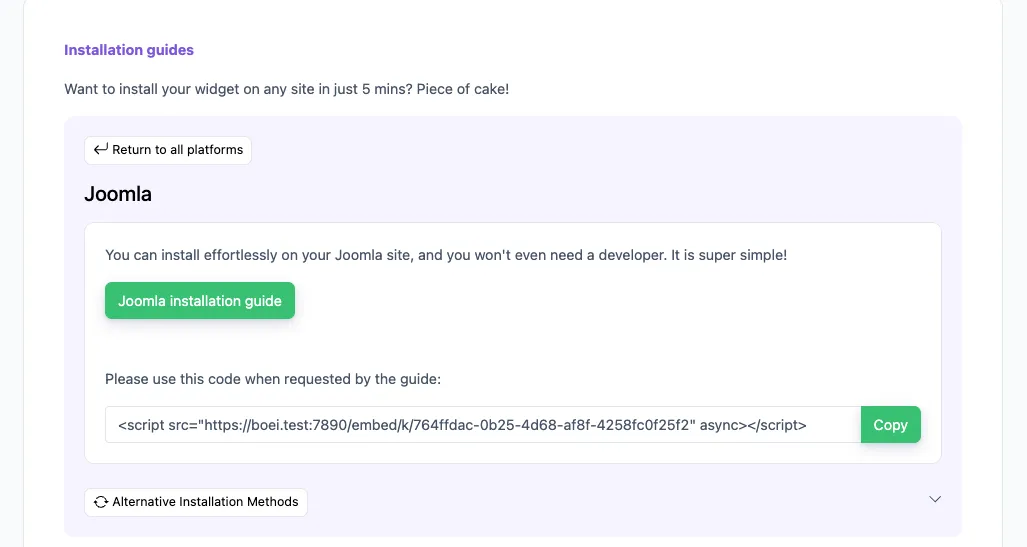
Copy installation code

In your Boei dashboard, open your widget and click the Install tab. Select Joomla and copy the installation code.

Tip: The Install tab also offers a landing page link, QR code, and iframe embed.

Copy installation code
2

Log in to Joomla

Log into your Joomla website as administrator. Follow Step 5 for Joomla 4 or Step 6 for Joomla 5.

3

Install on Joomla 4

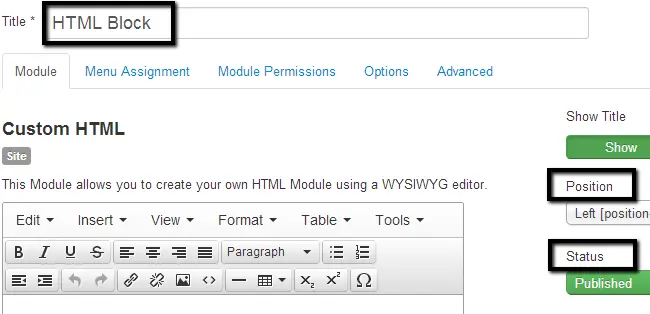
  1. Navigate to the Extensions tab and then Module Manager.
  2. Click on the New button at the top-left corner.
  3. Select the Custom HTML module type from the list.
  4. Edit the following options: Title: Boei, Position: Left, Status: Published.
  5. In the Custom HTML section, click on Tools > Source Code.
  6. Paste the Boei code that you got from step 2 here and click the OK button.
  7. Click Save & Close.
Install on Joomla 4
4

Install on Joomla 5

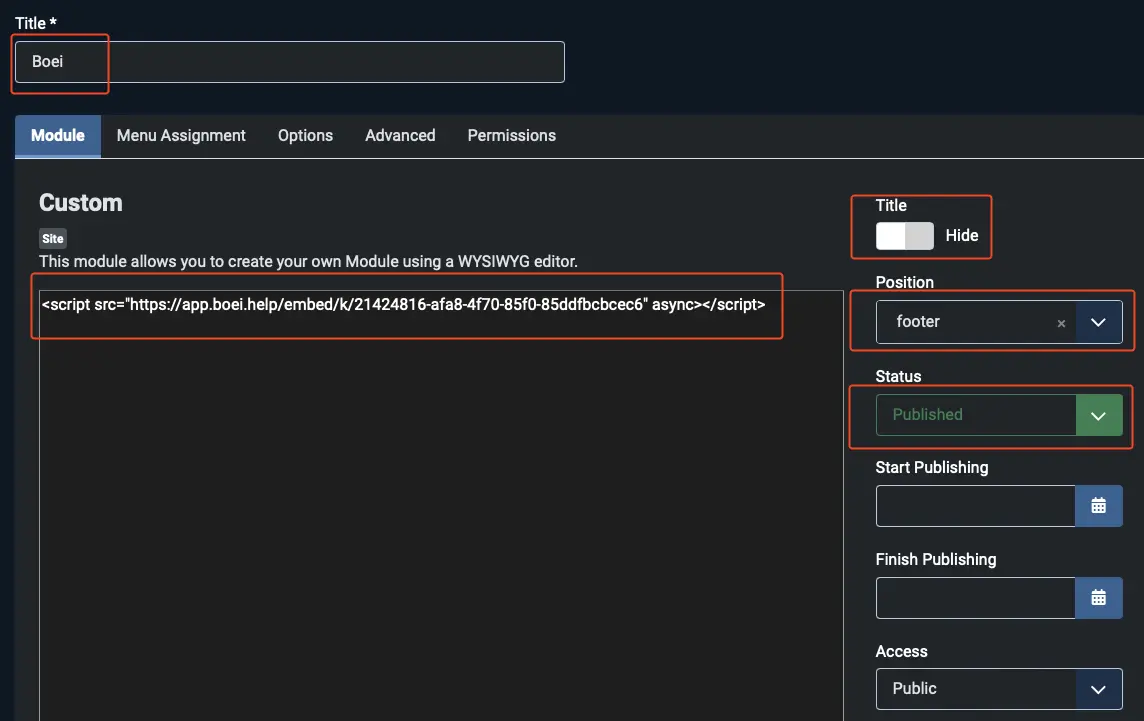
  1. In the User Menu on the right top, click Edit account.
  2. Go to Basic Settings and choose Editor - None. Note which editor you had so you can revert it later.
  3. Navigate to System and then Site Modules.
  4. Click the New button and select the Custom module type.
  5. Edit the following options: Title: Boei, Title Display: Hide, Position: footer, Status: Published.
  6. Paste the Boei code from step 2 in the text area and click Save & Close.
  7. Revert the editor setting: go to User Menu > Edit account > Basic Settings and set the Editor back to the original setting.

Congrats, you are done!

Install on Joomla 5

Joomla Features

Modern Messaging for Joomla Organizations

No extensions, no conflicts, no maintenance overhead

🏫

Reach Younger Audiences

Students, young professionals, and community members under 35 prefer DMs. Meet them where they are. Instagram DM on your Joomla site bridges the generation gap.

🤖

AI Answers Program Questions

Train AI on your Joomla site content. It answers questions about programs, events, schedules, and membership. Visitors get instant replies. Staff handles complex requests.

🔌

Zero Extension Overhead

No Joomla extension to install, update, or secure. One JavaScript line works across Joomla 3, 4, and 5. No compatibility checks when you upgrade Joomla.

🌍

Multi-Language Support

Serving a multilingual community? Widget and AI auto-translate to your visitor's language. 95+ languages. Important for international organizations on Joomla.

📋

Capture Volunteer and Member Leads

Collect name, email, and phone before the DM opens. Get contact details for your volunteer database or membership list, even if the DM conversation does not continue.

🔒

GDPR for European Organizations

Dutch company, Amsterdam servers. No cookies. No tracking before the click. DPA available. Matters for European schools, nonprofits, and public organizations.

Boei vs Joomla Social Extensions

Most Joomla social extensions just add links. Boei opens conversations

Boei JA Social Feed Social Icons Module Joomla Contact Form
Opens Instagram DM Yes (direct) No (feed display) No (profile link)
AI auto-replies ✓ Yes
Requires extension install No (one line of code) ✓ Yes ✓ Yes Built-in
Joomla 3 + 4 + 5 Yes (all versions) Varies Varies ✓ Yes
Lead capture ✓ Yes ✓ Yes
50+ channels ✓ Yes
Price From $11/mo $39/year Free Free

Bottom line: JA Social Feed shows your Instagram posts. Social Icons link to your profile. The built-in contact form collects email. None of them open an actual Instagram DM. Boei does, with AI that answers when your team is not online.

Joomla Tips

Instagram DM Strategies for Joomla Organizations

1

Add DM to Your Events Page

People have questions about events: timing, parking, dress code, registration. Instagram DM handles these casually. Put the button on your Joomla events page for instant answers.

2

Use the Custom HTML Module for Easy Install

Not comfortable editing template files? Create a Custom HTML module in Joomla, paste the Boei script, and assign it to all pages. No file editing required.

3

Post Instagram Stories About Your Programs

Share program highlights on Instagram Stories with a link to your Joomla site. When visitors land and see the DM button, they can ask follow-up questions instantly.

4

Train AI on Your FAQ Articles

Joomla sites often have FAQ sections. Make sure the AI crawls those pages. Common questions about your organization get answered automatically via DM.

Joomla Site Owners on Boei

Instagram DM on Joomla: FAQ

How do I add an Instagram DM button to Joomla?

Add one line of code to your Joomla template (index.php before the closing body tag) or use a Custom HTML module. No extension to install. Works on Joomla 3, 4, and 5. Full Joomla guide here.

Which Joomla versions work?

All of them. Joomla 3.x, 4.x, and 5.x. The script runs independently of Joomla's version. When you upgrade Joomla, Boei keeps working without changes.

Do I need to install a Joomla extension?

No. That is the whole point. One line of JavaScript. No extension to install, update, or monitor for security. Works across all templates and components.

Can the AI answer questions about our programs?

Yes. Train the AI on your Joomla site content: programs, events, schedules, membership info, FAQ pages. It answers DM questions using that content. Visitors get instant replies.

Does it work with Joomla multi-language sites?

Yes. The widget auto-detects your visitor's language. AI replies in their language. 95+ languages. Perfect for international organizations running multilingual Joomla sites.

Can I show the DM button on specific pages?

Yes. Control visibility by URL, Joomla menu item, or category. Show it on your contact and events pages. Hide it on admin or member-only areas.

What does it cost?

From $11/month (annual billing). Includes Instagram DM, AI with 2,000 messages, shared inbox, lead capture, 50+ channels, unlimited seats. 7-day free trial, no credit card.

Is it GDPR compliant for European organizations?

Yes. Dutch company, EU servers in Amsterdam. No cookies. No tracking before the click. DPA available. Important for European schools, nonprofits, and public institutions on Joomla.

Can we add other channels alongside Instagram DM?

Yes. Add WhatsApp, phone, email, AI chatbot, and 50+ other channels. Different audience segments prefer different channels.

Will it conflict with our existing Joomla components?

No. Boei loads asynchronously and runs independently. It does not interact with Joomla's component system, template framework, or database. Zero conflicts.

Instagram DM Widget for Every Platform

Same widget, same features. On your platform of choice

Bring Modern Messaging to Your Joomla Site

Instagram DM button. No extension. One line of code. AI handles the questions your younger audience asks.

7-day free trial • No credit card required • No extensions needed • Joomla 3, 4, and 5