Email Button Widget for Universal Accessibility

4.4 billion people use email — making it the most universal contact method on the planet. No app downloads, no accounts to create, no compatibility issues. Add an email button to your website and let every visitor reach you, regardless of device, browser, or corporate restrictions. Pre-fill subject lines for automatic department routing.

4.4B email users worldwide
No app downloads required
Pre-filled subject lines
Andrew Lee David S. Vance W. Grant Nitesh Manav
from 159 reviews

Email Widget by the Numbers

4.4B

Email users worldwide

99%

Check email daily

100%

Device compatibility

10,000+

Businesses trust Boei

What is an Email Widget?

An email widget (also called a mailto button, click-to-email button, or email contact button) is a floating button on your website that lets visitors send you an email with one click. When someone clicks the button, their default email client opens — Gmail, Outlook, Apple Mail, Thunderbird, or any other email app — with your address already filled in.

How Does a Mailto Email Button Work?

The email widget uses the standard mailto: protocol that has been part of the internet since 1995. When a visitor clicks your email button, it creates a link like mailto:hello@yourcompany.com?subject=Product%20Inquiry&body=Hi,%20I%20have%20a%20question%20about... that opens the visitor's preferred email application. The recipient address, subject line, and even initial message body can all be pre-filled.

Unlike contact forms that collect data on your website, email widgets hand control to the visitor. They compose the message in their own email client, can add attachments, CC colleagues, and keep the conversation in their inbox for reference. This makes email the preferred channel for formal, documented communication.

Why mailto: Links Are So Powerful

The mailto: protocol is supported by every web browser, every operating system, and every device manufactured in the last 30 years. There is no other contact method with this level of universal compatibility. Desktop computers, laptops, tablets, smartphones, even smart TVs — if it has a browser, your email button works. No app stores, no downloads, no account creation barriers.

Why Keep Email as a Contact Option?

In an era of WhatsApp, live chat, and AI chatbots, email might seem outdated. It is not. Email remains the backbone of business communication for powerful reasons that modern messaging apps cannot replicate:

Universal Access — No Barriers to Contact

Every person with an internet connection has an email address. Not everyone has WhatsApp (especially in North America and parts of Asia). Not everyone uses Telegram or Messenger. But everyone has email. By adding an email button to your website, you guarantee that 100% of visitors can contact you, not just those who use specific messaging apps.

Corporate Environments Restrict Messaging Apps

Many companies block WhatsApp, Telegram, Facebook Messenger, and other personal messaging apps on work devices. Employees in banking, government, healthcare, defense, and enterprise IT cannot install unauthorized software. Email is the only approved external communication channel in these environments. If your customers include corporate buyers or enterprise clients, an email widget is not optional — it is essential.

Formal Communication and Paper Trail

Legal consultations, contract discussions, formal complaints, detailed proposals, insurance claims — certain communications require the formality and documentation that only email provides. Email threads serve as legally admissible records. Visitors can attach PDFs, contracts, images, and spreadsheets. No messaging app matches email for formal, documented business communication.

The Perfect Fallback Channel

Even if you offer WhatsApp, live chat, and phone as primary channels, email should always be your safety net. Messaging apps have outages (WhatsApp went down for 6 hours in 2021, affecting 2 billion users). Chat widgets depend on JavaScript loading. Phone lines get busy. Email always works because it is decentralized — no single point of failure.

Asynchronous Communication on the Visitor's Terms

Not everyone wants real-time conversation. Some visitors prefer composing a thoughtful email at their own pace rather than feeling pressure to respond instantly in a live chat. Email respects the visitor's time and gives them full control over the conversation format, length, and timing.

Email Widget Use Cases by Industry

Specific scenarios where email outperforms modern messaging

Corporate & Enterprise

Enterprise clients work behind firewalls that block messaging apps. Their IT policies restrict software installations. Email is often the only approved external communication channel. An email widget ensures corporate buyers, procurement departments, and enterprise decision-makers can reach your sales team without IT approval barriers. Pair with contact form for structured RFP submissions.

Formal Inquiries & Legal

Legal consultations, contract negotiations, formal complaints, compliance inquiries, and insurance claims require documented communication trails. Email provides legally admissible records, supports file attachments (contracts, PDFs, evidence), and maintains professional tone. Pre-fill subject lines like 'Legal Inquiry' or 'Compliance Question' to route messages to the right department automatically.

Older Demographics

Millions of adults over 55 use email daily but have never installed WhatsApp, Telegram, or Messenger. If your audience includes retirees, senior services, healthcare patients, or traditional industries, email accessibility is critical. They know how email works — no learning curve, no app confusion. Combine with a phone widget for maximum accessibility.

Government & Public Sector

Government agencies, municipalities, public utilities, and NGOs serve diverse populations including people without smartphones or messaging apps. Email ensures every citizen can reach your organization. Government workers themselves operate under strict IT policies that prohibit personal messaging apps on work devices. Email is the universal standard for public sector communication.

Academic & Research

Professors, researchers, and students communicate primarily through institutional email. Academic inquiries about publications, collaboration proposals, conference submissions, and research partnerships happen over email. Pre-fill subject lines with department names or research areas to route inquiries efficiently. Add a contact form for student admissions.

Accessibility Fallback

Screen readers, assistive technologies, and accessibility tools work flawlessly with email because the mailto: protocol is a web standard supported since the earliest days of the internet. For visitors with disabilities, cognitive differences, or limited technical literacy, email is often the most familiar and accessible contact method. Always include email alongside modern channels for inclusive design.

Pre-Fill Subject Lines and Messages

A basic mailto link just opens an empty email to your address. Boei's email widget goes further — pre-fill subject lines and body text to guide visitors and automate your workflow. This transforms a simple email button into a smart routing and communication tool.

  • Custom subject lines per page: 'Product Inquiry — [Product Name]' on product pages, 'Support Request' on help pages
  • Pre-filled body text guides visitors: 'Please describe your issue below...' or 'I'm interested in getting a quote for...'
  • Department routing: sales@company.com on pricing pages, support@company.com on help pages, careers@company.com on job listings
  • Page context awareness: automatically include the page URL or product name the visitor was viewing
  • Works with every email client — Gmail, Outlook, Apple Mail, Thunderbird, Yahoo Mail, ProtonMail
Email
Send us an email
Contact via email

Email Widget Comparison: Boei vs Alternatives

There are several ways to add email contact functionality to your website. Here is how they compare:

FeatureBoei Email WidgetBasic Mailto LinkContact FormDIY Custom Code
Setup time5 minutes1 minute15-30 minutes1-3 hours
Email obfuscation (spam protection)YesNo (exposed in HTML)Not neededManual implementation
Pre-filled subject & bodyYes, per pageManual HTML editingN/AManual per page
Department routingDisplay rules per pageMultiple links neededDropdown fieldCustom JavaScript
Analytics trackingGA, Pixel, GTMNoneDepends on form toolManual
Multi-channel (50+ channels)YesNoNoNo
Floating button designCustomizableInline text linkEmbedded or popupCustom CSS needed
Business hours rulesYesNoSome toolsCustom code
GDPR compliantYes (EU servers)Your responsibilityVariesYour responsibility
Mobile optimizedYesBasicVariesManual

Email Widget vs Contact Form: When to Use Which

Use an email widget when visitors need to send detailed messages with attachments, when they want a copy of the conversation in their own inbox, or when targeting corporate users whose IT policies may block embedded forms. Use a contact form when you need structured data (specific fields like budget, company size, service type), when you want spam-free lead capture, or when you need complete conversion tracking. The best approach? Offer both. Boei lets you add email alongside contact forms in the same multi-channel widget.

Email Widget Best Practices

Adding an email button is straightforward. Making it work effectively for your business requires strategy. Here are proven best practices:

1. When to Use Email vs. Contact Form

Email is best for open-ended communication where visitors need flexibility — detailed proposals, file attachments, CC-ing colleagues, and keeping a personal copy. Contact forms are better for structured lead capture where you need specific data fields. Most businesses benefit from offering both: email for visitors who prefer traditional communication, forms for streamlined lead generation.

2. Protect Your Email Address from Spam Bots

Displaying a raw email address in your HTML source code invites spam harvesting bots. Boei's email widget uses JavaScript-based obfuscation to hide your address from automated scrapers while keeping it fully functional for real visitors. The email address is never visible in your page source code, CSS, or static HTML — it is assembled dynamically, making it invisible to crawlers.

3. Route Emails by Department Using Display Rules

Don't send every email to one shared inbox. Configure your email widget to route messages intelligently: sales@company.com on product and pricing pages, support@company.com on documentation and help pages, careers@company.com on your jobs page. Use Boei's display rules to show different email addresses based on page URL patterns. This eliminates manual forwarding and ensures faster response times.

4. Pre-Fill Subject Lines for Context

When someone clicks your email button, they should not face a blank email. Pre-fill the subject line with context: 'Inquiry from [Page Name]', 'Product Question — [Product]', 'Support Request — [Topic]'. This gives your team immediate context when the email arrives and helps visitors get started without thinking about what to write.

5. Combine Email with Modern Channels

Email should not be your only contact option. Pair it with WhatsApp for quick conversations, phone for urgent matters, and contact forms for structured lead capture. Show live chat during business hours and email after hours. Boei's multi-channel widget lets visitors choose their preferred method from a single button.

6. Track Email Button Clicks with Analytics

Connect your email widget to Google Analytics, Facebook Pixel, or Google Tag Manager to understand which pages generate the most email inquiries. While you cannot track whether visitors actually sent the email (that happens outside your website), click data reveals which content drives the most interest. Use this data to optimize your page content and widget placement.

How to Add an Email Button to Your Website

Two steps to go live

1

Configure Your Email Widget

Create a free Boei account (no credit card needed). Enter your email address, customize the subject line and body text. Set different email addresses for different pages using display rules. Customize the button colors, position, and icon to match your brand.

2

Install on Your Website

Copy one line of HTML code to your website, or install our plugin for WordPress, Shopify, Wix, or Squarespace. Your email button goes live immediately. Email obfuscation protects your address from spam bots automatically.

Platform Guide

Install Email Widget on WordPress

1

Copy WordPress key

In your Boei dashboard, open your widget and click the Install tab. Select WordPress and copy the WordPress plugin key.

Tip: The Install tab also offers a landing page link, QR code, and iframe embed.

Copy WordPress key
2

Log in to WordPress

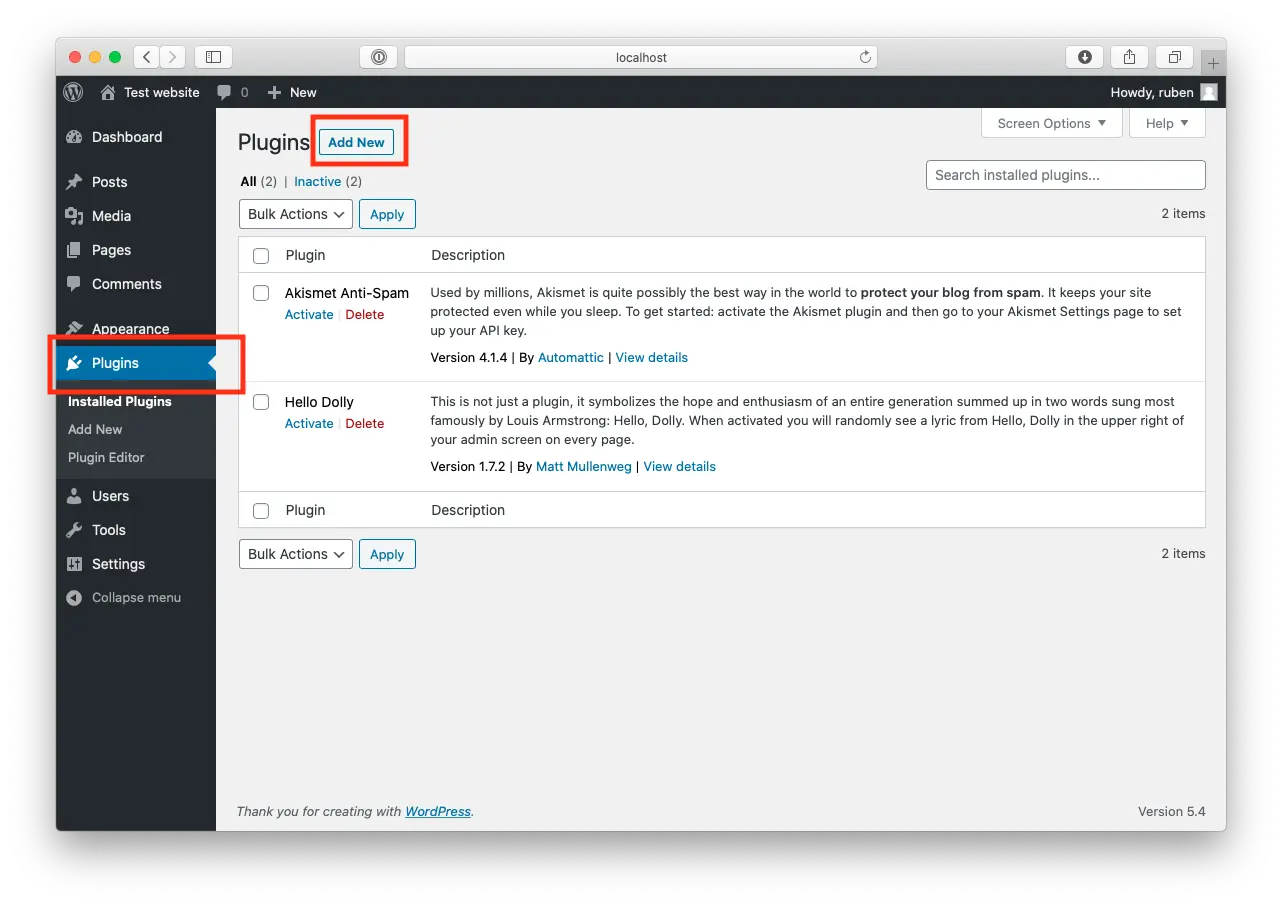
Open WordPress and click on "Plugins".
Now, click "Add New" at the top of the page.

Log in to WordPress
3

Install Boei Plugin

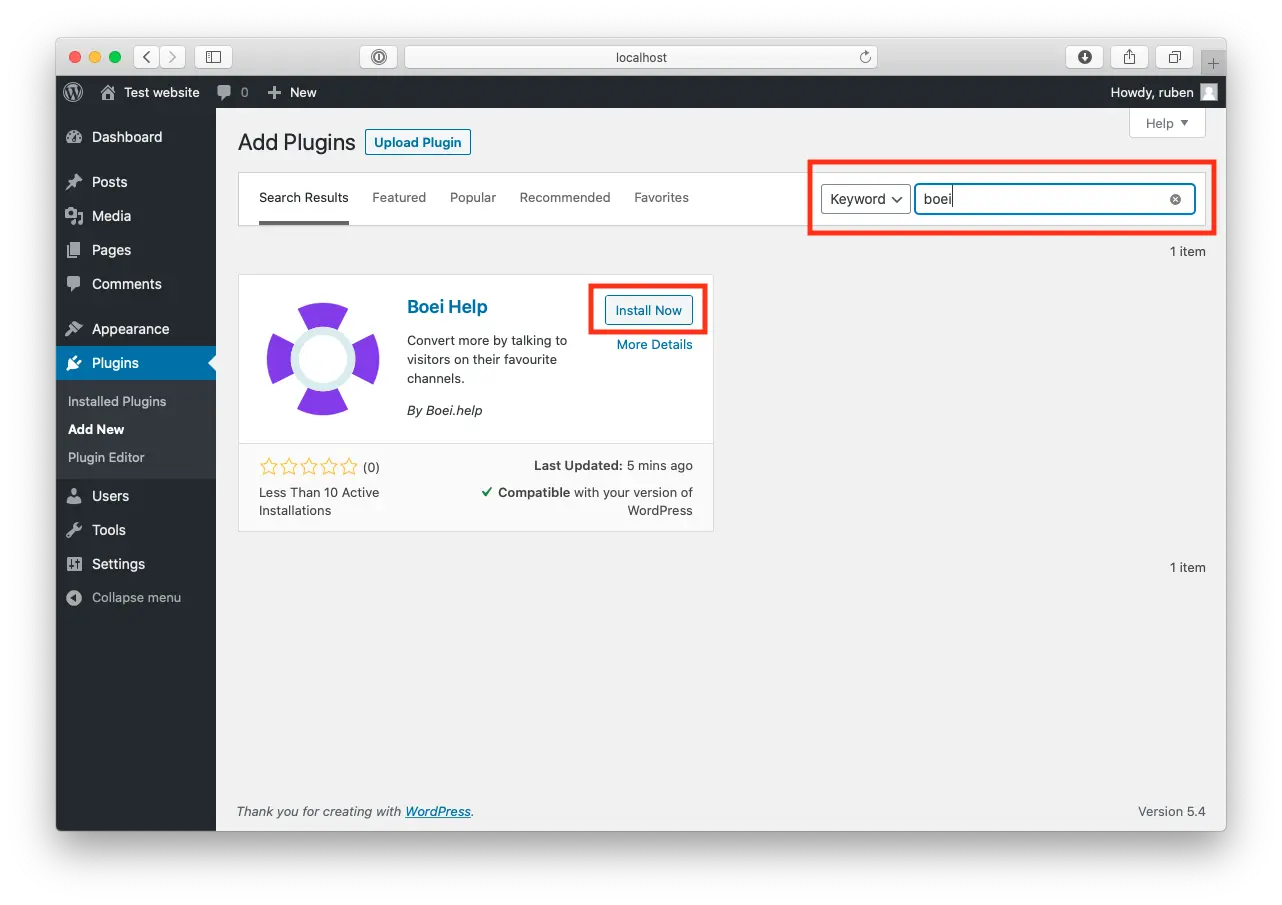
Search for "Boei" and find our plugin.

Click "Install Now".

Install Boei Plugin
4

Activate

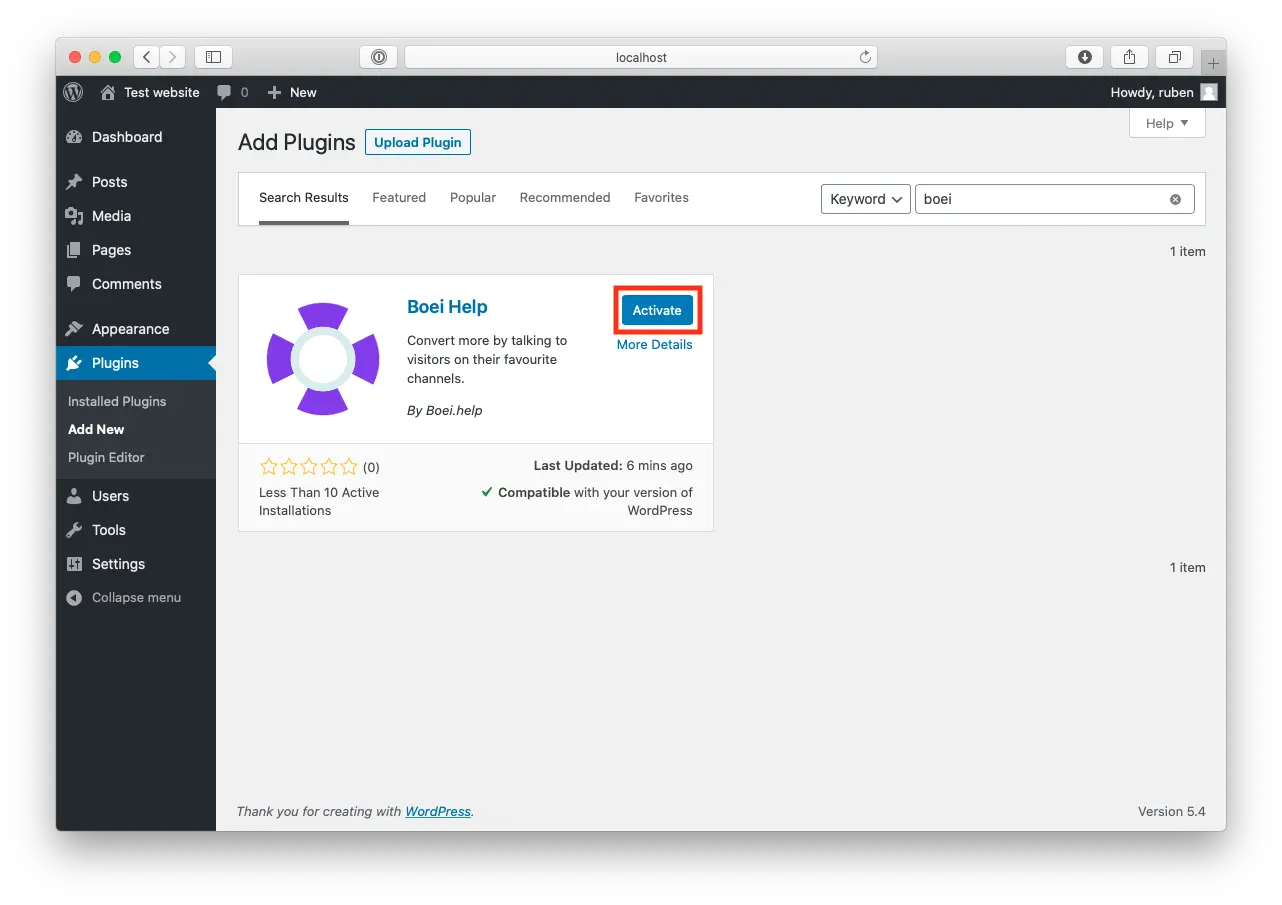
When the plugin is installed, press "Activate".

Activate
5

Paste key in Boei's WordPress Plugin

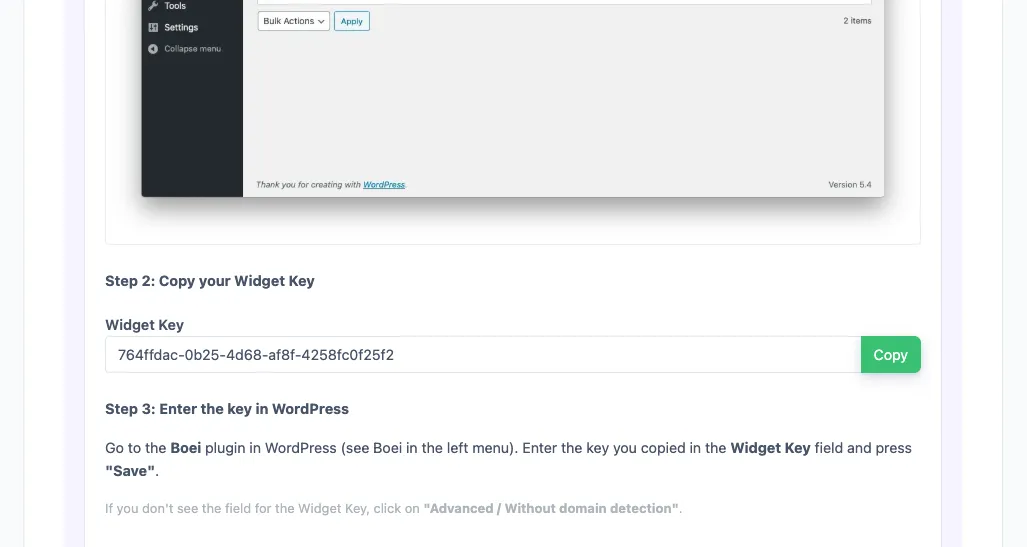
Go to the Boei plugin in WordPress (see Boei in the left menu).

Enter the key you copied in the Widget Key field and press "save".

If you don't see the field for the Widget Key, click on "Advanced / Without domain detection".

6

Finished coffee

Congrats, you are done!

Platform Guide

Install Email Widget on Shopify

1

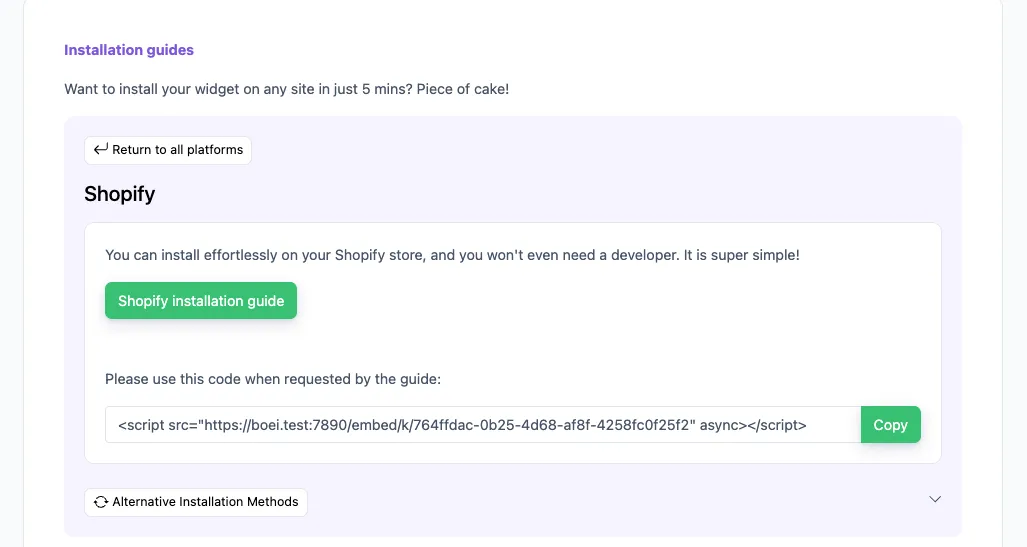
Copy installation code

In your Boei dashboard, open your widget and click the Install tab. Select Shopify and copy the installation code.

Tip: The Install tab also offers a landing page link, QR code, and iframe embed.

Copy installation code
2

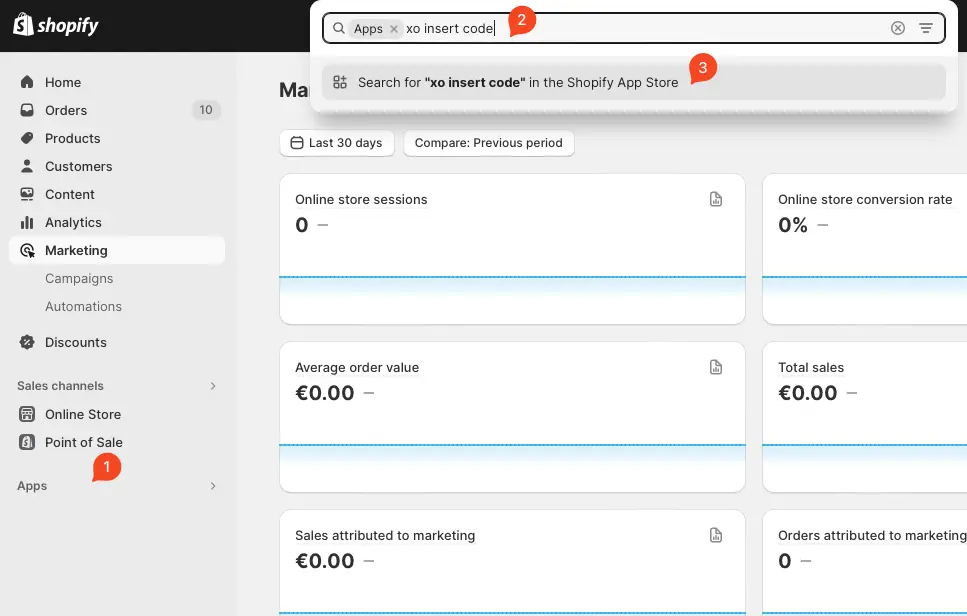
Log in to Shopify

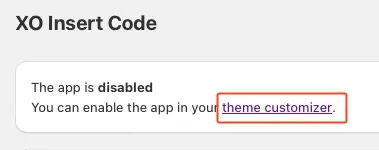
Open Shopify and click on "Apps" and search for "xo insert code".

We will use the plugin XO insert code to install Boei. It is a free and easy plugin.

Log in to Shopify
3

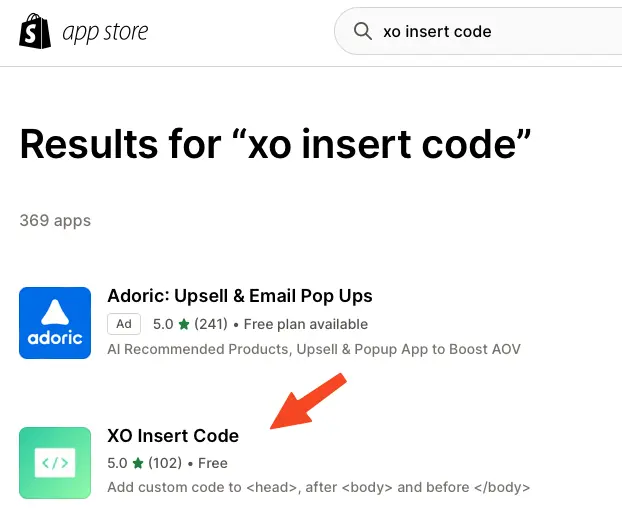
Install the plugin

Press install.

Confirm installation in Shopify.

Install the plugin
4

Install the Boei code

Click add new code

Name the code "Boei" and enable it on the entire store.

Place the script from step two in place of the "code in footer" textbox.

Press save.

Install the Boei code
5

Enable the plugin

Now, we enable the plugin by clicking the theme customizer link.

Enable the checkbox and press save.

Congrats, you are done! You now have the Boei live chat Shopify installed.

Enable the plugin

Platform Guide

Install Email Widget on Wix

1

Copy installation code

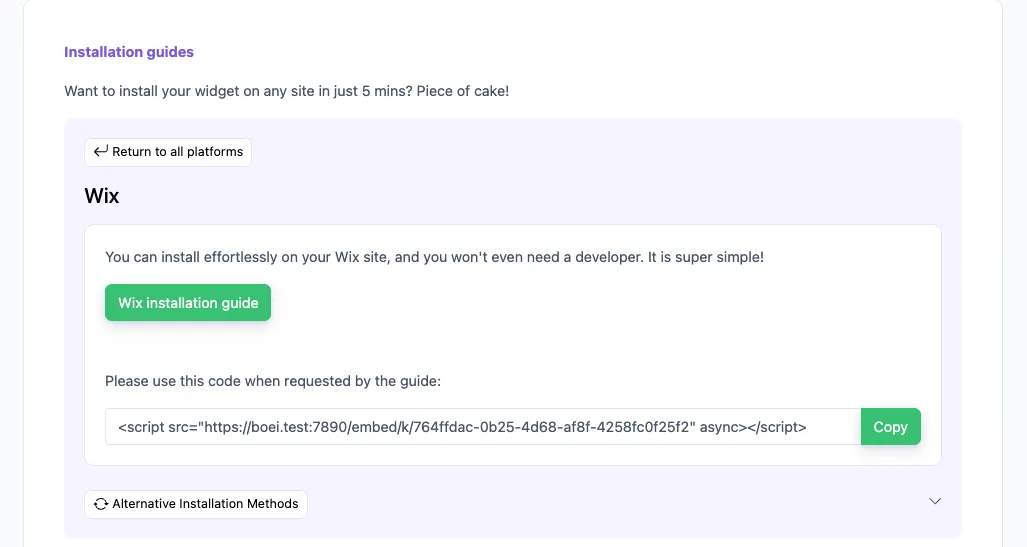
In your Boei dashboard, open your widget and click the Install tab. Select Wix and copy the installation code.

Tip: The Install tab also offers a landing page link, QR code, and iframe embed.

Copy installation code
2

Log in to Wix

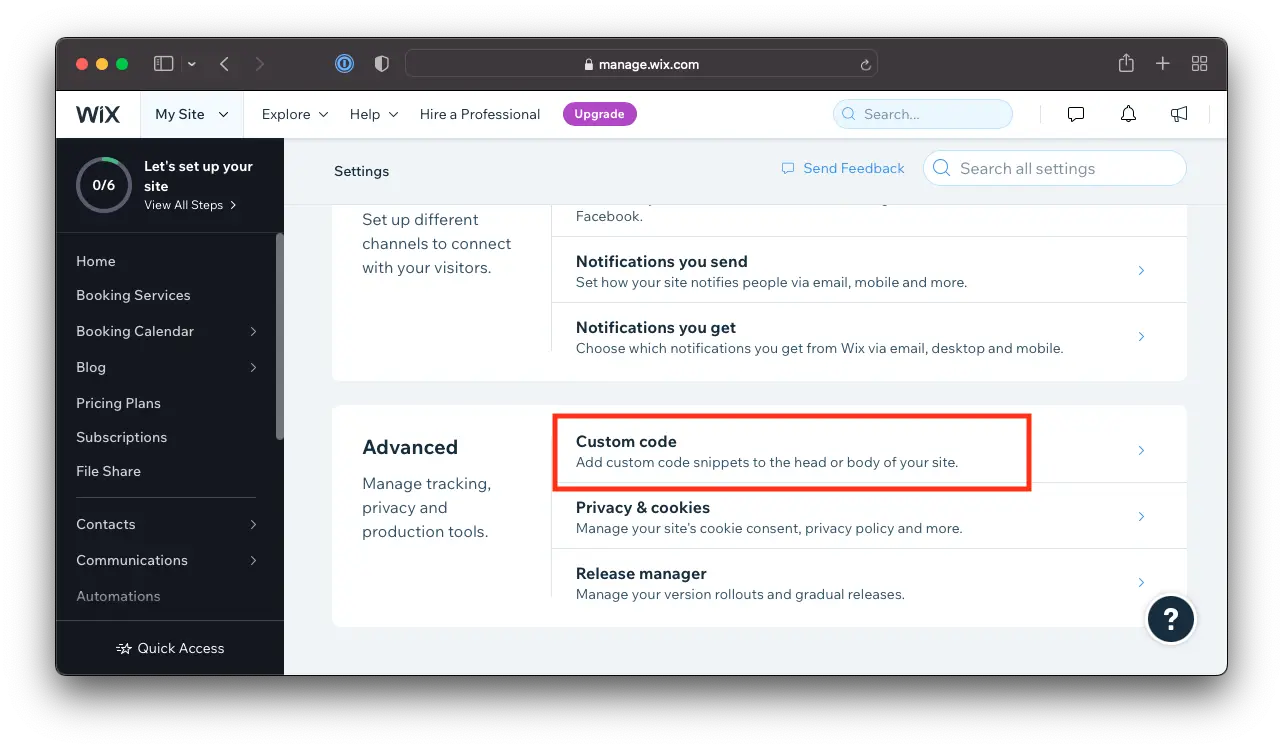
Open Wix and go to Settings -> Custom Code.

  1. Go to Settings in your site's dashboard.
  2. Click the Custom Code tab in the Advanced section.
Log in to Wix
3

Go to settings and install the Boei code snippet

  1. Click + Add Custom Code at the top right.
  2. Paste the code snippet in the text box. See step 2 above for the Boei code.
  3. Enter a name for your code.
  4. Select an option under Add Code to Pages: All pages
  5. Choose where to place your code under Place Code in:. Body - end

Note that Wix does not allow code scripts on all account types; you may need to upgrade.

4

Save

Click Apply in Wix. Congrats, you are done!

Platform Guide

Install Email Widget on Squarespace

1

Copy installation code

In your Boei dashboard, open your widget and click the Install tab. Select Squarespace and copy the installation code.

Tip: The Install tab also offers a landing page link, QR code, and iframe embed.

Copy installation code
2

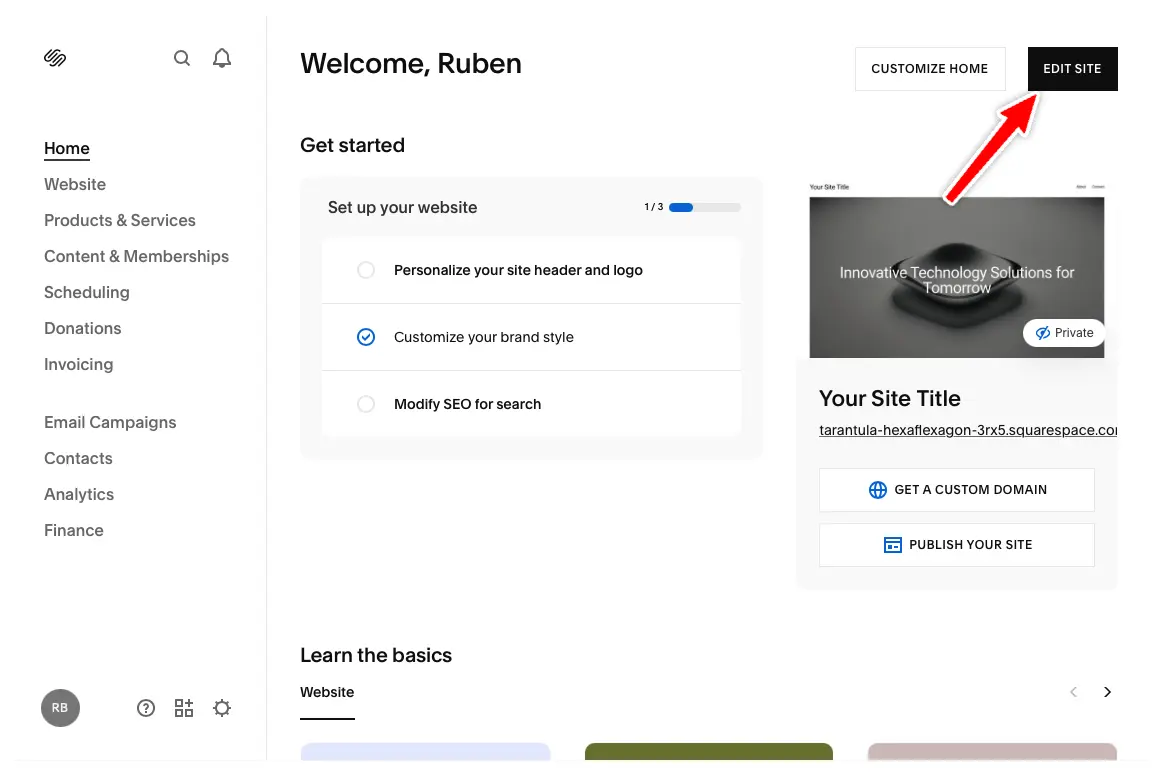
Click Edit Site

In your Squarespace dashboard, click "Edit Site" in the top right corner.

Click Edit Site
3

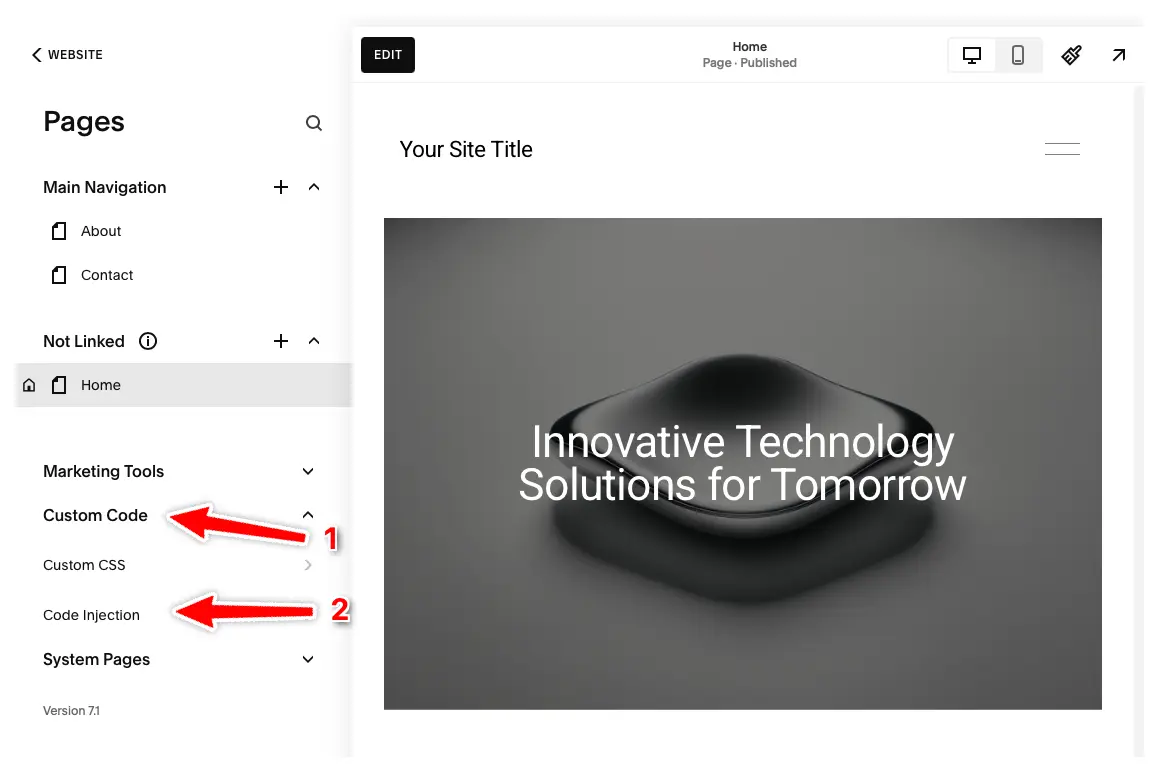
Open Code Injection

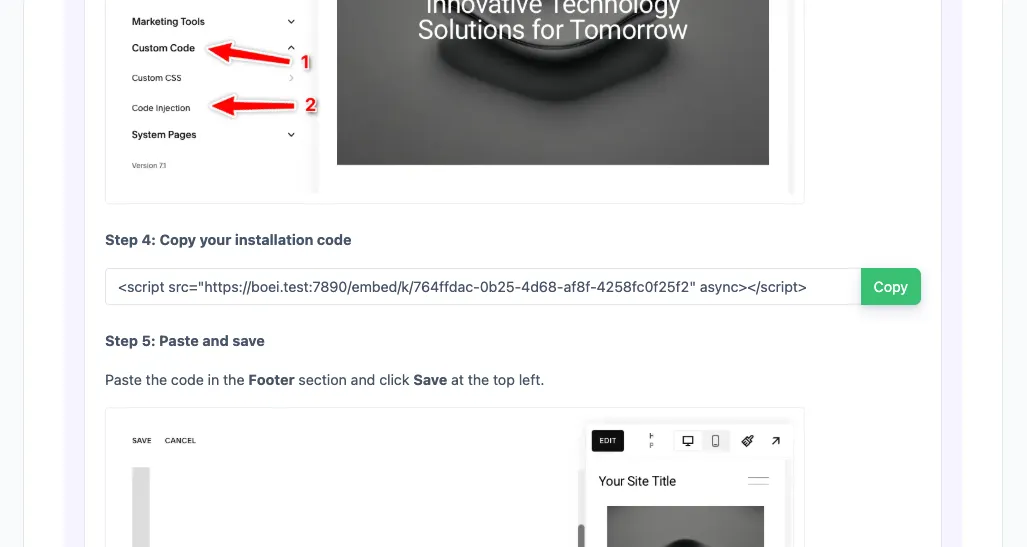
Click "Pages" in the left menu, then click "Custom Code" and select "Code Injection".

Note: Code Injection is available on Core, Plus, Advanced, Business, Commerce Basic, and Commerce Advanced plans. Personal plans don't have this feature.

Open Code Injection
4

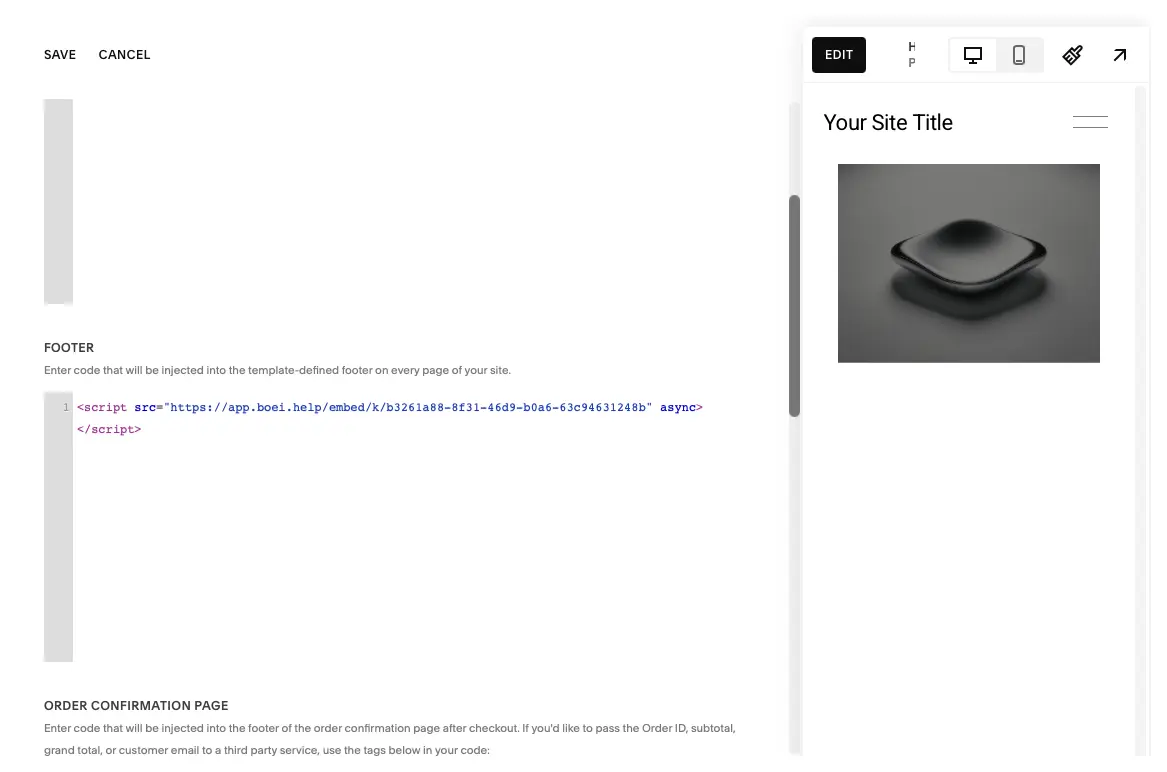
Paste Code & Save

Enter your Boei code in the Footer section and press "Save" at the top left.

The Boei widget will now appear on all pages of your Squarespace site. Congrats, you are done!

Paste Code & Save
Customize Your Bot
Brand Colors
Smart Responses
Personality

Advanced Email Widget Features

Beyond basic mailto links, Boei's email widget includes powerful features designed for businesses that take email communication seriously and want full control over how visitors contact them.

  • Email address obfuscation — your email is never exposed in page source code, preventing spam harvesting
  • Smart display rules — show email on specific pages, devices, or for visitors from certain countries
  • Department routing — different email addresses per page section (sales, support, careers, billing)
  • Analytics tracking — send click events to Google Analytics, Facebook Pixel, or Google Tag Manager
  • Multi-channel integration — combine email with WhatsApp, phone, contact forms, and 50+ channels in one widget
  • Business hours automation — show email always, but swap other channels based on your schedule
  • Custom pre-filled templates — different subject lines and body text per page for guided communication
  • Lead capture option — collect visitor name or phone number before opening email client

Trusted by 10,000+ Businesses

Email Widget FAQ

How do I add an email button to my website?

Sign up for Boei's free trial, enter your email address, customize the subject line and button appearance, then copy one line of code to your website. Works on any HTML website, WordPress, Shopify, Wix, Squarespace, and 500+ other platforms. The entire process takes about 5 minutes — no coding skills required.

How does a mailto email widget work?

When visitors click your email button, it triggers a mailto: link that opens their default email client (Gmail, Outlook, Apple Mail, Thunderbird, Yahoo Mail, etc.) with your email address pre-filled. You can also pre-fill the subject line and initial message body. The visitor composes and sends the email from their own email client — you receive it in your inbox like any normal email.

What is the difference between an email widget and a contact form?

An email widget opens the visitor's own email client — they compose, edit, and send the message from their familiar email app and keep a copy in their sent folder. A contact form collects information on your website through structured fields. Email widgets are better for open-ended communication with attachments. Contact forms are better for structured lead capture with specific data fields. Most businesses benefit from offering both.

How do you protect my email address from spam bots?

Boei's email widget uses JavaScript-based obfuscation to hide your email address from automated spam harvesters. Your email is never visible in the page source code, HTML, or CSS — it is assembled dynamically by JavaScript when a real user clicks the button. This makes it invisible to crawlers and bots that scan websites for email addresses. For maximum spam protection, combine with a contact form.

Can I pre-fill the email subject line and body?

Yes. Configure custom subject lines like 'Product Inquiry — Widget Pro', 'Support Request', or 'Partnership Proposal'. You can also pre-fill the email body with guided text like 'Please describe your question below...' or 'I am interested in learning about...'. Different pages can have different pre-filled content using display rules.

Can I use different email addresses for different pages?

Yes. Use Boei's display rules to show different email addresses based on page URL. Route product inquiries to sales@company.com, support questions to support@company.com, job applications to careers@company.com, and billing issues to billing@company.com. One widget, multiple destinations — no manual forwarding required.

Does the email widget work on mobile devices?

Yes, the mailto: protocol works on every device and every browser. On mobile, clicking the email button opens the default mail app (Gmail app, Apple Mail, Outlook app, etc.). On desktop, it opens the configured email client. Universal compatibility across iOS, Android, Windows, macOS, Linux, and every other platform.

Can I track email button clicks?

Yes. Boei tracks every click on your email widget and sends conversion events to Google Analytics, Facebook Pixel, Google Tag Manager, or any platform accepting custom events. You will see which pages generate the most email inquiries. Note: we cannot track whether visitors actually sent the email after their client opens, as that happens outside your website.

Is the email widget GDPR compliant?

Yes, Boei is fully GDPR-compliant. Our servers are located in Amsterdam, Netherlands (EU). The email widget uses zero cookies and collects no personal data before a visitor chooses to click the email button. Since the actual email is sent through the visitor's own email client, no personal data passes through our servers. We provide a Data Processing Agreement (DPA) for businesses that need one.

Should I use email if I already have WhatsApp and live chat?

Absolutely. Email serves as a critical fallback channel. Not everyone has WhatsApp (especially in North America). Corporate environments block messaging apps. Some visitors prefer the formality and documentation trail of email. And messaging platforms occasionally go down — email keeps working because it is decentralized. Best practice: offer modern channels as primary options, but always include email for universal accessibility.

Will the email widget slow down my website?

No. Boei loads asynchronously after your page content, so it does not affect page load speed or Core Web Vitals scores. The script is lightweight (under 30KB), CDN-optimized, and has no dependencies on jQuery or other libraries. Your site performance remains completely unaffected.

What if I want to offer multiple contact methods, not just email?

That is exactly what Boei is designed for. Our multi-channel widget lets you offer email alongside WhatsApp, phone, contact forms, Facebook Messenger, Telegram, and 50+ other channels — all from one floating button. Visitors choose their preferred contact method. Smart display rules show the right channels for each page.

Can I customize the email button appearance?

Yes. Full customization control including colors, position (bottom-left or bottom-right), button text, icon, size, and hover behavior. Match your brand perfectly. You can also add a tooltip or greeting message that appears after a configurable delay to encourage clicks.

How much does the email widget cost?

Boei offers a 7-day free trial with full access to all features — no credit card required. After the trial, plans start from just 8 euros per month for unlimited email widget clicks and all 50+ communication channels included. No per-click charges, no hidden fees. Cancel anytime.


Email Widget Resources

Guides, platform documentation, and related tools

Platform Installation Guides

Step-by-step email widget setup for every platform

Related Channels & Guides

Explore alternative contact methods

Combine Email with Other Contact Channels

Email is essential for universal accessibility, but it should not be your only contact option. Smart businesses offer multiple channels so every visitor finds their preferred way to reach you:

  • WhatsApp widget — For quick conversations and international customers who prefer messaging. 2 billion users worldwide.
  • Contact form widget — For structured lead capture with custom fields, spam protection, and complete conversion tracking.

  • Phone widget — For urgent matters, complex discussions, and customers who prefer voice communication.
  • Facebook Messenger — For customers active on Facebook who prefer messaging through their social platform.
  • Telegram widget — For privacy-conscious users and markets where Telegram is the dominant messaging platform.
  • Discord widget — For tech communities, gaming audiences, and developer-focused businesses.

Boei's multi-channel widget shows all your channels in one place. Use display rules to prioritize email for corporate-heavy pages, show WhatsApp for mobile visitors, add contact forms for quote requests, and include phone for urgent matters — all from a single floating button.

See All 50+ Channels

Add an Email Button to Your Website Today

Universal accessibility for 4.4 billion email users worldwide

7-day free trial • No credit card required • 5-minute setup • GDPR compliant (EU servers) • Email obfuscation included