 Ruben Buijs
Chatbot human handoff moves a customer conversation from the AI Agent to a person. The team receives the earlier messages, customer details, work already completed and the reason for handoff. The customer can continue in the same conversation instead of starting again.
Omar is a customer of our example software company. He sees two charges for the same renewal and asks for one payment to be refunded. The AI can find both charges, but a person should decide what happens next.
This guide uses Omar's request to set up the complete path. It shows when AI stops, how the right team takes over and what happens when nobody is available live.
The short answer: decide when the AI Agent must stop and route the request to the right team. Choose a live chat, email or form fallback. Test the route from the customer message to the human reply.
1. Decide when AI should hand off
Start with a small set of clear conditions. A handoff should happen when:
- The customer asks for a person
- The AI cannot support an answer from approved knowledge
- A required lookup fails or returns an unknown result
- The request needs judgment, empathy or account access
- A configured rule sends the topic to a specialist team
Omar asks:
"I was charged twice for the same renewal. Please refund one payment."
In this example, the AI already knows the billing policy and can read the two matching charges. It finds charge_913 and charge_914 against the same renewal. It cannot safely decide which charge should be refunded. That is the stopping point.
The same handoff rules apply to every matching request. Omar's case shows what one duplicate-payment request looks like after the answer and lookup are already working.
Do not force customers to fail three times before they can reach a person. Keep the human control route visible, and treat an explicit request for a person as enough.
Once the stopping point is clear, the request needs an owner. Routing decides which team sees it and whether live help is actually available.
2. Choose the team that should receive a handoff
Enable live chat in your AI Agent's handoff settings when a teammate should be able to join the conversation.
Choose the team that owns new handoffs. The AI Agent asks the routing question before handoff when the destination depends on the customer's answer. It can ask which location, department or request type applies and use that answer to choose the team. For example, route Rotterdam questions to the Rotterdam team and Amsterdam questions to the Amsterdam team. Set team hours and availability so live chat is offered only when somebody can accept it.
When Omar asks for a person during staffed hours, the widget tells him that he is waiting. The request appears in the team's Inbox.
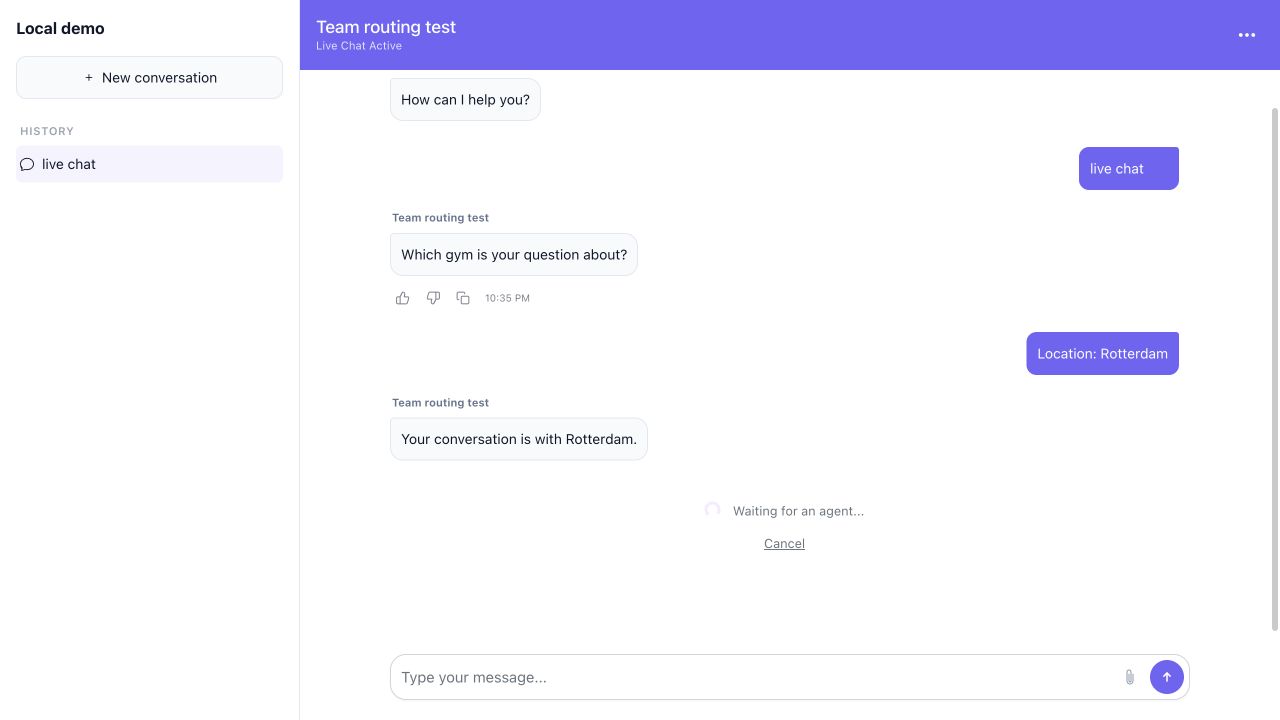
The waiting screen is part of the handoff. It should name what is happening and let the visitor cancel back to AI while nobody has taken over.
That works while somebody is available. The same handoff also needs an honest path when the team is offline or already full.
3. Choose what happens when nobody can answer live
Live help is not always available. Open the follow-up options in your handoff settings and pick one fallback:
- Ask for email when the team can reply later in the same conversation
- Open Form when the team needs fields such as order number, location or account email
- Don't offer follow-up when you only want to show contact details or leave the conversation with AI
Known contact details do not need to be collected again. Write an expectation your team can keep, such as "Finance will reply by email on the next business day."
Outside Finance hours, the AI Agent collects Omar's email if it is not already known. It keeps the duplicate-payment question and both charge IDs in the conversation. Finance can reply later without receiving a new case with no history.
The customer now knows what will happen. The teammate still needs the conversation, customer details and remaining decision together in one place.
4. Make the Inbox ready for takeover
Open Inbox and find the waiting conversation. A teammate clicks Claim for new live work or Take over for an AI conversation. The AI stops replying while the person owns it. The customer profile, earlier messages and details already collected stay beside the conversation, so the person can continue instead of starting a second intake.
The person should see:
- What Omar wants
- What the AI already explained
- The two charge IDs returned by the lookup
- Why the AI stopped
- The team and owner responsible for the next reply
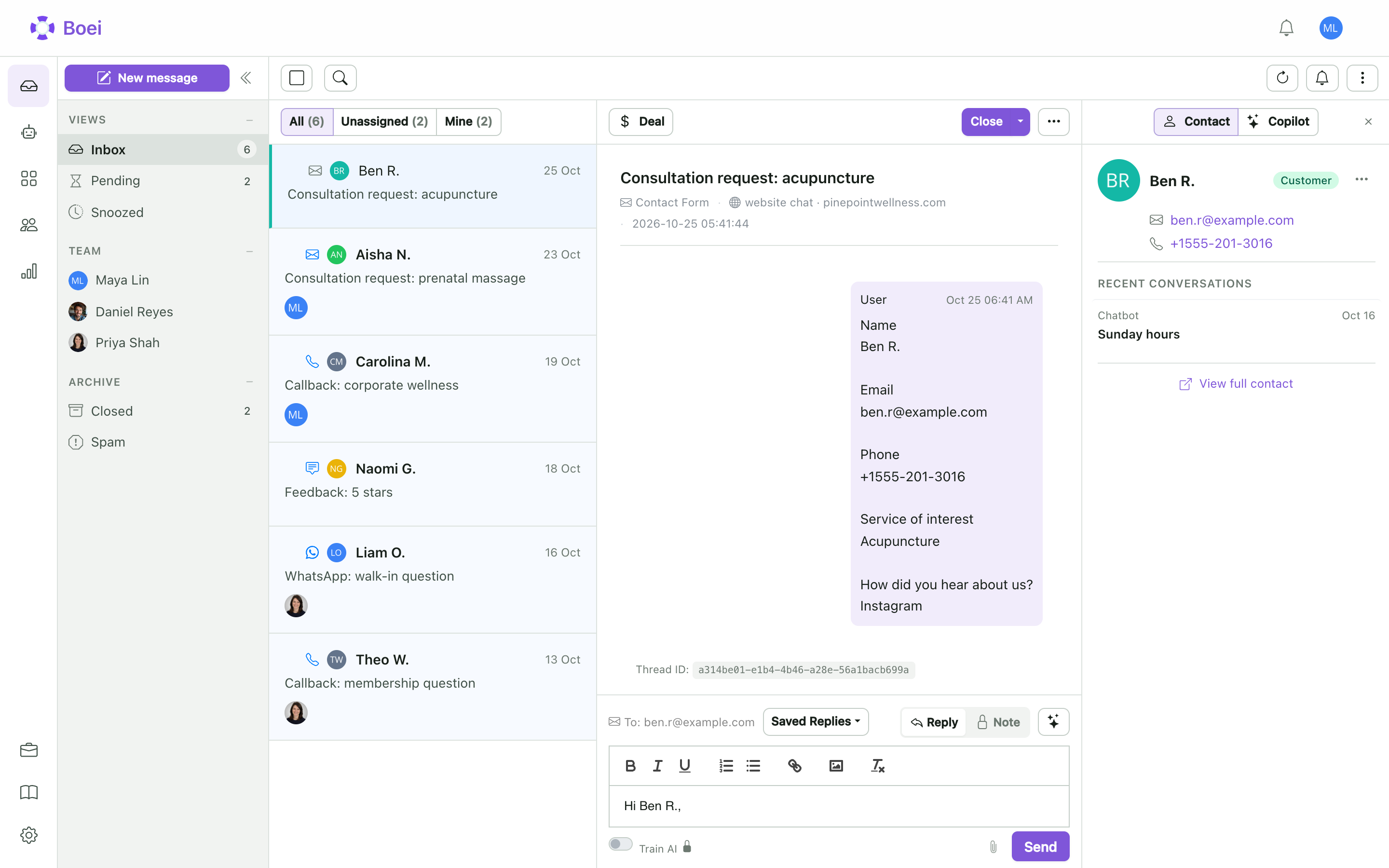
Use Transfer when another team should own the conversation. Add a private handoff note with the remaining decision. Use an internal note and an @mention when you only need a colleague's input and want to keep ownership.
Reply in the original channel. Confirm that Omar receives the human message and that the AI remains quiet until the conversation is deliberately returned.
Takeover gives a person the whole conversation. Sensitive actions need a different control when the AI may continue after one decision is approved.
5. Use approval for sensitive actions, not as a substitute for handoff
A refund action can wait for permission while the AI keeps helping. This is different from handing the whole conversation to a person.
Require human approval for the sensitive AI Action before it runs. Choose the team and whether any team member or one named person may review it.
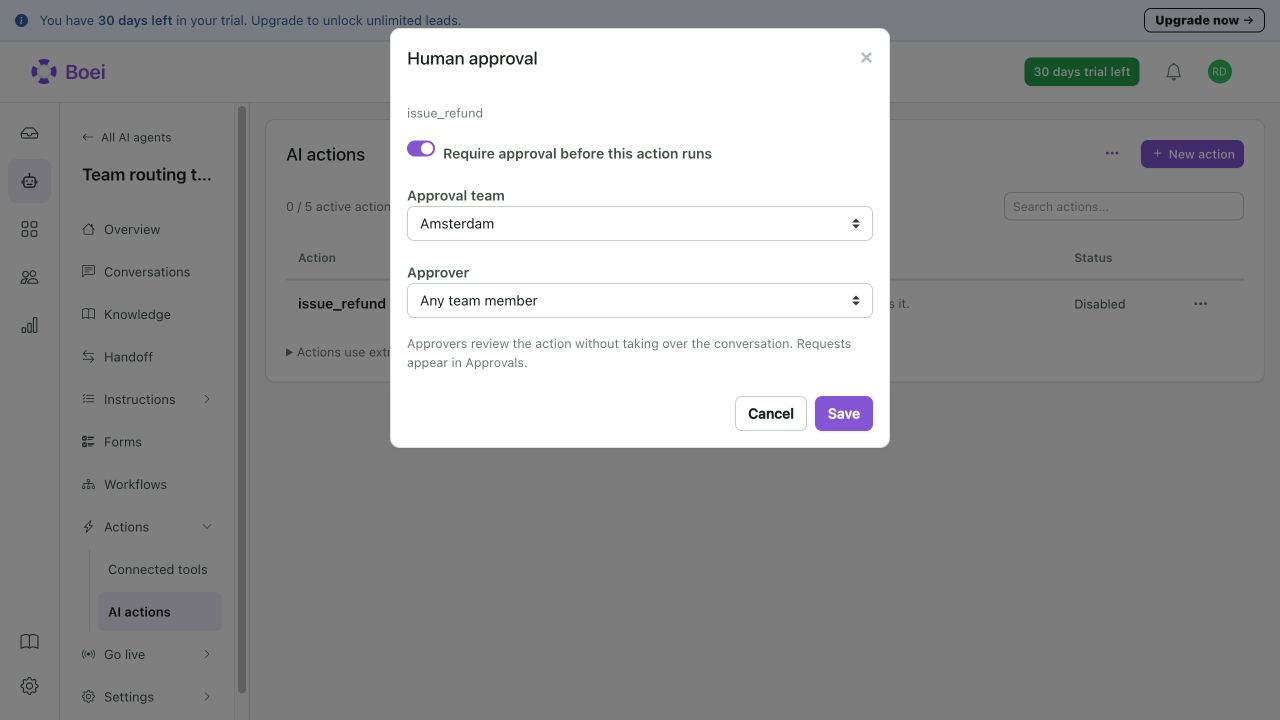
When the action is requested, open the approval queue in Inbox. Review the input and approve, edit or reject it. The execution result still needs to be checked after approval.
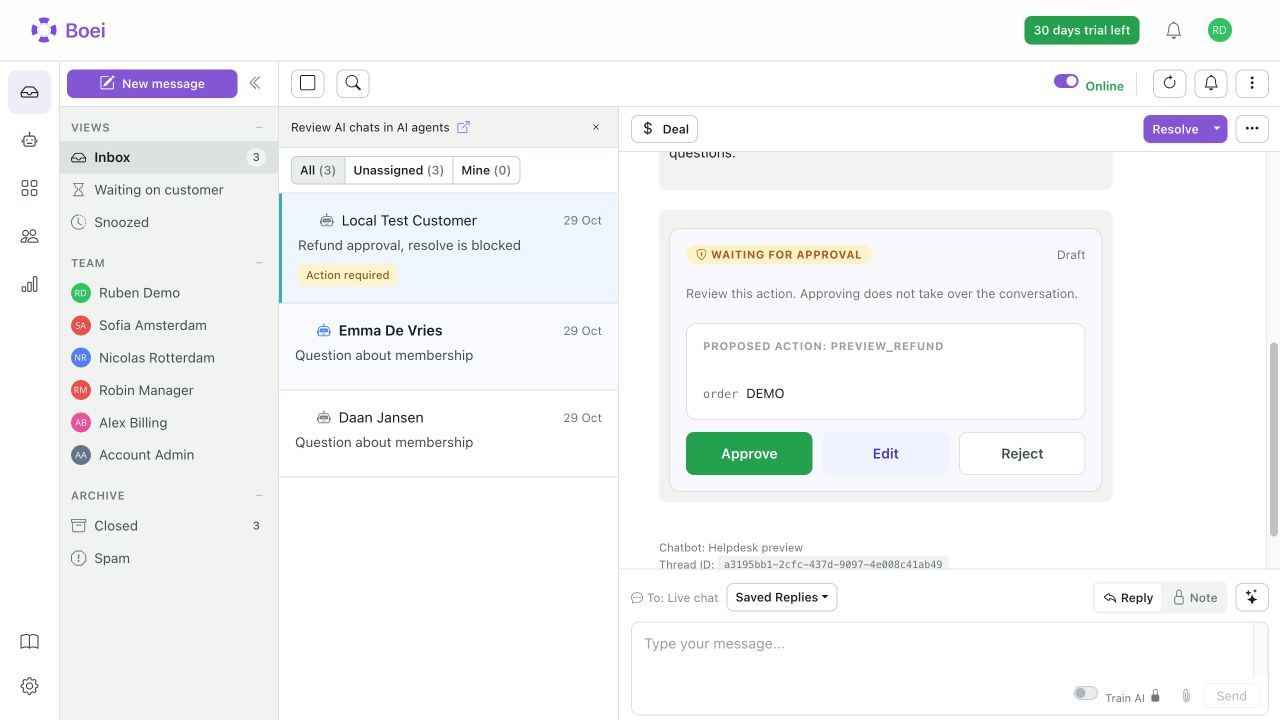
Remember: approval is not a handoff. Approving the refund does not take over Omar's conversation. Use takeover when a person should write the next customer reply. Use approval when the AI may continue after a person permits one action.
6. Take over before the AI asks for help
Handoff does not only start when the AI gets stuck. Your team can watch active AI conversations live and take over before the AI asks for help.
This is useful when a valuable lead enters the chat, a sensitive complaint develops or a teammate notices context the AI cannot know. A new-conversation notification can bring the conversation to the team's attention. The teammate opens it in Inbox, reads what has happened and takes over. The AI stops replying, while the transcript and customer profile stay in place.
The customer still experiences one conversation. The only difference is that your team chose the right moment to join.
7. Test four handoff situations
Test the setup from both sides of the conversation.
First, ask for a person while the team is available. Confirm that the right team receives the request, take over and send a reply in the same chat.
Next, repeat the request while the team is unavailable. The selected email or form fallback should appear, and the request should remain in Inbox for later follow-up.
Then trigger a sensitive action. It should create an approval without accidentally giving the whole conversation to a person. Approve or reject it and check the result.
Finally, open an active AI conversation before it requests help. Take over and confirm that the AI stops while the earlier messages and customer profile remain visible.
Also test a failed lookup, a missing email and a customer who leaves the page while waiting. Every path needs an honest customer message and a visible owner.
The decision
Use handoff when a person should own the next reply. Use approval when a person only needs to permit a sensitive action. Use email or a form when live help is unavailable.
Omar should experience one request. The AI explains the policy and finds both charges. A person decides what should happen and replies with the earlier context in view. No transcript reconstruction and no repeated charge IDs.
Next step: See how takeover, approval and conversation history work together on the human control page. If another ticket system must own the open case, continue with the chatbot-helpdesk integration guide.
Frequently asked questions
What is chatbot human handoff?
It is the transfer of a customer conversation from AI to a person, with a clear owner, useful context and a working reply path.
Should customers always be able to ask for a person?
Yes, when people are part of your support model. The route can be live, email or a form, but it should not be hidden behind repeated failures.
What happens outside working hours?
Offer the follow-up method you configured and give an honest response expectation. The request can remain in Inbox until the team replies.
Does approving an AI Action take over the chat?
No. Approval gives permission for that action. Use Take over when a person should own the customer conversation.
What context should the team receive?
Keep the customer goal, known details, AI answer, action result, handoff reason and original channel together. Add a short summary when the conversation is long.