 Ruben Buijs
Do you want to get more leads from your website? Do you want to improve customer engagement? If yes, you need to add a WhatsApp chat button to your website. This article will discuss how to add a WhatsApp chat button on websites and mobile apps.
WhatsApp is one of the world’s most popular messaging apps, with over 1 billion monthly active users. The app has become a primary means of communication for many internet users, especially younger ones, who are less likely to use email and social media sites as frequently as older generations.
Looking for the fastest way to add WhatsApp to your website? Check out this WhatsApp chat widget it takes just 5 minutes and requires no coding.
This guide covers multiple methods, including DIY solutions and ready-made tools like Boei.
Table of contents
- What is a WhatsApp Chat Button?
- How to add a WhatsApp chat button to your website for free?
- Tips to get more conversations on WhatsApp
- Frequently Asked Questions
- Conclusion
What is a WhatsApp Chat Button?
A WhatsApp chat button is a feature that allows users to share text, audio, and video content with other WhatsApp users. The buttons are typically added to websites and mobile apps.
How to add a WhatsApp chat button to your website for free?
So, now you want to add WhatsApp chat as an option. But how?
The first step is to sign up for a WhatsApp Business account. If you don’t have one, you can create one at https://www.whatsapp.com/business/. Next, install the WhatsApp app that will use your WhatsApp business number to send and receive messages.
Once the app is installed, the next step is to let your users know how they can find the button on your website and blog.
If you run a WordPress website, you can also use a plugin. See the best WhatsApp WordPress plugins.
There are two methods:
- Open WhatsApp using a link (simple)
- Get WhatsApp chats using Boei (simple)
1. WhatsApp using a link
For this to work, you need to create a button on your website.
To open WhatsApp, you can use the following link format.
https://api.whatsapp.com/send/?phone=<reference>You can replace <reference> with your phone number.
To make this easier, you can use this tool to generate a custom WhatsApp link for free.
2. WhatsApp chat using Boei
Boei lets your customers chat with you via their favorite channels like WhatsApp, Facebook Messenger, Viber, Slack, Telegram, and many other chat channels.
When you set up WhatsApp on Boei, it will look like this:
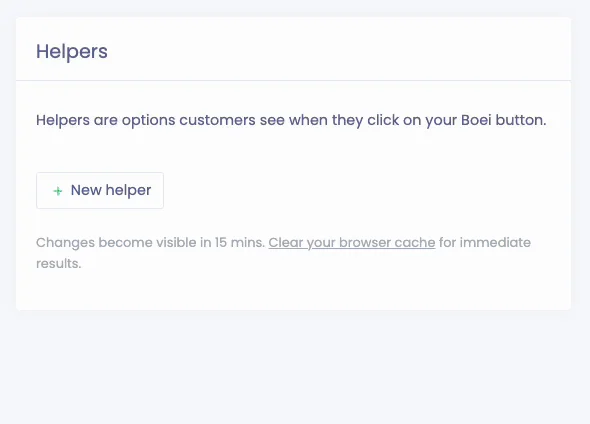
In Boei, you can create a new (so-called) helper for WhatsApp. Here you can fill in your WhatsApp or WhatsApp for business phone number.
Next to WhatsApp, you can also add many other channels (like Facebook Messenger chat or Telegram, see here). Or even an embedded contact form and newsletter subscription.
Boei is super easy to install, see the documentation.
Also, Boei is super lightweight and does not need to use a heavy Javascript library.
Tips to get more conversations on WhatsApp
- Create a WhatsApp QR code that people can scan on their desktop computer when they don't use WhatsApp web
- Use a prepopulated message as a starting point, so you know where the customer is coming from
- Use Boei's AI chatbot on WhatsApp to auto-reply to incoming messages 24/7. The AI qualifies leads and delivers full conversations to your shared inbox
- Add more space between the text and the button
- Use a dark background so that it will stand out on light backgrounds like white or light grey
- Make sure to include your logo or friendly face in the button design so that it is not missed
- Consider using colorful buttons with different shapes and designs to make them stand out more
Frequently Asked Questions
Is it free to add a WhatsApp button to my website?
Yes. You can add a basic WhatsApp button for free using a simple link (wa.me/yournumber). For a more polished chat widget with features like office hours and pre-filled messages, tools like Boei offer a free trial and paid plans starting at EUR 8/month.
Do my visitors need WhatsApp installed to use the chat button?
Yes, visitors need WhatsApp on their phone or WhatsApp Web on their desktop. When they click the button, it opens WhatsApp directly with your number pre-filled. Over 2 billion people already use WhatsApp, so most of your visitors will have it.
Can I use a regular WhatsApp number or do I need WhatsApp Business?
Both work. A regular WhatsApp number handles basic chat just fine. WhatsApp Business gives you extra features like business profiles, quick replies, automated greetings, and catalog links. It is free to use and worth setting up if you are serious about customer communication.
How do I track how many people click my WhatsApp button?
Tools like Boei include built-in analytics that show click counts and conversion data. If you use a plain link, you can set up Google Analytics event tracking on the button to measure clicks. Tracking helps you understand which pages drive the most WhatsApp conversations.
Can I add WhatsApp chat to Shopify, Wix, or WordPress?
Yes. Most website platforms support WhatsApp buttons. WordPress has dedicated plugins (see our WhatsApp plugin comparison or the WhatsApp for WordPress setup guide). For Shopify, Wix, Squarespace, and Webflow, you can use Boei's embed code or a simple HTML link.
Conclusion
With the help of this article, you can learn how to add a WhatsApp chat button to your website for free. With Boei, you can go beyond a simple button. Incoming WhatsApp messages get AI auto-replies and land in your shared inbox, so your team can manage everything in one place.