 Ruben Buijs
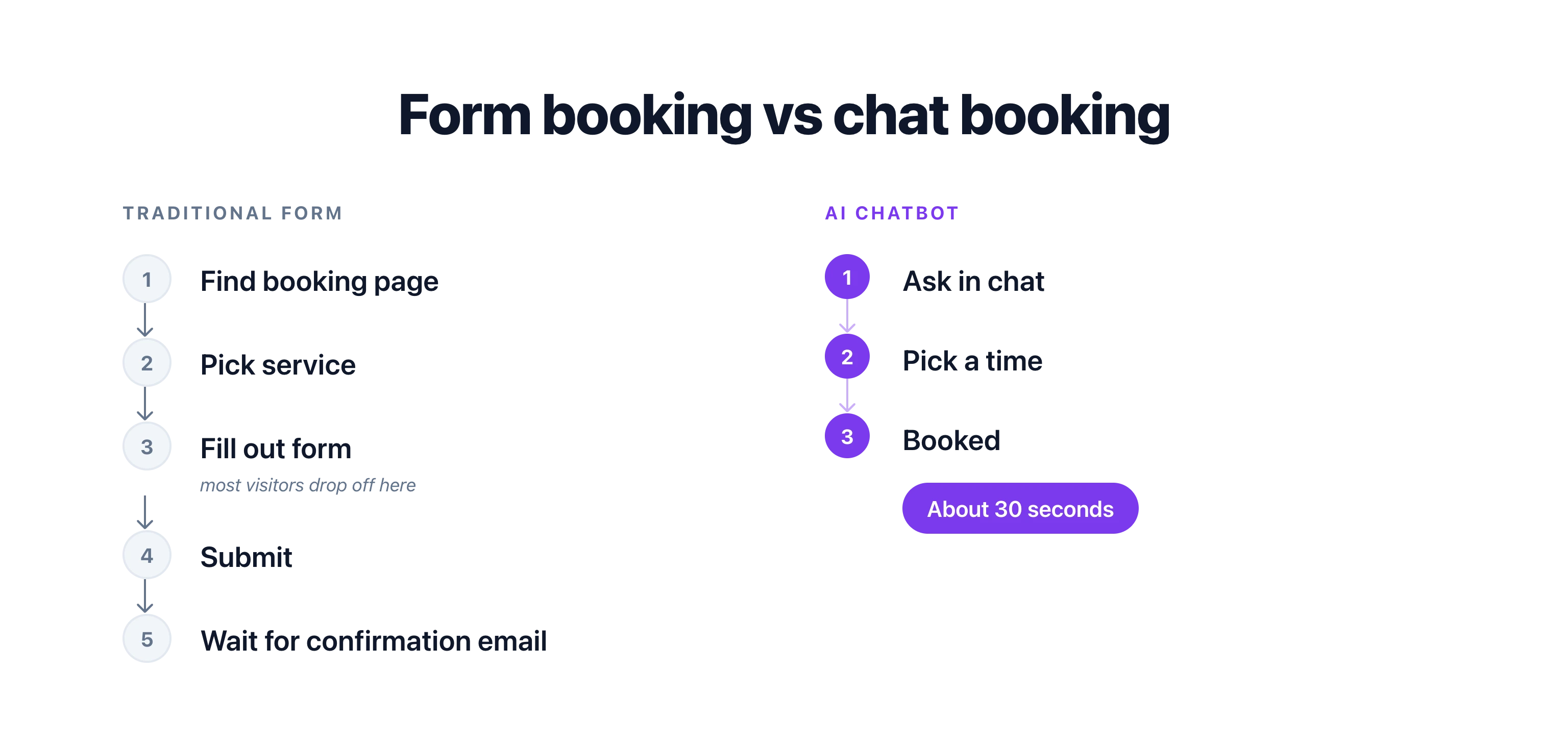
Most visitors who want to book a meeting never finish booking. They have to find the right button, load a scheduling page, pick a service, and fill in a form. Half drop off before the calendar even loads.
An AI chatbot that can book meetings skips all of that. It asks "Want me to book that for you?" and handles the rest inside the conversation, using the calendar you already have.
In short: An AI chatbot books meetings by connecting to your calendar tool's API (Google Calendar, Calendly, Cal.com, Acuity, or Outlook), reading real-time availability, and creating events directly inside the conversation. Visitors book in 30 seconds without leaving your website. Setup takes a few minutes and captures intent when it is highest, which lifts show rates compared to form-based booking.
Why Does Chat-Based Booking Convert Better Than Forms?
The difference between a traditional booking form and a chatbot booking flow comes down to friction. Every extra step costs you conversions.
| Traditional Booking Form | AI Chatbot Booking | |
|---|---|---|
| Steps to book | 5-7 (find page, pick service, fill form, confirm) | 2-3 (chat, confirm time, done) |
| Questions answered first | No - visitor must leave and come back | Yes - AI answers, then offers to book |
| Available 24/7 | Yes, but no help if visitor is confused | Yes, with real-time guidance |
| No-show rate | 20-30% (healthcare industry average) | Reduced by up to 40% with real-time booking |
| Time to complete | 3-5 minutes | Under 60 seconds |
| Mobile experience | Often clunky calendar grids | Natural chat interface |
According to Zendesk, 67% of customers prefer self-service for simple tasks like scheduling. But "self-service" does not mean "figure it out yourself on a confusing booking page." It means getting it done quickly without waiting for a human.
67% of customers prefer self-service over speaking to a company representative for simple tasks.
Source: Zendesk Customer Experience Trends Report
Chat visitors who book a meeting during a conversation have higher show rates than those who fill out a form and wait for a callback. The reason is simple. They booked when their intent was highest. No delay, no cooling off period, no forgetting about it.
Here is the math. If you are a consultant billing $200/hour and you lose 2 meetings per week to no-shows, that is $20,800 per year in lost revenue. Cutting no-shows by even 40% saves you over $8,000 annually, just by changing how people book.
$8,000 saved per year. A consultant billing $200/hour who cuts weekly no-shows from 2 to roughly 1 recovers over $8,000 in annual revenue. The only change is how visitors book.
Which Calendar Tools Let an AI Chatbot Book Meetings?
You do not need to switch calendar tools. A good AI chatbot connects to whatever you already use through APIs and webhooks. The most popular options are Google Calendar, Calendly, Cal.com, Acuity Scheduling, and Microsoft Outlook. Each connects in a slightly different way.
Google Calendar
The most widely used option for small businesses. Your chatbot reads your availability in real time and creates events directly on your calendar. If you use Google Workspace, it can also check team members' calendars to find the best overlap.
Connect Google Calendar to your chatbot
Calendly
Calendly handles the scheduling logic (buffer times, round-robin, event types) while your chatbot handles the conversation. The chatbot collects context from the visitor, then creates the Calendly booking with pre-filled information. The visitor never has to re-enter their name or reason for the meeting.
Connect Calendly to your chatbot
Cal.com
Cal.com is an open-source alternative to Calendly. It works the same way - your chatbot triggers bookings through the API. A good choice if you want full control over your scheduling data or prefer self-hosted tools.
Connect Cal.com to your chatbot
Acuity Scheduling
Acuity Scheduling (by Squarespace) is popular with salons, fitness studios, and healthcare providers. It supports intake forms, packages, and payment collection at booking time. Your chatbot can pass all the required intake information directly to Acuity, so the visitor completes everything in one conversation.
Connect Acuity Scheduling to your chatbot
Microsoft Outlook
For businesses on Microsoft 365, connecting to Outlook Calendar keeps everything inside the ecosystem you already use. Your chatbot checks availability through the Microsoft Graph API and books directly onto your Outlook calendar.
Connect Outlook Calendar to your chatbot
How Does an AI Chatbot Book a Meeting?
An AI chatbot books a meeting in three steps: it asks the visitor what they want, checks your calendar's real-time availability through the API, and creates the event with the visitor's details. The whole exchange happens inside the chat window. Here is what a typical chat-to-calendar conversation looks like:
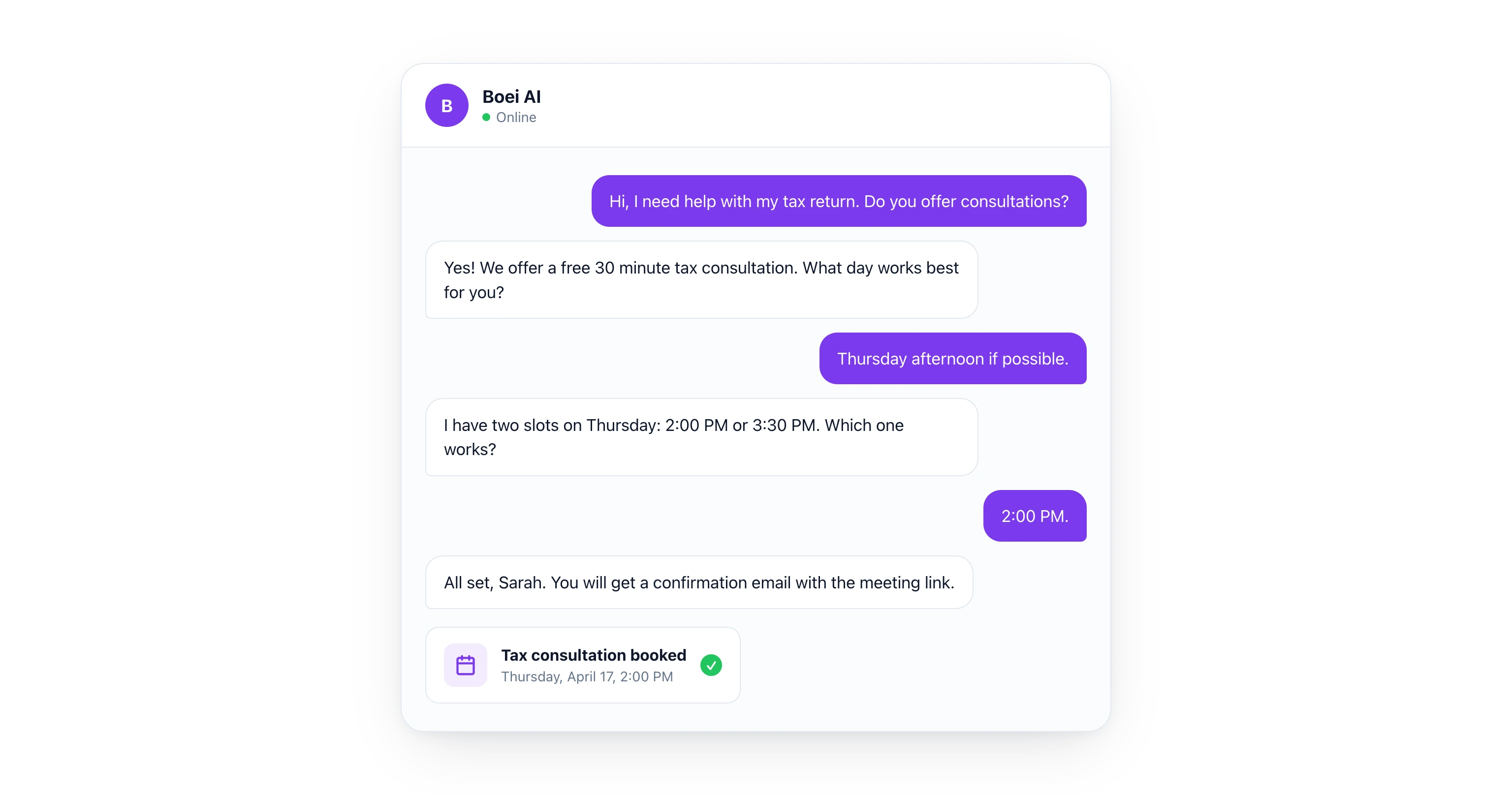
Visitor: "Hi, I need help with my tax return. Do you offer consultations?"
AI Chatbot: "Yes! We offer a free 30-minute tax consultation. I can book one for you right now. What day works best for you?"
Visitor: "Thursday afternoon if possible."
AI Chatbot: "I have two slots available on Thursday: 2:00 PM and 3:30 PM. Which one would you prefer?"
Visitor: "2:00 PM works."
AI Chatbot: "Done! I have booked you for Thursday at 2:00 PM. You will receive a confirmation email with a Google Meet link. Can I get your name and email to send the details?"
Visitor: "Sarah Johnson, [email protected]"
AI Chatbot: "All set, Sarah. You are booked for Thursday, April 17 at 2:00 PM. See you then!"
The whole exchange takes about 30 seconds. The visitor never left the chat window. The AI checked real-time calendar availability, created the event, and sent the confirmation. No forms, no page loads, no friction.
Which Industries Benefit Most from Chatbot Booking?
Any business that books appointments benefits, but the impact is largest in industries with high no-show rates, after-hours intent, or complex booking rules. Below are four common patterns.
Dental Practices
A patient visits your website at 9 PM with a toothache. Your office is closed. The AI chatbot asks about symptoms, confirms you accept their insurance, and books the earliest available emergency slot for the next morning. The patient gets an SMS reminder 2 hours before the appointment. Result: fewer no-shows, fewer phone calls to your front desk.
Consultants and Coaches
A potential client reads your case studies and wants to talk. Instead of sending them to a Calendly link where they stare at a calendar grid, the chatbot asks two qualifying questions ("What is your company size?" and "What is your biggest challenge right now?") and then books a discovery call. The meeting invite includes the visitor's answers so you walk into the call prepared.
Salons and Spas
A visitor wants a haircut and color but is not sure how long to book. The chatbot explains that a cut and color takes about 90 minutes, checks which stylists have 90-minute blocks available, and books the appointment. It can even collect a deposit or card on file through your payment integration.
Marketing Agencies
A lead fills out nothing. They just start chatting: "How much do you charge for SEO?" The AI answers their pricing question, gauges their budget, and if they are a fit, offers to book a strategy call with the right team member. Round-robin scheduling distributes meetings across your sales team automatically.
Setting Up Chat-to-Calendar in Boei
Setting up meeting booking through Boei's AI chatbot takes a few minutes. No coding required.
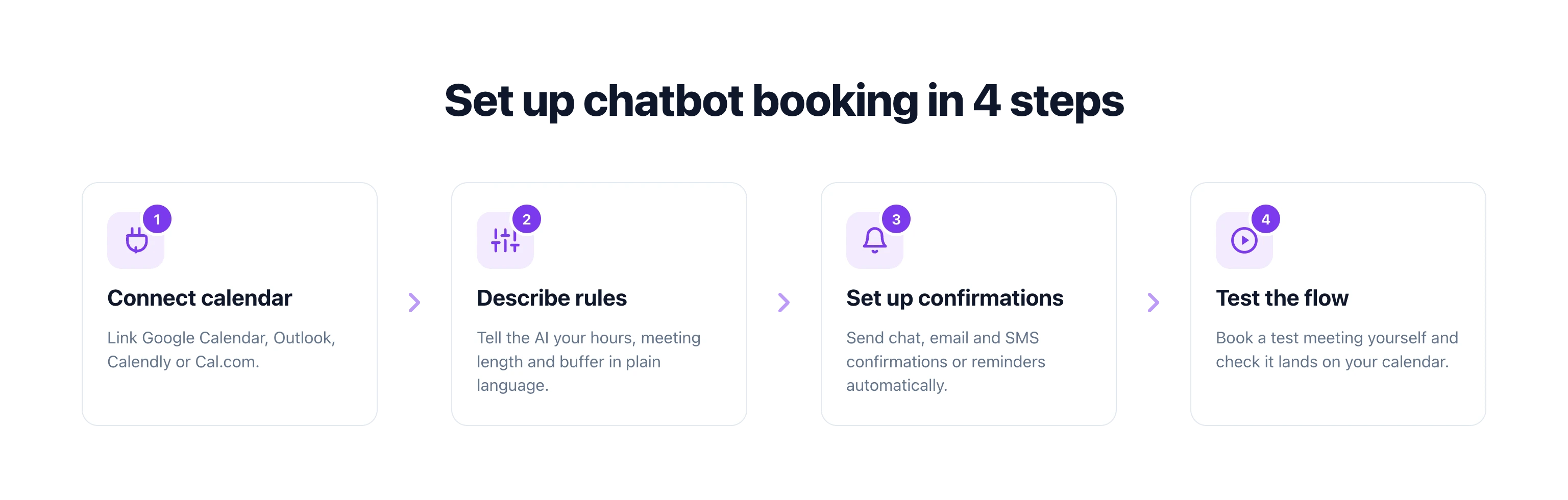
Step 1: Connect your calendar. In the Boei dashboard, link your Google Calendar, Outlook, or any tool with an API. For Calendly and Cal.com, you can connect through Zapier or use a direct webhook.
Step 2: Describe your booking rules. Tell the AI your constraints in plain language: "Available Monday through Friday, 9 AM to 5 PM. Each meeting is 30 minutes. Leave a 15-minute buffer between meetings. No bookings on public holidays."
Step 3: Set up confirmations. Choose what happens after a booking: send a chat confirmation, trigger an email with meeting details, send an SMS reminder 24 hours before, or add the contact to your CRM pipeline.
Step 4: Test the flow. Open your chatbot, ask to book a meeting, and verify the event shows up on your calendar. Adjust the AI's tone and questions until the conversation feels natural.
That is it. Your chatbot is now a 24/7 booking assistant that works while you sleep.
For a deeper walkthrough on appointment-based chatbots, see our full guide: AI Chatbot for Booking and Appointments.
What About Rescheduling and Cancellations?
A booking chatbot that only creates meetings is only half the solution. The best setups also handle changes. When a customer comes back and says "I need to move my Thursday call," the AI can look up their booking, show alternative slots, and update the calendar event. No human involvement needed.
This is where webhook-based approaches shine. The chatbot sends a request to your calendar tool's API, the change is made instantly, and both parties get updated confirmations. It works the same way whether you use Google Calendar, Calendly, or any other tool.
Start Booking Meetings Through Chat
Your website visitors are ready to book. The question is whether you make it easy or make them work for it. An AI chatbot that connects to your calendar removes every unnecessary step between "I am interested" and "I am booked."
Pick your calendar tool, connect it to your chatbot, describe your rules, and start converting more visitors into meetings today.
Try Boei free for 7 days - no credit card required.
FAQ
Can an AI chatbot book meetings on Google Calendar?
Yes. An AI chatbot can connect to Google Calendar through its API, check your real-time availability, and create events directly on your calendar. The visitor picks a time inside the chat without ever leaving your website.
Does chatbot booking work with Calendly?
Yes. Your chatbot can trigger Calendly bookings through the API or through a webhook integration like Zapier. The chatbot collects the visitor's information and preferred time, then creates the Calendly event with all details pre-filled.
How does chat-based booking reduce no-shows?
Real-time booking captures visitors at peak intent. Instead of filling out a form and waiting for a callback (where 20-30% never show up), the visitor books immediately during the conversation. Studies show this approach reduces no-shows by up to 40%.
Do I need to code anything to set this up?
No. Tools like Boei let you connect your calendar and describe your booking rules in plain language. The AI handles the conversation flow, availability checks, and event creation automatically. No code or developer needed.
Which calendar tools work with AI chatbot booking?
Most major calendar and scheduling tools work, including Google Calendar, Microsoft Outlook, Calendly, Cal.com, and Acuity Scheduling. If your tool has an API or supports webhooks, it can connect to an AI chatbot.