Webflow logo

Instagram DM Widget

Instagram DM Widget for Webflow

Add an Instagram DM button to your Webflow site. Let visitors message you directly on Instagram. AI auto-replies included. 5-minute setup.

Trusted by 14,368 websites

Works with Instagram Business accounts

Andrew Lee David S. Vance W. Grant Nitesh Manav
from 159 reviews

Also available for:

See Instagram DM Widget in Action on Webflow

Why Webflow Designers Choose Boei for Instagram DM

2B+

Instagram monthly users

70%

Users under 35

5 min

Setup time

0

Design compromises

Instagram DM Integration for Design-Forward Webflow Sites

Webflow designers obsess over every pixel. Boei's Instagram DM widget is built with the same attention to detail — fully customizable colors, sizes, positions, and animations that complement your Webflow design. Visitors tap the button and land directly in your Instagram DM.

  • Pixel-perfect widget that matches your Webflow design system
  • Works with personal and Business Instagram profiles
  • Custom animations and hover states
  • Visitors continue the conversation on their phone or desktop
  • Combine with AI chatbot for instant replies 24/7
Instagram DM
Hey! I saw your agency's work on Instagram. Do you take on new clients?
We'd love to chat! What type of project are you working on? I'll connect you with the right team.
Shared inbox showing Instagram DM conversations from Webflow site

Manage All Instagram DMs from Your Webflow Site in One Inbox

Every Instagram DM conversation from your Webflow site appears in Boei's shared inbox. Your team sees who messaged, from which page, and gets AI-generated summaries. Assign, respond, and collaborate — all from one place.

  • All Instagram DM conversations in one unified inbox
  • Assign conversations to team members with one click
  • AI-generated summaries for every conversation
  • See which Webflow page triggered the conversation
  • Unlimited team seats included in Pro plan

Why Your Webflow Site Needs an Instagram DM Button

Webflow is the platform of choice for agencies, startups, and design studios — businesses that already invest heavily in their Instagram presence. An Instagram DM button on your Webflow site connects your best marketing channel (Instagram) to your best sales channel (your website).

Webflow's native form solutions are functional but impersonal. Instagram DM is conversational — visitors message like they'd text a friend. For agencies pitching creative work, consultants booking discovery calls, and studios showcasing portfolios, the informal DM format builds rapport faster than any form.

Instagram DM conversations are async and persistent. A prospect discovers your Webflow site at midnight, sends a DM, and you respond in the morning. The conversation continues across days and devices without either party losing context.

Boei installs on Webflow in under 5 minutes via Project Settings → Custom Code. Works with all Webflow templates, CMS collections, and Webflow Ecommerce. No Webflow interactions conflicts.

Quick Setup

Install Instagram DM Widget on Webflow

From setup to your first Instagram DM conversation in under 5 minutes

1

Copy installation code

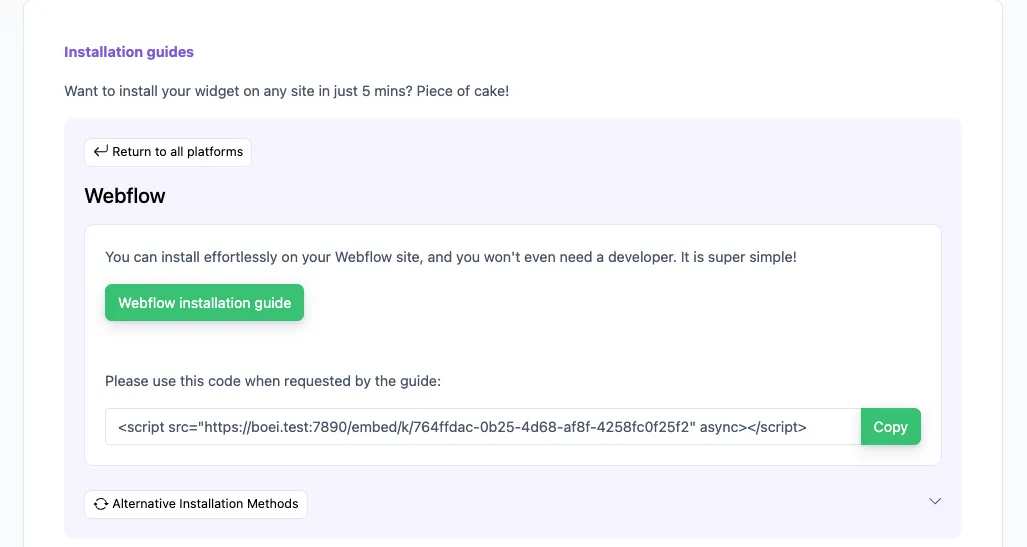
In your Boei dashboard, open your widget and click the Install tab. Select Webflow and copy the installation code.

Tip: The Install tab also offers a landing page link, QR code, and iframe embed.

Copy installation code
2

Go to Webflow

  1. Log in to your Webflow account and open your dashboard.
  2. Go to Settings of your site by clicking the dots on the right bottom.
  3. Click Custom Code.
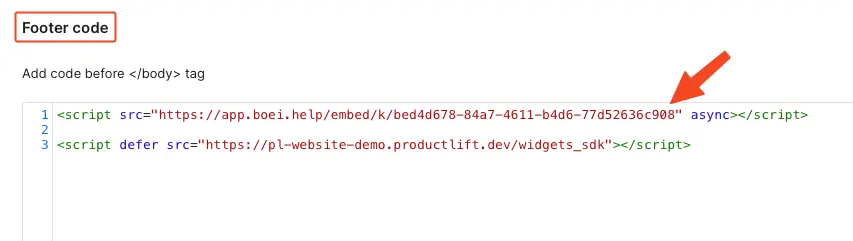
  4. Paste the Boei code from step 2 in the Footer code area. If there is already some code there, paste the Boei code below that.

Click Save and then Publish to see the changes on your live site.

Congrats, you are done!

Go to Webflow

Webflow Features

Instagram DM Widget Built for Webflow

Pixel-perfect widget that respects your design system

📸

Visual Messaging

Share photos, videos, and voice notes via Instagram DM. Perfect for agencies, studios, and creative professionals showcasing visual work.

🤖

AI Auto-Replies

Boei's AI responds instantly when you're offline. Answers inquiries, shares pricing, and captures contact details 24/7.

📥

Shared Team Inbox

All Instagram DM conversations in one inbox. Assign to team members, add internal notes, and track response times.

🎨

Design System Friendly

Match your exact brand colors, typography feel, and spacing. Fully customizable position, size, and animation. No design compromises.

📄

CMS & Ecommerce

Works with Webflow CMS collections and Ecommerce. Show the widget on specific pages, blog posts, or product pages.

🔒

GDPR Compliant

Dutch company, Amsterdam servers. Zero cookies, no personal data collected before click. Full GDPR compliance.

Compare Options

Boei vs Other Webflow Chat Options

See why Webflow designers choose Boei for Instagram DM

Feature Boei Webflow Logic Forms Elfsight Chaty
Instagram DM button
AI auto-replies
Shared team inbox
Lead capture
50+ channels 20+ 25
Design customization Full Full ✗ Limited ✗ Limited
Price €14/mo Included $5/mo $15/mo
Setup time 5 minutes Built-in 10 min 10 min

Bottom line: Webflow forms don't support Instagram DM. Elfsight and Chaty add a button but lack AI replies and a shared inbox. Boei opens a direct Instagram DM, adds AI auto-replies, and gives your team a shared inbox — all for €14/month.

What Webflow Users Say

Questions?

Instagram DM Widget for Webflow — FAQ

How do I add an Instagram DM button to Webflow?

Sign up at Boei (free trial), enter your Instagram username, customize the button. Then go to Webflow → Project Settings → Custom Code → Footer Code and paste the one-line embed. Publish your site and the widget is live. See our Webflow installation guide.

Do visitors need an Instagram account?

Yes, visitors need to be logged into Instagram. With 2 billion+ monthly active users, this is rarely a barrier. Offer WhatsApp or a contact form alongside for visitors who prefer other channels.

Does it work with Webflow CMS and Ecommerce?

Yes. Boei works with all Webflow features — CMS collections, Ecommerce, Logic, and Memberships. Show the Instagram DM button on specific pages or across your entire site.

Will it conflict with Webflow Interactions?

No. Boei loads asynchronously and doesn't interfere with Webflow's interactions, animations, or custom code. The widget runs independently of your Webflow project.

Can I customize the widget to match my design?

Yes. Full control over colors (HEX/RGB), size, position, corner radius, shadow, and animation. Instagram-inspired gradient presets available. Preview on your live Webflow site before publishing.

What does it cost?

Boei Pro is €14/month and includes the Instagram DM widget, AI auto-replies with 2,000 messages, shared inbox, 50+ channels, and unlimited team seats. Start with a 7-day free trial — no credit card required.

Is it GDPR compliant?

Yes. Boei is a Dutch company with servers in Amsterdam (EU). No cookies, full GDPR compliance, DPA available on request.

Can I combine Instagram DM with other channels?

Yes — Boei lets you add Instagram DM alongside WhatsApp, Messenger, phone, AI chatbot, and 50+ other channels in one floating button.

Instagram DM Widget for Every Platform

Same widget, same features — on your platform of choice

Add Instagram DM to Your Webflow Site

Connect with 2B+ Instagram users. AI auto-replies included. Free 7-day trial.

5-minute setup, no coding • GDPR compliant (EU servers) • Works with all Webflow features • No interaction conflicts
Andrew Lee David S. Vance W. Grant Nitesh Manav
from 159 reviews