WordPress logo

Instagram DM Widget

Instagram DM Widget for WordPress

Add an Instagram DM button to your WordPress site. Let visitors message you directly on Instagram. AI auto-replies included. 5-minute setup.

Trusted by 14,368 websites

Works with Instagram Business accounts

Andrew Lee David S. Vance W. Grant Nitesh Manav
from 159 reviews

Also available for:

See Instagram DM Widget in Action on WordPress

Why WordPress Sites Choose Boei for Instagram DM

2B+

Instagram monthly users

70%

Users under 35

5 min

Setup time

150M+

Business conversations/month

Instagram DM Integration That Works Seamlessly with WordPress

Your WordPress visitors tap the Instagram DM button and land directly in your Instagram inbox. No forms, no friction — just a natural conversation on the platform they already use every day. With 2 billion+ monthly active users, Instagram is where your younger audience lives.

  • One-tap connection from your WordPress site to Instagram DM
  • Works with personal and Business Instagram profiles
  • Visitors continue the conversation on their phone or desktop
  • Instagram Business profile gives you analytics and automated greetings
  • Combine with AI chatbot for instant replies 24/7
Instagram DM
Hi! I saw your latest post and want to book an appointment.
Thanks for reaching out! I'd love to help. What service are you interested in?
Shared inbox showing Instagram DM conversations with AI summary and agent assignment

Manage All Instagram DMs in One Shared Inbox

Stop switching between Instagram, email, and your website. Every Instagram DM conversation from your WordPress site appears in Boei's shared inbox. Your team can view, assign, and respond — all from one place. AI generates conversation summaries so agents get full context instantly.

  • All Instagram DM conversations in one unified inbox
  • Assign conversations to team members with one click
  • AI-generated summaries for every conversation
  • Round-robin or department-based routing
  • Unlimited team seats included in Pro plan

Why Your WordPress Site Needs an Instagram DM Button

WordPress powers over 40% of all websites, but most WordPress sites still rely on contact forms and email for customer communication. Meanwhile, 150 million+ business conversations happen on Instagram every month — and your visitors are already there.

70% of Instagram users are under 35. For them, sending a DM is as natural as texting a friend. An Instagram DM button on your WordPress site meets this audience where they're comfortable — casual, fast, and visual. Customers who message businesses on Instagram are 44% more likely to make a purchase.

Unlike live chat that requires constant monitoring, Instagram DM is asynchronous. Visitors message when it's convenient for them, and you respond when you can. Conversations persist across devices and over time — no lost leads.

Boei's WordPress plugin installs in under 5 minutes. No coding, no theme edits, no conflict with Elementor, Divi, or any page builder. Works perfectly with WooCommerce, too — add the Instagram DM button to product pages, cart, and checkout.

Quick Setup

Install Instagram DM Widget on WordPress

From setup to your first Instagram DM conversation in under 5 minutes

1

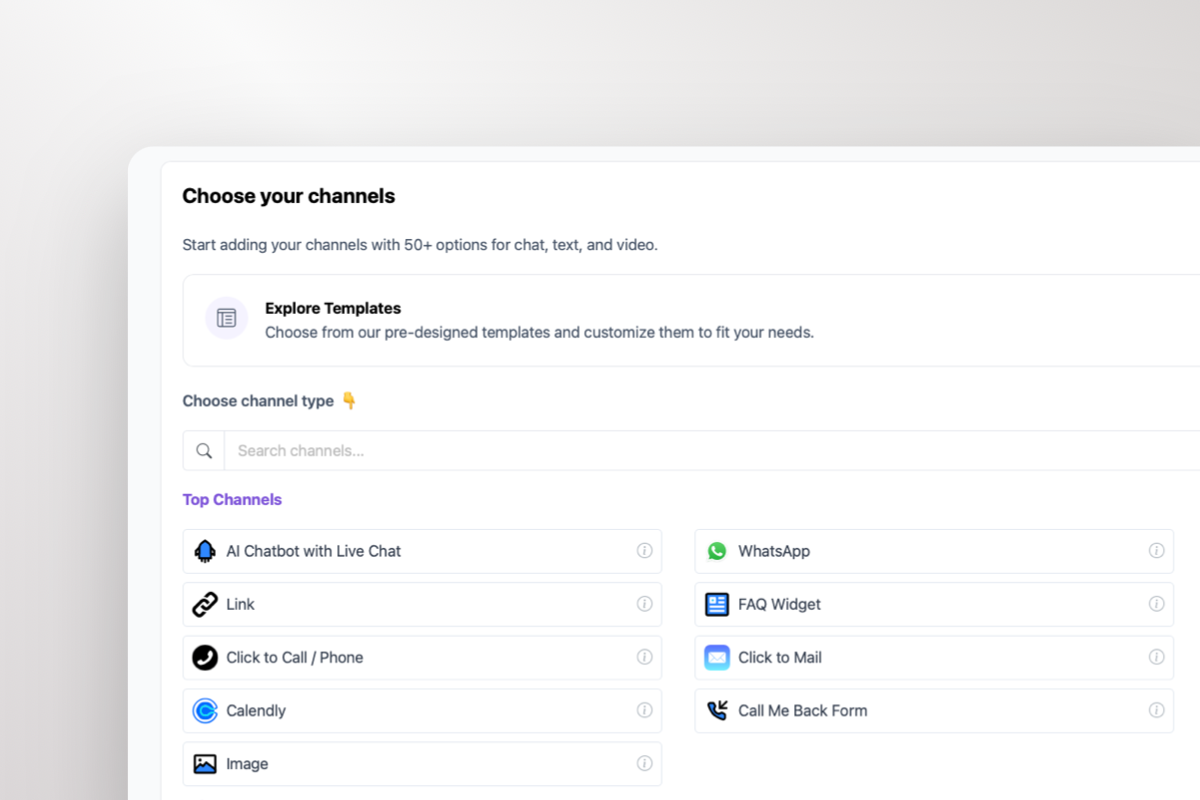
Copy WordPress key

In your Boei dashboard, open your widget and click the Install tab. Select WordPress and copy the WordPress plugin key.

Tip: The Install tab also offers a landing page link, QR code, and iframe embed.

Copy WordPress key
2

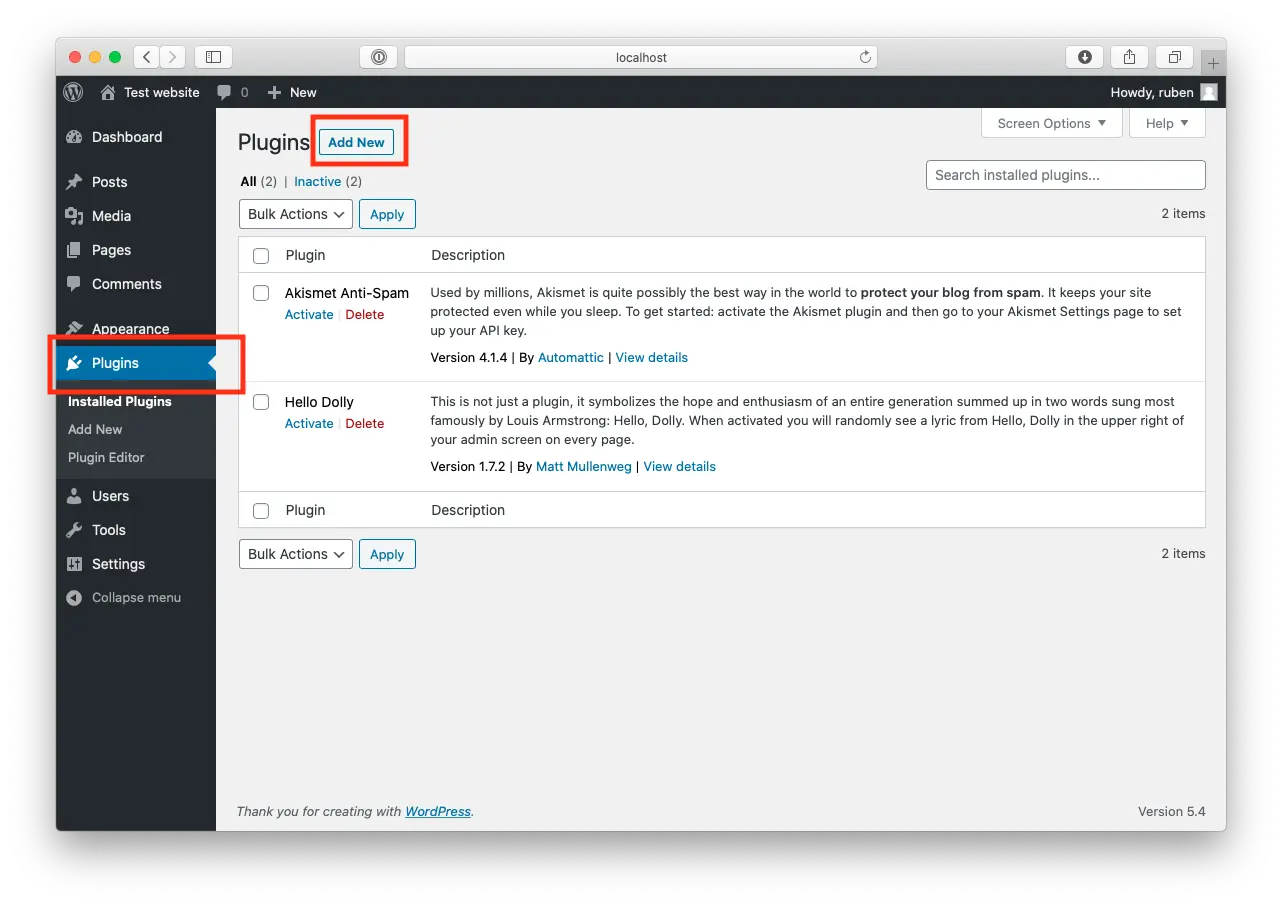
Log in to WordPress

Open WordPress and click on "Plugins".
Now, click "Add New" at the top of the page.

Log in to WordPress
3

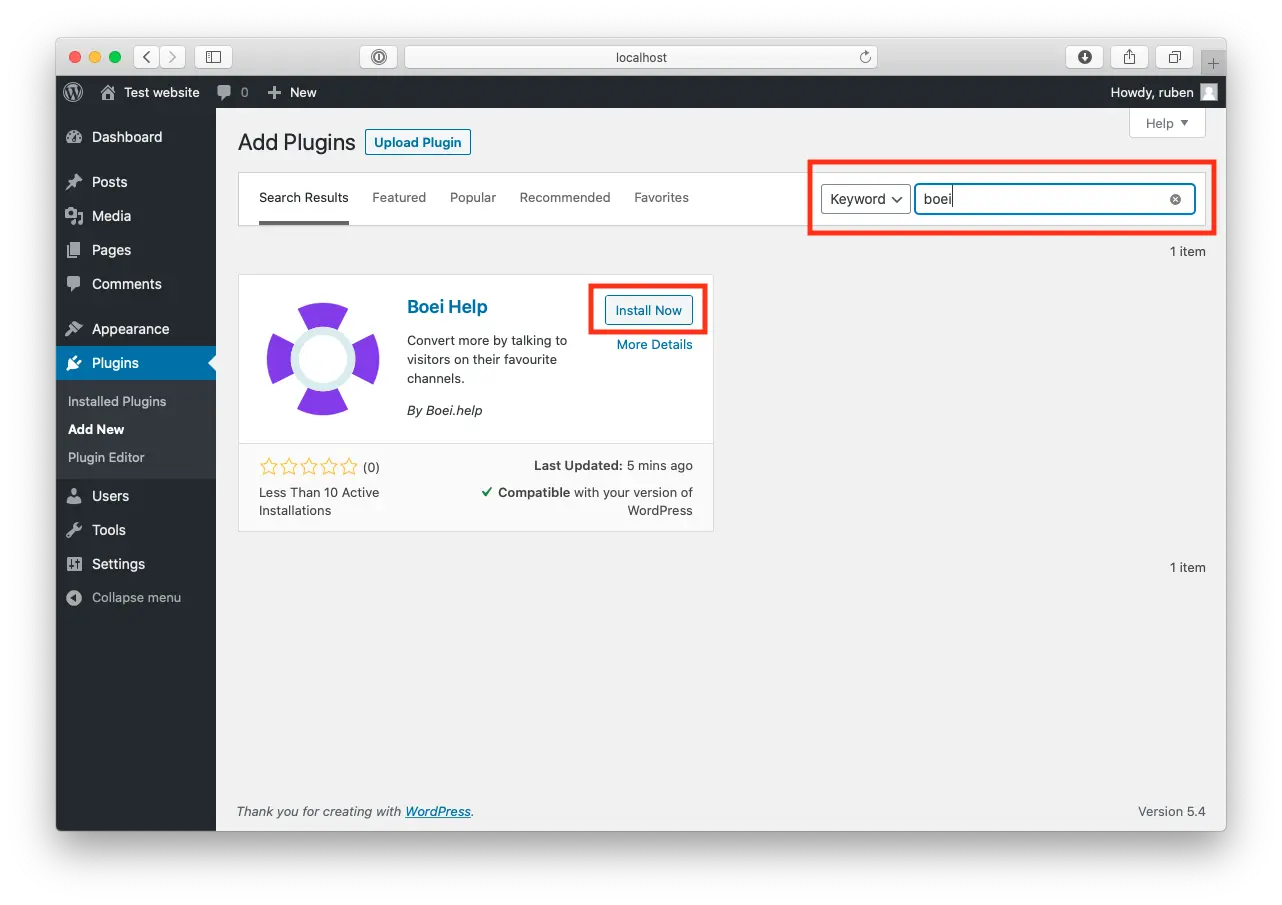
Install Boei Plugin

Search for "Boei" and find our plugin.

Click "Install Now".

Install Boei Plugin
4

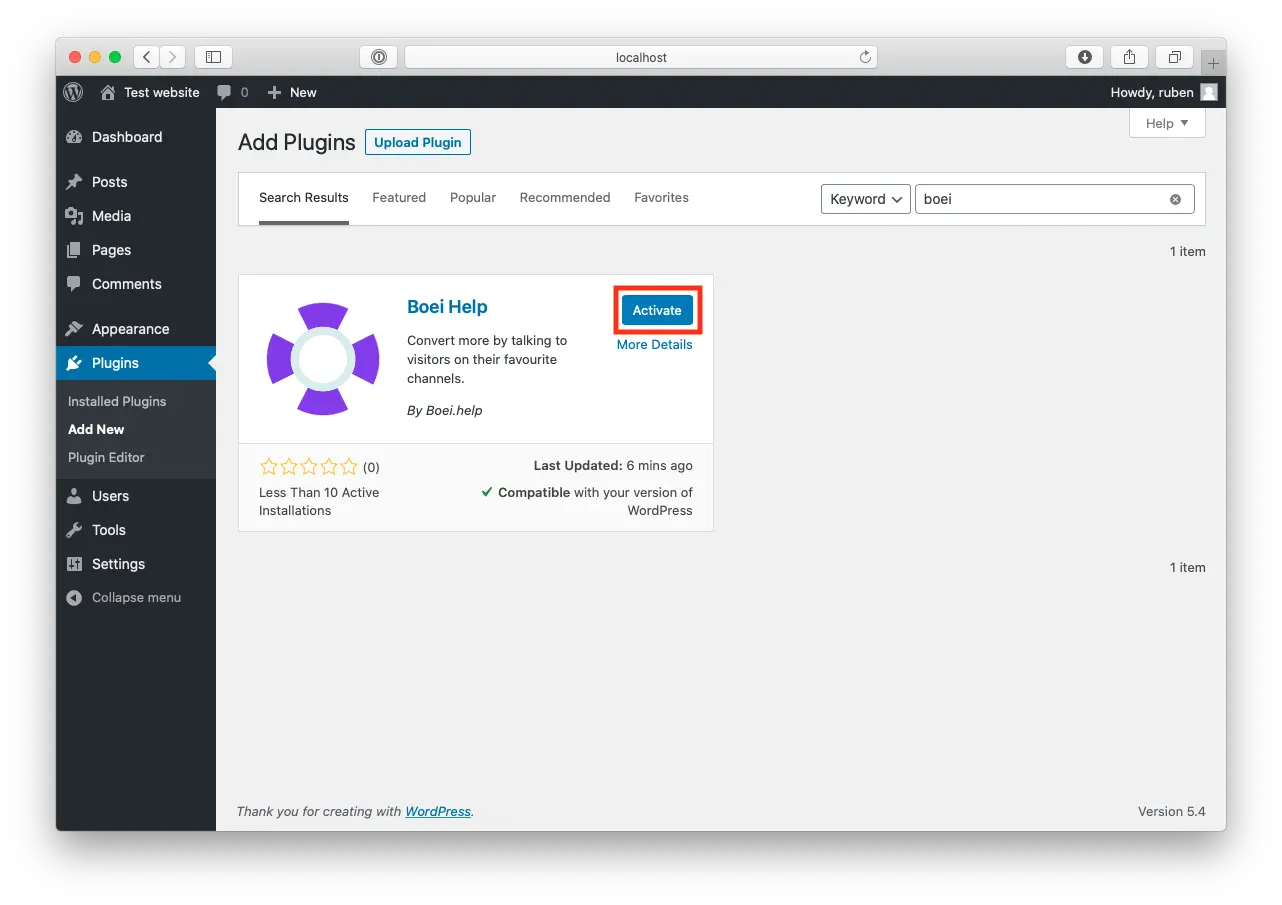
Activate

When the plugin is installed, press "Activate".

Activate
5

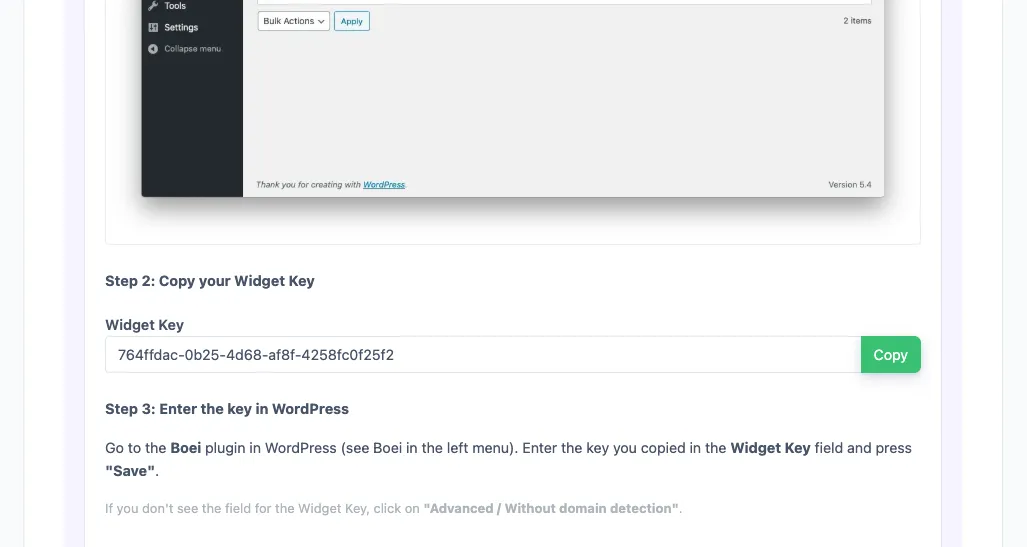
Paste key in Boei's WordPress Plugin

Go to the Boei plugin in WordPress (see Boei in the left menu).

Enter the key you copied in the Widget Key field and press "save".

If you don't see the field for the Widget Key, click on "Advanced / Without domain detection".

6

Finished coffee

Congrats, you are done!

WordPress Features

Instagram DM Widget Built for WordPress

Everything you need to connect your WordPress visitors with your Instagram

📸

Visual-First Messaging

Instagram DM supports photos, videos, voice notes, and stories. Perfect for visual brands — salons, fashion, food, design, and real estate.

🤖

AI Auto-Replies

Boei's AI responds instantly when you're offline. Trained on your website content, FAQs, and pricing. Visitors get answers 24/7 without waiting.

📥

Shared Team Inbox

All Instagram DM conversations in one inbox. Assign to team members, add internal notes, and track response times.

🛒

WooCommerce Ready

Show the Instagram DM button on product pages, cart, and checkout. Customers ask about sizing, shipping, and stock directly via DM.

🎨

Full Customization

Match your brand colors, adjust size and position, choose Instagram-inspired gradients. Preview on your live site before publishing.

🔒

GDPR Compliant

Dutch company, Amsterdam servers. Zero cookies, no personal data collected before click. Works with WP Rocket and all caching plugins.

Compare Options

Boei vs Other WordPress Instagram Plugins

See why 14,000+ websites choose Boei for their Instagram DM widget

Feature Boei Suspended Social Bar Simple Social Icons Social Chat
Instagram DM button Link only
AI auto-replies
Shared team inbox
Lead capture
50+ channels WhatsApp only
GDPR compliant Varies Varies
Price €14/mo Free Free $25/year
Setup time 5 minutes 10 min 5 min 15 min

Bottom line: Social bar plugins add a basic Instagram link — no DM integration, no AI, no inbox. Boei opens a direct Instagram DM conversation, adds AI auto-replies, and gives your team a shared inbox — all for €14/month.

What WordPress Users Say

Questions?

Instagram DM Widget for WordPress — FAQ

How do I add an Instagram DM button to WordPress?

Go to Plugins → Add New, search for 'Boei', install and activate. Sign up at Boei (free trial), enter your Instagram username, customize the button, and paste your widget key in Settings → Boei. Your Instagram DM button is live in 5 minutes. See our WordPress installation guide.

Do visitors need an Instagram account to message me?

Yes, visitors need to be logged into Instagram. With 2 billion+ monthly active users, this is rarely a barrier. For visitors without Instagram, offer alternatives like WhatsApp or a contact form alongside the button.

Does it work with WooCommerce?

Yes. Show the Instagram DM button on product pages, cart, and checkout. Customers ask about sizing, shipping, returns, and stock via Instagram DM. Works with all WooCommerce themes and extensions.

Should I use a personal or Business Instagram profile?

Both work. An Instagram Business profile is recommended — it gives you message analytics, saved replies, automated greetings, and the 'Very responsive' badge. Switching is free and takes 30 seconds.

Does it work with Elementor, Divi, and other page builders?

Yes. Boei works with all WordPress themes and page builders: Elementor, Divi, Beaver Builder, WPBakery, Gutenberg, Astra, GeneratePress, and custom themes. No conflicts.

What does it cost?

Boei Pro is €14/month and includes the Instagram DM widget, AI auto-replies with 2,000 messages, shared inbox, 50+ channels, and unlimited team seats. Start with a 7-day free trial — no credit card required.

Is the Instagram DM widget GDPR compliant?

Yes. Boei is a Dutch company with servers in Amsterdam (EU). No cookies, full GDPR compliance, DPA available on request. Compatible with WP Rocket, LiteSpeed, and all caching plugins.

Can I use Instagram DM alongside other channels?

Absolutely — this is what Boei is built for. Add Instagram DM alongside WhatsApp, Messenger, phone, AI chatbot, and 50+ other channels in one floating button.

Instagram DM Widget for Every Platform

Same widget, same features — on your platform of choice

Add Instagram DM to Your WordPress Site

Connect with 2B+ Instagram users. AI auto-replies included. Free 7-day trial.

5-minute setup, no coding • GDPR compliant (EU servers) • Works with all themes & page builders • WooCommerce ready
Andrew Lee David S. Vance W. Grant Nitesh Manav
from 159 reviews