Squarespace logo

Instagram DM Widget

Instagram DM Widget for Squarespace

Add an Instagram DM button to your Squarespace site. Let visitors message you directly on Instagram. AI auto-replies included. 5-minute setup.

Trusted by 14,368 websites

Works with Instagram Business accounts

Andrew Lee David S. Vance W. Grant Nitesh Manav
from 159 reviews

Also available for:

See Instagram DM Widget in Action on Squarespace

Why Squarespace Users Choose Boei for Instagram DM

2B+

Instagram monthly users

70%

Users under 35

5 min

Setup time

150M+

Business conversations/month

Instagram DM Integration Designed for Squarespace

Squarespace and Instagram share the same DNA — visual, design-forward, and brand-conscious. Your visitors tap the Instagram DM button and land directly in your Instagram inbox. The conversation feels native because it is: same platform they already follow you on, same visual language.

  • One-tap connection from your Squarespace site to Instagram DM
  • Matches Squarespace's clean, minimal aesthetic
  • Visitors continue the conversation on their phone or desktop
  • Share portfolio samples, pricing, and availability via DM
  • Combine with AI chatbot for instant replies 24/7
Instagram DM
Hi! I love your work. Do you have availability for a brand shoot next month?
Thanks so much! I do have openings in March. Let me share my packages with you.
Shared inbox showing Instagram DM conversations from Squarespace site

All Instagram DMs from Your Squarespace Site in One Inbox

Stop switching between Instagram and your email. Every Instagram DM conversation from your Squarespace site appears in Boei's shared inbox. View, assign, and respond from one place. AI generates summaries so you never lose context across conversations.

  • All Instagram DM conversations in one unified inbox
  • Assign conversations to team members with one click
  • AI-generated summaries for every conversation
  • Internal notes for team collaboration
  • Unlimited team seats included in Pro plan

Why Your Squarespace Site Needs an Instagram DM Button

Squarespace users are design-conscious professionals — photographers, architects, artists, consultants, and boutique brands. They choose Squarespace for its clean templates and visual focus. Instagram is the natural messaging extension of that visual identity.

Squarespace already integrates with Instagram for content blocks and feeds. But when a visitor wants to reach out, they hit a contact form — impersonal and slow. An Instagram DM button lets them message you the same way they'd message a friend: tap, type, send.

Instagram DM conversations are persistent and visual. Clients share reference images, you send mood boards and samples. The conversation becomes a visual brief that lives on both your devices — no attachments, no downloads, no lost emails.

Boei installs on Squarespace in under 5 minutes via Code Injection — no developer needed. Works on all Squarespace templates (7.0 and 7.1) and Squarespace Commerce. The widget matches your site's aesthetic with full color and position control.

Quick Setup

Install Instagram DM Widget on Squarespace

From setup to your first Instagram DM conversation in under 5 minutes

1

Copy installation code

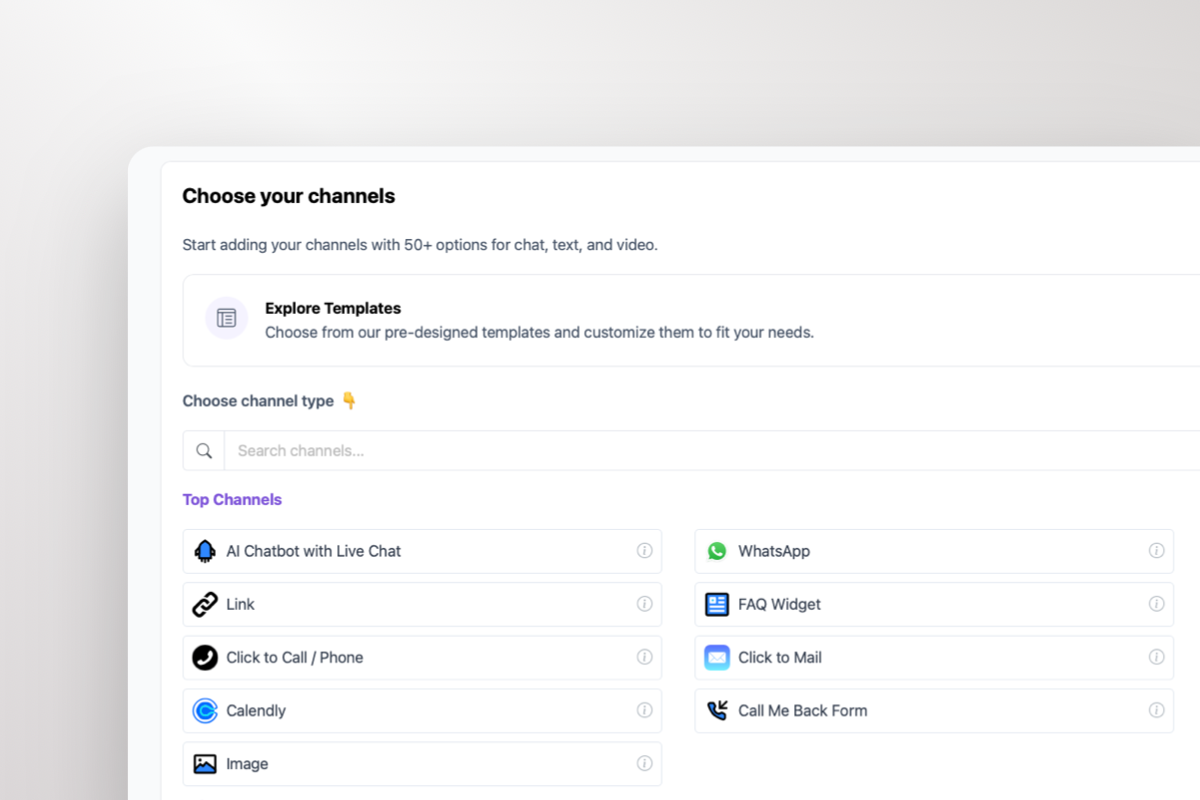
In your Boei dashboard, open your widget and click the Install tab. Select Squarespace and copy the installation code.

Tip: The Install tab also offers a landing page link, QR code, and iframe embed.

Copy installation code
2

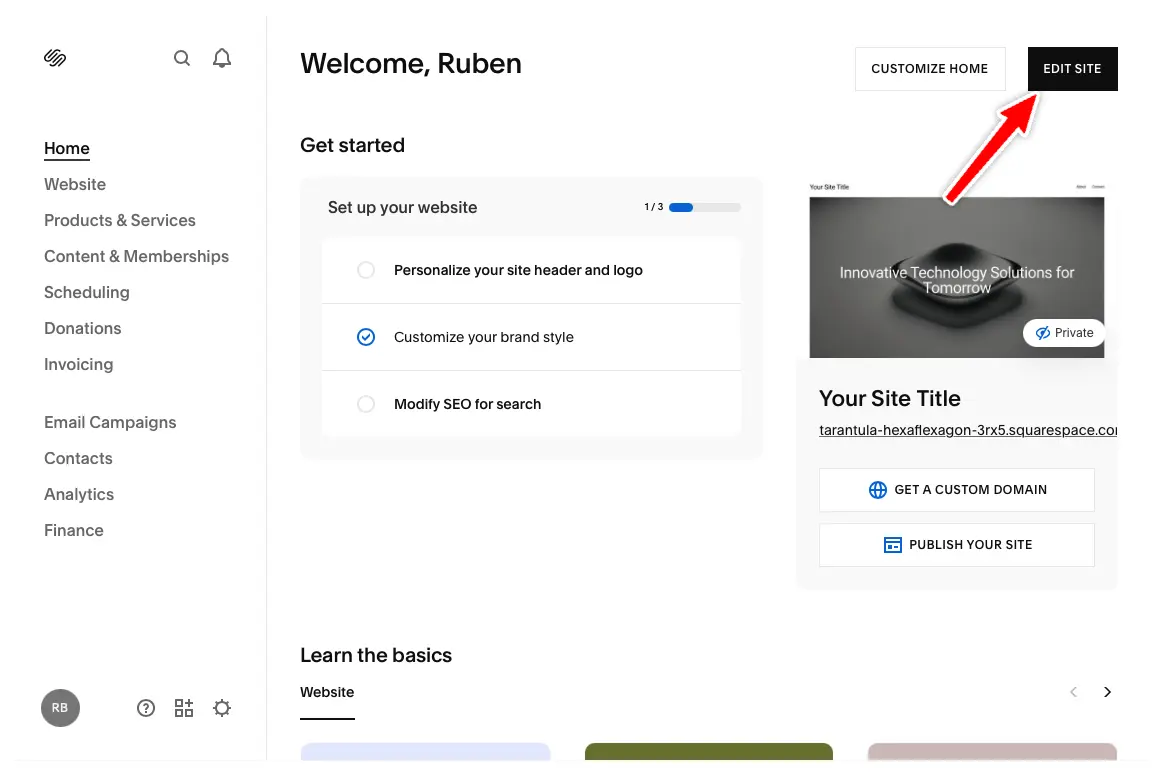
Click Edit Site

In your Squarespace dashboard, click "Edit Site" in the top right corner.

Click Edit Site
3

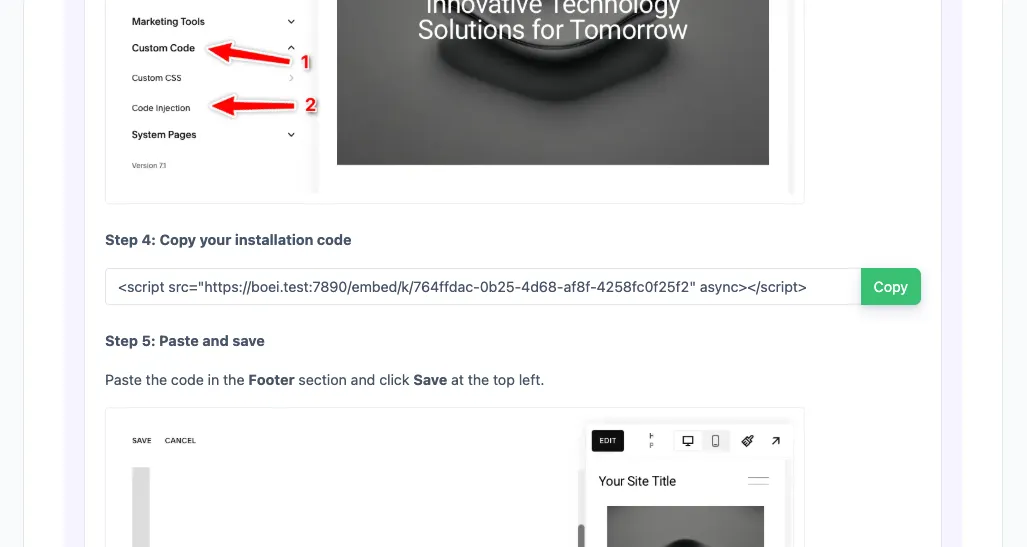
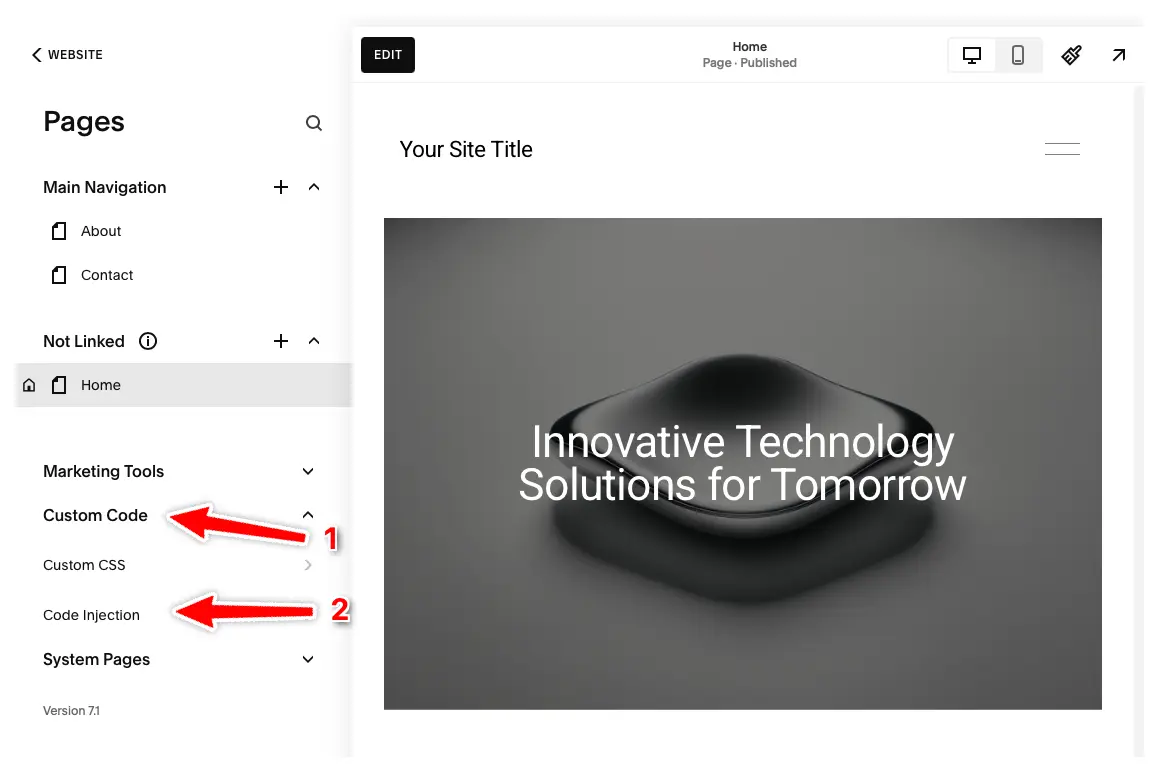
Open Code Injection

Click "Pages" in the left menu, then click "Custom Code" and select "Code Injection".

Note: Code Injection is available on Core, Plus, Advanced, Business, Commerce Basic, and Commerce Advanced plans. Personal plans don't have this feature.

Open Code Injection
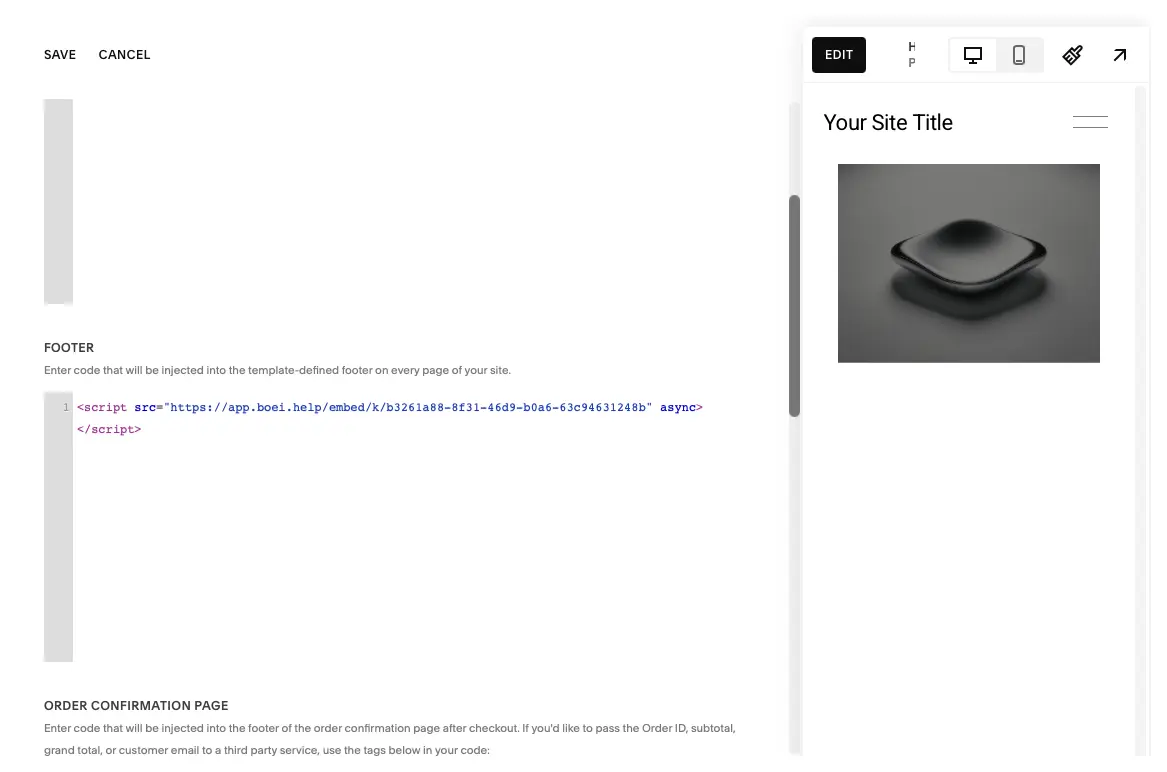
4

Paste Code & Save

Enter your Boei code in the Footer section and press "Save" at the top left.

The Boei widget will now appear on all pages of your Squarespace site. Congrats, you are done!

Paste Code & Save

Squarespace Features

Instagram DM Widget Built for Squarespace

Everything you need to connect your Squarespace visitors with your Instagram

📸

Visual Conversations

Share photos, mood boards, and portfolio samples via Instagram DM. Perfect for photographers, designers, and creative professionals.

🤖

AI Auto-Replies

Boei's AI responds instantly when you're away. Answers booking questions, shares pricing info, and captures leads 24/7.

📥

Shared Team Inbox

All Instagram DM conversations in one inbox. Assign to team members, add internal notes, and track response times.

🎨

Design-First Widget

Matches Squarespace's clean aesthetic. Custom colors, minimal design, adjustable position. Looks native on every template.

🛒

Squarespace Commerce

Show the Instagram DM button on product pages, category pages, and checkout. Shoppers ask product questions via DM.

🔒

GDPR Compliant

Dutch company, Amsterdam servers. Zero cookies, no personal data collected before click. Full GDPR compliance.

Compare Options

Boei vs Other Squarespace Chat Options

See why Squarespace users choose Boei for Instagram DM

Feature Boei Squarespace Chat (Business) Elfsight Social Icons Block
Instagram DM button Link only
AI auto-replies
Shared team inbox ✗ Limited
Lead capture
50+ channels 1 20+
Works on all templates Business plan only
Price €14/mo $33+/mo $5/mo Included
Setup time 5 minutes Built-in 10 min Built-in

Bottom line: Squarespace's built-in chat requires a Business plan and doesn't support Instagram DM. Social Icons link to your profile without opening DM. Boei opens a direct Instagram DM conversation, adds AI auto-replies, and gives you a shared inbox — all for €14/month.

What Squarespace Users Say

Questions?

Instagram DM Widget for Squarespace — FAQ

How do I add an Instagram DM button to Squarespace?

Sign up at Boei (free trial), enter your Instagram username, customize the button design. Then go to Squarespace → Settings → Advanced → Code Injection and paste the one-line embed code. Live in 5 minutes. See our Squarespace installation guide.

Do visitors need an Instagram account?

Yes, visitors need to be logged into Instagram. With 2 billion+ monthly active users, this is rarely a barrier. Offer WhatsApp or a contact form alongside for visitors who prefer other channels.

Does it work with Squarespace 7.0 and 7.1?

Yes. Boei works with all Squarespace templates — both 7.0 (Brine, Bedford, Pacific, etc.) and 7.1. Also works with Squarespace Commerce and member areas.

Will it match my Squarespace template design?

Yes. Full control over colors, size, position, corner radius, and shadow. Choose from Instagram-inspired gradient presets or match your exact brand colors. Preview on your live site before publishing.

Can I use it for booking inquiries?

Absolutely. Photographers, consultants, and service providers use Instagram DM for booking requests. Clients share reference images, you respond with availability and pricing. The visual conversation thread becomes a natural brief.

What does it cost?

Boei Pro is €14/month and includes the Instagram DM widget, AI auto-replies with 2,000 messages, shared inbox, 50+ channels, and unlimited team seats. Start with a 7-day free trial — no credit card required.

Is it GDPR compliant?

Yes. Boei is a Dutch company with servers in Amsterdam (EU). No cookies, full GDPR compliance, DPA available on request.

Can I combine Instagram DM with other channels?

Yes — Boei lets you add Instagram DM alongside WhatsApp, Messenger, phone, AI chatbot, and 50+ other channels in one floating button.

Instagram DM Widget for Every Platform

Same widget, same features — on your platform of choice

Add Instagram DM to Your Squarespace Site

Connect with 2B+ Instagram users. AI auto-replies included. Free 7-day trial.

5-minute setup, no coding • GDPR compliant (EU servers) • Works with all Squarespace templates • Squarespace Commerce compatible
Andrew Lee David S. Vance W. Grant Nitesh Manav
from 159 reviews