WordPress logo

Best WhatsApp WordPress Plugin

WhatsApp Chat Button for WordPress

WordPress has 60,000+ plugins. Most WhatsApp ones just open a chat window and call it a day. No AI, no auto-replies, no lead capture. Boei is the WhatsApp plugin that actually works for you. Visitors click the button, AI replies instantly on WhatsApp, and you get leads with full conversation history. Install the official WordPress plugin in 5 minutes.

Trusted by 17,000+ websites

Official WordPress plugin

Andrew Lee David S. Vance W. Grant Nitesh Manav
from 159 reviews

Also available for:

Try the WordPress WhatsApp AI Demo

WordPress WhatsApp Plugins Are Stuck in 2019

Search 'WhatsApp' in the WordPress plugin directory. You get Chaty, Click to Chat, WP Social Chat, Join.chat, and dozens more. They all do the same thing: add a green button that opens a WhatsApp chat window. That is it. No AI. No auto-replies. No lead capture. Just a link to wa.me.

  • Click to Chat has 300,000+ installs but zero intelligence. A visitor clicks the button, types a message, and... waits. If you are not watching your phone, that lead is gone. There is no auto-reply, no fallback, nothing
  • Chaty (Premio) charges EUR 59/year for a floating button. It supports multiple channels, but every WhatsApp message still goes to your personal phone with no AI handling. You are paying for a button, not a solution
  • WP Chat App and Join.chat are the same story. A button that opens WhatsApp. If you are offline, the visitor sees 'last seen' and leaves. No business should lose leads because the owner was eating lunch

What Boei does differently on WordPress:

Boei adds WhatsApp to your WordPress site with AI auto-reply built in. When a visitor sends a WhatsApp message, AI responds instantly. It answers questions using your website content, captures contact details mid-conversation, and hands warm leads to your team with a full summary. Your visitors get answers at 2am on a Sunday. You get leads in your inbox Monday morning.

WhatsApp is the world's most popular messaging app with 2+ billion users. Your visitors already use it daily. Meeting them on WhatsApp instead of forcing them into a contact form means more conversations, more leads, and faster responses.

WooCommerce + WhatsApp: Answer Product Questions Before the Sale

Your WooCommerce shoppers have questions. 'Is this in my size?' 'When will it ship?' 'Can I return it?' Most WordPress WhatsApp plugins just open a chat window. If you are not online, the shopper leaves and buys from Amazon instead. Boei's AI trains on your WooCommerce product catalog. When a shopper asks about a product on WhatsApp, AI answers with the right specs, price, and availability. No waiting.

  • Train AI on your WooCommerce products via CSV upload or page crawl
  • AI answers product specs, pricing, shipping, and return questions on WhatsApp
  • Product cards with images and prices shown in chat
  • Captures shopper contact details for follow-up
  • Routes ready-to-buy shoppers to your sales team with product context
WhatsApp AI answering WooCommerce product questions
WhatsApp auto-reply powered by AI on WordPress

WhatsApp Auto-Reply That Knows Your WordPress Site

Other WordPress WhatsApp plugins send a generic 'We will get back to you' message. Or nothing at all. Boei's auto-reply is powered by AI that actually reads your WordPress pages, posts, and WooCommerce products. It gives real answers. Not canned responses. A visitor asks 'What are your opening hours?' and AI checks your About page and replies with the answer. No templates. No scripted flows.

  • AI crawls your WordPress pages, posts, and products automatically
  • Replies on WhatsApp with real answers from your site content
  • Works 24/7, even when your team is offline
  • Handles multiple WhatsApp conversations at the same time
  • Hands off to a human when the conversation needs a personal touch

WordPress WhatsApp Plugins Compared

Boei vs the most popular WhatsApp plugins in the WordPress repository

Boei Click to Chat Chaty Join.chat
What it does WhatsApp + AI auto-reply WhatsApp link only Multi-channel button WhatsApp link only
AI auto-reply on WhatsApp Yes (2,000 msgs included)
Lead capture from WhatsApp Yes (name, email, phone)
Shared team inbox ✓ Yes
WooCommerce product training Yes (CSV/page crawl)
Additional channels 50+ channels WhatsApp only 20 channels WhatsApp only
Works offline (AI replies) Yes, 24/7
Price From $11/mo Free EUR 59/year Free
GDPR compliant (EU servers) ✓ Yes No data stored No data stored

Bottom line: Click to Chat and Join.chat are free but they only add a link. No AI, no auto-reply, no inbox. Chaty adds multi-channel buttons but still no AI on WhatsApp. Boei is the only WordPress WhatsApp plugin where AI actually replies to your visitors, captures leads, and manages conversations. From $11/mo with the official WordPress plugin.

WhatsApp on WordPress by Site Type

Different WordPress sites use WhatsApp differently

WooCommerce Stores

WhatsApp handles pre-sale questions that email forms never capture. 'Does this come in blue?' 'Can you ship to Portugal?' AI answers from your product catalog. Shoppers who message on WhatsApp convert 3x better than those who browse silently.

Service and Agency Sites

Most WordPress service sites rely on Contact Form 7 or Gravity Forms. These forms have 2-5% conversion rates. Adding a WhatsApp button with AI auto-reply gives visitors an instant conversation. AI qualifies the lead and captures project details before your team even sees it.

Local Business Sites

Restaurants, dentists, salons, and repair shops on WordPress. Their customers already use WhatsApp to message friends. Adding WhatsApp to the website makes contacting the business feel natural. AI handles 'Are you open today?' and 'How much for X?' while the owner is busy working.

Real Estate Sites

Property listings on WordPress get more inquiries through WhatsApp than email forms. Buyers want quick answers about viewings, pricing, and availability. AI replies instantly and captures buyer details so agents can follow up with the right information.

Quick Setup

Install WhatsApp on WordPress

Official plugin. 5 minutes. AI auto-reply included.

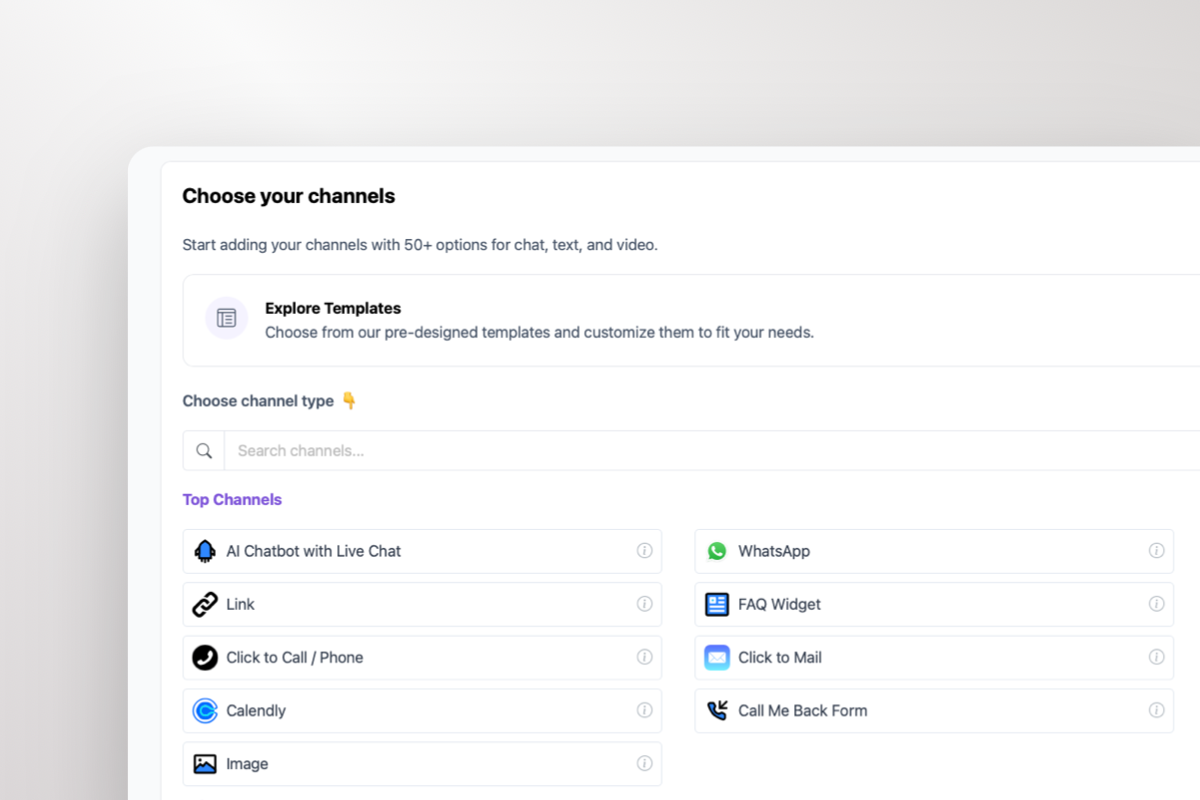
1

Copy WordPress key

In your Boei dashboard, open your widget and click the Install tab. Select WordPress and copy the WordPress plugin key.

Tip: The Install tab also offers a landing page link, QR code, and iframe embed.

Copy WordPress key
2

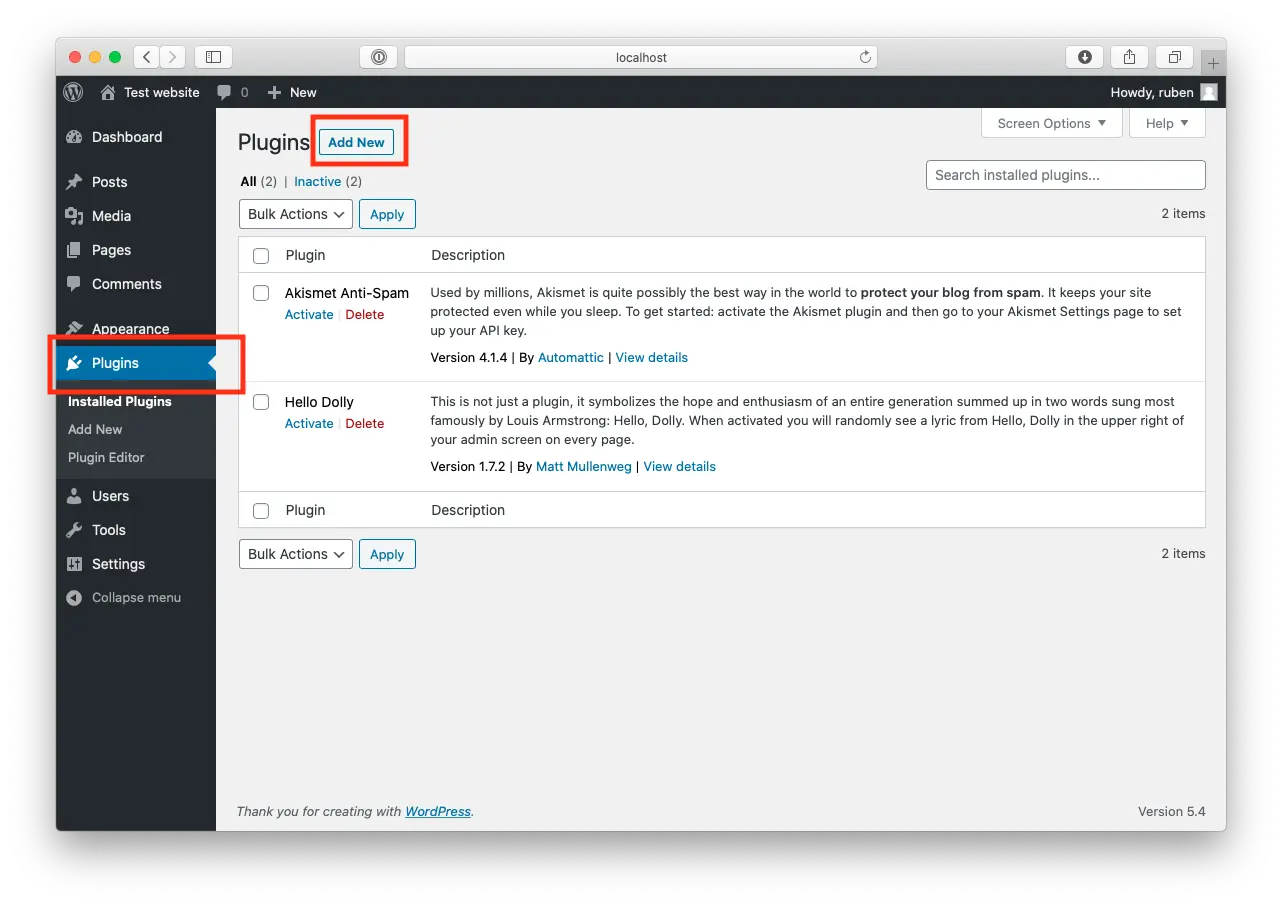
Log in to WordPress

Open WordPress and click on "Plugins".
Now, click "Add New" at the top of the page.

Log in to WordPress
3

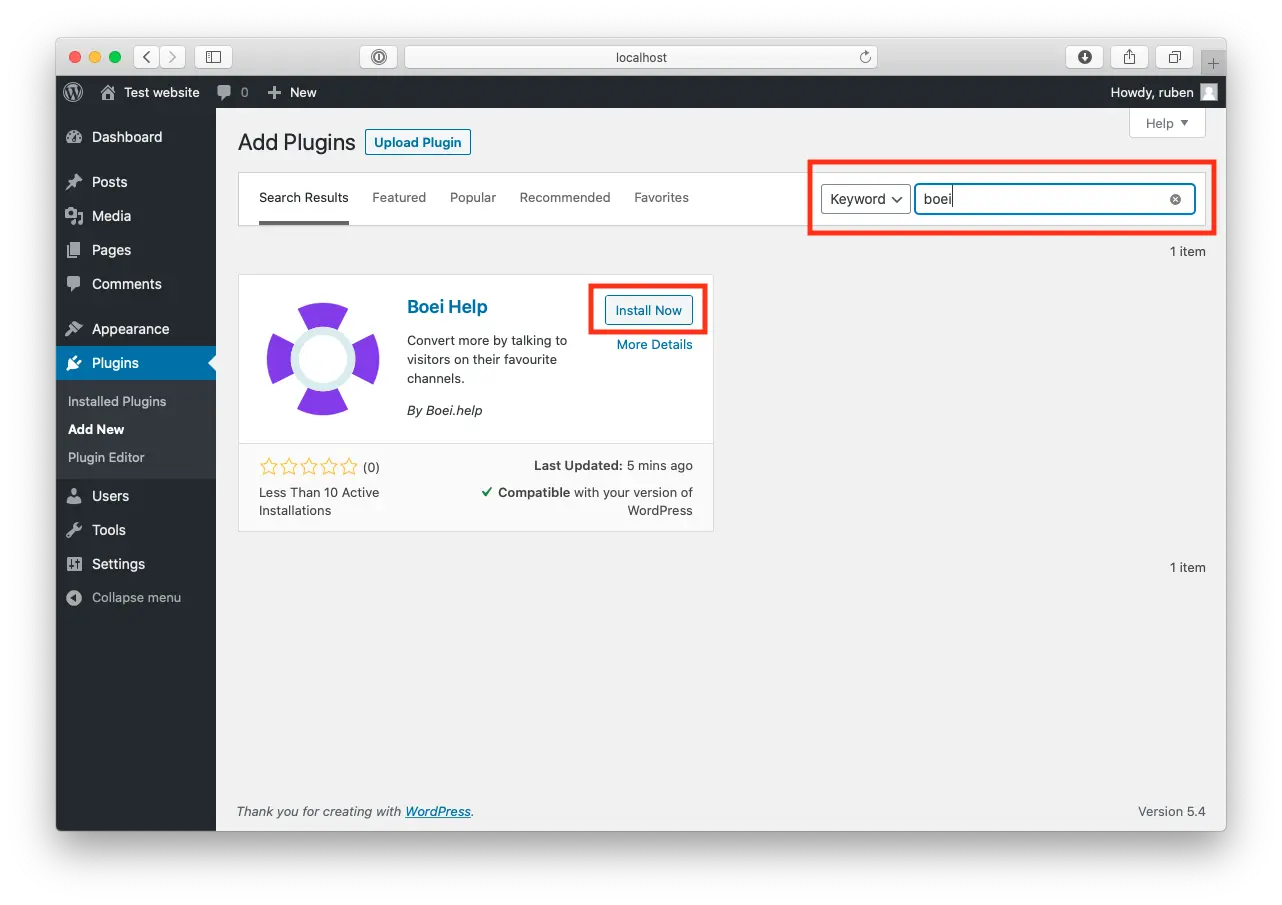
Install Boei Plugin

Search for "Boei" and find our plugin.

Click "Install Now".

Install Boei Plugin
4

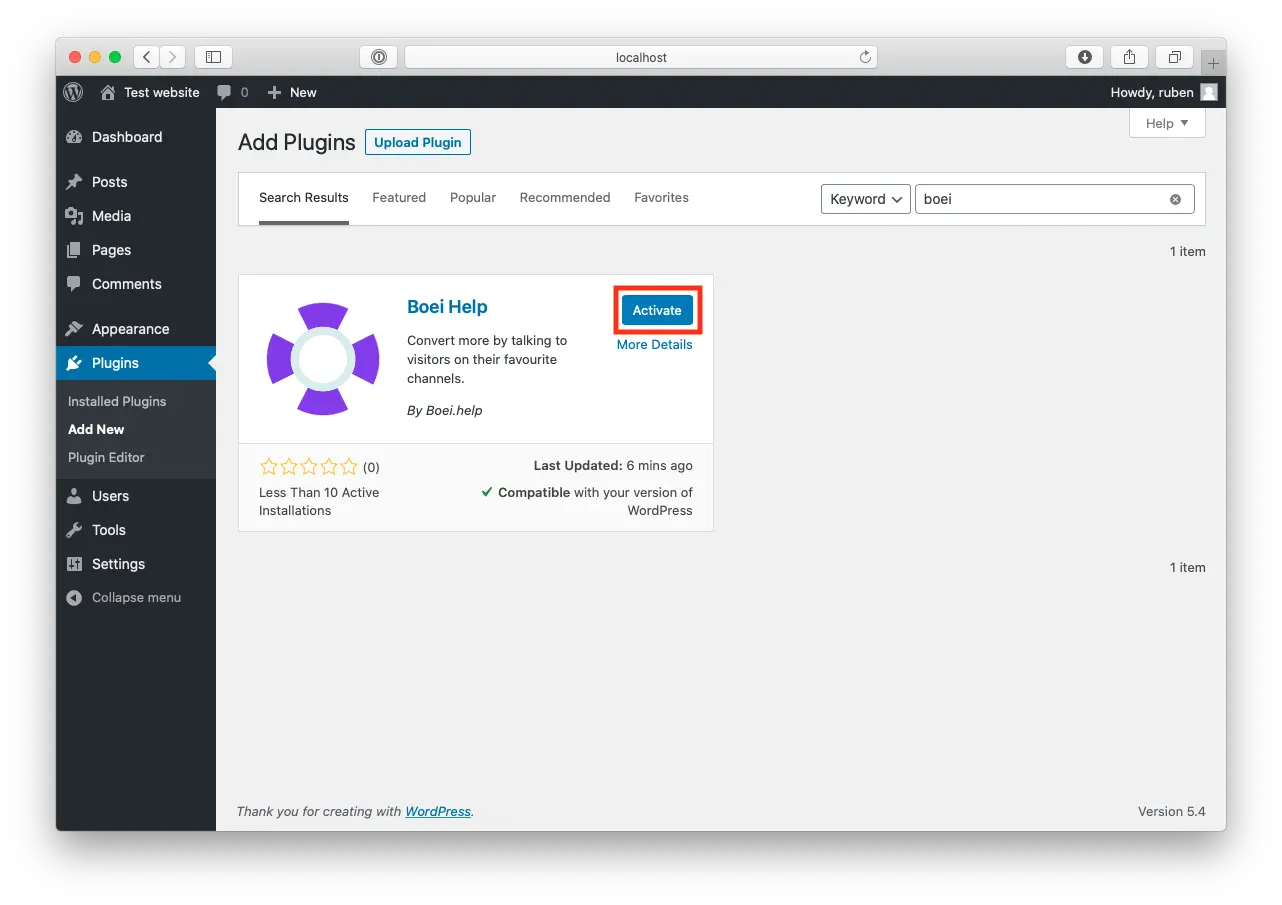
Activate

When the plugin is installed, press "Activate".

Activate
5

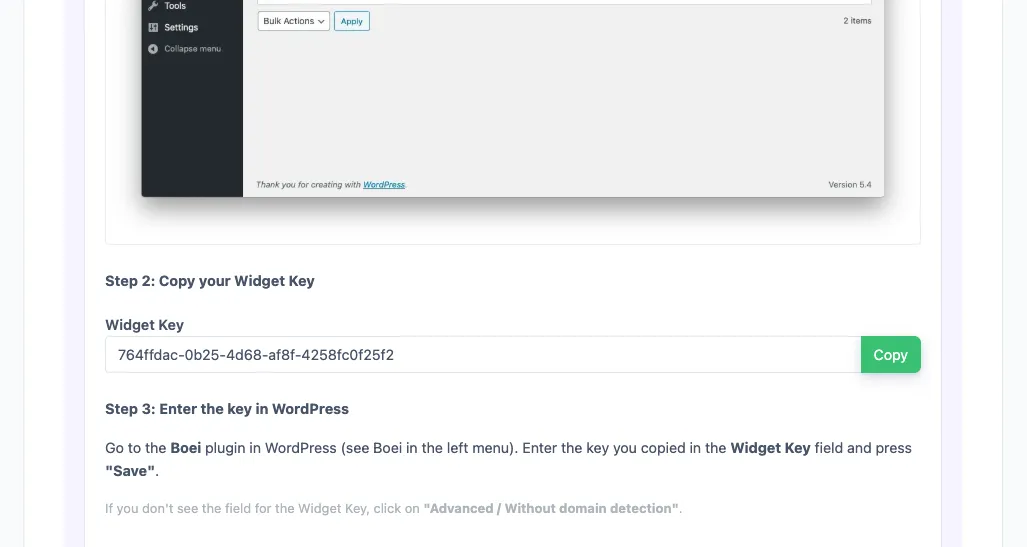
Paste key in Boei's WordPress Plugin

Go to the Boei plugin in WordPress (see Boei in the left menu).

Enter the key you copied in the Widget Key field and press "save".

If you don't see the field for the Widget Key, click on "Advanced / Without domain detection".

6

Finished coffee

Congrats, you are done!

Pro Tips

Get More From WhatsApp on WordPress

1

Use WhatsApp Click-to-Chat Links in WooCommerce Emails

Add a WhatsApp click-to-chat link to your WooCommerce order confirmation emails. Customers can ask delivery questions directly on WhatsApp instead of clogging your support inbox. AI handles the common questions automatically.

2

Train AI on Your WordPress FAQ and Knowledge Base

If you use a FAQ plugin or knowledge base on WordPress, point Boei's AI at those pages. It learns your answers and uses them on WhatsApp. Update your FAQ once, and WhatsApp auto-replies stay current.

3

Show WhatsApp on Mobile, All Channels on Desktop

Most WhatsApp messages come from mobile visitors (WhatsApp is a phone app, after all). Use Boei's display rules to show only the WhatsApp button on mobile and the full channel menu on desktop.

4

Track WhatsApp Leads in Google Analytics

Connect Boei to Google Analytics or Google Tag Manager. Every WhatsApp lead gets tracked as a conversion event. See exactly which WordPress pages drive WhatsApp conversations and optimize from there.

What WordPress Site Owners Say

WordPress WhatsApp Plugin FAQ

How do I add a WhatsApp button to WordPress?

Go to Plugins > Add New in your WordPress dashboard, search for 'Boei', install and activate. Enter your WhatsApp number in the Boei settings. The WhatsApp chat button appears on every page immediately. AI auto-reply starts working as soon as you point it at your site. Full WordPress installation guide.

Is Boei better than Click to Chat for WordPress?

Click to Chat is free and has 300,000+ installs, but it only opens a WhatsApp chat window. If you are offline, visitors get no reply. Boei adds AI auto-reply so visitors get instant answers on WhatsApp 24/7. It also captures lead details and gives you a shared inbox. Click to Chat is a link. Boei is a full WhatsApp solution.

How is Boei different from Chaty (Premio) for WhatsApp?

Chaty adds a floating button with multiple channels for EUR 59/year. But every WhatsApp message still goes to your personal phone with no AI reply. Boei's AI answers WhatsApp messages automatically using your WordPress content. It captures leads and manages all conversations in a shared inbox. Chaty is a button. Boei is an AI employee.

Do I need the WhatsApp Business API?

No. Boei works with your regular WhatsApp Business number. Visitors click the button on your WordPress site, it opens WhatsApp on their phone, and AI handles the conversation through Boei's platform. No API setup, no Meta Business verification, no developer needed.

Does WhatsApp AI work with WooCommerce?

Yes. Upload your WooCommerce product catalog as CSV or let AI crawl your shop pages. When shoppers ask about products on WhatsApp, AI answers with the right specs, pricing, and availability. Works with all WooCommerce themes and extensions.

Will this plugin slow down my WordPress site?

No. Boei's script is under 50KB and loads asynchronously after your page content. No jQuery dependency. Works with WP Rocket, W3 Total Cache, LiteSpeed, and all major caching plugins. Zero impact on PageSpeed scores.

Can AI reply on WhatsApp when I am not online?

Yes. That is the main advantage over other WordPress WhatsApp plugins. AI uses your website content to reply on WhatsApp 24/7. Visitors get real answers, not 'we will get back to you.' When AI cannot answer, it captures the visitor's details and your team follows up later.

Does it work with Elementor, Divi, and other page builders?

Yes. Boei works with every WordPress page builder: Elementor, Divi, Beaver Builder, WPBakery, Gutenberg, and all themes. The plugin installs site-wide. No shortcodes or widget blocks needed.

Can I use WhatsApp and live chat together on WordPress?

Yes. Boei shows multiple channels in one widget. Visitors pick WhatsApp, live chat, email, phone, or any other channel they prefer. All conversations land in the same inbox. Most WordPress sites see 40-60% of visitors choose WhatsApp over live chat.

What happens with leads from WhatsApp conversations?

AI captures contact details (name, email, phone) during WhatsApp conversations. Leads appear in the Boei inbox with the full chat transcript and an AI summary. You can also push leads to Google Analytics, Meta Pixel, HubSpot, or any CRM via webhooks.

Is it GDPR compliant?

Yes. Boei is a Dutch company with all servers in Amsterdam. The WordPress plugin runs without cookies by default. No consent banner needed for the chat widget. DPA available on request.

Can I try it free on WordPress?

Yes. 7-day free trial with full WhatsApp AI access. Install the WordPress plugin, add your WhatsApp number, and test with real visitors. No credit card needed to start.

Your WordPress WhatsApp Plugin Should Reply for You

Most WhatsApp plugins just add a button. Boei adds AI that answers, captures leads, and works 24/7.

7-day free trial • No credit card required • WhatsApp AI auto-reply included • Works with all themes and plugins