 Ruben Buijs
Learning how to build an AI chatbot from scratch is easier than you think with the right approach. This guide shows you how to create an AI chatbot that handles customer service, generates leads, and automates business processes.
Steps to Build an AI Chatbot
Building an AI chatbot requires three core components: a clear purpose, quality training data, and the right technical infrastructure. Most businesses fail because they overcomplicate the first two and underestimate the complexity of the third.
Step 1: Define Your Chatbot's Purpose
Before touching any code or platform, establish exactly what your chatbot will do. This determines everything from your training data structure to your user interface design.
Focus on One Primary Function:
- Customer Support: Answering FAQs, troubleshooting, ticket routing
- Lead Generation: Qualifying prospects, collecting contact information (see lead generation chatbots)
- Sales Assistant: Product recommendations, inventory checks, order processing (great for ecommerce)
- Appointment Booking: Schedule management, availability checking
Define your target audience and set measurable success metrics like response accuracy rate (aim for 85%+), conversation completion rate. Average response time (under 2 seconds for simple queries).
Map out integration requirements early - will your bot need to pull data from your CRM, create tickets, or access user accounts?
Example: A real estate chatbot might focus on lead qualification with success metrics of 70% contact capture rate and 40% viewing bookings, requiring MLS database and calendar integrations.
Summary
✅ Choose ONE primary function for your chatbot
✅ Define your target audience and their communication style
✅ Set specific, measurable success metrics
✅ List all required system integrations
Step 2: Choose Your Development Approach
| Approach | Cost | Complexity | Time to Deploy | Best For |
|---|---|---|---|---|
| Build from Scratch | $50k-200k+ | Very High | 6-12 months | Large enterprises with unique requirements |
| API Integration | $5k-25k | Medium | 2-6 weeks | Businesses wanting custom UI with proven AI |
| No-Code Platform | $50-500/month | Low | 1-7 days | Most businesses wanting quick deployment |
Build from Scratch
Requires NLP engines, vector databases, RAG pipelines, and extensive development resources. You'll need backend APIs, frontend widgets, admin dashboards, and ongoing maintenance.
API Integration
Use established AI APIs (OpenAI GPT, Anthropic Claude) with custom interfaces. Build your training system and frontend while using proven AI capabilities.
No-Code Platforms
Platforms handle technical complexity while giving you control over customization. Look for RAG capabilities, multiple training methods, integration options, and source attribution.
Most businesses should start with a no-code platform like Boei to validate their approach before investing in custom development.
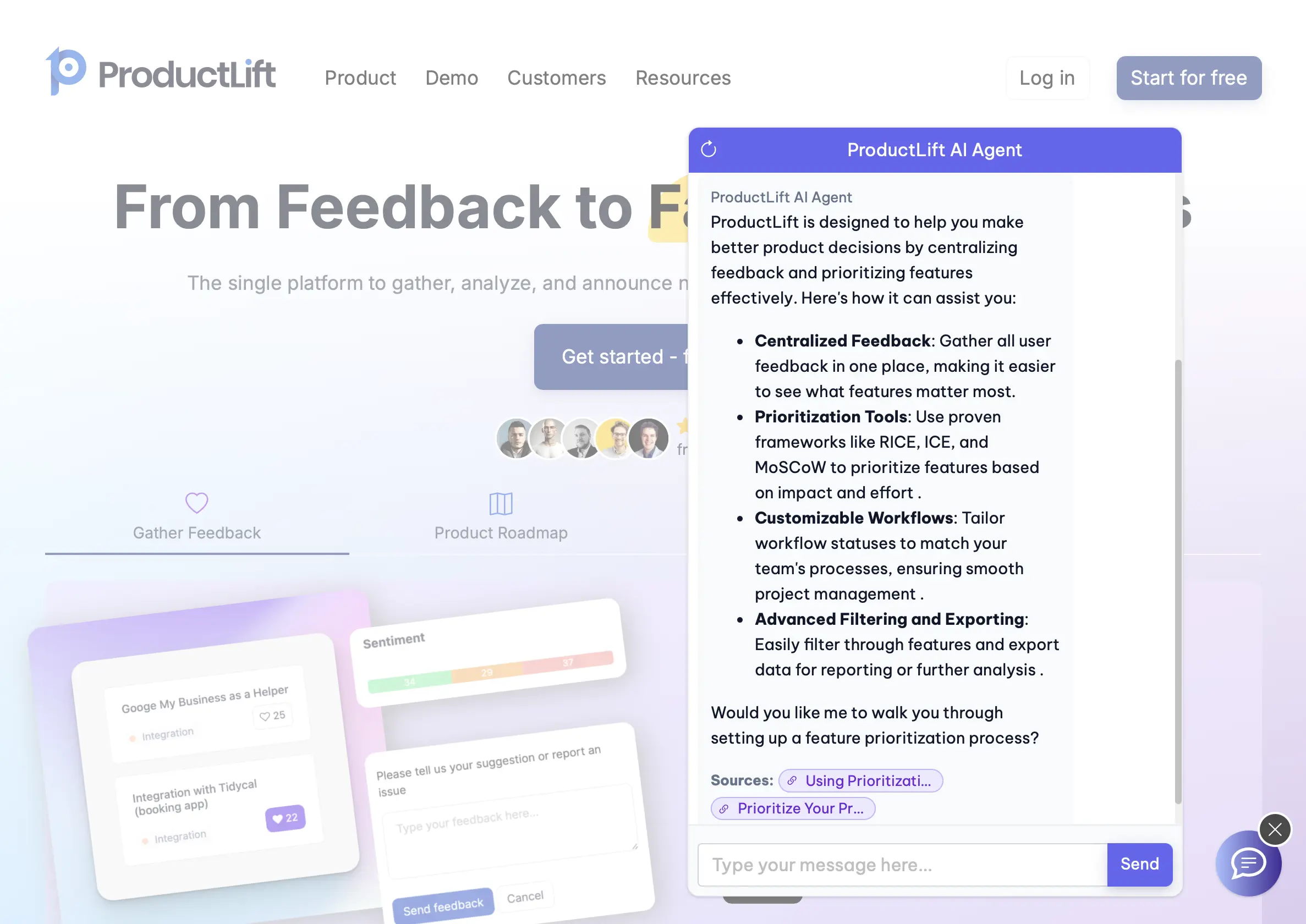
This is how a chatbot in Boei can look like:
Summary
✅ No-code platforms offer the best speed-to-value ratio
✅ Custom builds only make sense for enterprises with unique needs
✅ API integration is the middle ground for technical teams
✅ Start simple and scale complexity based on results
Step 3: Collect and Structure Training Data
Training data quality determines your chatbot's effectiveness more than any other factor. Poor data leads to irrelevant responses and frustrated users.
High-Quality Training Sources
Good Sources:
- Detailed product/service pages with specifications
- Comprehensive FAQ sections with real customer questions
- Step-by-step how-to guides and tutorials
- Customer service scripts with proven responses
Poor Sources:
- Generic "About Us" pages without actionable information
- Marketing copy without substance
- Outdated documentation
- Navigation pages with minimal content
Data Organization Best Practices
Structure content in clear topic categories with descriptive headers. Instead of "Our Services," use "Real Estate Services: Home Buying, Selling, and Investment Property Management."
Include context and examples: "Our commission is 6%. For a $500,000 home, total commission would be $30,000, split between buyer's and seller's agents."
Here you can see a chatbot trained on a small number of pages in Boei. Though there are Boei AI agents trained on 10.000 product pages.
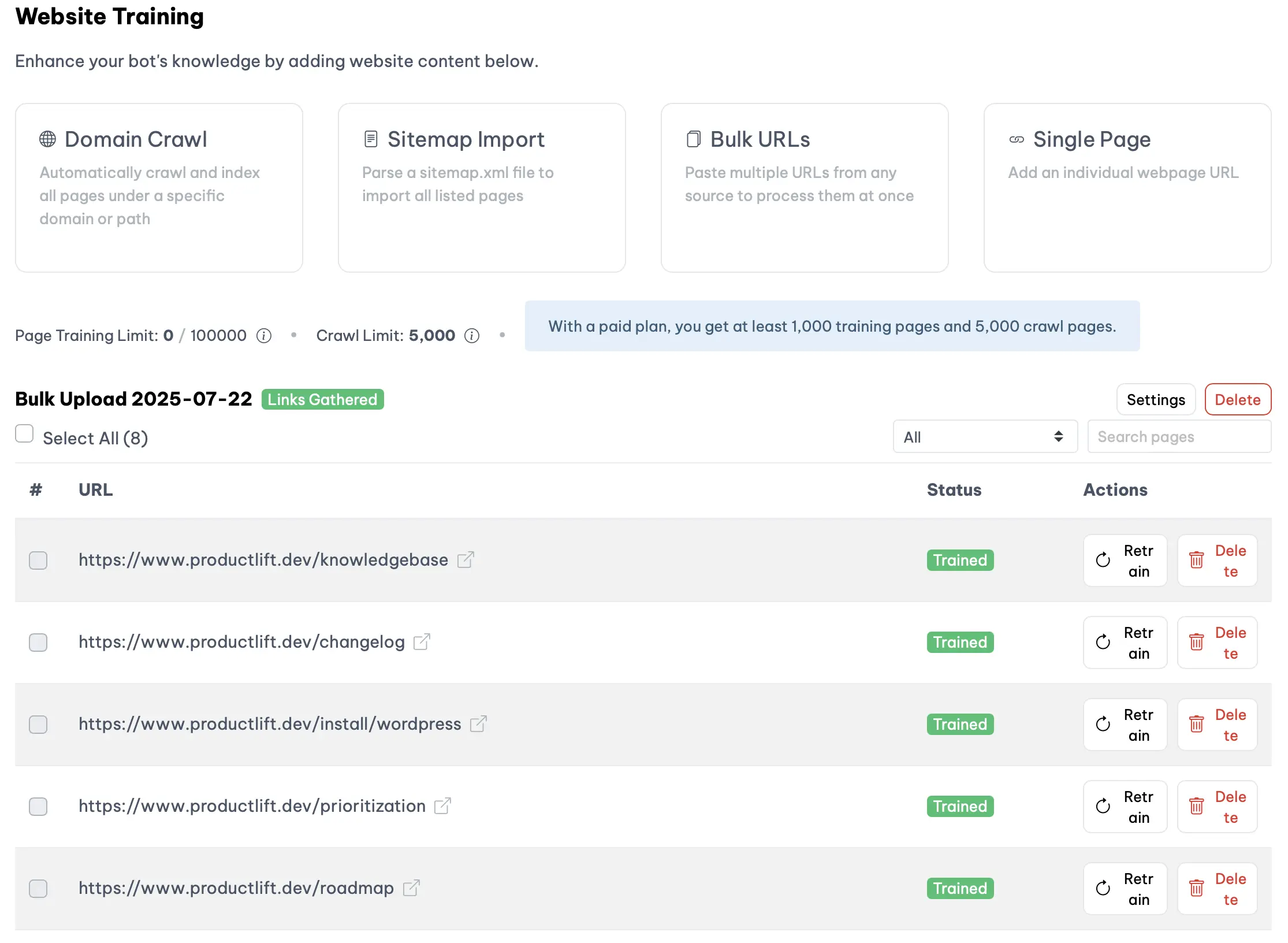
For implementation, platforms like our AI chatbot platform can crawl your website automatically and let you select high-quality pages. Also supporting PDF uploads and custom Q&A pairs for precise control.
Use content tags for overlapping topics. If your chatbot serves multiple product lines, locations, or audiences, tag your training data by category. Then add pre-chat questions so visitors self-select their topic. The chatbot searches only matching content plus general untagged content — preventing answer mix-ups when the same question ("Am I covered?", "What are your hours?") has different answers depending on context. Learn more about content tagging.
Summary
✅ Focus on specific, actionable content over marketing materials
✅ Organize data in clear topic categories with descriptive headers
✅ Include real examples and context, not just facts
✅ Use multiple data sources: web content, documents, and Q&A pairs
✅ Tag content by topic when your chatbot covers areas with overlapping or conflicting answers
Step 4: Implement RAG and Prevent Hallucinations
RAG (Retrieval-Augmented Generation) grounds your chatbot's responses in your actual training data instead of generating creative but potentially incorrect answers.
How RAG Works
- User asks a question
- System searches your knowledge base for relevant content
- AI uses only retrieved passages to generate responses
- Sources are cited for transparency
Hallucination Prevention
Configure strict source requirements: "Only answer using provided training data. If information isn't available, say 'I don't have that information' and offer human connection." The best platforms include automatic live chat escalation that smoothly transfers conversations to your team with full context when the AI reaches its limits.
Implement confidence scoring where low-confidence responses (<0.5) trigger human handoffs. Always show source attribution: "According to our pricing page..." or "Based on our FAQ section..."
Since building RAG from scratch requires vector databases and embedding models, most businesses benefit from platforms that include these features. Tools like this chatbot solution handle RAG implementation automatically while providing source attribution controls.
Summary
✅ RAG prevents hallucinations by using only your training data
✅ Always require source attribution for transparency
✅ Set confidence thresholds for human escalation
✅ Most businesses should use platforms with built-in RAG
Step 5: Set Up Lead Capture and Integrations
Progressive Data Collection Strategy
Ask for information gradually to balance conversion with data quality:
- Initial engagement: No data required
- After helpful exchanges: "What's your name so I can personalize responses?"
- Before valuable resources: "I'll email you this guide. What's your email?"
- When scheduling: Full contact information
Here we are collecting Name, Email, and Company size in Boei:
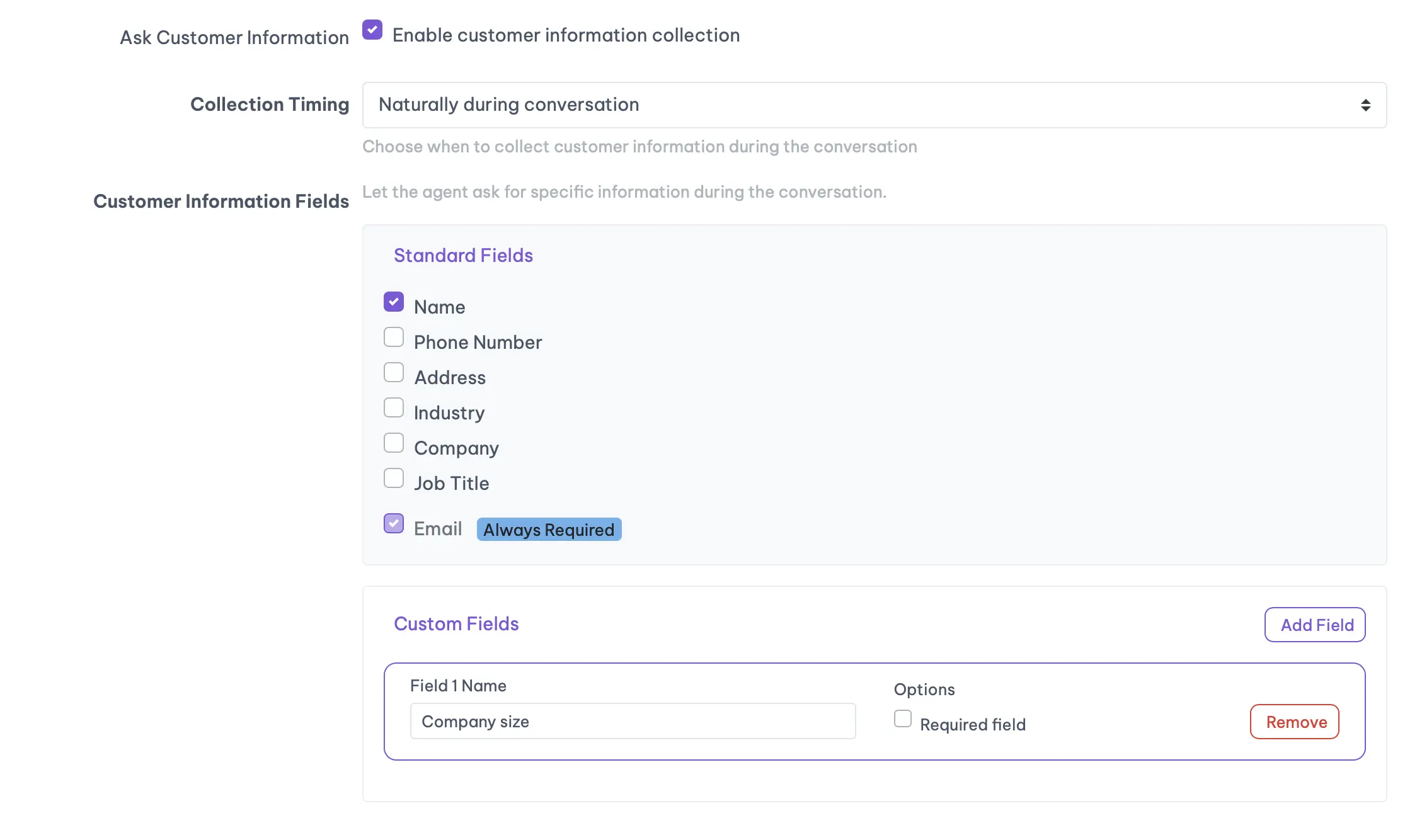
Focus on essential data that impacts your business processes: name, email, specific need, and timeline. Nice-to-have data like company size or budget can come later.
CRM and Marketing Integration
Automatically create leads with conversation transcripts, interest tags, and engagement scores. Set up email sequences based on chatbot interactions and automated follow-up triggers.
Essential integration capabilities should include live chat escalation - when your AI chatbot encounters complex queries, it should smoothly hand off to human agents with full conversation history. This ensures no lead falls through the cracks and complex issues get the attention they deserve.
Most platforms provide webhook integrations for easy CRM connection, though custom builds require manual API development.
Summary
✅ Collect data progressively to maintain conversation flow
✅ Focus on essential information that drives business processes
✅ Integrate with existing CRM and marketing systems
✅ Set up automated follow-up based on user behavior
Step 6: Test and Optimize Performance
Systematic Testing Approach
Create test scenarios for happy paths, edge cases, and error scenarios. Verify responses against source material and ensure confidence levels align with answer quality.
Test with people unfamiliar with your business to identify friction points and conversation flow issues.
Test Automation for Consistency
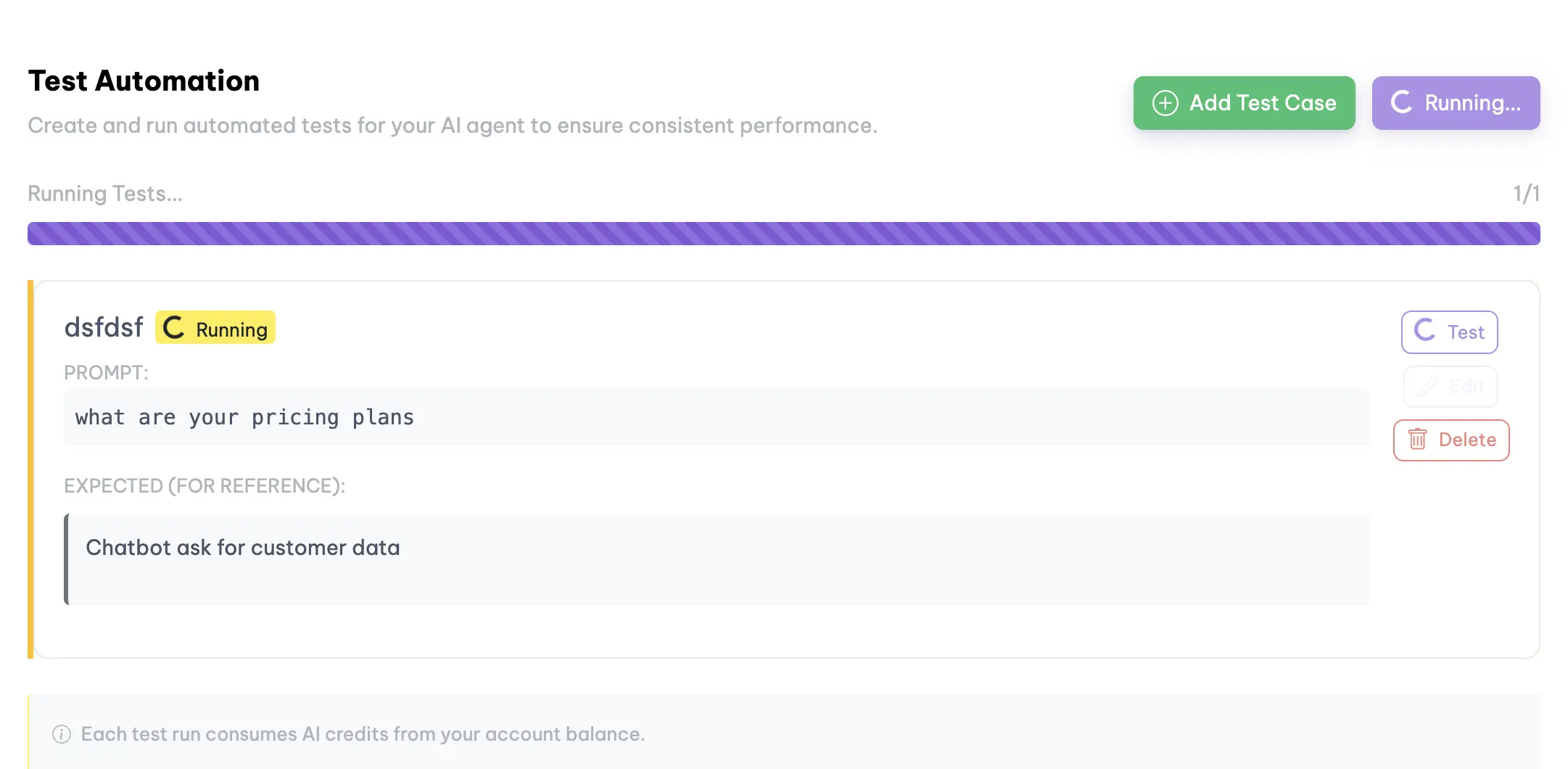
Manual testing becomes time-consuming as your chatbot grows. Advanced platforms now offer automated testing capabilities where you can create test scripts that automatically verify your bot's responses when you make changes to training data or configurations.
For example, the platform allows you to set up comprehensive test scripts that automatically run whenever you update your bot. That improvements don't break existing functionality. This is particularly valuable when you're continuously refining your AI chatbot training data.
Here is how this looks like in Boei:
Key Performance Metrics
Engagement: Conversation starts, completion rates, return visitors Accuracy: Response confidence, user satisfaction, human escalation rate
Business Impact: Lead generation, conversion rates, support ticket reduction
Review conversation transcripts weekly to identify common unanswered questions and update training data monthly based on new business information.
Summary
✅ Test all major use cases plus edge scenarios
✅ Set up automated test scripts to run on every change
✅ Verify accuracy against your source materials
✅ Monitor engagement, accuracy, and business impact metrics
✅ Update training data based on real conversations
Step 7: Deploy and Monitor
Start with a soft launch - internal testing, then beta customers, then limited website pages before full deployment.
Track essential metrics like conversation completion rate (users getting answers), lead generation rate, and response accuracy. Set up weekly transcript reviews and monthly performance analysis.
For deployment, custom builds require widget installation and monitoring setup, while platforms typically provide simple code installation and built-in analytics.
Summary
✅ Start with soft launch to gather data and refine
✅ Monitor business outcomes, not just technical metrics
✅ Review transcripts weekly and analyze monthly trends
✅ Focus on continuous improvement based on real usage
Common Mistakes to Avoid
Insufficient Training Data: Don't just use your homepage. Include content from your entire customer journey - pre-sales, purchase process, and post-sales support.
Poor Source Quality: Avoid training on marketing fluff. Focus on specific how-to guides, detailed FAQs, and actionable documentation.
Ignoring User Intent: Train based on what users actually want to accomplish, not what you want to tell them about your business.
Missing Business Context: Provide custom instructions about your brand voice, escalation procedures, and compliance boundaries.
Implementation Timeline
24-Hour Quick Start:
- Hours 1-3: Define purpose, set up platform, configure basic settings
- Hours 4-7: Collect and upload training data, test knowledge retrieval
- Hours 8-9: Configure lead capture, set up integrations, run quality tests
- Hour 10: Deploy widget, configure monitoring, document processes
Most businesses can have a functional chatbot live within 24 hours using no-code platforms, though custom development requires weeks or months.
Common FAQs
Do I need coding skills to build a chatbot? Not with modern no-code platforms. You need strategic thinking about your business processes and quality content for training, but no programming knowledge. Custom builds obviously require development expertise.
How much does it cost to build and run a chatbot? No-code platforms: $20-100/month depending on features and usage. See our pricing page for Boei's plans. API integration: $5k-25k upfront plus ongoing API costs. Custom development: $50k-200k+ upfront plus maintenance costs.
What about multilingual support? Most modern AI models handle multiple languages automatically. The challenge is having quality training data in each language. Some platforms like our chatbot builder offer automatic translation.
How accurate can I expect my chatbot to be? With quality training data and RAG implementation, expect 85-95% accuracy for questions within your domain. The key is comprehensive training data and proper hallucination prevention.
Can chatbots integrate with existing business systems? Yes, through APIs and webhooks. Most platforms offer pre-built integrations with popular CRMs, email systems, and help desk software. Custom builds can integrate with any system that has an API.
What happens when the chatbot can't answer a question? Best practice is graceful live chat escalation: "I don't have that information. Let me connect you with a team member who can help." Modern platforms automatically transfer the full conversation history to human agents. Customers never have to repeat themselves. The key features of effective escalation include: automatic handoff when confidence is low, full context preservation, smart routing to the right team member, and configurable escalation rules. This "best of both worlds" approach combines AI efficiency for routine questions with human expertise for complex situations.
How do I measure ROI from my chatbot? Focus on business metrics: lead generation rates, support ticket reduction, conversion improvements. Time savings for human agents. Most businesses see positive ROI within 3-6 months when properly implemented.
Conclusion
Now that you know how to build an AI chatbot from scratch, the key is starting with clear strategy, focusing on user needs over technical features. Iterating based on real performance data. Whether you choose custom development, API integration, or a no-code platform depends on your timeline, budget, and specific requirements.
For most businesses wanting to learn how to make an AI chatbot quickly, no-code platforms offer the fastest path to results. Solutions like Boei handle the technical complexity while giving you control over the strategy and content that actually drive business outcomes. Boei's AI chatbot also works on WhatsApp. The same AI auto-replies to incoming WhatsApp messages and delivers conversations to your shared inbox.
AI Chatbot for Your Website
Ready to add an AI chatbot? Try Boei's AI chatbot: 2,000 AI credits, 50+ channels, from $19/mo.