Webflow logo

Telegram Chat Widget

Telegram Chat Widget for Webflow

Add a Telegram chat widget to your Webflow site. AI answers visitor questions, captures leads, and routes conversations to your team. 5-minute setup, no coding required.

Trusted by 14,368 websites

No Telegram Bot API setup required

Andrew Lee David S. Vance W. Grant Nitesh Manav
from 159 reviews

Also available for:

See Telegram Chat Widget in Action

Trusted by Webflow Designers Worldwide

14,368+

Websites using Boei

900M+

Telegram users reachable

5 min

Average setup time

50+

Channels included

Telegram Bot Integration for Webflow

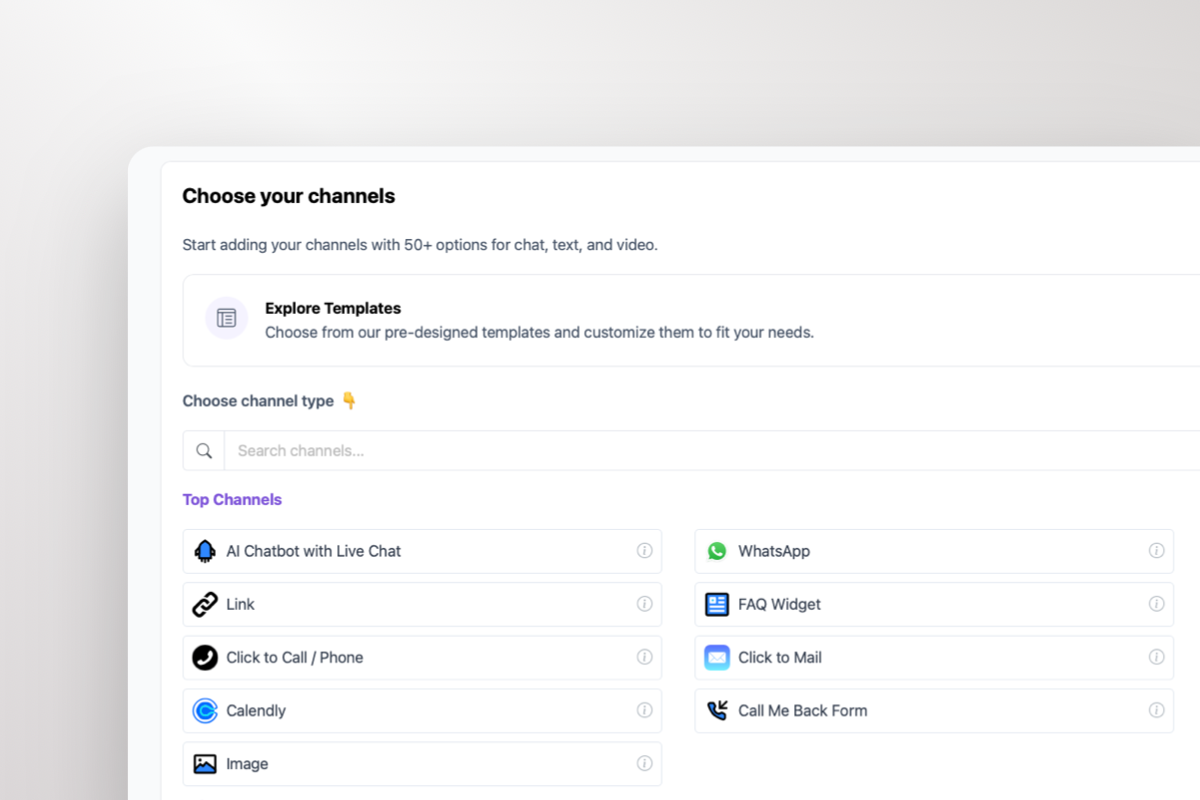
Connect your Telegram to your Webflow site and let visitors message you through their preferred app. Boei adds a floating widget that matches your custom Webflow design. Visitors click it and land in a Telegram conversation with your team or bot.

  • Supports both Telegram usernames and bot accounts
  • Pre-filled messages give visitors context-aware conversation starters
  • QR code display for desktop visitors to open Telegram on mobile
  • Full visual customization to match your Webflow design system
  • Works with Webflow CMS, Ecommerce, and Memberships
Telegram Bot
Hi! I'm interested in your agency services. Can we discuss a project?
Absolutely! Tell me about your project scope and timeline, and I'll connect you with the right team member.
Shared inbox showing Telegram conversations from Webflow with AI summary

Every Telegram Message in One Shared Inbox

All Telegram conversations from your Webflow site appear in a single shared inbox. Your team sees every message, assigns conversations, and collaborates without switching between apps. AI generates summaries so agents pick up context instantly.

  • All Telegram chats visible in one unified inbox
  • Assign conversations to specific team members or departments
  • AI-generated conversation summaries for quick context
  • Round-robin or department-based routing across agents
  • Unlimited team seats included in every plan

Why Your Webflow Site Needs Telegram

Webflow is the platform of choice for agencies, SaaS companies, and design-forward businesses. Many of these businesses serve global clients — and Telegram is the messaging app of choice for tech-savvy users, developers, and crypto communities with 900 million monthly active users.

Webflow's native form blocks collect leads but don't enable real-time conversations. A Telegram widget adds instant messaging that persists after visitors leave your site. Prospects start chatting on your Webflow landing page and continue the conversation on their phone or desktop app.

For agencies and freelancers using Webflow, Telegram's username-only contact keeps business and personal communications separate. The 2GB file transfer limit means clients can share briefs, design files, and assets directly through the chat without email attachments.

Installation is straightforward: add the Boei snippet to Webflow's Project Settings → Custom Code → Footer. Works with all Webflow plans, CMS collections, and Ecommerce templates. Combine with WhatsApp for Webflow for full market coverage.

Quick Setup

Install Telegram Chat Widget on Webflow

From setup to your first Telegram conversation in under 5 minutes

1

Copy installation code

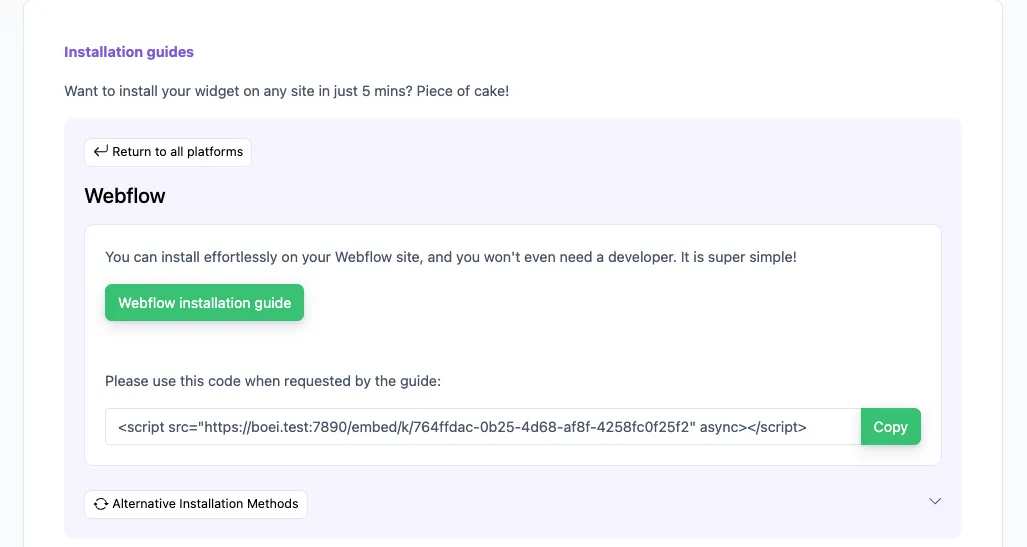
In your Boei dashboard, open your widget and click the Install tab. Select Webflow and copy the installation code.

Tip: The Install tab also offers a landing page link, QR code, and iframe embed.

Copy installation code
2

Go to Webflow

  1. Log in to your Webflow account and open your dashboard.
  2. Go to Settings of your site by clicking the dots on the right bottom.
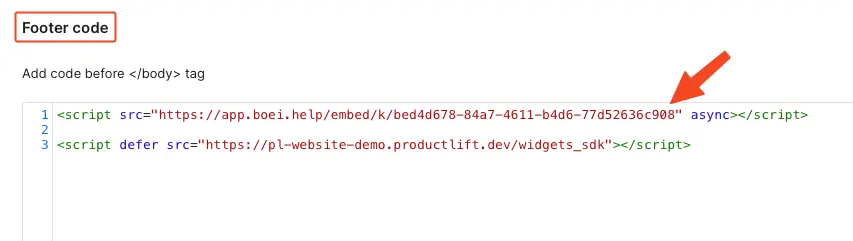
  3. Click Custom Code.
  4. Paste the Boei code from step 2 in the Footer code area. If there is already some code there, paste the Boei code below that.

Click Save and then Publish to see the changes on your live site.

Congrats, you are done!

Go to Webflow

Webflow Features

Built for Webflow

Everything you need to connect Telegram to your Webflow site

🤖

AI-Powered Responses

AI answers visitor questions on Telegram instantly — trained on your Webflow site content, services, and pricing. Handles inquiries 24/7.

📥

Shared Team Inbox

All Telegram conversations in one inbox. Assign, route, and collaborate across your team without switching apps.

🎨

Design System Compatible

Customize widget colors, position, and animations to match your Webflow design system. Looks native on any custom layout.

🌍

Geo-Targeting Rules

Show Telegram to tech-savvy visitors and crypto communities. Show WhatsApp to mainstream Western audiences. Automatic per-visitor selection.

📊

CMS & Ecommerce Ready

Widget works on all Webflow CMS collection pages, Ecommerce product pages, and Membership gated content.

🔒

GDPR Compliant

Dutch company, Amsterdam servers. Zero cookies before interaction. Full GDPR compliance with DPA available on request.

Compare Options

Boei vs Other Webflow Chat Widgets

See why Webflow users choose Boei over Crisp, Elfsight, and Chaty

Feature Boei Crisp Elfsight Chaty
Telegram support ✓ (via integration)
AI chatbot included ✓ (extra cost)
Shared team inbox
Lead capture & CRM ✓ (extra cost)
Geo-targeting rules ✓ (Pro)
Channels included 50+ 12 15 25
Auto-translation 95+ languages
Price €14/mo €25/mo $5/mo €59/year
No-code Webflow install

Bottom line: Crisp supports Telegram but charges extra for AI and CRM. Elfsight and Chaty add Telegram links without AI or inbox. Boei gives you an AI-powered Telegram widget, shared inbox, geo-targeting, and 50+ channels — all included for €14/month.

What Webflow Users Say

Questions?

Telegram Widget for Webflow FAQ

How do I add a Telegram chat widget to Webflow?

Sign up for Boei, add your Telegram username, customize the widget, then go to Webflow Project Settings → Custom Code → Footer Code and paste the embed snippet. Publish your site and the widget is live. See our Webflow installation guide.

Does the widget work with Webflow CMS and Ecommerce?

Yes. The Telegram widget appears on all Webflow pages including CMS collection pages, Ecommerce product pages, and Membership-gated content. Configure page rules to show different widgets on different sections.

Will the widget affect my Webflow site's performance?

No. Boei loads asynchronously and weighs under 30KB. It doesn't block page rendering or affect your Webflow site's Core Web Vitals or Lighthouse score.

Can I match the widget to my Webflow design system?

Yes. Customize colors (hex values), position, size, icon style, and animations. Most Webflow designers match the widget to their site's accent color for a seamless look.

Do I need a Telegram bot for my Webflow site?

No. A regular Telegram username works for direct conversations. Bots are optional and useful for automated responses at scale.

Can I show different channels on different Webflow pages?

Yes. Use page URL rules to show Telegram on your developer docs, WhatsApp on your pricing page, and a contact form on your careers page. Full control per page.

How much does the Telegram widget cost for Webflow?

Boei Pro is €14/month and includes the Telegram widget, AI chatbot with 2,000 messages, shared inbox, built-in CRM, 50+ channels, and unlimited team seats. Start with a 7-day free trial — no credit card required.

Is the widget GDPR compliant?

Yes. Boei is a Dutch company with servers in Amsterdam (EU). No cookies before interaction, full GDPR compliance, and DPA available on request.

Telegram Chat Widget for Every Platform

Same Telegram integration, optimized for your website platform

Add Telegram to Your Webflow Site

Reach 900M+ Telegram users directly from Webflow. AI-powered, shared inbox, 50+ channels.

7-day free trial • No credit card required • 5-minute setup • Works with all Webflow plans
Andrew Lee David S. Vance W. Grant Nitesh Manav
from 159 reviews