Joomla logo

Messenger Chat Widget

Facebook Messenger Widget for Joomla

Add Facebook Messenger to your Joomla site. AI answers visitor questions, captures leads, and routes conversations to your team. 5-minute setup.

Trusted by 14,368 websites

No Facebook API setup required

Andrew Lee David S. Vance W. Grant Nitesh Manav
from 159 reviews

Also available for:

Messenger Widget Demo on Joomla

Trusted by 14,000+ Websites Worldwide

Facebook Messenger Chat on Your Joomla Site

When visitors click the Messenger button on your Joomla site, they open a direct conversation with your Facebook page. Messages arrive in your Facebook inbox and Messenger app. Installation is simple — add a custom HTML module or paste the snippet in your template. No Joomla extensions to maintain.

  • One-click Messenger conversations from your Joomla site
  • Messages arrive in your Facebook Page inbox and Messenger app
  • Conversations persist across devices and over time
  • Rich media support: photos, videos, documents, and voice messages
  • No Facebook SDK or API integration required
Messenger Chat
Hello! I need help with my order.
Hi there! I'd be happy to help. Can you share your order number?
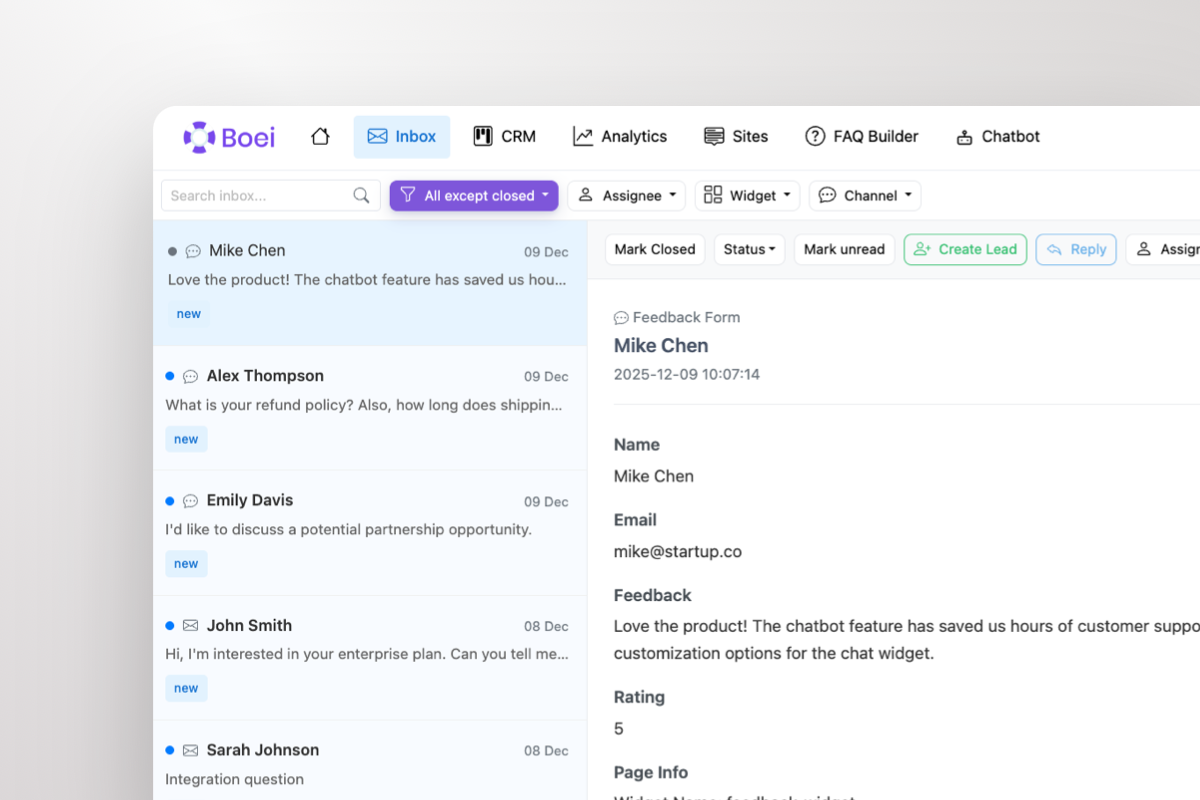
Shared inbox showing Messenger conversations with AI summary and agent handoff

All Joomla Conversations in One Shared Inbox

Joomla doesn't come with a messaging hub. Boei gives you a shared inbox where Messenger conversations sit alongside WhatsApp, email, Instagram DM, and 50+ other channels. Your team handles every inquiry from one dashboard with AI-generated summaries.

  • All Messenger conversations in one team inbox
  • AI-generated summaries for every conversation
  • Round-robin or department-based routing
  • One-click agent handoff with full context
  • Built-in CRM pipeline tracks every lead

Why Your Joomla Site Needs Facebook Messenger

Joomla powers millions of websites, but its contact form options are basic. Visitors increasingly expect instant messaging — not email forms with 24-hour response times. Facebook Messenger, with 3 billion monthly active users, gives your Joomla site real-time communication on a platform visitors already know and trust.

Businesses, organizations, and community sites on Joomla use Messenger for customer support, member inquiries, and sales conversations. Unlike traditional contact forms, Messenger conversations are persistent and asynchronous — visitors can reach out, leave, and come back to the conversation days later.

Most Joomla Messenger extensions are outdated or rely on Facebook's deprecated Chat Plugin SDK. Boei uses modern Messenger deep links — no JavaScript SDK, no cookies, no extension conflicts. Install via a Custom HTML module or paste the snippet directly in your template's index.php before .

Combine Messenger with WhatsApp, Instagram DM, AI chatbot, and 50+ other channels in one floating button. One widget, all your communication channels.

Quick Setup

Install Messenger Widget on Joomla

From setup to your first Messenger conversation in under 5 minutes

1

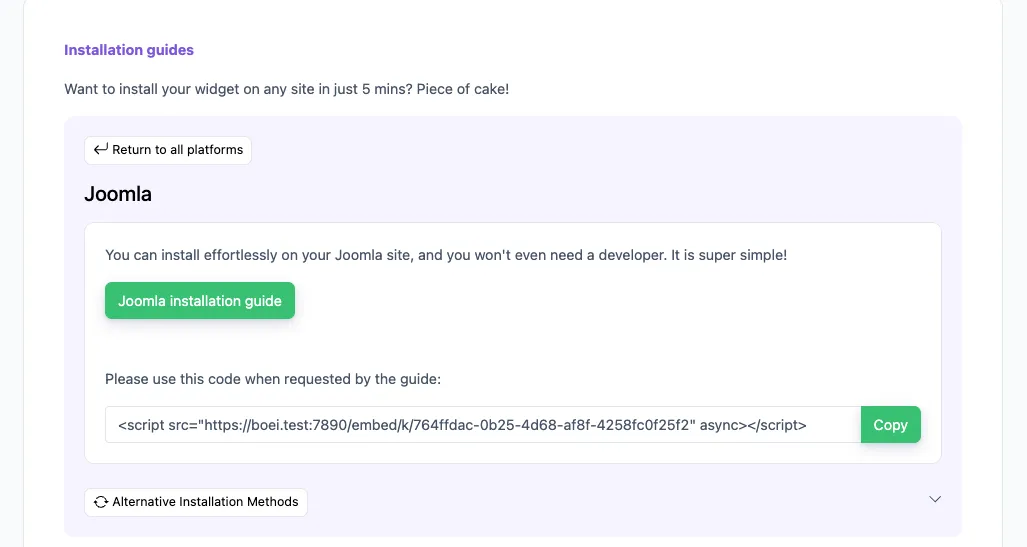
Copy installation code

In your Boei dashboard, open your widget and click the Install tab. Select Joomla and copy the installation code.

Tip: The Install tab also offers a landing page link, QR code, and iframe embed.

Copy installation code
2

Log in to Joomla

Log into your Joomla website as administrator. Follow Step 5 for Joomla 4 or Step 6 for Joomla 5.

3

Install on Joomla 4

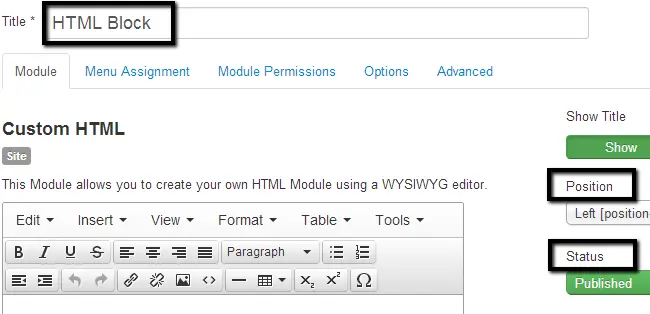
  1. Navigate to the Extensions tab and then Module Manager.
  2. Click on the New button at the top-left corner.
  3. Select the Custom HTML module type from the list.
  4. Edit the following options: Title: Boei, Position: Left, Status: Published.
  5. In the Custom HTML section, click on Tools > Source Code.
  6. Paste the Boei code that you got from step 2 here and click the OK button.
  7. Click Save & Close.
Install on Joomla 4
4

Install on Joomla 5

  1. In the User Menu on the right top, click Edit account.
  2. Go to Basic Settings and choose Editor - None. Note which editor you had so you can revert it later.
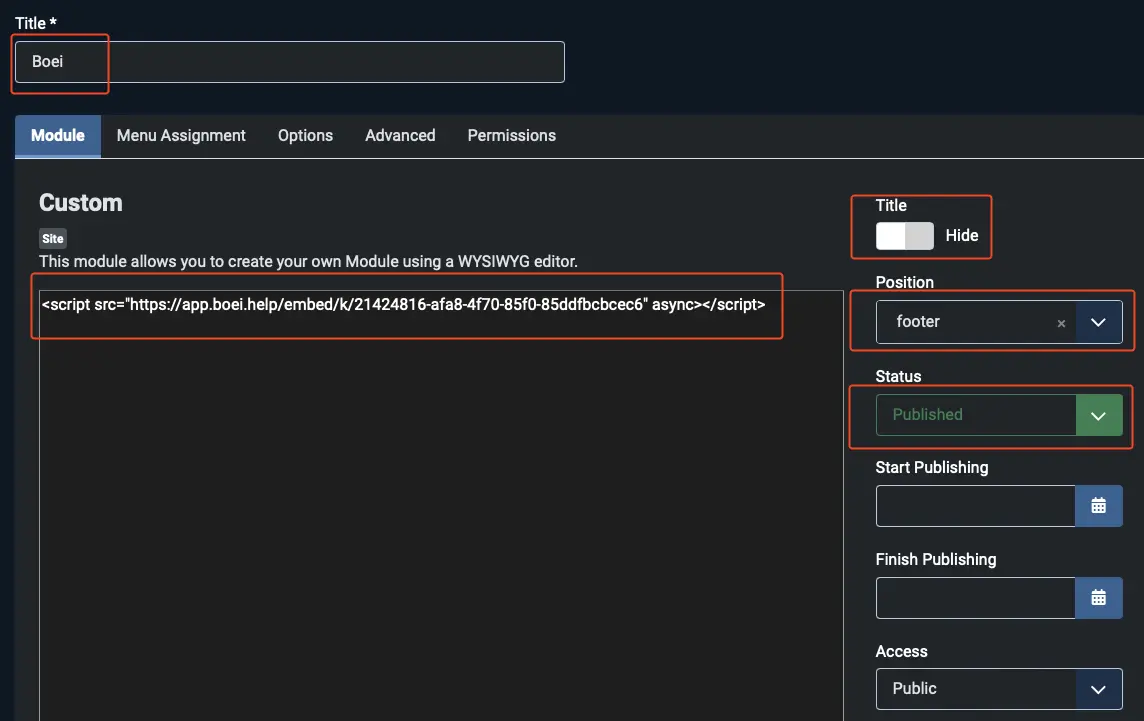
  3. Navigate to System and then Site Modules.
  4. Click the New button and select the Custom module type.
  5. Edit the following options: Title: Boei, Title Display: Hide, Position: footer, Status: Published.
  6. Paste the Boei code from step 2 in the text area and click Save & Close.
  7. Revert the editor setting: go to User Menu > Edit account > Basic Settings and set the Editor back to the original setting.

Congrats, you are done!

Install on Joomla 5

Joomla Features

Built for Joomla

Messenger chat widget that works with all Joomla versions

💬

Simple Installation

Add via Custom HTML module or template snippet. No Joomla extensions to install, update, or maintain. Works with Joomla 3.x, 4.x, and 5.x.

🤖

AI-Powered Responses

Built-in AI chatbot answers visitor questions 24/7 using your website content, FAQs, and pricing. Captures leads automatically.

📥

Shared Team Inbox

All Messenger conversations in one inbox alongside WhatsApp, email, and 50+ channels. AI summaries help your team respond faster.

🔧

Template Compatible

Works with all Joomla templates: Cassiopeia, Helix Ultimate, JA templates, and custom templates. No conflicts with other extensions.

📱

50+ Channels Included

Messenger, WhatsApp, Telegram, Instagram DM, SMS, phone, contact forms — all in one widget, one inbox, one price.

🔒

GDPR Compliant

Dutch company, Amsterdam servers. Zero cookies before click. Full GDPR compliance. Compatible with Joomla privacy extensions.

Compare Options

Boei vs Other Joomla Chat Options

See why Joomla site owners choose Boei for Messenger chat

Feature Boei Joomla Contact Form JivoChat Facebook Chat Plugin (Deprecated)
Messenger integration Deprecated
AI chatbot included ✗ Limited
Real-time conversations Deprecated
Shared team inbox
Lead capture & CRM Basic ✗ Limited
Channels included 50+ Email only 5 1
Price €14/mo Free €19/agent Deprecated
No extension needed

Bottom line: Joomla's contact form is email-only with no real-time chat. JivoChat doesn't support Messenger. Boei gives you Messenger plus AI chatbot, shared inbox, CRM, and 50+ channels for €14/month. See all features.

What Joomla Users Say

Questions?

Joomla Messenger Widget FAQ

How does the Messenger widget work on Joomla?

When a visitor clicks the Messenger button on your Joomla site, it opens a direct conversation with your Facebook page. On mobile it opens the Messenger app, on desktop it opens Messenger.com. You respond from your Facebook Page inbox, Messenger app, or Boei's shared inbox.

How do I install it on Joomla?

Sign up at Boei (free trial), add your Facebook page ID, and copy the widget code. In Joomla, create a Custom HTML module, paste the snippet, assign it to all pages, and set the position to 'debug' or any bottom position. See our Joomla installation guide.

Does it work with Joomla 5?

Yes. Boei works with all Joomla versions including Joomla 3.x, 4.x, and 5.x. No extensions or plugins to install — just a simple code snippet that works across all versions.

Does it replace the deprecated Facebook Chat Plugin?

Yes. Facebook deprecated its official Chat Plugin in 2024. Boei provides a modern alternative using Messenger deep links — no SDK, no cookies, no breakage.

Will it conflict with other Joomla extensions?

No. Boei is a standalone JavaScript snippet that doesn't interact with Joomla's extension system. It loads asynchronously and won't conflict with your existing extensions, templates, or plugins.

Can I use Messenger alongside other channels?

Yes. Add Messenger alongside WhatsApp, Instagram DM, Telegram, phone, email, AI chatbot, and 50+ other channels — all in one floating button.

Is it GDPR compliant?

Yes. Boei is a Dutch company with servers in Amsterdam (EU). No cookies, full GDPR compliance, DPA available on request.

How much does it cost?

Boei Pro is €14/month and includes the Messenger widget, AI chatbot with 2,000 messages, shared inbox, built-in CRM, 50+ channels, and unlimited team seats. Start with a 7-day free trial — no credit card required.

Messenger Widget for Every Platform

Add Facebook Messenger to any website builder

Add Facebook Messenger to Your Joomla Site

Simple module setup. AI chatbot, shared inbox, and 50+ channels included.

7-day free trial • No credit card required • 5-minute setup • Works with all templates
Andrew Lee David S. Vance W. Grant Nitesh Manav
from 159 reviews