Messenger Chat Widget
Add Facebook Messenger to your WordPress site. AI answers visitor questions, captures leads, and routes conversations to your team. 5-minute setup.
Trusted by 14,368 websites
No Facebook API setup required
Also available for:
When visitors click the Messenger button on your WordPress site, they open a direct conversation with your Facebook page. Messages land in your Facebook inbox and Messenger app. No API setup, no developer tools, no cookies. Modern replacement for Facebook's deprecated Chat Plugin.
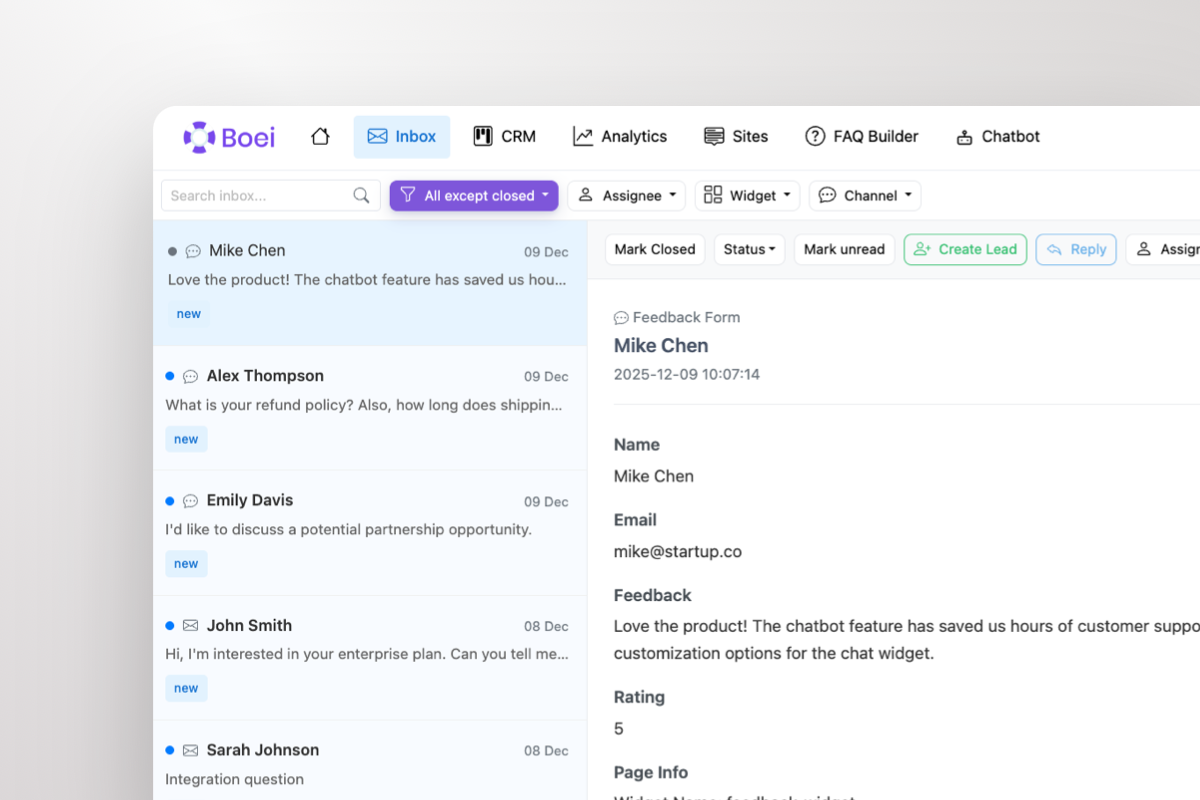
Stop switching between Facebook Page inbox and other tools. Boei brings all your Messenger conversations into a single shared inbox alongside WhatsApp, email, Instagram DM, and 50+ other channels. Your team sees every conversation in one place with AI-generated summaries.
With 3 billion monthly active users, Facebook Messenger reaches more people than almost any other messaging platform. Your WordPress visitors already use Messenger daily — adding it to your site removes friction and starts conversations instantly.
Unlike live chat that disappears when the browser closes, Messenger conversations persist indefinitely. A customer can start a conversation on desktop, continue on mobile, and pick up again weeks later with full history. It's asynchronous — no real-time monitoring needed from your team.
Facebook deprecated its official Chat Plugin in 2024. The old SDK was heavy, cookie-dependent, and broke with every platform update. Boei provides a modern, lightweight alternative that uses simple Messenger deep links — no JavaScript SDK, no cookies, no breakage. Works perfectly with WooCommerce, Elementor, Divi, and all WordPress themes.
Combine Messenger with WhatsApp, Instagram DM, AI chatbot, and 50+ other channels in one floating button. Show Messenger to North American visitors, WhatsApp to European visitors, and phone for urgent pages — all automatically.
From setup to your first Messenger conversation in under 5 minutes
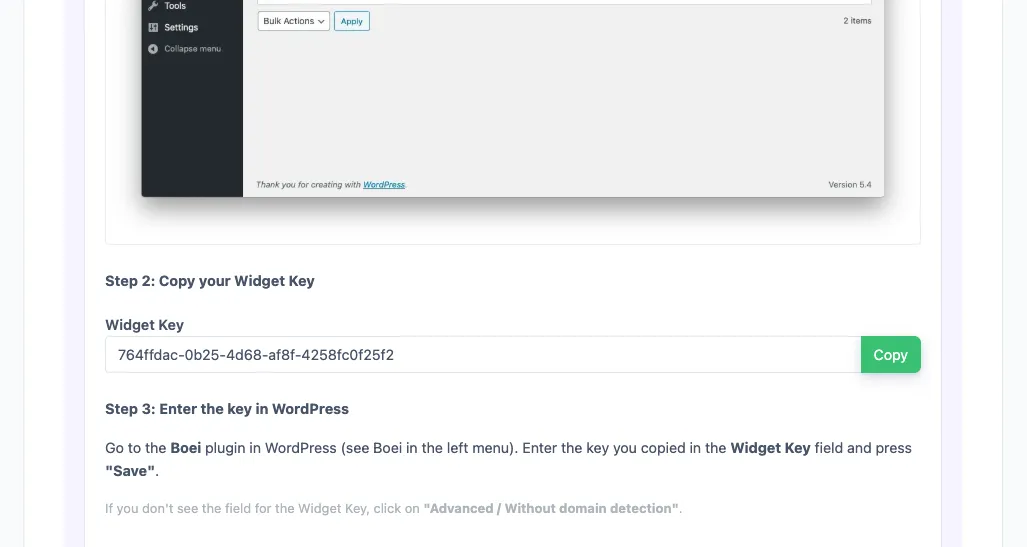
In your Boei dashboard, open your widget and click the Install tab. Select WordPress and copy the WordPress plugin key.
Tip: The Install tab also offers a landing page link, QR code, and iframe embed.
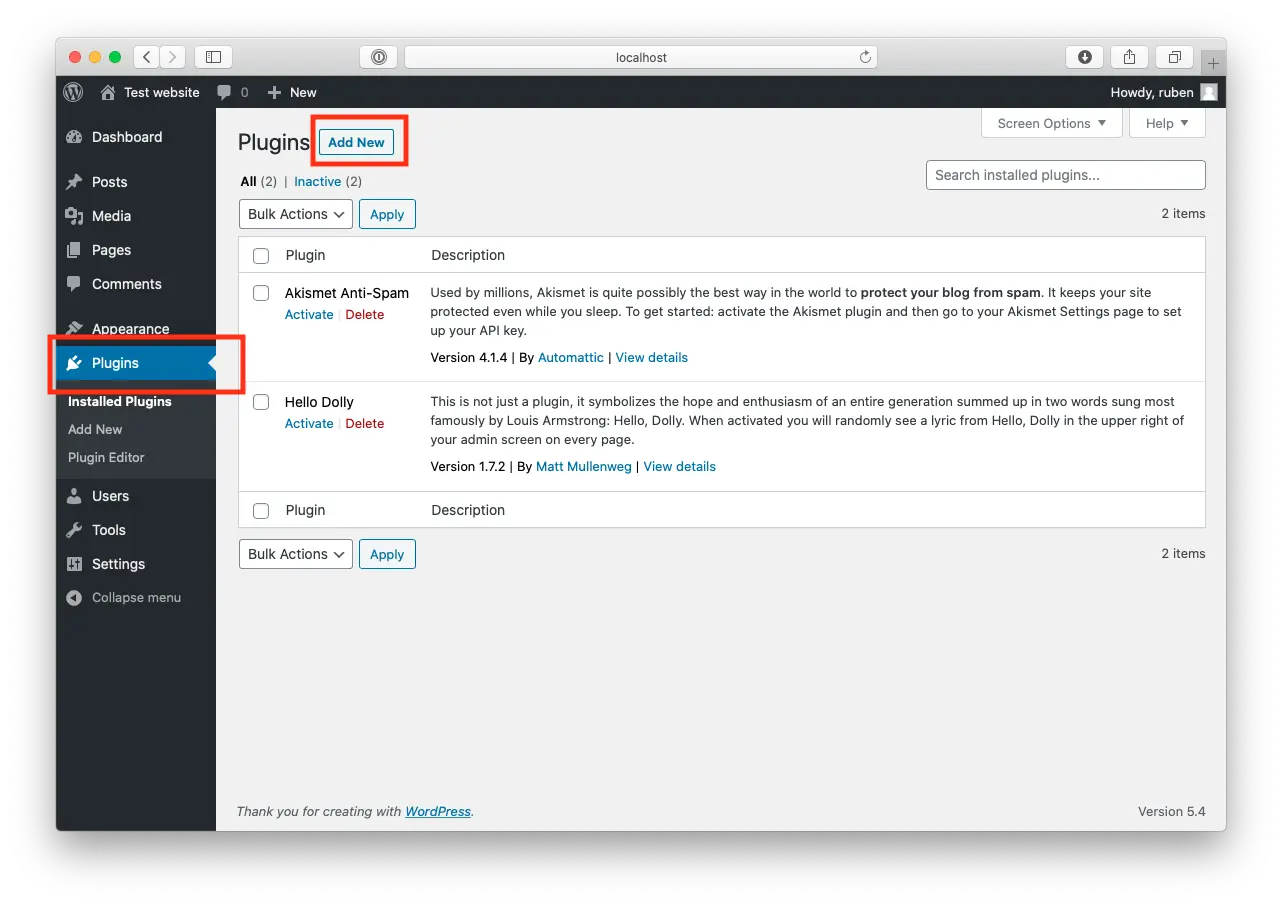
Open WordPress and click on "Plugins".
Now, click "Add New" at the top of the page.
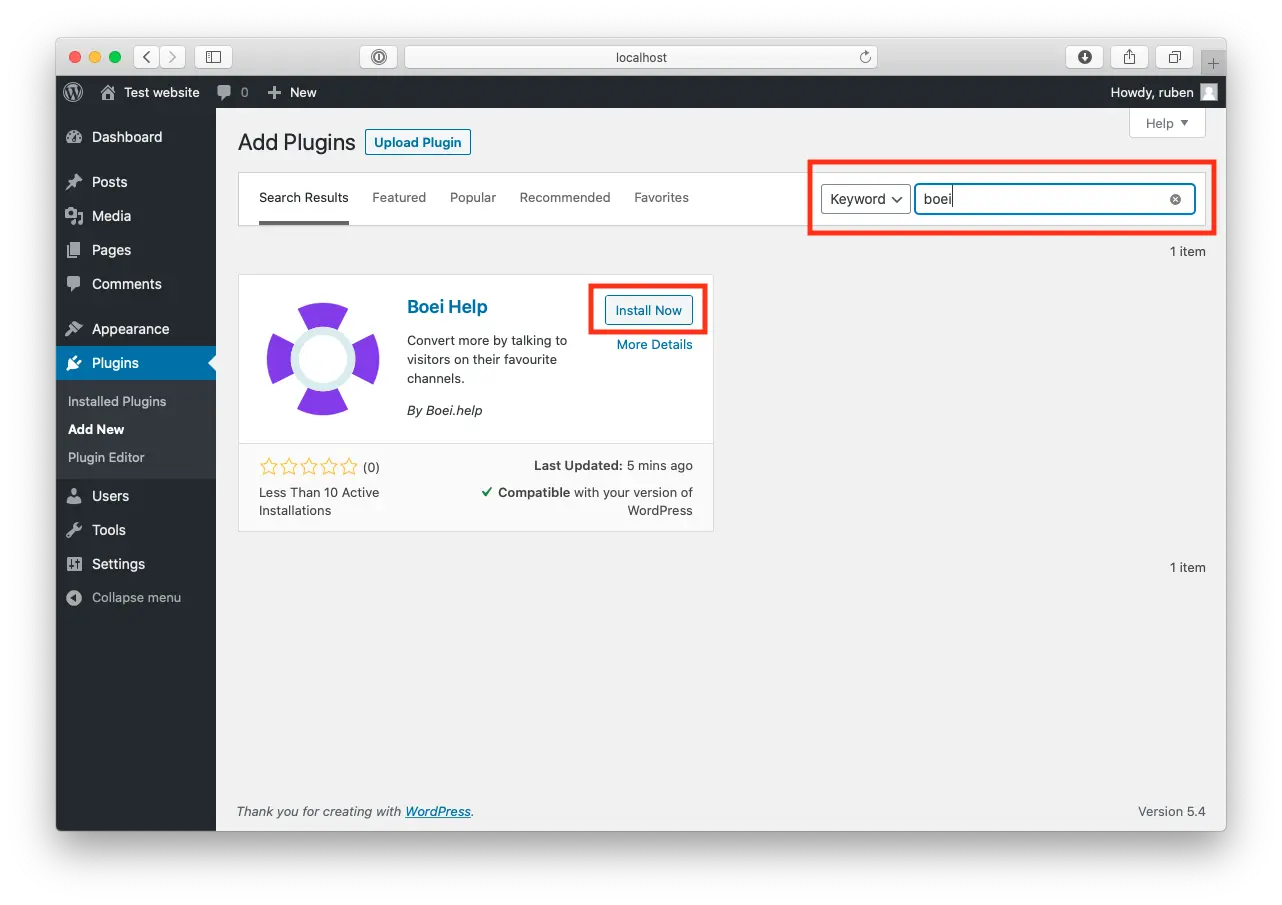
Search for "Boei" and find our plugin.
Click "Install Now".
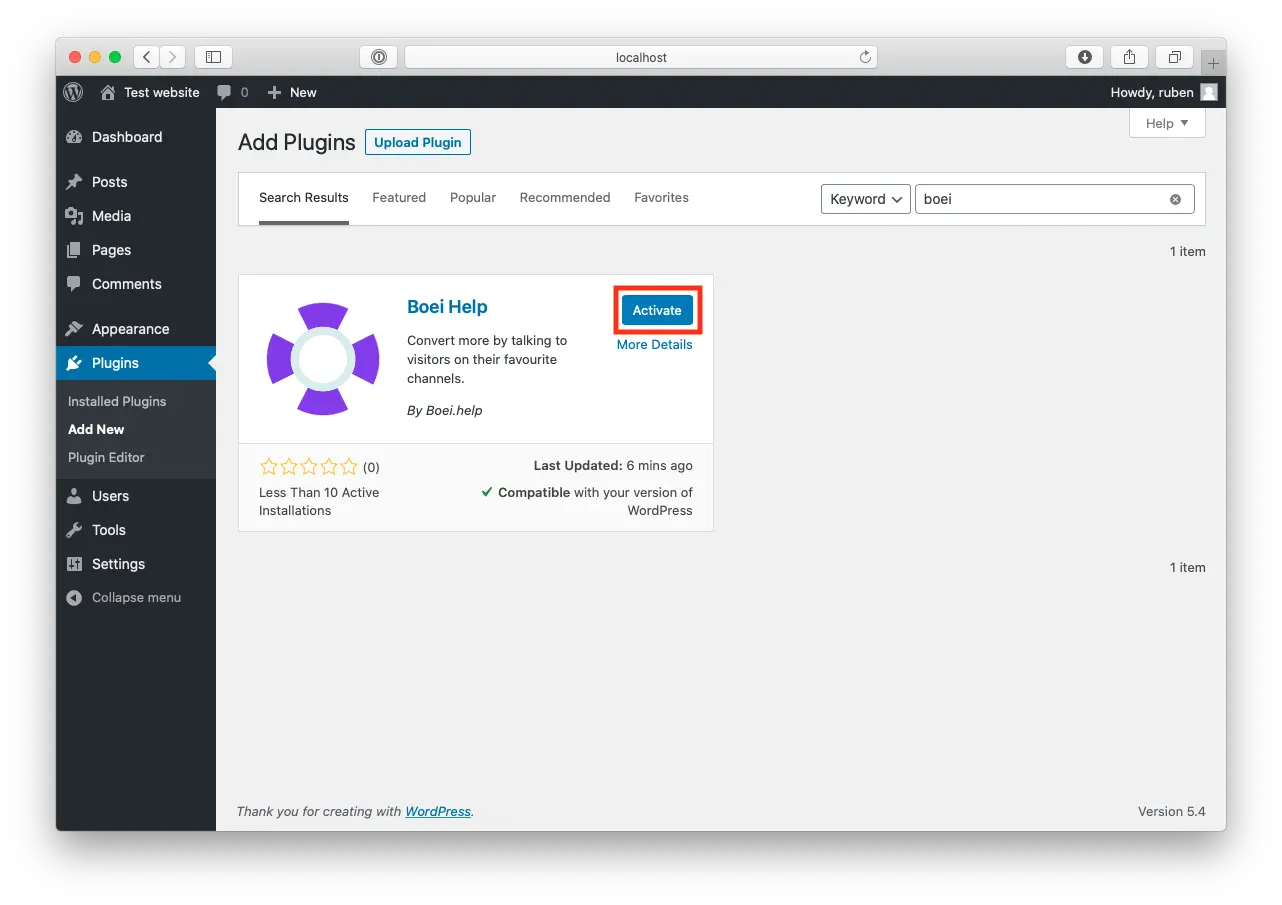
When the plugin is installed, press "Activate".
Go to the Boei plugin in WordPress (see Boei in the left menu).
Enter the key you copied in the Widget Key field and press "save".
If you don't see the field for the Widget Key, click on "Advanced / Without domain detection".
Congrats, you are done!
Messenger chat widget designed for WordPress sites
No Facebook SDK or API setup. Uses simple Messenger deep links that work reliably across all devices and browsers. Modern replacement for the deprecated Chat Plugin.
Built-in AI chatbot answers visitor questions 24/7 using your website content, FAQs, and pricing. Captures leads and qualifies prospects automatically.
All Messenger conversations in one inbox alongside WhatsApp, email, and 50+ channels. AI summaries help your team respond faster.
Messenger widget on product pages, cart, and checkout. Visitors ask about sizing, shipping, and stock — then buy with confidence.
Works with Elementor, Divi, Beaver Builder, WPBakery, Gutenberg, and all WordPress themes. No conflicts with caching plugins.
Dutch company, Amsterdam servers. Zero cookies before click. Compatible with WP Rocket, LiteSpeed, Wordfence, and Sucuri.
See why 14,000+ websites choose Boei over basic chat button plugins
| Feature | Boei | Chaty | NinjaTeam Messenger | Social Chat |
|---|---|---|---|---|
| AI chatbot included | ✓ | ✗ | ✗ | ✗ |
| Shared team inbox | ✓ | ✗ | ✗ | ✗ |
| Lead capture & CRM | ✓ | ✗ | ✗ | ✗ |
| Agent escalation | ✓ | ✗ | ✗ | ✗ |
| Channels included | 50+ | 25 | Messenger only | 4 |
| Replaces deprecated Chat Plugin | ✓ | Partial | ✗ | ✗ |
| Price | €14/mo | €59/year | Free | $25 one-time |
| Setup time | 5 minutes | 10-30 min | 10 min | 15 min |
| Auto-translation | 95+ languages | ✗ | ✗ | ✗ |
Bottom line: Most WordPress Messenger plugins add a basic button — no AI, no inbox, no CRM. Boei gives you an AI chatbot, shared team inbox, built-in CRM, and 50+ channels for €14/month. See all Messenger features.
David K.
CEO Small-Business (50 or fewer emp.)
Seif Ahmed
@seif588
Neu
@siddharthaneu
Irfan
@mak_web_media
Peter C
@peter_c1
Andrew Lee
@fromlife89
Grzegorz G.
Joshua G.
Ronald D.
Director Small-Business (50 or fewer emp.)
Fahd T.
Founder Small-Business (50 or fewer emp.)
David S.
CEO/Founder Small-Business (50 or fewer emp.)
Vance W.
Julien V.
Développeur d'e-commerce Small-Business (50 or fewer emp.)
Grant
Hansie
David K.
CEO Small-Business (50 or fewer emp.)
Seif Ahmed
@seif588
Neu
@siddharthaneu
Irfan
@mak_web_media
Peter C
@peter_c1
Chandra Kusuma
Pepe
Arjun E.
José Manuel D.
Cristian Trappolini
Daniel Gyger
Nitesh Manav
Renaat Sioncke
Fran Tully
Proinsias M.
Gavin S.
Sara Hall
Mike Foston
Lukáš H.
Bikram K. S.
Chandra Kusuma
Pepe
Arjun E.
José Manuel D.
When a visitor clicks the Messenger button on your WordPress site, it opens a direct conversation with your Facebook page. On mobile it opens the Messenger app, on desktop it opens Messenger.com. You receive and respond from your regular Facebook Page inbox, Messenger app, or Boei's shared inbox.
Go to Plugins → Add New, search for 'Boei', install and activate. Sign up at Boei (free trial), add your Facebook page ID, copy your widget key, and paste it in Settings → Boei. Your Messenger widget is live in 5 minutes. See our WordPress installation guide.
Yes. Facebook deprecated its official Chat Plugin in 2024. It required heavy SDK integration, used cookies that conflicted with GDPR, and frequently broke. Boei provides a modern alternative using simple Messenger deep links — no SDK, no cookies, no breakage.
Yes. The Messenger widget works on all WooCommerce pages including product pages, cart, and checkout. Combine with the AI chatbot to answer product questions automatically.
Yes, visitors need a Facebook or Messenger account. With 3 billion monthly active users, the vast majority already have access. For visitors without Facebook, offer alternatives like WhatsApp or contact form in Boei's multi-channel widget.
Absolutely. Add Messenger alongside WhatsApp, Instagram DM, Telegram, phone, email, AI chatbot, and 50+ other channels — all in one floating button.
Yes. Boei works with all WordPress themes and page builders: Elementor, Divi, Beaver Builder, WPBakery, Gutenberg, Astra, GeneratePress, and custom themes. Also compatible with WP Rocket and LiteSpeed caching.
Boei Pro is €14/month and includes the Messenger widget, AI chatbot with 2,000 messages, shared inbox, built-in CRM, 50+ channels, and unlimited team seats. Start with a 7-day free trial — no credit card required.
Add Facebook Messenger to any website builder
Modern replacement for deprecated Chat Plugin. AI chatbot, shared inbox, and 50+ channels included.