Wix logo

Messenger Chat Widget

Facebook Messenger Widget for Wix

Add Facebook Messenger to your Wix site. AI answers visitor questions, captures leads, and routes conversations to your team. 5-minute setup.

Trusted by 14,368 websites

No Facebook API setup required

Andrew Lee David S. Vance W. Grant Nitesh Manav
from 159 reviews

Messenger Widget Demo on Wix

Trusted by 14,000+ Websites Worldwide

Facebook Messenger Chat on Your Wix Site

When visitors click the Messenger button on your Wix website, they open a direct conversation with your Facebook page. Messages land in your Facebook inbox and Messenger app. No coding required, no API setup — just paste one code snippet in your Wix site settings.

  • One-click Messenger conversations from your Wix site
  • Messages arrive in your Facebook Page inbox and Messenger app
  • Conversations persist across devices and over time
  • Rich media support: photos, videos, documents, and locations
  • No coding or Facebook API required
Messenger Chat
Hi! I'm interested in booking an appointment.
Welcome! I can help you schedule that. What day works best for you?
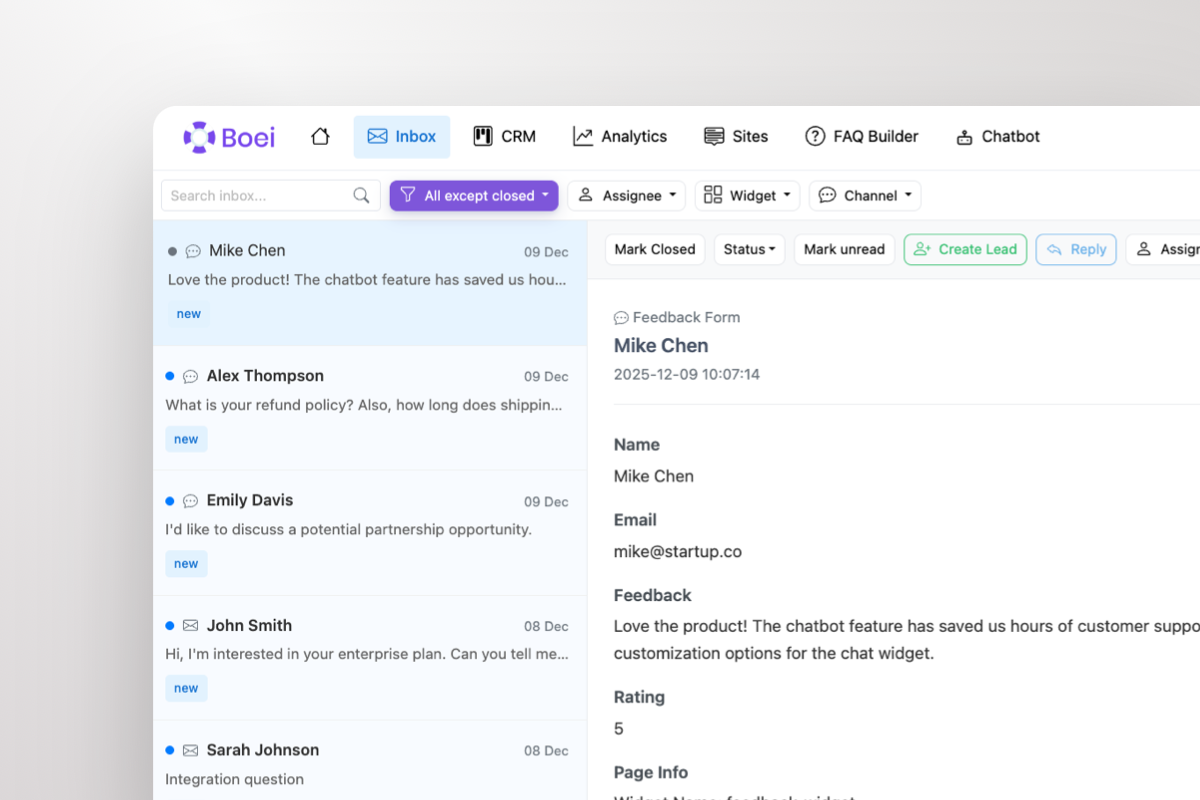
Shared inbox showing Messenger conversations with AI summary and agent handoff

All Wix Conversations in One Shared Inbox

Stop switching between Facebook Page inbox and Wix Inbox. Boei brings all your Messenger conversations into a single shared inbox alongside WhatsApp, email, Instagram DM, and 50+ other channels. Your team handles every inquiry from one place.

  • All Messenger conversations in one team inbox
  • AI-generated summaries for quick context
  • Round-robin or department-based routing
  • One-click agent handoff with full chat history
  • Built-in CRM tracks every lead automatically

Why Your Wix Site Needs Facebook Messenger

Wix's built-in chat options are limited. Wix Chat only works while visitors are on your site — close the tab and the conversation is gone. Facebook Messenger gives your Wix visitors a persistent, cross-device channel with 3 billion active users.

Service businesses, consultants, and local shops on Wix benefit most from Messenger. Customers can ask about pricing, availability, and book appointments through a platform they use every day. Conversations don't expire — a lead can come back weeks later and continue right where they left off.

Facebook deprecated its official Chat Plugin in 2024. Boei provides a modern, no-code alternative that works perfectly with Wix. Add one snippet in Settings → Custom Code and your Messenger widget is live. No Velo coding, no iframes, no App Market required.

Combine Messenger with WhatsApp, Instagram DM, AI chatbot, and 50+ other channels in one floating button. Give every visitor their preferred way to reach you.

Quick Setup

Install Messenger Widget on Wix

From setup to your first Messenger conversation in under 5 minutes

1

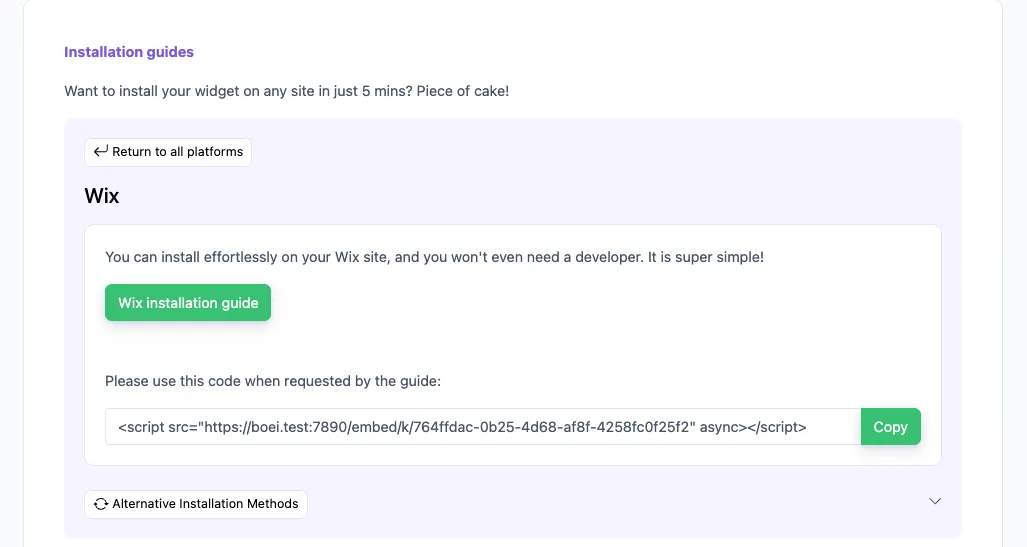
Copy installation code

In your Boei dashboard, open your widget and click the Install tab. Select Wix and copy the installation code.

Tip: The Install tab also offers a landing page link, QR code, and iframe embed.

Copy installation code
2

Log in to Wix

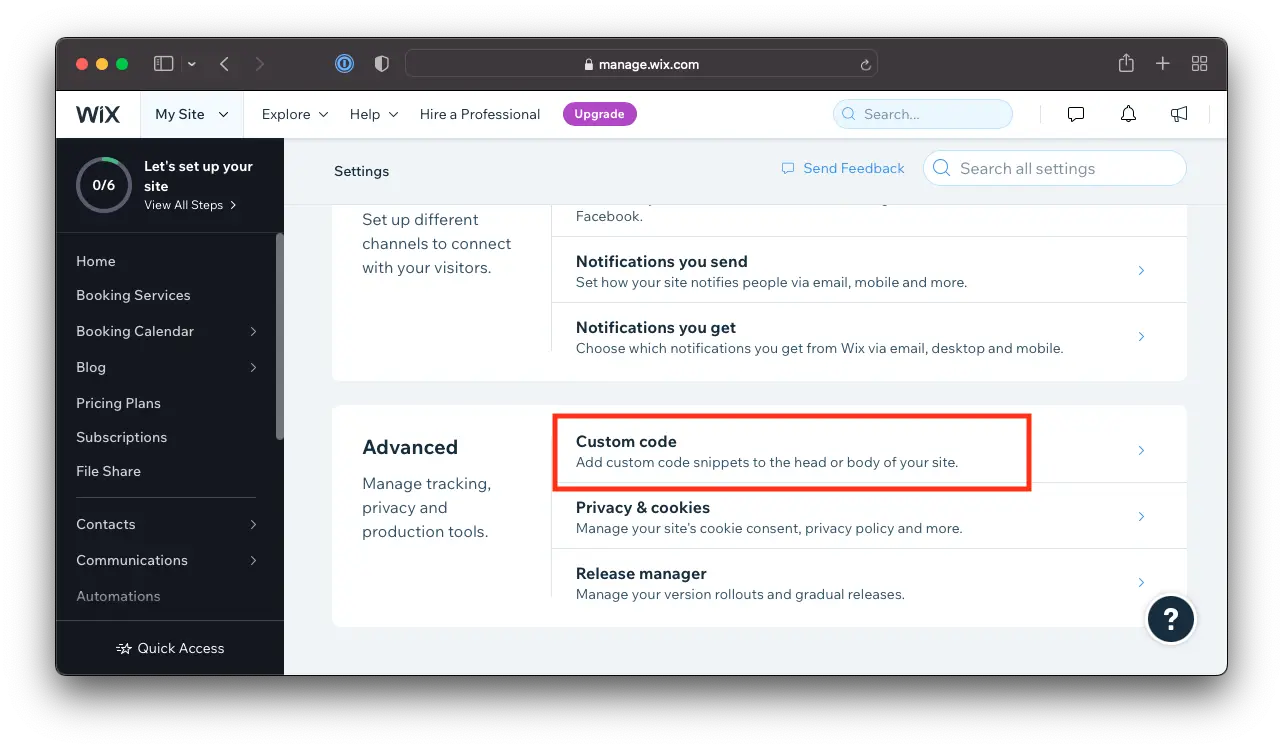
Open Wix and go to Settings -> Custom Code.

  1. Go to Settings in your site's dashboard.
  2. Click the Custom Code tab in the Advanced section.
Log in to Wix
3

Go to settings and install the Boei code snippet

  1. Click + Add Custom Code at the top right.
  2. Paste the code snippet in the text box. See step 2 above for the Boei code.
  3. Enter a name for your code.
  4. Select an option under Add Code to Pages: All pages
  5. Choose where to place your code under Place Code in:. Body - end

Note that Wix does not allow code scripts on all account types; you may need to upgrade.

4

Save

Click Apply in Wix. Congrats, you are done!

Wix Features

Built for Wix Websites

Messenger chat widget that works perfectly with Wix

💬

No-Code Setup

Add Messenger to Wix in one step. Paste a code snippet in Settings → Custom Code. No Velo, no iframes, no App Market needed.

🤖

AI-Powered Responses

Built-in AI chatbot answers visitor questions 24/7 using your website content, FAQs, and pricing. Captures leads automatically.

📥

Shared Team Inbox

All Messenger conversations in one inbox alongside WhatsApp, email, and 50+ channels. Better than switching between Wix Inbox and Facebook.

🛍️

Wix Stores Compatible

Messenger widget on product pages and checkout. Shoppers ask about sizing, shipping, and availability — and get instant answers.

📅

Booking Integration

Service businesses on Wix Bookings can use Messenger for appointment inquiries, rescheduling, and confirmations.

🔒

GDPR Compliant

Dutch company, Amsterdam servers. Zero cookies before click. Full GDPR compliance. DPA available on request.

Compare Options

Boei vs Other Wix Chat Options

See why Wix site owners choose Boei for Messenger chat

Feature Boei Wix Chat Elfsight Messenger Facebook Chat Plugin (Deprecated)
Messenger integration Deprecated
AI chatbot included
Shared team inbox ✗ Limited
Lead capture & CRM ✗ Limited
Persistent conversations Deprecated
Channels included 50+ 1 1 1
Price €14/mo Free (limited) $5/mo Deprecated
No coding required

Bottom line: Wix Chat only works while visitors are on your site. Elfsight adds a basic Messenger button. Boei gives you Messenger plus AI chatbot, shared inbox, CRM, and 50+ channels — all for €14/month. See all features.

What Wix Users Say

Questions?

Wix Messenger Widget FAQ

How does the Messenger widget work on Wix?

When a visitor clicks the Messenger button on your Wix site, it opens a direct conversation with your Facebook page. On mobile it opens the Messenger app, on desktop it opens Messenger.com. You respond from your Facebook Page inbox, Messenger app, or Boei's shared inbox.

How do I install it on Wix?

Sign up at Boei (free trial), add your Facebook page ID, and copy the widget code. In Wix, go to Settings → Custom Code → Add Custom Code → paste the snippet. Set it to load on all pages in the body end. See our Wix installation guide.

Does it work better than Wix Chat?

Wix Chat only works while visitors are on your site — close the browser and the conversation is lost. Messenger conversations persist across devices and over time. Plus Boei adds AI chatbot, shared inbox, CRM, and 50+ channels that Wix Chat doesn't offer.

Do I need Velo (Wix Code) to install it?

No. Boei works with Wix's built-in Custom Code feature. No Velo, no iframes, no Wix App Market. Just paste one snippet and you're live.

Does it work with Wix Stores?

Yes. The Messenger widget appears on all pages including Wix Stores product pages and checkout. Combine with the AI chatbot to answer product questions automatically.

Can I use Messenger alongside other channels?

Yes. Add Messenger alongside WhatsApp, Instagram DM, Telegram, phone, email, AI chatbot, and 50+ other channels — all in one floating button.

Is it GDPR compliant?

Yes. Boei is a Dutch company with servers in Amsterdam (EU). No cookies, full GDPR compliance, DPA available on request. The widget collects no personal data before a visitor clicks.

How much does it cost?

Boei Pro is €14/month and includes the Messenger widget, AI chatbot with 2,000 messages, shared inbox, built-in CRM, 50+ channels, and unlimited team seats. Start with a 7-day free trial — no credit card required.

Messenger Widget for Every Platform

Add Facebook Messenger to any website builder

Add Facebook Messenger to Your Wix Site

No-code setup, AI chatbot, shared inbox, and 50+ channels — all for €14/month.

7-day free trial • No credit card required • 5-minute setup • No coding needed
Andrew Lee David S. Vance W. Grant Nitesh Manav
from 159 reviews