Squarespace logo

WhatsApp AI Agent

WhatsApp AI Agent & Chat Widget for Squarespace

Turn your WhatsApp into an AI agent that answers questions, qualifies leads, and routes warm prospects to your team. Automatically. Matches Squarespace's premium design aesthetic.

Trusted by 14,368 websites

No WhatsApp Business API required

Andrew Lee David S. Vance W. Grant Nitesh Manav
from 159 reviews

Also available for:

A WhatsApp AI Agent That Qualifies Leads Automatically

Your WhatsApp chat widget comes with a built-in AI agent. It doesn't wait for questions: it qualifies visitors, asks about budget, timeline, and needs, captures contact details, and scores lead intent. Warm prospects get routed to your team with a full conversation summary. Cold leads stay nurtured automatically.

  • Asks qualifying questions based on your sales process
  • Captures name, email, phone, and company details mid-conversation
  • Scores lead intent so your team focuses on hot prospects
  • Hands warm leads to agents with full context + AI summary
  • Trained on your website, PDFs, pricing, and FAQs
WhatsApp AI
Hi! I'm looking for a solution for my team of 12.
Great! What's your main goal: lead capture, customer support, or both? I'll match you with the right plan.
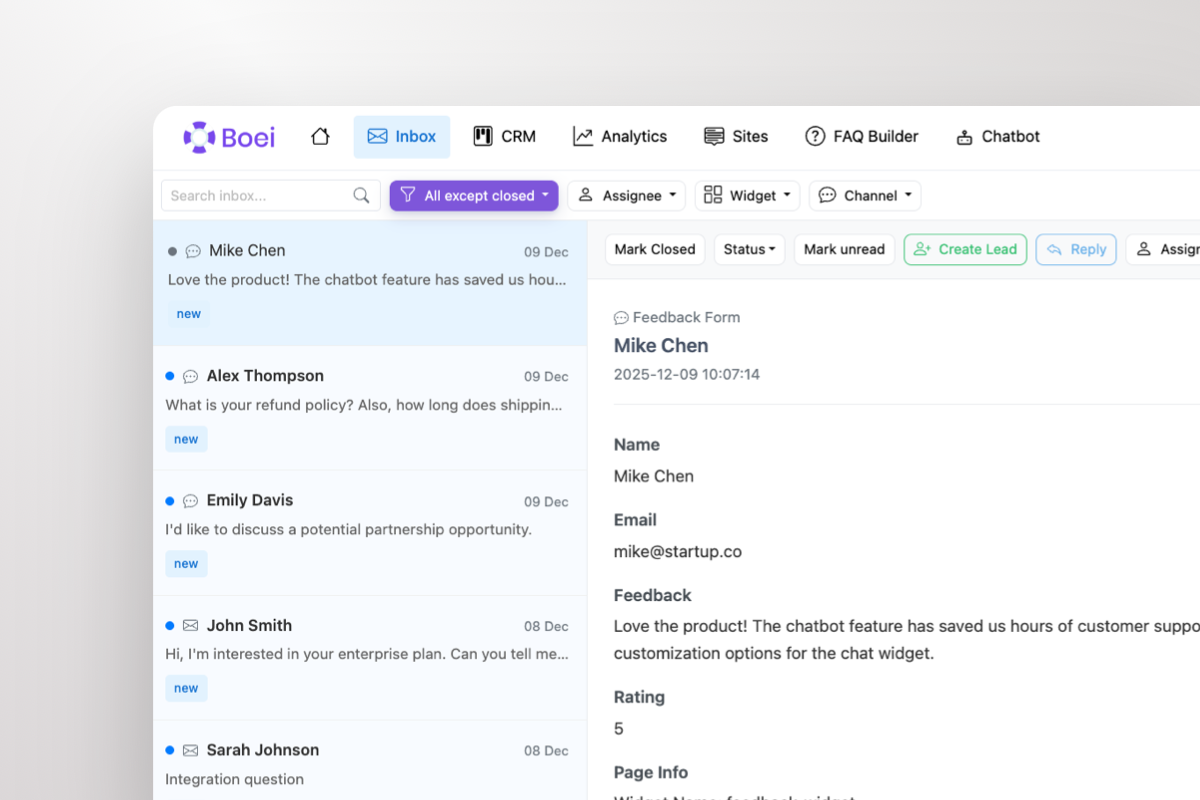
Shared inbox showing WhatsApp conversations with AI summary and agent handoff

Warm Leads Go Straight to Your Team

When a prospect is ready to buy, the AI doesn't keep chatting. It escalates. Your sales team gets the lead in a shared inbox with the full WhatsApp conversation and an AI-generated summary: who they are, what they need, and how warm they are. One click to take over.

  • AI escalates warm leads to your team automatically
  • Agents see full conversation + AI summary in shared inbox
  • Take over any WhatsApp chat with one click
  • Round-robin or department-based routing across agents
  • Leads flow into built-in CRM pipeline automatically

What Squarespace Users Say

Your WhatsApp Widget, Your Brand

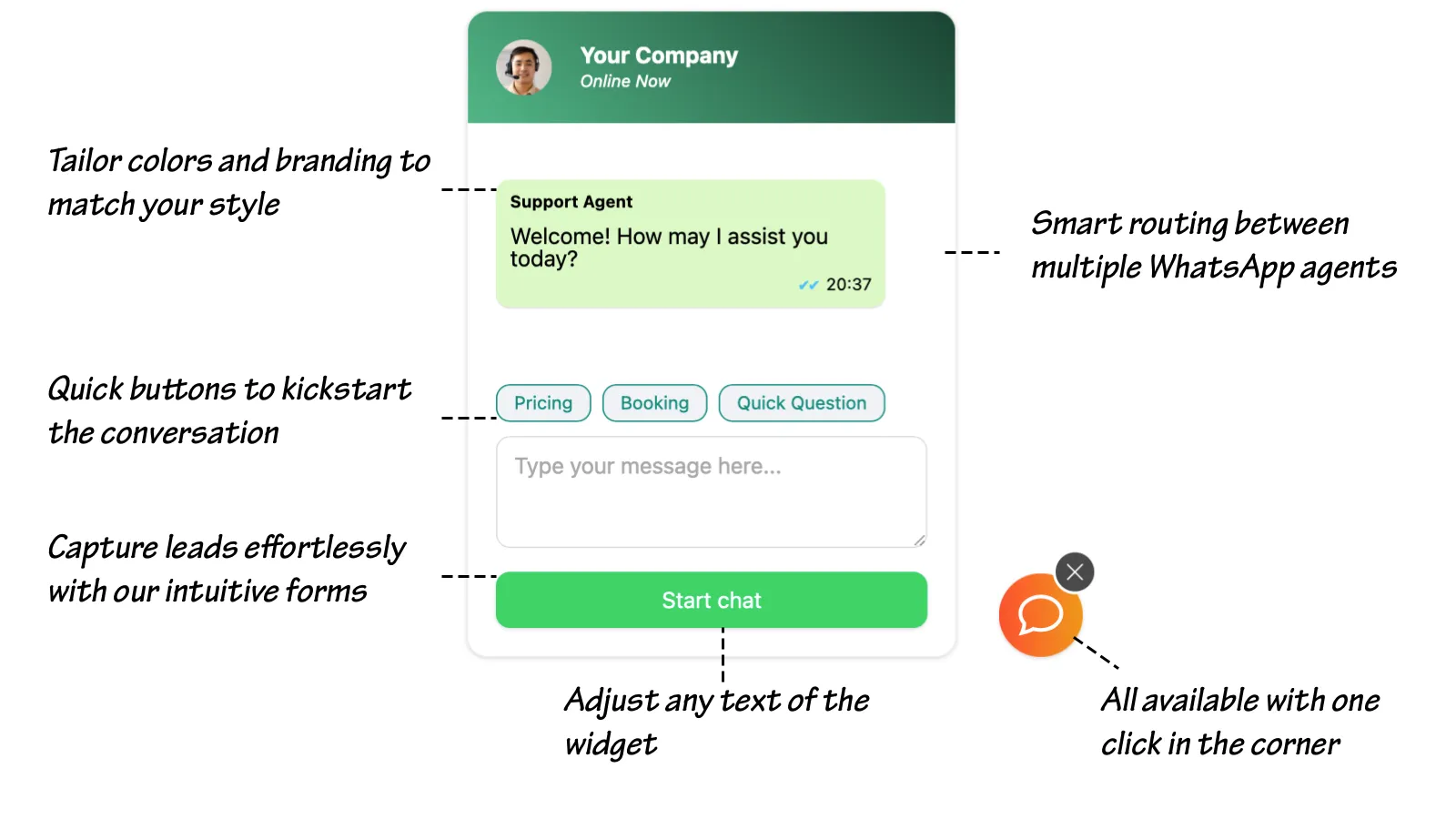
WhatsApp chat widget showing branding options, quick-reply prompts, lead capture form, and agent routing

Compare Options

Boei vs Elfsight vs Common Ninja vs DelightChat

See why Squarespace users choose Boei for professional WhatsApp AI sales

Feature Boei Elfsight Common Ninja DelightChat
AI agent
Lead qualification & scoring
Shared team inbox
Agent escalation with AI summary
Built-in CRM
Design aesthetic Premium Generic Generic Basic
Channels included 50+ 1 1 1
Price €14/mo Paid plans Paid plans Free
7.0 & 7.1 compatible ✗ Limited

Bottom line: Elfsight, Common Ninja, and DelightChat add a basic WhatsApp button: no AI, no lead qualification, no inbox, no CRM. Boei gives you an AI agent that qualifies leads, a shared inbox for your team, a built-in CRM, and a design that matches Squarespace's premium aesthetic. All for €14/month.

Quick Setup

Install WhatsApp AI Agent on Squarespace

From setup to your first qualified lead in under 5 minutes

1

Copy installation code

In your Boei dashboard, open your widget and click the Install tab. Select Squarespace and copy the installation code.

Tip: The Install tab also offers a landing page link, QR code, and iframe embed.

Copy installation code
2

Click Edit Site

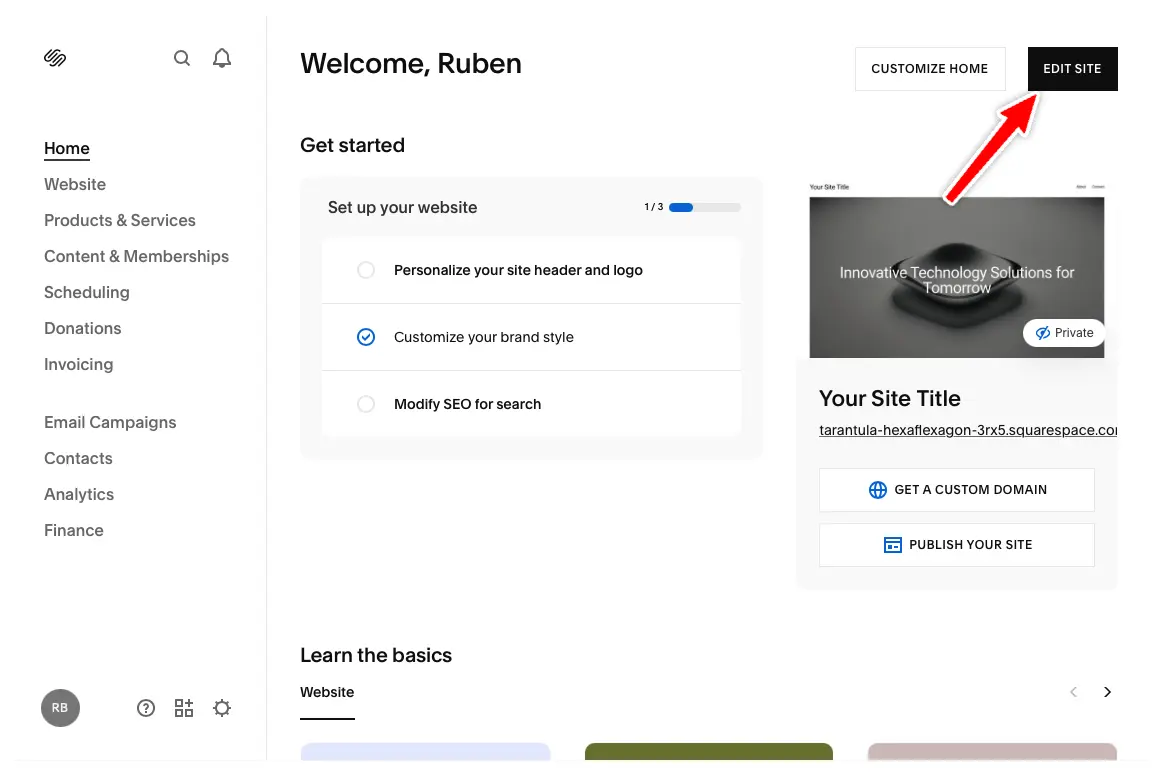
In your Squarespace dashboard, click "Edit Site" in the top right corner.

Click Edit Site
3

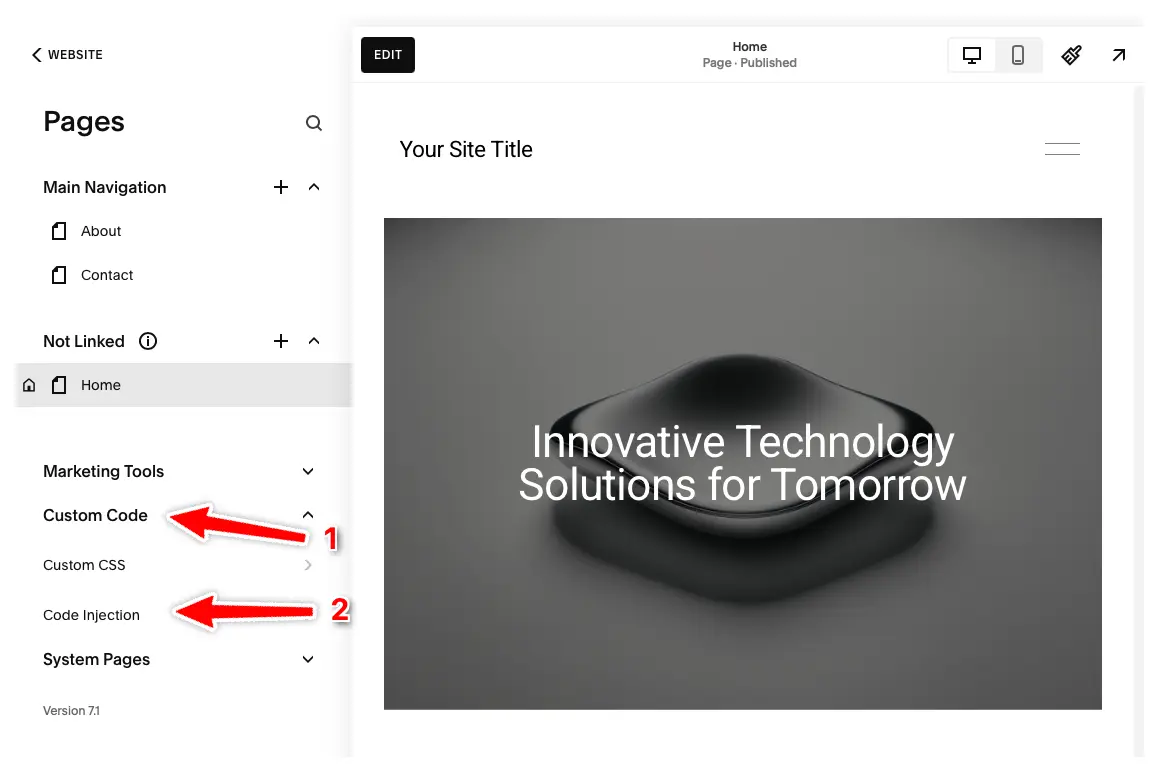
Open Code Injection

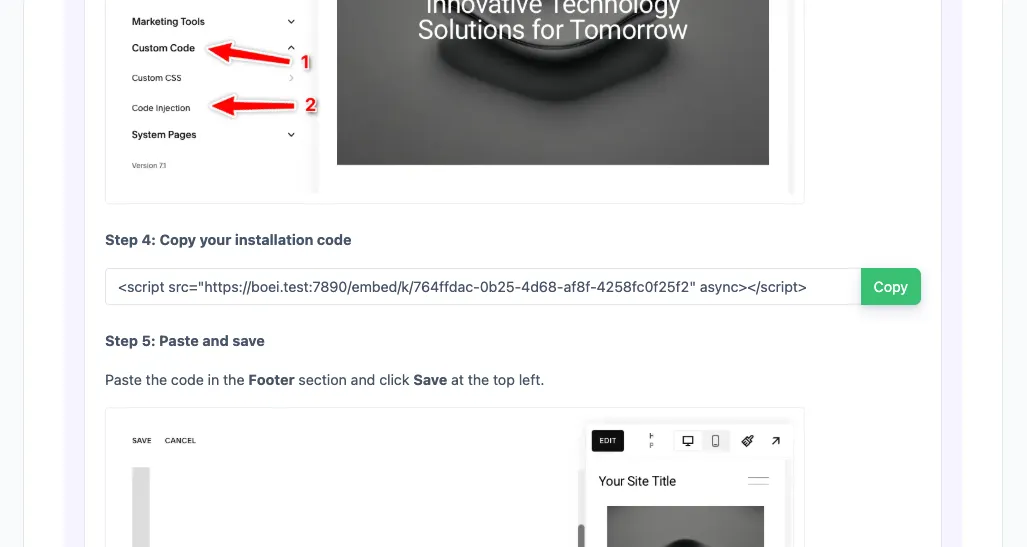
Click "Pages" in the left menu, then click "Custom Code" and select "Code Injection".

Note: Code Injection is available on Core, Plus, Advanced, Business, Commerce Basic, and Commerce Advanced plans. Personal plans don't have this feature.

Open Code Injection
4

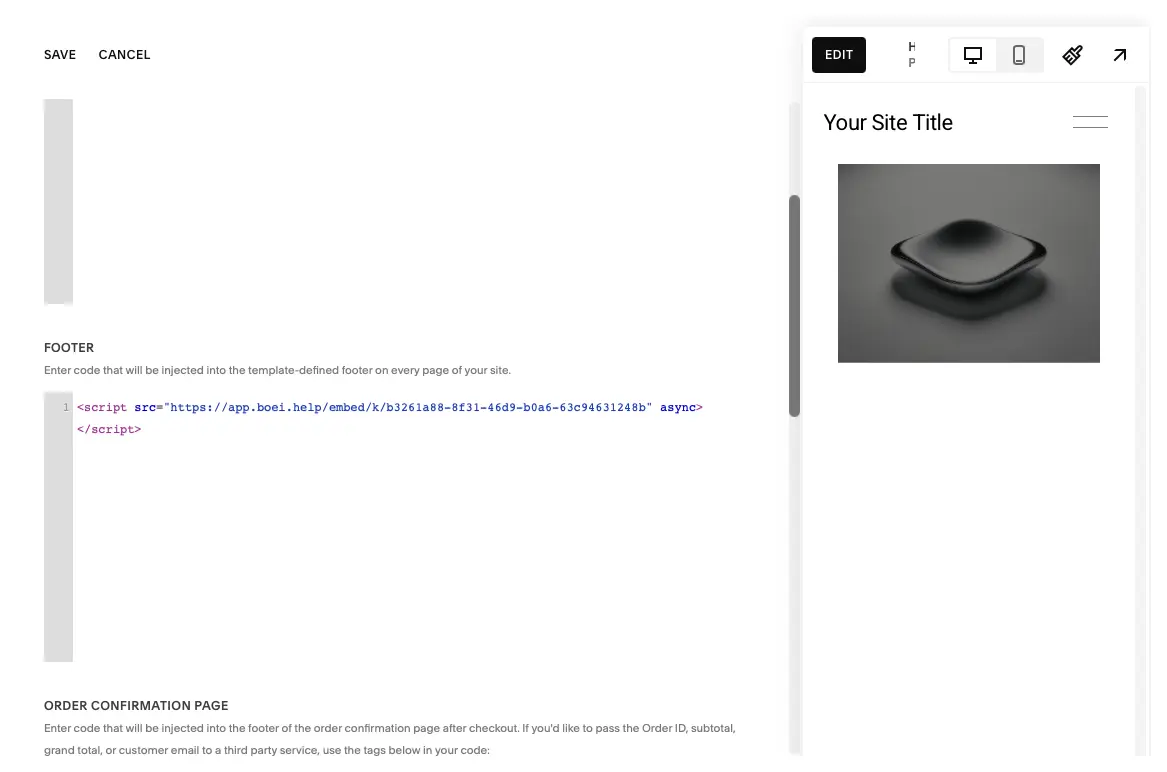
Paste Code & Save

Enter your Boei code in the Footer section and press "Save" at the top left.

The Boei widget will now appear on all pages of your Squarespace site. Congrats, you are done!

Paste Code & Save

Squarespace Features

Built for Squarespace

AI agent with design aesthetics that match your premium site

🤖

AI Lead Qualification

AI asks qualifying questions, captures contact details, and scores lead intent. Trained on your Squarespace site content, services, and portfolio.

📥

Shared Team Inbox

All WhatsApp conversations in one inbox. AI escalates warm leads with full context and AI summary. Agents take over with one click.

📊

Built-in CRM Pipeline

Leads flow into CRM automatically. Track every deal from first message to close without third-party tools.

🎨

Premium Design Aesthetic

Widget designed to match Squarespace's premium look. Fully customizable colors, position, and style.

7.0 & 7.1 Compatible

Works with both Squarespace 7.0 and 7.1 including Fluid Engine. One-time code injection, no compatibility issues.

📱

50+ Channels Including Instagram DM

WhatsApp, Instagram DM, Messenger, email, phone: all in one widget, one inbox, one CRM. Perfect for creative professionals.

🌍

Auto-Translation

AI conversations auto-translate to 95+ languages. Qualify international clients effortlessly.

🔒

GDPR Compliant

Dutch company, Amsterdam servers. No cookies, full GDPR compliance. Simple code injection, no plugins to maintain.

How Squarespace Sites Convert with WhatsApp AI

AI qualifies leads and routes them to you. Across creative industries

Photographers

AI pre-qualifies clients by asking about event type, date, budget, and location. Serious inquiries get routed to you with a full brief. Ready to send a proposal.

  • AI qualifies by event type, date, and budget
  • Instagram DM + WhatsApp for visual communication
  • Warm leads escalated with AI-written brief
  • CRM tracks every inquiry through your pipeline

Designers & Agencies

AI asks about project scope, timeline, and budget. Qualified leads are routed to the right team member with full requirements. No scoping call needed for basic briefs.

  • AI captures project scope and budget range
  • Routes to correct team member by expertise
  • Full brief ready before first human contact
  • Leads tracked from inquiry to signed contract

Consultants & Coaches

AI qualifies coaching or consulting leads by asking about goals, experience level, and investment readiness. Warm prospects get booked directly into discovery calls.

  • AI qualifies by goals and readiness to invest
  • Captures contact details mid-conversation
  • Routes qualified leads to discovery call booking
  • CRM tracks conversion from lead to client

AI Agent That Matches Squarespace's Premium Look

Creative professionals, photographers, designers, and agencies need communication tools that match their standards. Your AI qualifies leads on WhatsApp with the same attention to aesthetics that Squarespace users expect. Then routes serious clients to your inbox with a full brief.

  • Design aesthetic that matches Squarespace's premium look
  • AI qualifies leads by scope, budget, and timeline
  • Instagram DM integration for visual creatives
  • Warm clients escalated with AI-written brief and full context
  • QR codes for print portfolios and business cards
  • All leads tracked in built-in CRM pipeline
Squarespace WhatsApp AI Agent with premium design

Pro Tips

Get More Qualified Leads on Squarespace

1

Match Your Brand Aesthetic

Customize widget colors, position, and style to match your Squarespace site's design. Maintain brand consistency across every touchpoint.

2

Include Instagram DM for Visual Clients

Many creative clients prefer Instagram. Include it alongside WhatsApp. Your AI qualifies leads on both channels, all flowing into one inbox and CRM.

3

Use Quick-Reply Prompts for Client Intent

Widgets like 'View Portfolio', 'Request Quote', 'Book Consultation' signal intent. Your AI tailors the qualifying conversation based on what visitors click.

4

Add QR Codes to Print Materials

Generate WhatsApp QR codes for print portfolios, business cards, and exhibition materials. Offline visitors connect via WhatsApp, AI qualifies them, leads flow into your CRM.

Your AI Sells on 50+ Channels

Same AI, same inbox, same CRM. Across every channel your clients use

Questions?

Squarespace WhatsApp AI Agent FAQ

How does the AI agent work on Squarespace?

When a visitor messages your WhatsApp from your Squarespace site, the AI engages immediately: asking qualifying questions, capturing contact details, and scoring intent. When a lead is warm, it escalates to your team in the shared inbox with the full conversation and an AI-generated summary.

How do I add it to Squarespace?

Sign up at Boei (free trial), configure your WhatsApp. In Squarespace, go to Settings → Advanced → Code Injection. Paste the Boei code in the Header box, click Save. Your AI agent is live across your entire site. See our Squarespace installation guide.

Does it work with Squarespace 7.0 and 7.1?

Yes. Boei works with both Squarespace 7.0 and 7.1 including Fluid Engine. One-time code injection works across all versions, no compatibility issues.

Will it match my Squarespace site's design?

Yes. Unlike generic widgets from Elfsight or Common Ninja, Boei is designed with aesthetics in mind. Fully customizable colors, position, and style to match your site's premium look.

What does it cost?

Boei Pro is €14/month and includes the WhatsApp AI agent, 2,000 AI messages, shared inbox, built-in CRM, 50+ channels, and unlimited team seats. Start with a 7-day free trial. No credit card required.

Do I need a Squarespace Business plan?

Yes. Code injection requires a Squarespace Business plan or higher (not Personal plan). If you're a professional using Squarespace, you likely already have Business or Commerce.

How does agent escalation work?

The AI handles conversations automatically. When a lead is qualified or asks for a human, it escalates to your team. Agents see the full conversation plus an AI summary: who the lead is, what they need, and how warm they are. One click to take over.

Is it GDPR compliant?

Yes. Boei is a Dutch company with servers in Amsterdam (EU). No cookies, full GDPR compliance, DPA available on request.

Put Your WhatsApp AI Agent to Work on Squarespace

AI qualifies leads on WhatsApp 24/7, shared inbox for your team, built-in CRM. From €14/month.

7-day free trial • No credit card required • Works with 7.0 & 7.1 • Simple code injection
Andrew Lee David S. Vance W. Grant Nitesh Manav
from 159 reviews