Framer logo

Messenger Chat Widget

Facebook Messenger Widget for Framer

Add Facebook Messenger to your Framer site. AI answers visitor questions, captures leads, and routes conversations to your team. 5-minute setup.

Trusted by 14,368 websites

No Facebook API setup required

Andrew Lee David S. Vance W. Grant Nitesh Manav
from 159 reviews

Also available for:

Messenger Widget Demo on Framer

Trusted by 14,000+ Websites Worldwide

Facebook Messenger Chat on Your Framer Site

When visitors click the Messenger button on your Framer site, they open a direct conversation with your Facebook page. Framer's custom code support makes installation easy — paste one snippet in your site settings and Messenger is live on every page. No components or plugins needed.

  • One-click Messenger conversations from your Framer site
  • Messages arrive in your Facebook Page inbox and Messenger app
  • Conversations persist across devices and over time
  • Rich media support: photos, videos, documents, and voice messages
  • No Facebook SDK or API integration required
Messenger Chat
Hi! I love your portfolio. Are you taking new clients?
Thank you! Yes, we're currently booking for Q2. What type of project do you have in mind?
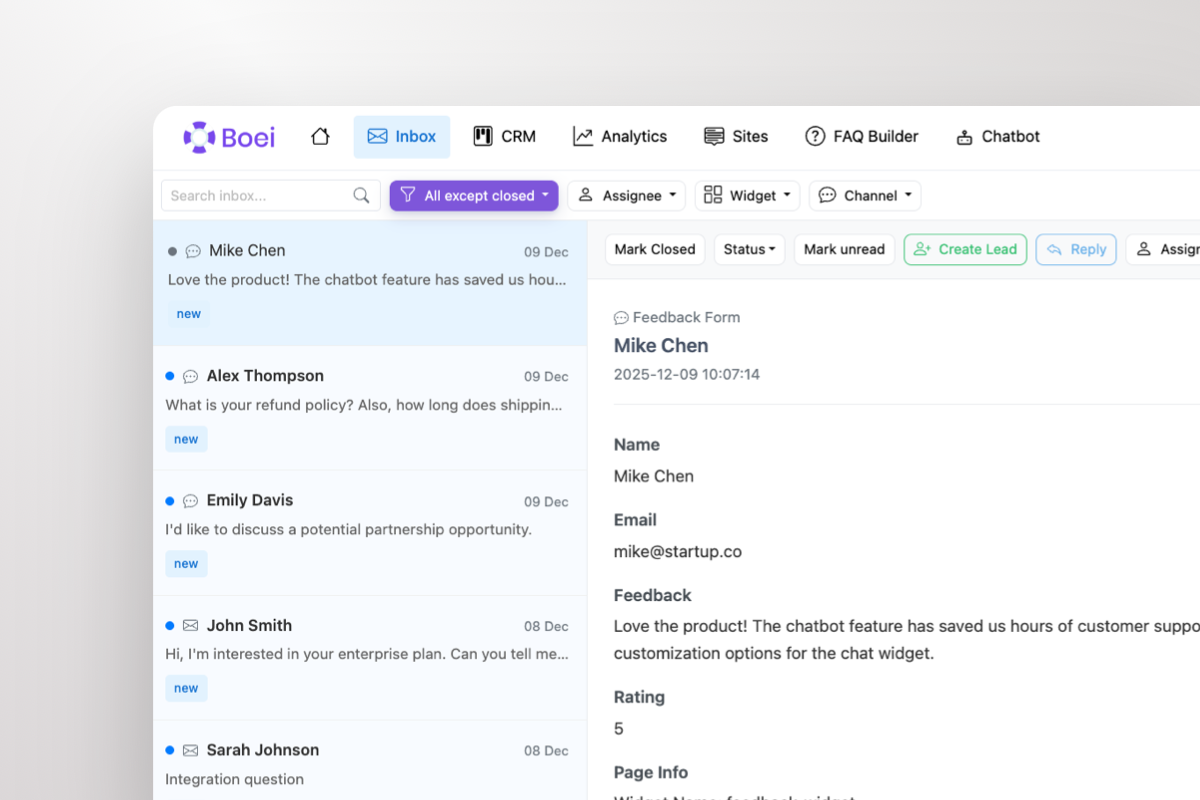
Shared inbox showing Messenger conversations with AI summary and agent handoff

All Framer Conversations in One Shared Inbox

Framer doesn't have any built-in messaging tools. Boei gives you a shared inbox where Messenger conversations sit alongside WhatsApp, email, Instagram DM, and 50+ other channels. Your team handles every inquiry from one dashboard.

  • All Messenger conversations in one team inbox
  • AI-generated summaries for every conversation
  • Round-robin or department-based routing
  • One-click agent handoff with full context
  • Built-in CRM pipeline tracks every lead

Why Your Framer Site Needs Facebook Messenger

Framer builds stunning websites but has zero built-in messaging tools. Your contact form captures email addresses, but modern visitors expect instant conversation. Facebook Messenger — used by 3 billion people — gives your Framer site real-time communication without forcing visitors to share personal information upfront.

Designers, agencies, and startups on Framer use Messenger to engage prospects while interest is high. A visitor viewing your case studies can instantly ask about pricing, timeline, or process — and you respond from the Messenger app you already have on your phone. No new tools to learn.

Framer supports custom code in Site Settings → General → Custom Code. Paste Boei's snippet in the End of tag section, publish your site, and the Messenger widget appears on every page. Takes 2 minutes. No Framer components or code overrides needed.

Combine Messenger with WhatsApp, Instagram DM, AI chatbot, and 50+ other channels in one floating button. Match your Framer site's design with custom colors and positioning.

Quick Setup

Install Messenger Widget on Framer

From setup to your first Messenger conversation in under 5 minutes

1

Copy installation code

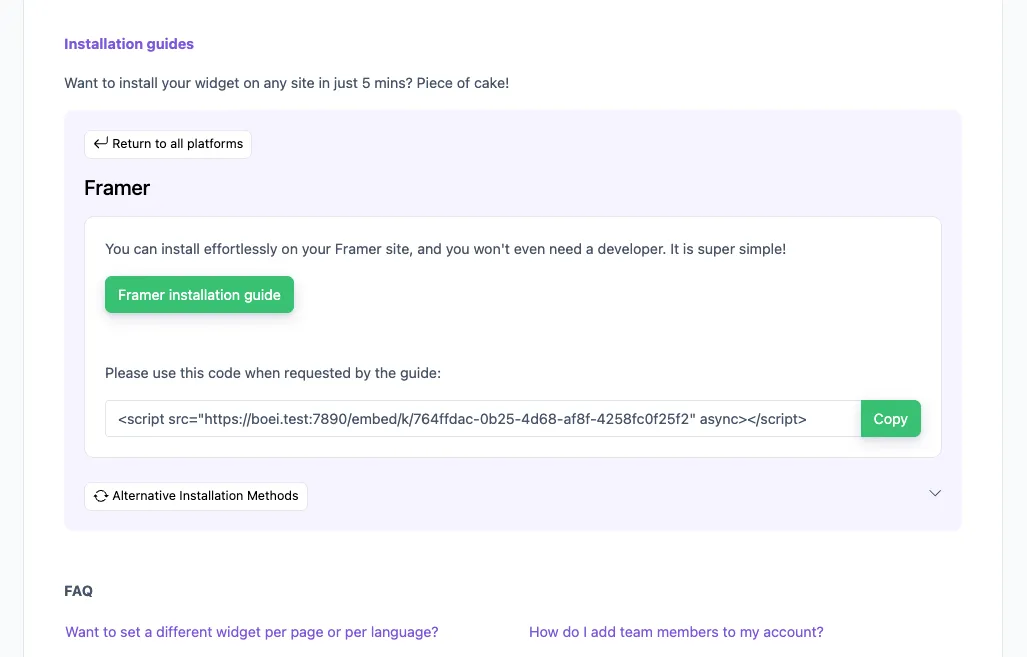
In your Boei dashboard, open your widget and click the Install tab. Select Framer and copy the installation code.

Tip: The Install tab also offers a landing page link, QR code, and iframe embed.

Copy installation code
2

Go to Framer

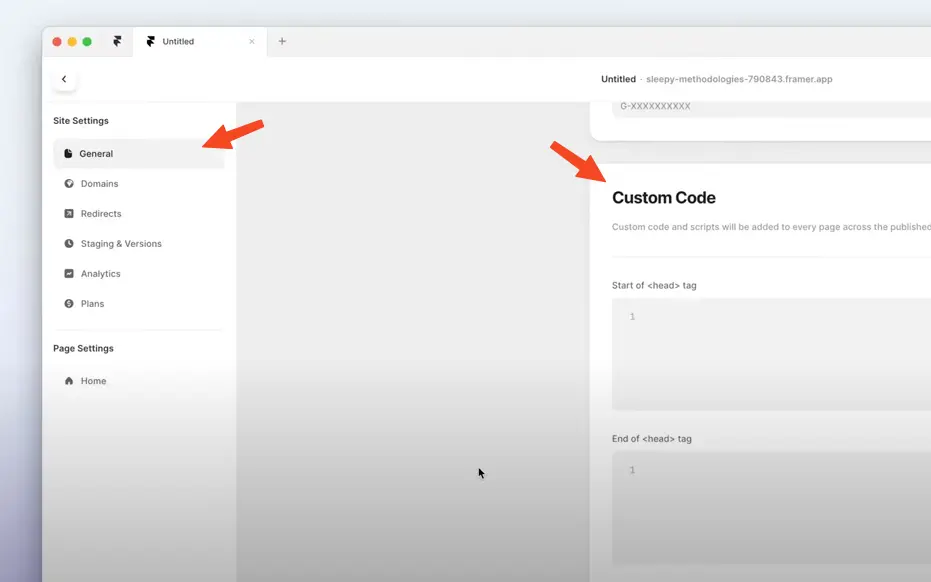
  1. Log in to your Framer account.
  2. Go to Settings by clicking the cog on the right top.
  3. Click General and scroll down to Custom Code.
  4. Paste the Boei code from step 2 in the End of <body> tag area. If there is already some code there, paste the Boei code below that.

Click Save and then Publish to see the changes on your live site.

Note that Framer does not load Boei in the Preview mode.

Congrats, you are done!

Go to Framer

Framer Features

Built for Framer

Messenger chat widget that complements your Framer design

💬

Custom Code Setup

Add Messenger via Framer's Site Settings → Custom Code. One snippet, all pages. No components or code overrides needed.

🤖

AI-Powered Responses

Built-in AI chatbot answers visitor questions 24/7 using your website content and FAQs. Captures and qualifies leads automatically.

📥

Shared Team Inbox

All Messenger conversations in one inbox alongside WhatsApp, email, and 50+ channels. AI summaries help your team respond faster.

🎨

Design-Friendly Widget

Customize colors, position, and branding to match your Framer design. Minimal, clean widget that respects your visual style.

Lightweight & Fast

Loads asynchronously, under 50KB. Won't affect your Framer site's performance or Core Web Vitals scores.

🔒

GDPR Compliant

Dutch company, Amsterdam servers. Zero cookies before click. Full GDPR compliance. DPA available on request.

Compare Options

Boei vs Other Framer Chat Options

Framer has no native messaging — see how Boei compares

Feature Boei Framer Forms Elfsight Messenger Crisp
Messenger integration
AI chatbot included ✗ Limited
Real-time conversations
Shared team inbox
Lead capture & CRM Basic ✗ Limited
Channels included 50+ Form only 1 5
Price €14/mo Included $5/mo €25/mo
Custom Code setup N/A

Bottom line: Framer forms are static and email-based. Elfsight adds a basic Messenger button. Boei gives you Messenger plus AI chatbot, shared inbox, CRM, and 50+ channels for €14/month. See all features.

What Framer Users Say

Questions?

Framer Messenger Widget FAQ

How does the Messenger widget work on Framer?

When a visitor clicks the Messenger button on your Framer site, it opens a direct conversation with your Facebook page. On mobile it opens the Messenger app, on desktop it opens Messenger.com. You respond from your Facebook Page inbox, Messenger app, or Boei's shared inbox.

How do I install it on Framer?

Sign up at Boei (free trial), add your Facebook page ID, and copy the widget code. In Framer, go to Site Settings → General → Custom Code → End of tag → paste the snippet. Publish your site and the Messenger widget is live. See our Framer installation guide.

Does it work with Framer CMS?

Yes. The Messenger widget appears on all pages including Framer CMS collection pages, blog posts, and portfolio items. One snippet covers your entire site.

Will it slow down my Framer site?

No. Boei loads asynchronously and adds less than 50KB. It won't affect your Framer site's loading speed or Core Web Vitals.

Do I need Framer Pro to add custom code?

Custom code is available on Framer's Mini plan and above. Check your Framer plan to ensure custom code access is included.

Can I use Messenger alongside other channels?

Yes. Add Messenger alongside WhatsApp, Instagram DM, Telegram, phone, email, AI chatbot, and 50+ other channels — all in one floating button.

Is it GDPR compliant?

Yes. Boei is a Dutch company with servers in Amsterdam (EU). No cookies, full GDPR compliance, DPA available on request.

How much does it cost?

Boei Pro is €14/month and includes the Messenger widget, AI chatbot with 2,000 messages, shared inbox, built-in CRM, 50+ channels, and unlimited team seats. Start with a 7-day free trial — no credit card required.

Messenger Widget for Every Platform

Add Facebook Messenger to any website builder

Add Facebook Messenger to Your Framer Site

2-minute Custom Code setup. AI chatbot, shared inbox, and 50+ channels included.

7-day free trial • No credit card required • 5-minute setup • No components needed
Andrew Lee David S. Vance W. Grant Nitesh Manav
from 159 reviews