AI Chatbot for Weebly

Add an AI chatbot to your Weebly website in 5 minutes. Answer visitor questions instantly, capture leads around the clock, and grow your small business — no coding required.

Trusted by 14,368 websites

Works with any Weebly theme

Andrew Lee David S. Vance W. Grant Nitesh Manav
from 159 reviews

Try the Weebly AI Chatbot

Why Add an AI Chatbot to Weebly?

You built your Weebly website to attract customers. But when visitors arrive with questions — about your services, hours, pricing, or products — they leave if they can't get answers fast. An AI chatbot for Weebly answers those questions instantly, even when you're busy running your business.

Boei's AI chatbot learns your entire Weebly site automatically. It reads your pages, services, products, and contact information — then answers visitor questions accurately, 24/7. Perfect for small businesses, freelancers, and local shops on Weebly.

Why Weebly site owners choose Boei:

  • Always-on support — Answer customer questions at 2 AM, on weekends, during holidays — automatically
  • Easy drag-and-drop setup — Add the chatbot with Weebly's embed code element, no technical skills needed
  • Lead capture built in — Collect visitor emails and phone numbers without adding extra forms
  • WhatsApp and more — Let visitors reach you via their preferred channel — all from one widget
  • Affordable for small business — Just €14/mo for AI chat with 2,000 conversations included

Small businesses using Weebly see more leads and fewer missed opportunities with an AI chatbot. Check our transparent pricing and explore all AI chatbot features.

Key Benefits

Why Weebly Users Love Boei

🔲

Drag-and-Drop Installation

Add the chatbot just like any Weebly element — drag the Embed Code block to your footer, paste the script, publish. True drag-and-drop simplicity.

🏪

Extend Your Square Ecosystem

Weebly is part of Square. Add Boei to complement your Square payments and POS with intelligent customer engagement on your website.

📞

Replace Static Contact Pages

Weebly's built-in contact form collects messages but can't answer questions. Boei answers first, then captures leads — higher quality contacts.

🕐

Support After Business Hours

Most small business Weebly sites get traffic in evenings and weekends. The AI chatbot handles those off-hours inquiries when you can't.

Quick Setup

Simple Setup

Get your AI chatbot live on Weebly in under 5 minutes

1

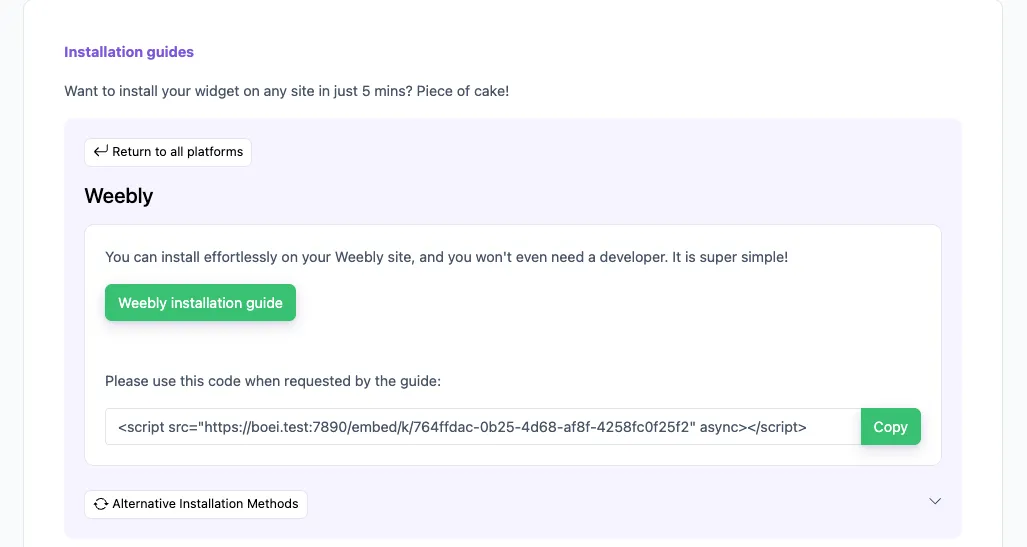
Copy installation code

In your Boei dashboard, open your widget and click the Install tab. Select Weebly and copy the installation code.

Tip: The Install tab also offers a landing page link, QR code, and iframe embed.

Copy installation code
2

Go to Weebly

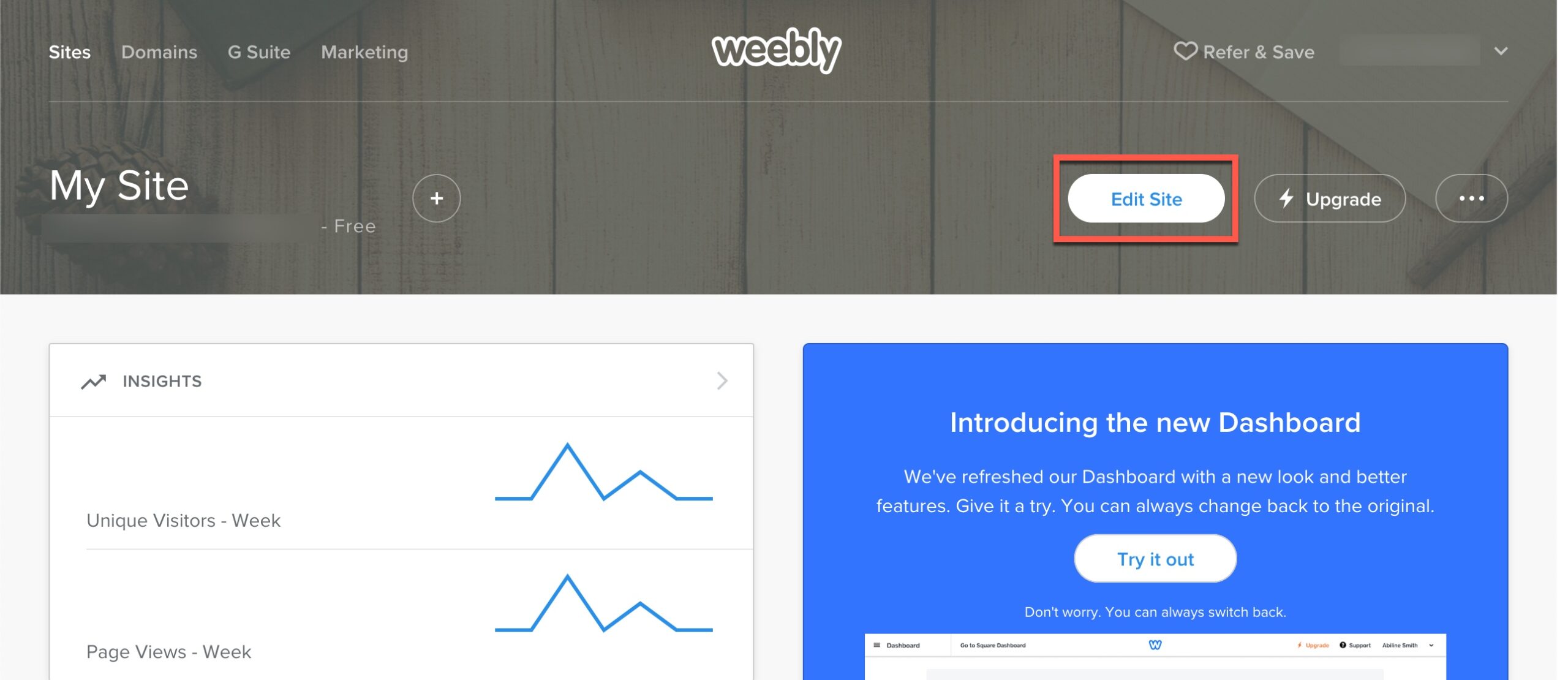
  1. Log in to your Weebly account.

  2. Click Edit Site.

  3. Click Settings.

  4. Click SEO.

  5. Copy the Boei code from step 2 and paste it into the "Footer Code" box in the Weebly. If there already is data, add the Boei code at the bottom.

Click Save and then Publish to apply the changes. Congrats, you are done!

Go to Weebly

Weebly Features

Built for Small Business

Everything your Weebly site needs

🔲

Weebly Element Compatible

Works alongside Weebly's drag-and-drop elements. The floating widget sits on top of your layout without interfering with your page builder sections.

🛒

Square Store Integration

Selling through Weebly's Square-powered store? The chatbot answers product questions, explains your shipping options, and helps shoppers decide.

📋

Smarter Than Weebly Forms

Weebly forms are static. Boei's AI asks follow-up questions, qualifies leads, and captures context that a form field never could.

📧

Lead Alerts to Any Email

Get instant email notifications when the chatbot captures a lead. Forward to your Square inbox, Gmail, or any email you use for business.

🎯

Appointment Booking Links

Using Square Appointments? Configure the chatbot to share your booking link when visitors ask about scheduling.

🌍

Serve Diverse Communities

Many Weebly small businesses serve multilingual neighborhoods. The AI responds in 95+ languages, removing language barriers.

Compare Options

Boei vs Other Weebly Chat Options

See how we compare to popular alternatives

Feature Boei Weebly Contact Form Powr Chat Tidio
Starting price €14/mo Free (basic) $5.49/mo €39/mo
AI-powered answers Yes (2,000/mo) 50-1,000
Learns your Weebly content ✓ Yes ✗ Limited
WhatsApp, forms, 50+ channels ✓ Yes Email only
Works with Square Store ✓ Yes ✓ Yes ✓ Yes ✓ Yes
Lead qualification AI-powered Basic form Basic

Bottom line: Boei gives you AI chat that learns your Weebly content for €14/mo. Affordable for small businesses with no branding or per-seat fees.

Your 24/7 Business Assistant

Imagine having a team member who knows everything about your business, greets every visitor, and never takes a day off. That's what Boei's AI chatbot does for your Weebly website.

  • Answer questions about your services, hours, and location
  • Help visitors find the right product or service
  • Collect contact details from interested prospects
  • Share pricing information and package details
  • Handle common questions so you can focus on your business
Weebly AI Business Assistant

Pro Tips

Get More From Your Weebly Chatbot

1

Use Weebly's Built-in Blog

Publish blog posts about your services, process, and expertise. The chatbot learns from every post, getting smarter with each article you write.

2

Link Your Square Appointments

If you use Square Appointments, add your booking URL. The chatbot can direct visitors to schedule when they ask about availability.

3

Add Your Weebly Store Products

Selling through Weebly's store? Detailed product descriptions with materials, sizes, and care instructions improve chatbot accuracy.

4

Set Up After-Hours Messages

Configure the chatbot's welcome message for evenings and weekends. Let visitors know the AI can help while you're away.

Need Help?

Troubleshooting Common Issues

Widget not showing on my Weebly site?
Make sure you've added the Boei script using the Embed Code element in your Weebly editor. Place it in the footer area and publish your site.
Chatbot not learning my pages?
Ensure your pages are published (not hidden or draft). Add your website URL to Boei's training section for complete content crawling.
Widget looks wrong on mobile?
The Boei widget is responsive by default. If it overlaps with Weebly's mobile menu, adjust the widget position in the Boei dashboard settings.
Can I use it on the free Weebly plan?
Embed code functionality requires a paid Weebly plan (Personal or higher). The free plan has limited embed code support.

What Small Business Owners Say

See AI Chatbot in Action

Real websites using Boei's AI chatbot

Add More Contact Channels

Combine AI chatbot with other ways for visitors to reach you

Related Resources

Learn more about AI chatbots

Wix

AI chatbot for Wix websites

Pricing

Transparent AI chatbot pricing

Weebly Chatbot Pricing

Simple, transparent pricing with AI chatbot included

Vance
Vance: " Helps me to convert website visitors to warm leads " ★★★★★

$8 / month

Billed annually at $96Cancel anytime

Number of websites

Optional Add-ons

Optional

Enhance your plan with these extras

What's included

    No contractsCancel anytime Trusted by 14.368 businesses

    Start 7-Day Free Trial

    Prices exclude VAT, calculated at checkout

    Need an Agency or Enterprise Solution?

    Get custom pricing, priority support, and advanced features such as custom domains and mailers

    Contact Sales

    Questions?

    Weebly AI Chatbot FAQ

    How do I install the AI chatbot on Weebly?

    Drag the Embed Code element into your Weebly page footer. Paste the Boei script code and publish your site. The chatbot appears on all pages.

    Will it slow down my Weebly site?

    No. The Boei script is under 50KB and loads asynchronously after your page content. It won't affect your site's loading speed.

    Does it work with Weebly ecommerce?

    Yes. The chatbot learns your product pages and can answer questions about items, pricing, shipping, and returns.

    Do I need a paid Weebly plan?

    The Embed Code element works best on Weebly's paid plans (Personal and above). Some embed features are limited on the free plan.

    How smart is the AI chatbot?

    Boei uses GPT-5 and Claude, the most advanced AI models available. They understand context — if a visitor asks 'do you do weekends?', the AI checks your hours page and gives a specific answer.

    What if the chatbot doesn't know an answer?

    It tells the visitor honestly and offers to collect their contact details so you can follow up personally. No made-up answers, no hallucinated information.

    Can I customize the chatbot appearance?

    Yes. Change colors, position, welcome message, and quick reply buttons from the Boei dashboard. Match your Weebly theme perfectly.

    Do I need a cookie banner for the chatbot?

    Boei offers a cookieless mode that requires no cookie consent. If you prefer cookies for returning visitor recognition, it works with standard cookie banners. EU servers, GDPR compliant.

    Does the AI chatbot work on WhatsApp too?

    Yes. Boei’s AI chatbot works on your website and on WhatsApp. Incoming WhatsApp messages get automatic AI replies, and all conversations land in your shared inbox with AI summaries.

    Ready to Grow Your Weebly Business?

    Join thousands of small businesses using Boei. Setup takes 5 minutes.

    7-day free trial • No credit card required • Works with any Weebly theme
    Andrew Lee David S. Vance W. Grant Nitesh Manav
    from 159 reviews