AI Chatbot for Jimdo

Add an AI chatbot to your Jimdo website in 5 minutes. Answer visitor questions instantly, capture leads around the clock, and grow your business: easy setup, no coding needed.

Trusted by 14,368 websites

Works with Jimdo Creator & Dolphin

Andrew Lee David S. Vance W. Grant Nitesh Manav
from 159 reviews

Try the Jimdo AI Chatbot

Why Add an AI Chatbot to Jimdo?

You built your Jimdo website to showcase your business. But visitors arrive with questions: about your services, pricing, availability. And if they don't get answers quickly, they leave. An AI chatbot for Jimdo answers those questions instantly, converting visitors into customers while you run your business.

Boei's AI chatbot learns your entire Jimdo website automatically. It reads your pages, services, and contact information. Then answers visitor questions accurately, 24/7. Built in Europe, just like Jimdo, with full GDPR compliance.

Why Jimdo website owners choose Boei:

  • European & GDPR-compliant. EU servers in Amsterdam, matching Jimdo's European roots and privacy standards
  • Simple setup. Add the chatbot through Jimdo's head code area, no technical skills needed
  • Always-on support. Answer customer questions evenings, weekends, and holidays automatically
  • Lead capture. Collect visitor emails and phone numbers through natural conversations
  • Affordable. Just from $11/mo for AI chat with 2,000 conversations, perfect for small businesses

Jimdo websites convert more visitors when they offer instant answers. Check our transparent pricing and explore all AI chatbot features.

Key Benefits

Why Jimdo Users Love Boei

🇩🇪

Made for the German Market

Jimdo is from Hamburg, Boei is from the Netherlands. Both understand European business culture, DSGVO requirements, and the Impressum-first mindset.

🤖

Complement Jimdo's AI Builder

Jimdo Dolphin creates your website with AI. Boei adds the missing piece. AI that talks to your visitors based on the content Dolphin generated.

📋

Better Than Jimdo's Contact Form

Jimdo's built-in form collects messages but can't answer questions. Boei answers visitor questions first, then captures qualified lead details.

🏠

Local Business Focus

Most Jimdo users are local businesses: bakeries, salons, consultants. The chatbot answers questions about hours, location, and services that these customers ask.

Quick Setup

Simple Setup

Get your AI chatbot live on Jimdo in under 5 minutes

1

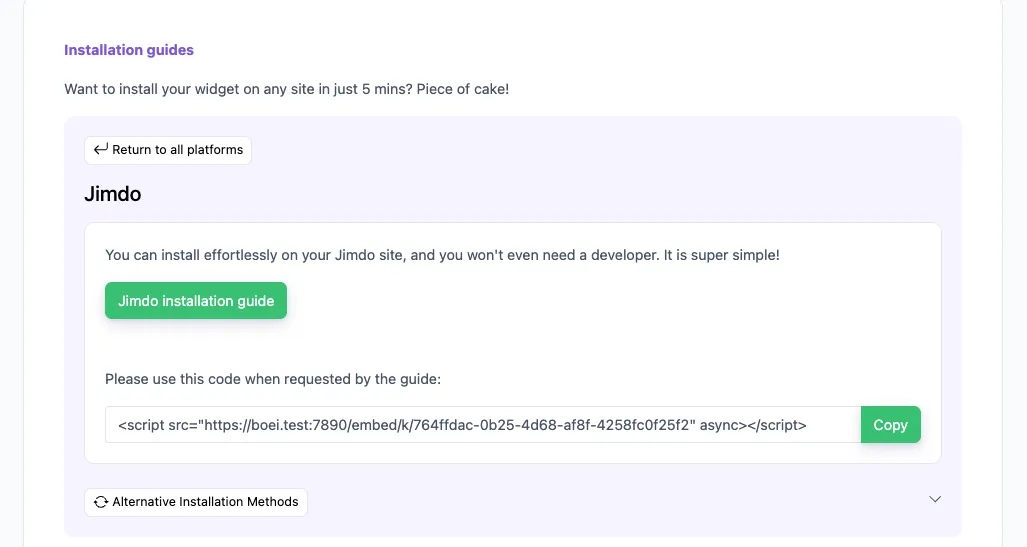
Copy installation code

In your Boei dashboard, open your widget and click the Install tab. Select Jimdo and copy the installation code.

Tip: The Install tab also offers a landing page link, QR code, and iframe embed.

Copy installation code
2

Log in to Jimdo

Log in to your Jimdo account and choose the desired website.

3

Add Widget/HTML Element

  1. Click Edit to enter your Jimdo Creator website’s edit mode
  2. Hover over the content area to click on Add Element > More elements and Add-ons
  3. Choose the Widget/HTML Element to add it to your website
  4. Paste the code snippet you copied in step 2 in the text box.

Note that Jimdo may not allow code scripts on all account types; you may need to upgrade.

4

Save

Save your changes in Jimdo.

5

Finished coffee

Congrats, you are done!

Jimdo Features

Built for Small Business

Everything your Jimdo site needs

🐬

Jimdo Dolphin & Creator

Works with both Jimdo Dolphin (the AI builder) and Jimdo Creator (the classic editor). One script, both platforms.

🏢

Impressum & Legal Pages

The chatbot learns your Impressum, Datenschutz, and AGB pages. It can answer legal and policy questions that German customers expect.

🛒

Jimdo Online-Shop

Running Jimdo's built-in shop? The chatbot learns your product catalog, answers questions about Versand, Retouren, and Zahlungsmethoden.

📍

Local SEO Boost

When visitors search for local services and land on your Jimdo site, the chatbot immediately engages them with relevant answers.

🔒

DSGVO-Konform

EU servers in Amsterdam, no data processing outside Europe, optional cookieless mode. Meets DSGVO requirements without extra legal work.

🇩🇪

Native German Support

The AI responds in perfect German. Including formal Sie/Du distinctions. Also speaks French, Dutch, Italian, and 90+ other languages.

📋

Lead Flow

Capture leads with structured question flows. Ask for name, email, phone, and company inside the chat conversation.

🧠

Choose Your AI Model

Pick from OpenAI, Anthropic, Google, or Mistral. Switch models anytime from your dashboard.

Exact Answers

Override AI responses for specific questions. Bulk-import Q&A pairs via Excel template.

Compare Options

Boei vs Other Jimdo Chat Options

See how we compare to popular alternatives

Feature Boei Jimdo Contact Form Userlike Smartsupp
Starting price from $11/mo Free (built-in) €90/mo Free (limited)
AI-powered answers Yes (2,000/mo) Add-on ✗ Limited
Learns your Jimdo content ✓ Yes
WhatsApp, forms, 50+ channels ✓ Yes Email only ✗ Limited
DSGVO/GDPR compliant Yes (Amsterdam) ✓ Yes Yes (Germany) Yes (EU)
German language AI Native quality No AI German UI only ✗ Limited

Bottom line: Boei offers European-hosted AI chat for from $11/mo. Perfect for Jimdo users who value privacy and simplicity.

Your 24/7 Business Assistant

Imagine having a team member who greets every visitor, knows everything about your business, and is fluent in every European language. That's what Boei's AI chatbot does for your Jimdo website.

  • Answer questions about your services and business hours
  • Share pricing information and package details
  • Collect contact details from interested visitors
  • Guide visitors to the right page on your site
  • Handle common inquiries so you can focus on your work
Jimdo AI Business Assistant

Pro Tips

Get More From Your Jimdo Chatbot

1

Publish a Detailed Impressum

German visitors check your Impressum for legitimacy. A detailed legal page also helps the chatbot answer questions about your company details.

2

Write Leistungen Pages in Detail

List every service with description, pricing, and process. Jimdo Dolphin generates basic text. Expand it so the chatbot can give thorough answers.

3

Add Öffnungszeiten Prominently

Business hours are the #1 question for local businesses. Put them on your Jimdo homepage so the chatbot learns and shares them instantly.

4

Connect WhatsApp for German Customers

WhatsApp has 60M+ users in Germany. Add it as a channel alongside AI chat. Many German customers prefer messaging on WhatsApp.

Need Help?

Troubleshooting Common Issues

Widget not showing on my Jimdo site?
For Jimdo Creator: go to Settings → Edit Head and add the Boei script. For Jimdo Dolphin: use the embed code block in your page layout.
Chatbot not learning my pages?
Ensure your pages are published and not hidden. Add your website URL to Boei's training section for complete content crawling.
Does it work with Jimdo Dolphin?
Yes. Jimdo Dolphin supports embed codes. Add the Boei script through an embed block or the head code area in your site settings.
Widget conflicts with Jimdo elements?
The Boei widget uses a floating position that rarely conflicts with Jimdo layouts. Adjust position (left/right) in the Boei dashboard if needed.

What Small Business Owners Say

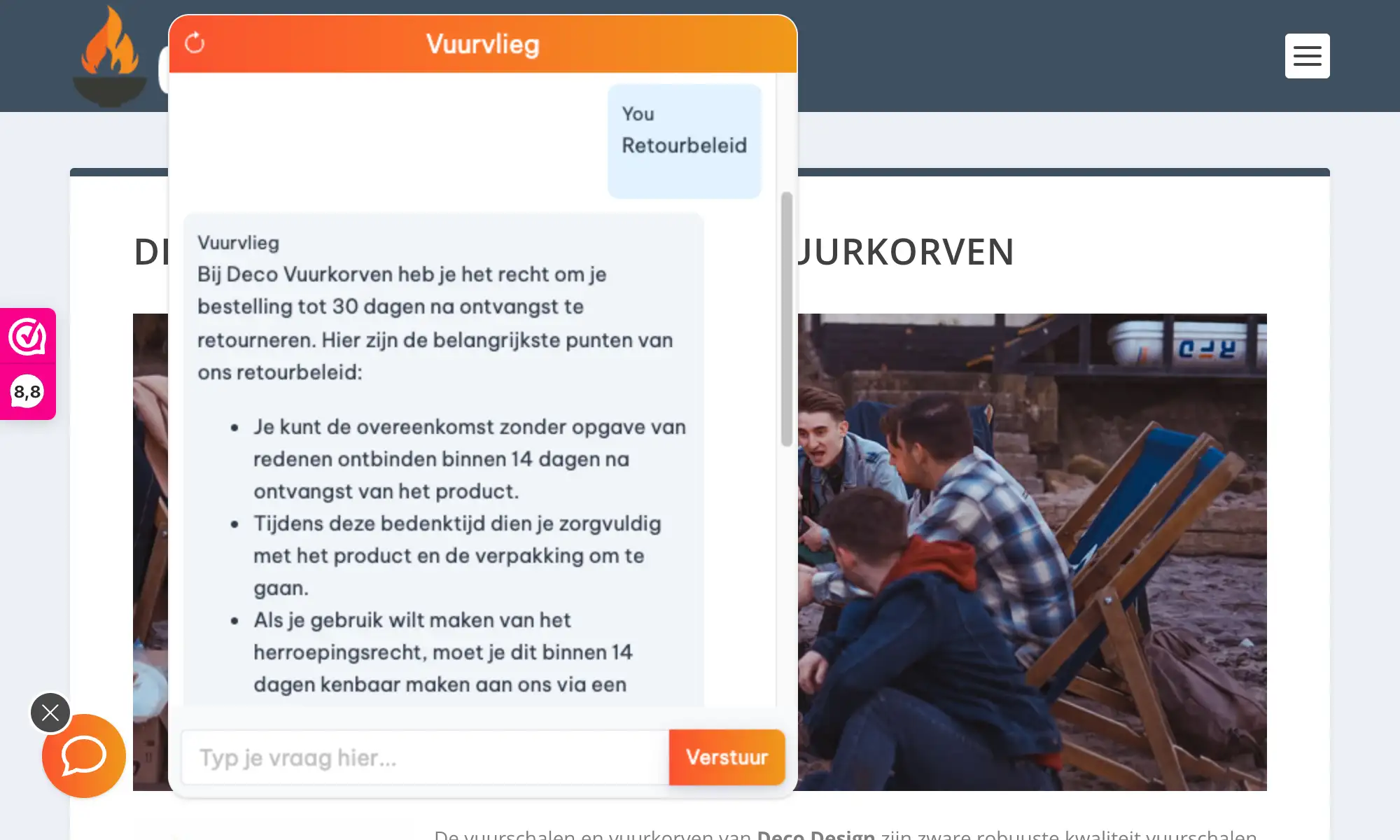
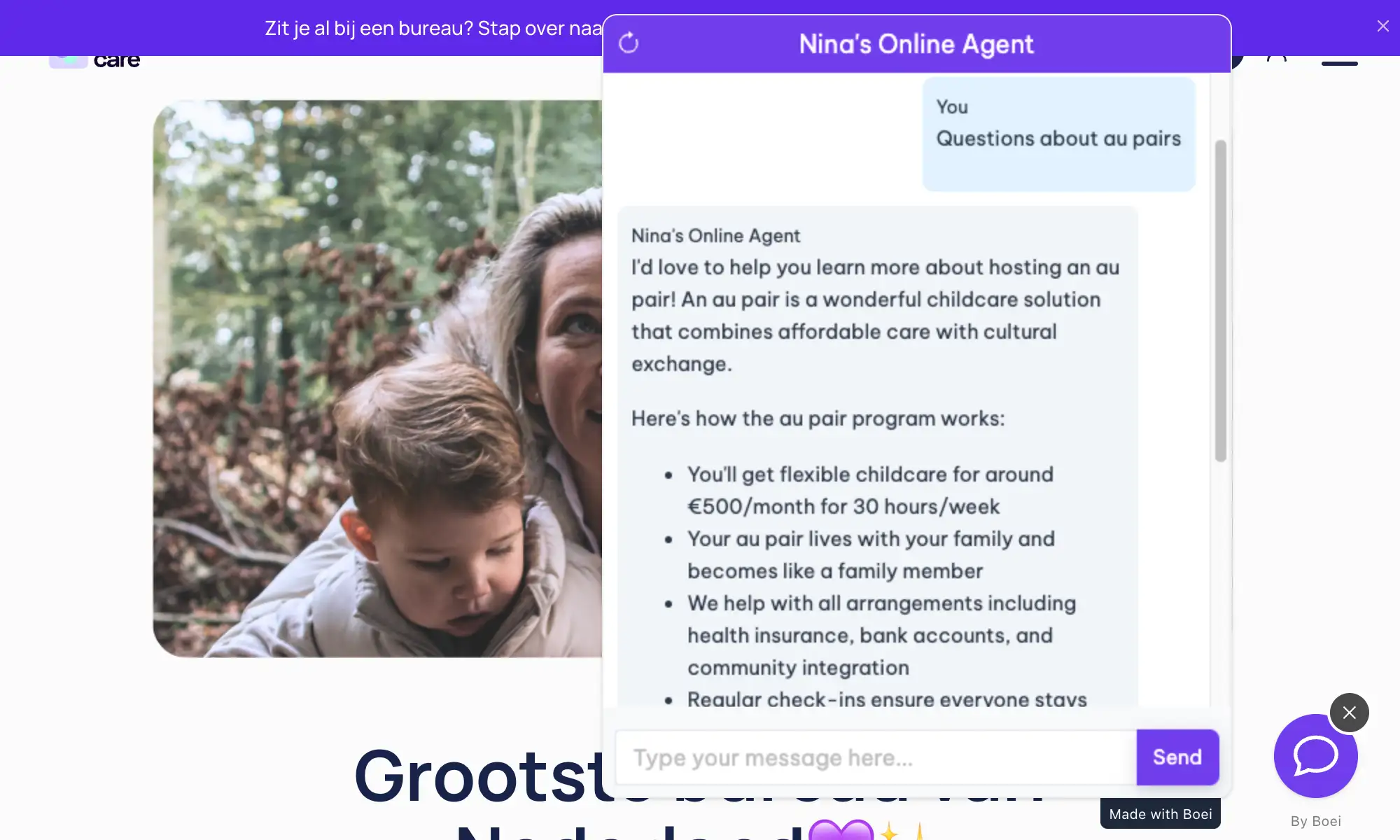
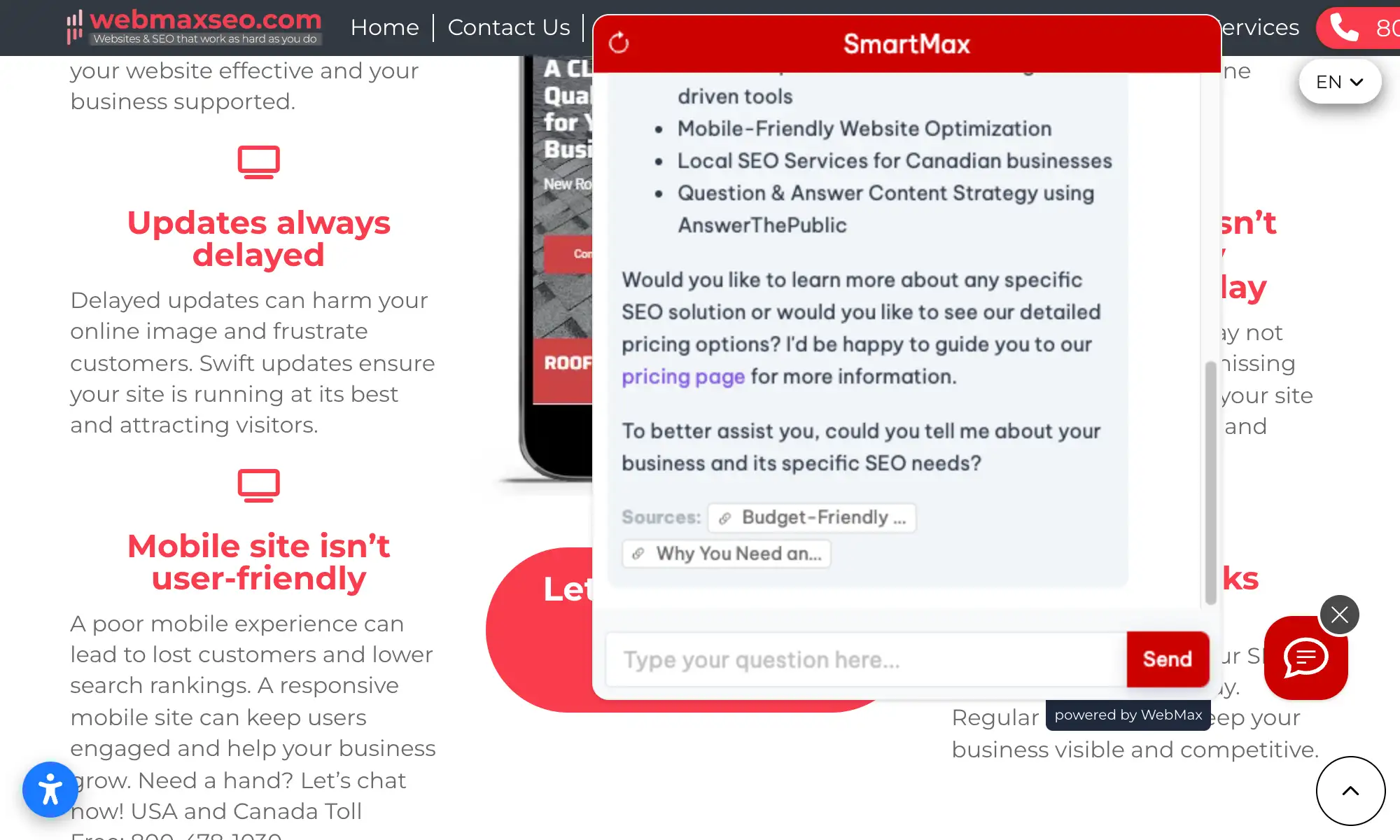
See AI Chatbot in Action

Real websites using Boei's AI chatbot

Add More Contact Channels

Combine AI chatbot with other ways for visitors to reach you

Related Resources

Learn more about AI chatbots

Wix

AI chatbot for Wix websites

Pricing

Transparent AI chatbot pricing

Jimdo Chatbot Pricing

Simple, transparent pricing with AI chatbot included

Vance
Vance: " Helps me to convert website visitors to warm leads " ★★★★★

Lite

For individuals & small sites

$11/mo
Billed at $132/yr
  • 1 domain, 1 chatbot
  • 50+ contact channels
  • 50 AI credits/mo
  • 100 training pages
  • 1 live chat agent
  • Inbox + contacts
  • Unlimited leads & conversations
  • Unlimited widgets
  • Analytics & marketing integrations

Starter

For small businesses

$19/mo
Billed at $228/yr
  • Everything in Lite, plus:
  • 2,000 AI credits/mo
  • 1,000 training pages
  • 50 product training
  • Email + WhatsApp chatbot
  • Lead collectors
  • Source gap detect
  • 5 AI actions/bot coming soon
  • CRM & advanced integrations
Most popular

Growth

For teams & deal automation

$49/mo
Billed at $588/yr
  • Everything in Starter, plus:
  • 3 domains, 3 chatbots
  • 7,000 AI credits/mo
  • 3,500 training pages
  • 500 product training
  • 3 workspace seats
  • 3 live chat agents
  • Auto retrain, Tagging
  • Ticket training
  • AI summary on handover
  • Deal pipeline
  • API access
  • Webhooks

Business

For agencies & high volume

$129/mo
Billed at $1,548/yr
  • Everything in Growth, plus:
  • 10 domains, 10 chatbots
  • 20,000 AI credits/mo
  • 10,000 training pages
  • Unlimited product training
  • 5 workspace seats

  • 5 live chat agents
  • Custom domain
  • White-label
  • Branding removed

7-day free trial · No credit card required · Prices exclude VAT

Compare Plans

Lite
$11/mo
Starter
$19/mo
Growth
$49/mo
Business
$129/mo
Core Limits
Domains1110
WidgetsUnlimitedUnlimitedUnlimited
Chatbots1110
Contacts/moUnlimitedUnlimitedUnlimited
Workspace seats115
AI Chatbot
AI credits/mo502,00020,000
Training pages1001,00010,000
Product training new50 productsUnlimited
Email + WhatsApp chatbot newYesYes
AI actions/bot5 coming soon15 coming soon
Lead collectors newYesYes
Source gap detectYesYes
Auto retrainYes
Tagging newYes
Ticket training newYes
AI summary on handover newYes
Live Chat & Inbox
Live chat agents115
Inbox + contactsYesYesYes
Deal pipelineYes
Integrations
Analytics GA4, GTM, Plausible, Simple AnalyticsYesYesYes
Facebook PixelYesYesYes
MailchimpYesYesYes
HubSpot CRMYesYes
Missive AI reply on emailsYesYes
SDK PrefillsYesYes
WebhooksYes
Platform
API accessYes
Custom domainYes
White-labelYes
BrandingAdd-onAdd-onRemoved

Add-ons

Extra domain
$9/mo per domain
Extra chatbot
$6/mo annual
Extra live agent
$6/mo annual
AI credits
$6/mo per 1,000 credits
Branding removal
$14/mo
SMS credits
$10 per 100 credits

Need an Agency or Enterprise Solution?

Get custom pricing, priority support, and advanced features

Contact Sales

Questions?

Jimdo AI Chatbot FAQ

How do I install the AI chatbot on Jimdo?

For Jimdo Creator, go to Settings → Edit Head and paste the Boei script. For Jimdo Dolphin, add it via an embed code block. Both methods take under 5 minutes.

Will it slow down my Jimdo website?

No. The Boei script is under 50KB and loads asynchronously after your page content. It won't affect your site's loading speed.

Does it work with Jimdo's online shop?

Yes. The chatbot learns your product pages and can answer questions about items, pricing, shipping, and returns.

Is it GDPR compliant?

Yes. EU-based servers (Amsterdam), no training on your conversations, optional cookieless mode. DPA available on request. Built in Europe for European businesses.

Welche KI-Modelle werden verwendet?

Boei nutzt GPT-5 und Claude. Die fortschrittlichsten Sprachmodelle. Sie verstehen deutsche Grammatik, formelle Anrede, und können Fachbegriffe korrekt verwenden. (Boei uses GPT-5 and Claude for native-quality German responses.)

Erfindet die KI Informationen?

Nein. Der Chatbot antwortet ausschließlich auf Basis Ihrer veröffentlichten Jimdo-Inhalte. Bei unbekannten Fragen verweist er auf Ihr Kontaktformular. (No. The AI only uses your published Jimdo content and admits when it doesn't know.)

Can I use it in German and other languages?

Yes. The AI auto-detects visitor language and responds in 95+ languages including German, French, Dutch, Spanish, and more.

Can I use it on multiple Jimdo sites?

Yes. Your Boei subscription covers unlimited websites. Create separate chatbots for each Jimdo site.

Does the AI chatbot work on WhatsApp too?

Yes. Boei’s AI chatbot works on your website and on WhatsApp. Incoming WhatsApp messages get automatic AI replies, and all conversations land in your shared inbox with AI summaries.

Can I choose which AI model powers the chatbot?

Yes. Boei supports OpenAI, Anthropic, Google, and Mistral models. You can switch models anytime from your dashboard settings. All models train on your website content automatically.

Ready to Grow Your Jimdo Business?

Join thousands of European businesses using Boei. Setup takes 5 minutes.

7-day free trial • No credit card required • GDPR compliant (EU servers)
Andrew Lee David S. Vance W. Grant Nitesh Manav
from 159 reviews