Jimdo logo

WhatsApp AI Agent

WhatsApp AI Agent & Chat Widget for Jimdo

Turn your WhatsApp into an AI agent that answers questions, qualifies leads, and routes warm prospects to your team — automatically. Perfect for German small businesses where WhatsApp is the #1 way to communicate.

Trusted by 14,368 websites

No WhatsApp Business API required

Andrew Lee David S. Vance W. Grant Nitesh Manav
from 159 reviews

A WhatsApp AI Agent That Qualifies Leads Automatically

Your WhatsApp chat widget comes with a built-in AI agent. It doesn't wait for questions — it qualifies visitors, asks about budget, timeline, and needs, captures contact details, and scores lead intent. Warm prospects get routed to your team with a full conversation summary. Cold leads stay nurtured automatically.

  • Asks qualifying questions based on your sales process
  • Captures name, email, phone, and company details mid-conversation
  • Scores lead intent so your team focuses on hot prospects
  • Hands warm leads to agents with full context + AI summary
  • Trained on your website, PDFs, pricing, and FAQs
WhatsApp AI
Hi! I'm looking for a solution for my team of 12.
Great! What's your main goal — lead capture, customer support, or both? I'll match you with the right plan.
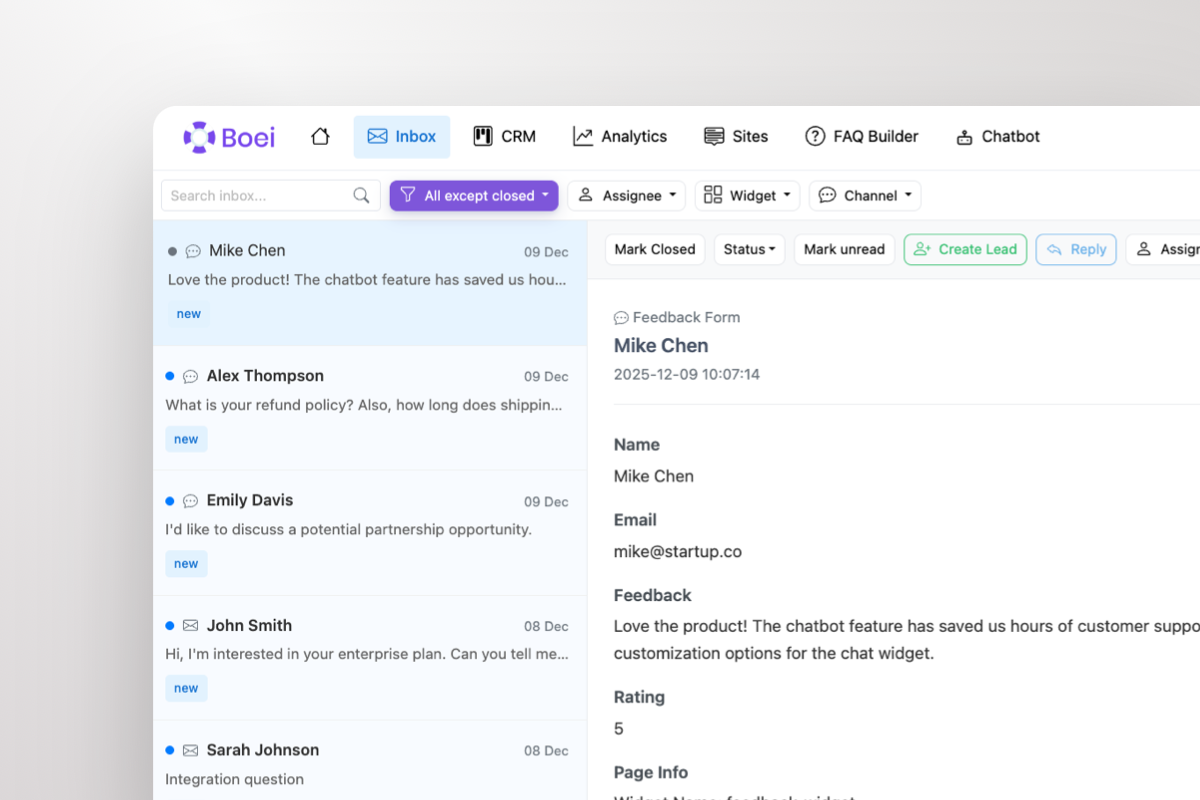
Shared inbox showing WhatsApp conversations with AI summary and agent handoff

Warm Leads Go Straight to Your Team

When a prospect is ready to buy, the AI doesn't keep chatting — it escalates. Your sales team gets the lead in a shared inbox with the full WhatsApp conversation and an AI-generated summary: who they are, what they need, and how warm they are. One click to take over.

  • AI escalates warm leads to your team automatically
  • Agents see full conversation + AI summary in shared inbox
  • Take over any WhatsApp chat with one click
  • Round-robin or department-based routing across agents
  • Leads flow into built-in CRM pipeline automatically

What Jimdo Users Say

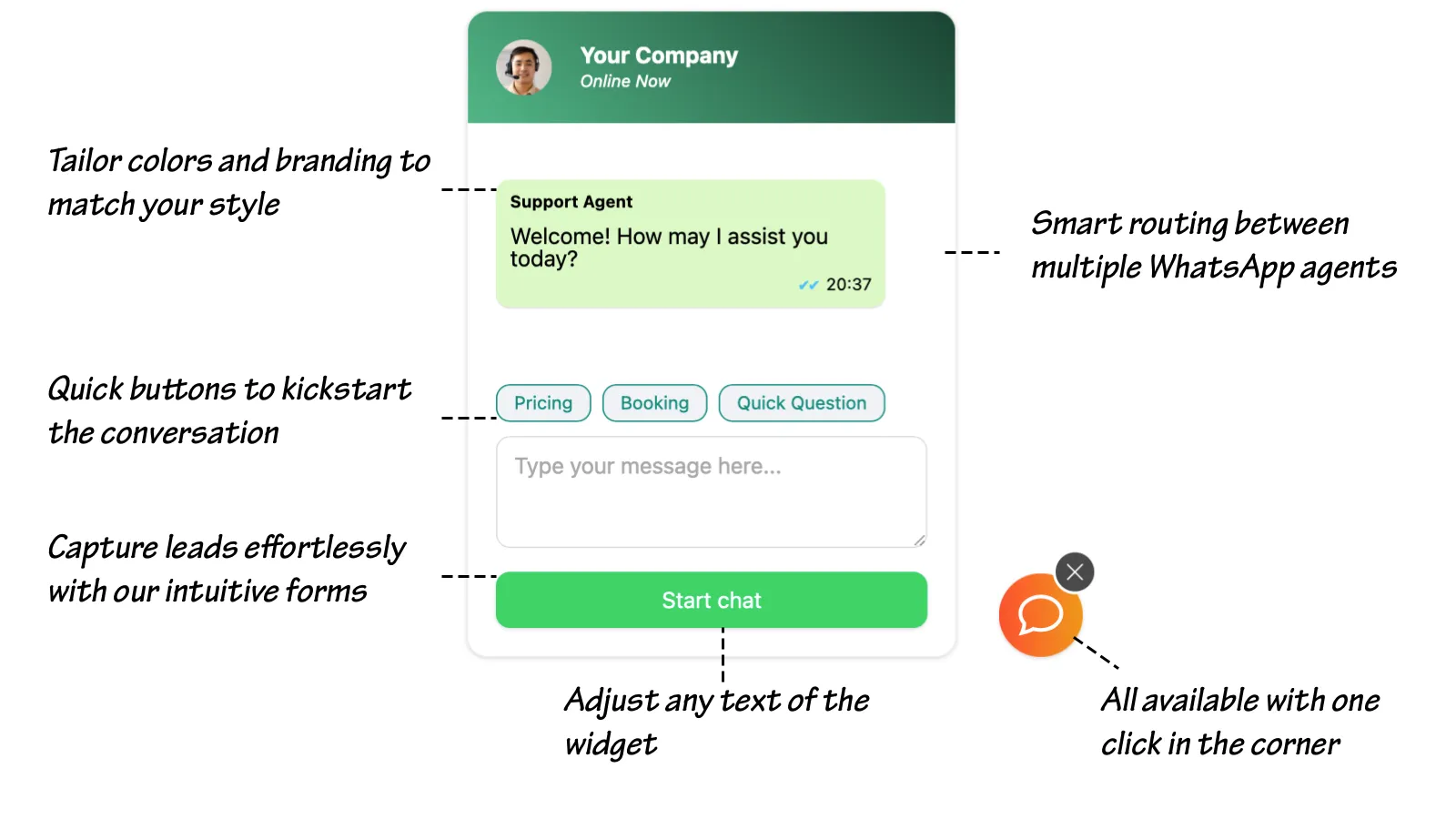
Your WhatsApp Widget, Your Brand

WhatsApp chat widget showing branding options, quick-reply prompts, lead capture form, and agent routing

Compare Options

Boei vs Jimdo Contact Form vs Elfsight

Jimdo has basic contact forms — here's how Boei transforms your customer communication

Feature Boei Jimdo Contact Form Elfsight Embed WhatsApp Link
AI agent
Lead qualification
Shared inbox Email only Phone app
Built-in CRM
WhatsApp channel ✓ (basic)
Channels included 50+ Contact form 1 1
AI automation 2,000 msgs/mo
After-hours handling AI 24/7
Price €14/mo Free €6-20/mo Free

Bottom line: Jimdo's contact form sends emails you might miss. A WhatsApp link opens your phone app with no automation. Elfsight adds a button with no intelligence. Boei gives you an AI that qualifies leads 24/7, a shared inbox, and a CRM to track every customer — all for €14/month.

Quick Setup

Install WhatsApp AI Agent on Jimdo

From setup to your first qualified lead in under 5 minutes

1

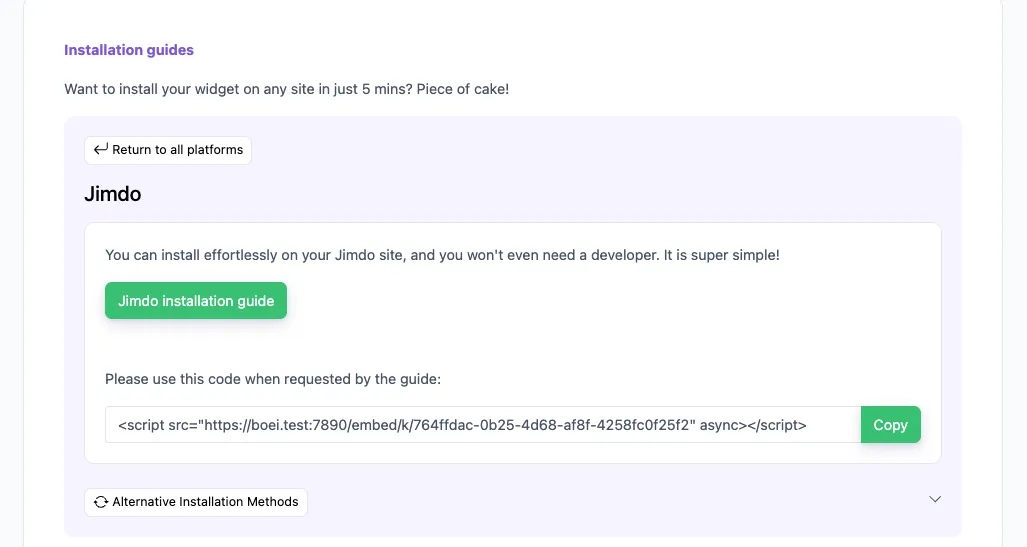
Copy installation code

In your Boei dashboard, open your widget and click the Install tab. Select Jimdo and copy the installation code.

Tip: The Install tab also offers a landing page link, QR code, and iframe embed.

Copy installation code
2

Log in to Jimdo

Log in to your Jimdo account and choose the desired website.

3

Add Widget/HTML Element

  1. Click Edit to enter your Jimdo Creator website’s edit mode
  2. Hover over the content area to click on Add Element > More elements and Add-ons
  3. Choose the Widget/HTML Element to add it to your website
  4. Paste the code snippet you copied in step 2 in the text box.

Note that Jimdo may not allow code scripts on all account types; you may need to upgrade.

4

Save

Save your changes in Jimdo.

5

Finished coffee

Congrats, you are done!

Jimdo Features

Built for Jimdo Websites

As simple as Jimdo — but with AI power behind it

🤖

AI Answers Customer Questions

Trained on your Jimdo site — services, pricing, hours, locations. Answers 'Was kostet das?' and 'Haben Sie morgen noch Termine?' automatically.

📥

One Inbox for Everything

WhatsApp, phone calls, email, contact forms — all in one place. No more switching between apps. AI prioritizes warm leads for you.

📊

Simple Customer CRM

Track every customer and job. See who contacted you, what they need, and where they are in your pipeline. Replaces notebooks and spreadsheets.

📱

50+ Contact Channels

WhatsApp, phone, email, Messenger, contact forms — customers choose how they reach you. One Jimdo widget, every channel.

5-Minute Setup

As simple as adding any Jimdo element. Paste one code snippet, save, done. No technical knowledge needed — if you can build a Jimdo site, you can add Boei.

🕐

Works After Hours

Customers message at 9pm. AI qualifies them overnight. You start each morning with a list of warm leads — ready to call back.

🌍

Multi-Language AI

German, English, Turkish, Arabic, and 90+ more. AI converses in your customers' language — perfect for diverse communities.

🔒

DSGVO-Konform

Dutch company, Amsterdam servers. No cookies, full DSGVO/GDPR compliance. DPA available — trustworthy for German businesses.

How Jimdo Businesses Grow with WhatsApp AI

AI qualifies leads while you focus on your craft

Tradespeople (Handwerker)

Plumbers, electricians, painters, builders. AI captures job details, location, and urgency from WhatsApp messages. You get quote-ready leads before making a single phone call.

  • AI captures job type, location, and urgency
  • Collects customer phone and preferred contact time
  • Prioritizes urgent vs general requests
  • QR codes on vans, tools, and job site signs

Salons & Personal Services

AI handles appointment requests, service questions, and pricing inquiries. Books customers into your schedule while you're with a client.

  • AI answers service and pricing questions
  • Captures preferred date and time
  • Routes booking requests with customer details
  • After-hours booking via AI

Consultants & Coaches

AI pre-qualifies consulting leads by asking about goals, budget, and timeline. Serious prospects get routed to you with a full brief — before the discovery call.

  • AI qualifies by goals and budget range
  • Captures contact details mid-conversation
  • Routes warm leads with AI-written brief
  • CRM tracks every prospect through pipeline

Perfect for Tradespeople and Local Service Providers

You're on a job site, not watching your phone. AI handles incoming WhatsApp messages — asking what customers need, when they need it, and capturing their address and phone number. By the time you check your inbox, you have a prioritized list of leads with everything you need to quote.

  • AI captures job details, location, and urgency while you work
  • Asks customers what they need — plumbing, electrical, painting, etc.
  • Captures phone, address, and preferred contact time
  • Prioritizes urgent requests vs general inquiries
  • QR codes for your van, business cards, and flyers
  • Simple CRM tracks every job from inquiry to completion
Jimdo tradesperson WhatsApp AI lead qualification

Pro Tips

Get More Customers from Your Jimdo Site

1

Let AI Handle While You Work

On a job? In a meeting? With a client? AI qualifies leads on WhatsApp 24/7. Check your inbox between appointments — warm leads are prioritized and ready.

2

Print QR Codes Everywhere

Put WhatsApp QR codes on your van, business cards, flyers, receipts, and uniforms. Every QR scan starts an AI conversation that qualifies the lead into your CRM.

3

Use Quick-Reply Prompts in German

Widgets like 'Angebot anfordern', 'Termin buchen', 'Öffnungszeiten' help German customers start the right conversation. AI handles it from there.

4

Replace Your Notebook with CRM

Stop writing customer details on paper. Every WhatsApp lead is automatically in your CRM with contact info, what they need, and conversation history.

Your AI Works on 50+ Channels

Same AI, same inbox, same CRM — however your customers want to reach you

Questions?

Jimdo WhatsApp AI Agent FAQ

How does the AI agent work on Jimdo?

When a customer messages your WhatsApp from your Jimdo site, the AI responds instantly in their language — answering questions, capturing their details, and qualifying their interest. Warm leads are routed to you with the full conversation and a summary of what they need.

How do I install it on Jimdo?

In Jimdo, add the Boei snippet via Settings → Edit Head section, or use a custom code widget on your page. Save and publish — your AI agent is live. Takes 5 minutes, no coding. See our Jimdo installation guide.

Does it speak German?

Yes. AI converses fluently in German, English, Turkish, Arabic, and 90+ other languages. Perfect for German businesses serving diverse communities.

Can AI handle messages when I'm on a job?

Yes — that's the main benefit. AI qualifies leads 24/7 while you work. Check your inbox between appointments — warm leads are prioritized with full context, ready to call back.

What does it cost?

Boei Pro is €14/month and includes the WhatsApp AI agent, 2,000 AI messages, shared inbox, built-in CRM, 50+ channels, and unlimited team seats. Start with a 7-day free trial — no credit card required.

Is it DSGVO/GDPR compliant?

Yes. Dutch company, EU servers (Amsterdam). No cookies, full DSGVO/GDPR compliance, DPA (Auftragsverarbeitungsvertrag) available on request.

Can I use it for appointment booking?

Yes. AI captures preferred dates, times, and service type from WhatsApp conversations. Booking requests are routed to you with all details — ready to confirm.

Do I need the Jimdo Business plan?

The Head Code method requires a Jimdo Creator plan with code access. Alternatively, you can use the custom embed widget on any Jimdo plan.

Put Your WhatsApp AI Agent to Work on Jimdo

AI qualifies leads on WhatsApp 24/7 while you work — shared inbox, CRM, from €14/month.

7-day free trial • No credit card required • 5-minute setup • DSGVO-konform
Andrew Lee David S. Vance W. Grant Nitesh Manav
from 159 reviews