Joomla logo

WhatsApp AI Agent

WhatsApp AI Agent & Chat Widget for Joomla

Turn your WhatsApp into an AI agent that answers questions, qualifies leads, and routes warm prospects to your team — automatically. Works with Joomla 4 and 5. GDPR-ready.

Trusted by 14,368 websites

No WhatsApp Business API required

Andrew Lee David S. Vance W. Grant Nitesh Manav
from 159 reviews

A WhatsApp AI Agent That Qualifies Leads Automatically

Your WhatsApp chat widget comes with a built-in AI agent. It doesn't wait for questions — it qualifies visitors, asks about budget, timeline, and needs, captures contact details, and scores lead intent. Warm prospects get routed to your team with a full conversation summary. Cold leads stay nurtured automatically.

  • Asks qualifying questions based on your sales process
  • Captures name, email, phone, and company details mid-conversation
  • Scores lead intent so your team focuses on hot prospects
  • Hands warm leads to agents with full context + AI summary
  • Trained on your website, PDFs, pricing, and FAQs
WhatsApp AI
Hi! I'm looking for a solution for my team of 12.
Great! What's your main goal — lead capture, customer support, or both? I'll match you with the right plan.
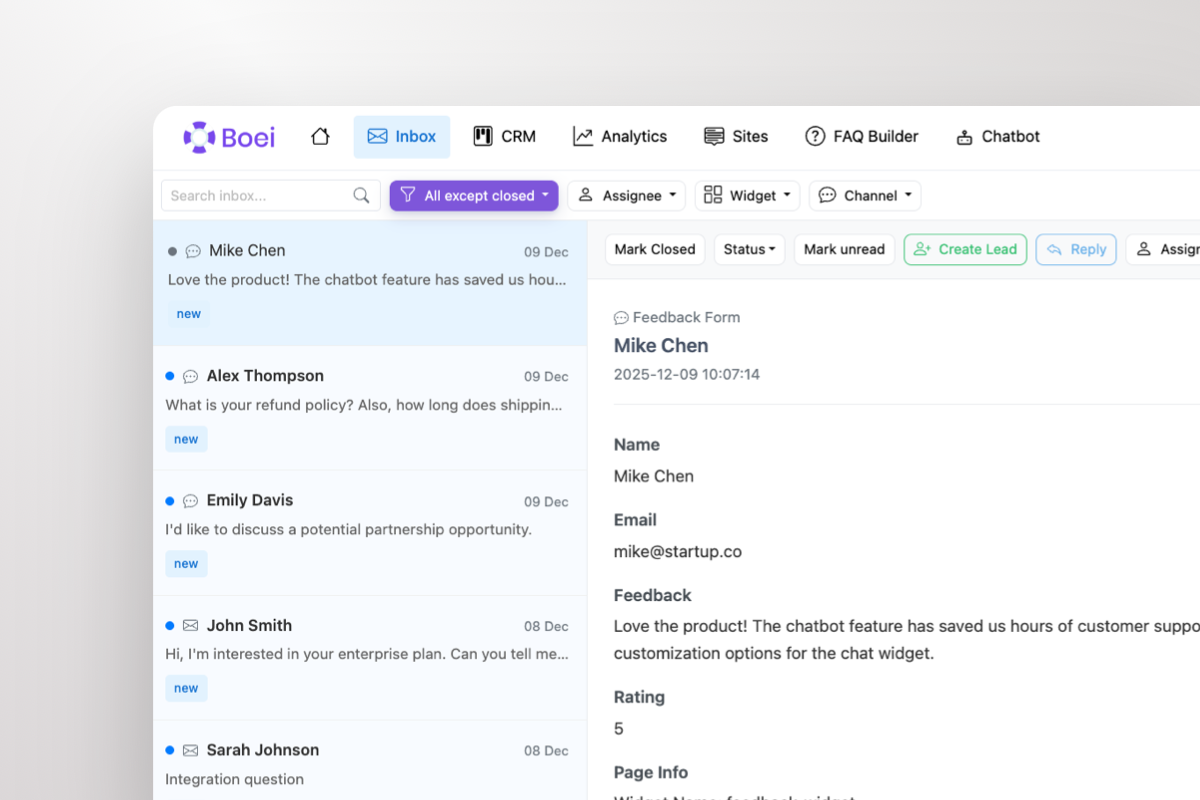
Shared inbox showing WhatsApp conversations with AI summary and agent handoff

Warm Leads Go Straight to Your Team

When a prospect is ready to buy, the AI doesn't keep chatting — it escalates. Your sales team gets the lead in a shared inbox with the full WhatsApp conversation and an AI-generated summary: who they are, what they need, and how warm they are. One click to take over.

  • AI escalates warm leads to your team automatically
  • Agents see full conversation + AI summary in shared inbox
  • Take over any WhatsApp chat with one click
  • Round-robin or department-based routing across agents
  • Leads flow into built-in CRM pipeline automatically

What Joomla Users Say

Your WhatsApp Widget, Your Brand

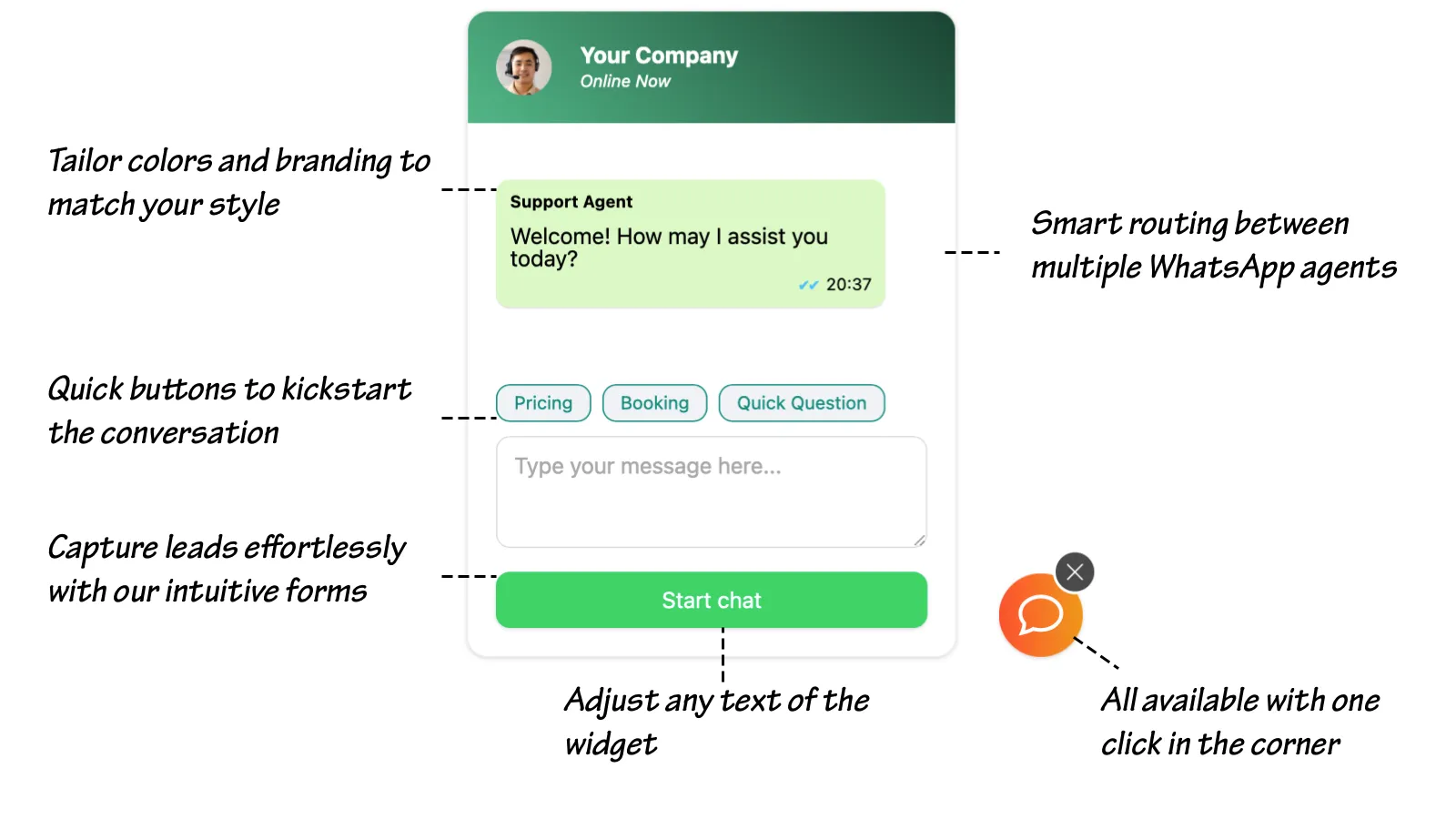
WhatsApp chat widget showing branding options, quick-reply prompts, lead capture form, and agent routing

Compare Options

Boei vs Joomla WhatsApp Extensions

Joomla's WhatsApp extensions are outdated — here's how Boei compares

Feature Boei JivoChat Joomla Extensions Elfsight Embed
AI agent
Lead qualification & scoring
Shared team inbox
Agent escalation with AI summary
Built-in CRM
Multi-language AI 95+ languages ✗ Limited
Channels included 50+ Live chat + some WhatsApp only 1
Joomla 4 & 5 compatible Often outdated
Price €14/mo $19+/agent/mo Free-€30 €6-20/mo

Bottom line: Joomla WhatsApp extensions are mostly outdated click-to-chat buttons — no AI, no inbox, no CRM. JivoChat offers live chat but no AI qualification and charges per agent. Boei gives you an AI agent, shared inbox, CRM, and 50+ channels for €14/month flat — no per-agent pricing, works with Joomla 4 and 5.

Quick Setup

Install WhatsApp AI Agent on Joomla

From setup to your first qualified lead in under 5 minutes

1

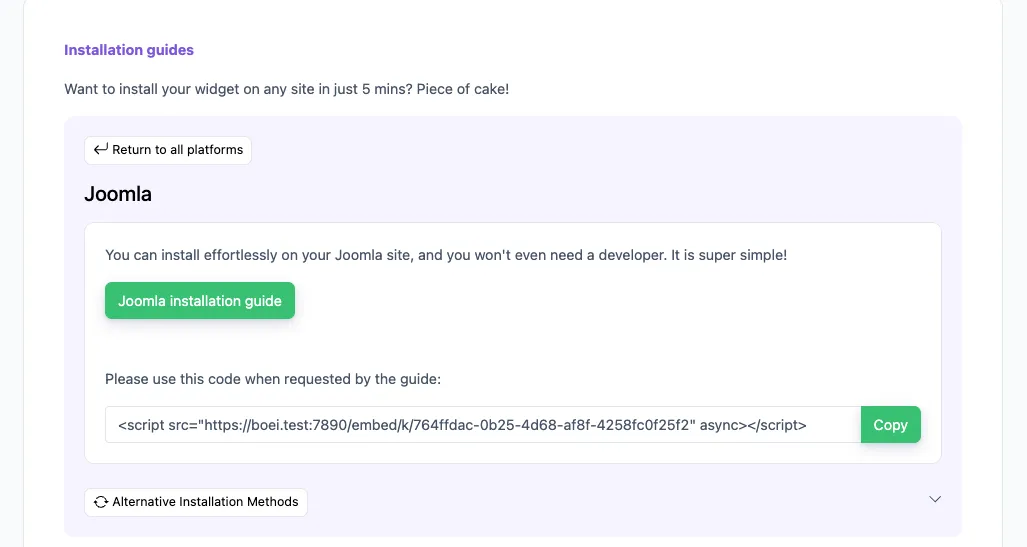
Copy installation code

In your Boei dashboard, open your widget and click the Install tab. Select Joomla and copy the installation code.

Tip: The Install tab also offers a landing page link, QR code, and iframe embed.

Copy installation code
2

Log in to Joomla

Log into your Joomla website as administrator. Follow Step 5 for Joomla 4 or Step 6 for Joomla 5.

3

Install on Joomla 4

  1. Navigate to the Extensions tab and then Module Manager.
  2. Click on the New button at the top-left corner.
  3. Select the Custom HTML module type from the list.
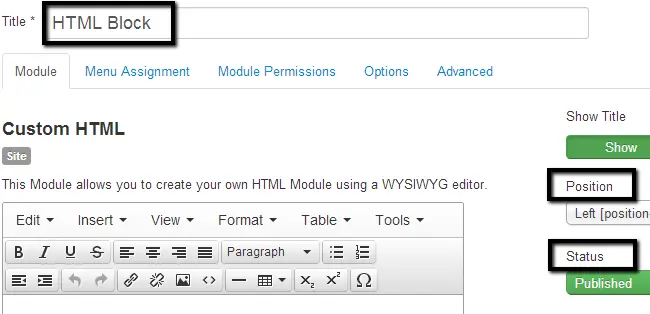
  4. Edit the following options: Title: Boei, Position: Left, Status: Published.
  5. In the Custom HTML section, click on Tools > Source Code.
  6. Paste the Boei code that you got from step 2 here and click the OK button.
  7. Click Save & Close.
Install on Joomla 4
4

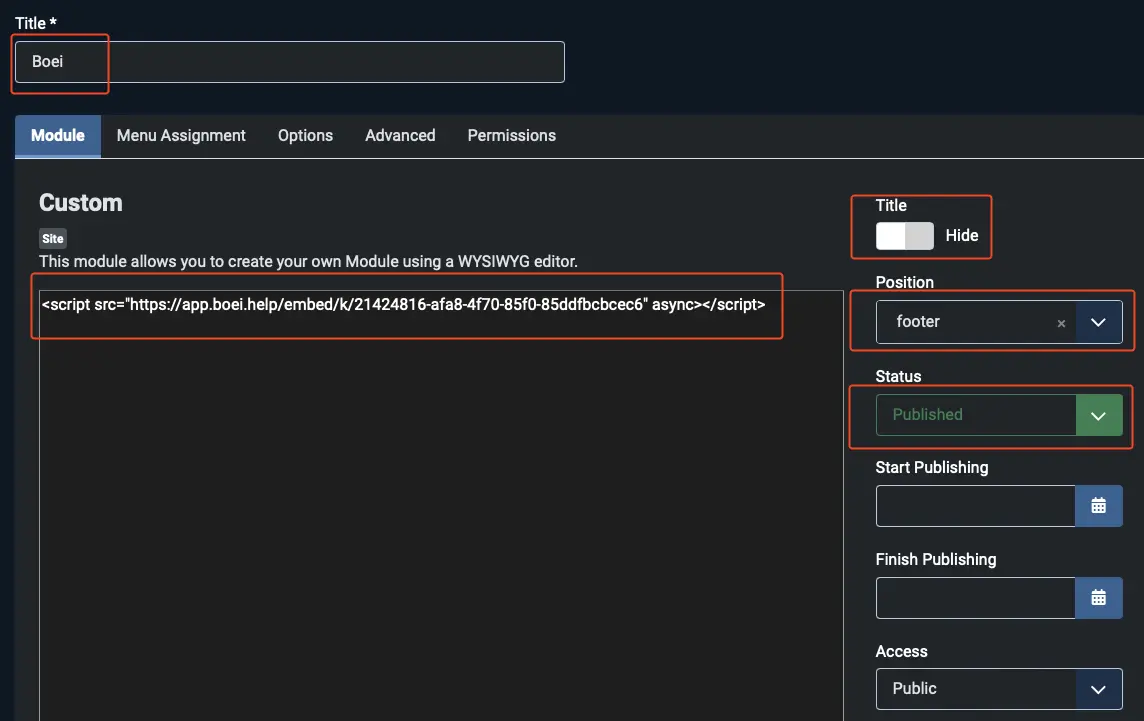
Install on Joomla 5

  1. In the User Menu on the right top, click Edit account.
  2. Go to Basic Settings and choose Editor - None. Note which editor you had so you can revert it later.
  3. Navigate to System and then Site Modules.
  4. Click the New button and select the Custom module type.
  5. Edit the following options: Title: Boei, Title Display: Hide, Position: footer, Status: Published.
  6. Paste the Boei code from step 2 in the text area and click Save & Close.
  7. Revert the editor setting: go to User Menu > Edit account > Basic Settings and set the Editor back to the original setting.

Congrats, you are done!

Install on Joomla 5

Joomla Features

Built for Joomla Sites

AI agent that works with Joomla's powerful CMS features

🤖

AI Lead Qualification

AI asks qualifying questions, captures details, and scores intent. Trained on all your Joomla articles, categories, and menu items across every language.

📥

Shared Team Inbox

All WhatsApp conversations in one inbox. Route to departments — sales, support, regional teams. AI summaries help agents take over instantly.

📊

Built-in CRM Pipeline

Track every inquiry from first message to resolution. Organize by department, language, or urgency level.

🌍

Multi-Language AI

Matches Joomla's native multi-language support. AI qualifies leads in 95+ languages. Display conditions show different widgets per language section.

Joomla 4 & 5 Compatible

Works with both Joomla 4 and Joomla 5. Add via Custom HTML module or template — no extension conflicts.

📱

50+ Channels Included

WhatsApp, Messenger, phone, email, contact forms, Telegram — all in one widget. Replace multiple extensions with one solution.

🔒

GDPR & Compliance Ready

EU servers (Amsterdam), no cookies, DPA available. Meets compliance standards for government, education, and enterprise Joomla sites.

No Extension Conflicts

Loads asynchronously via simple script. No Joomla extensions to install, no update conflicts, no PHP version dependencies.

How Joomla Sites Convert with WhatsApp AI

AI qualifies leads and routes them to the right department

Business & Corporate Sites

AI qualifies B2B inquiries by company size, budget, and requirements. Routes enterprise leads to senior sales, routine inquiries to support — each with an AI brief.

  • AI qualifies by company size and requirements
  • Routes to correct department automatically
  • Multi-language support for global operations
  • CRM tracks deals through enterprise pipeline

Education & Institutions

AI handles admissions questions, program inquiries, and campus information in multiple languages. Prospective students get qualified and routed to the right department.

  • AI answers program and admissions questions
  • Multi-language for international students
  • Routes to admissions, financial aid, or departments
  • Tracks inquiries from first message to enrollment

Nonprofits & Associations

AI handles membership inquiries, donation questions, and event information. Qualifies potential donors and routes to development team with context.

  • AI answers membership and program questions
  • Qualifies potential donors by interest area
  • Routes event inquiries to the right coordinator
  • Tracks engagement in built-in CRM

Built for Organizations That Need Departmental Routing

Large Joomla sites often serve multiple departments — sales, support, admissions, regional offices. AI qualifies each inquiry and routes it to the right team with full context. Every department sees only their leads in the shared inbox.

  • AI qualifies and routes by inquiry type (sales, support, general)
  • Department-based routing across teams and offices
  • Each department has separate inbox view and CRM pipeline
  • Multi-language AI matches Joomla's native language capabilities
  • GDPR compliant with DPA for compliance-sensitive organizations
  • No Joomla extension needed — no update conflicts or PHP dependencies
Joomla organization WhatsApp AI with departmental routing

Pro Tips

Get More Qualified Leads on Joomla

1

Use Display Conditions per Language

Show different WhatsApp numbers or qualifying questions per language section. Match your Joomla multi-language setup with language-specific AI conversations.

2

Set Up Departmental Routing

Route sales leads to sales, support tickets to support, admissions to admissions. Each department sees only their conversations in the shared inbox.

3

Train AI on All Content Sections

Enter your Joomla URL and AI learns all articles, categories, and pages. It qualifies leads based on your actual content across every language.

4

Replace Multiple Extensions with One

Stop managing outdated WhatsApp extensions, live chat modules, and contact form plugins. Boei replaces all of them with one script — 50+ channels, AI, inbox, and CRM.

Your AI Sells on 50+ Channels

Same AI, same inbox, same CRM — across every channel your visitors use

Questions?

Joomla WhatsApp AI Agent FAQ

How does the AI agent work on Joomla?

When a visitor messages your WhatsApp from your Joomla site, the AI responds in their language — asking qualifying questions, capturing contact details, and scoring intent. Warm leads are escalated to the right department with full conversation context and an AI summary.

How do I install it on Joomla?

Add a Custom HTML module in Joomla admin, paste the Boei snippet, and assign it to all pages. Works with Joomla 4 and 5. No extension to install, no PHP dependencies. See our Joomla installation guide.

Does it work with Joomla's multi-language feature?

Yes. AI auto-translates conversations to 95+ languages. Use display conditions to show different WhatsApp numbers or qualifying questions per language section — matching Joomla's native multi-language content associations.

Is it better than Joomla WhatsApp extensions?

Most Joomla WhatsApp extensions are outdated click-to-chat widgets — no AI, no inbox, no CRM. Boei gives you an AI agent that qualifies leads, a shared inbox with departmental routing, and a CRM — without extension compatibility issues.

What does it cost?

Boei Pro is €14/month and includes the WhatsApp AI agent, 2,000 AI messages, shared inbox, built-in CRM, 50+ channels, and unlimited team seats. No per-agent pricing. Start with a 7-day free trial — no credit card required.

Is it compliant for government and education sites?

Yes. Dutch company, EU servers (Amsterdam). No cookies, full GDPR compliance, DPA available. Meets compliance standards for government, education, and enterprise organizations.

Can different departments have separate inboxes?

Yes. Set up department-based routing — sales inquiries go to sales, support to support, admissions to admissions. Each team sees only their conversations in filtered inbox views.

Will it conflict with existing Joomla extensions?

No. Boei loads via a simple JavaScript snippet — no Joomla extension to install. No PHP conflicts, no update dependencies, no compatibility issues with your existing extensions.

Put Your WhatsApp AI Agent to Work on Joomla

AI qualifies leads in 95+ languages, shared inbox with departmental routing, built-in CRM — from €14/month.

7-day free trial • No credit card required • Joomla 4 & 5 compatible • GDPR compliant
Andrew Lee David S. Vance W. Grant Nitesh Manav
from 159 reviews