Tilda logo

Best AI Chatbot for Tilda

AI Chatbot for Tilda

Add an AI chatbot to your Tilda website in minutes. Engage visitors on your beautifully designed pages, answer questions automatically, and capture leads around the clock. Works with all Tilda templates and Zero Blocks.

Trusted by 14,368 websites

Works with all Tilda plans

Andrew Lee David S. Vance W. Grant Nitesh Manav
from 159 reviews

Also available for:

Try the Tilda AI Chatbot

Why Add an AI Chatbot to Tilda?

Tilda is the go-to platform for designers, agencies, and creatives who want stunning websites without writing code. Its block-based editor produces beautiful pages β€” but beautiful pages alone don't convert visitors into customers. An AI chatbot for Tilda engages visitors the moment they have a question, turning passive browsers into active leads.

Boei's AI chatbot learns your entire Tilda site automatically. It reads your pages, services, portfolio, and content blocks. Then it answers visitor questions accurately, 24/7 β€” so you never miss an inquiry, even outside business hours.

Why Tilda creators choose Boei:

  • Learns your Tilda pages automatically. The AI crawls your published site and understands your content, services, and offerings
  • Design-safe integration. The widget doesn't break your carefully crafted layouts or interfere with your Tilda design
  • Works in all Zero Blocks. Compatible with Tilda's advanced design blocks and custom layouts
  • 95+ languages supported. Auto-detects visitor language β€” perfect for Tilda's international user base across Europe and beyond
  • Captures leads naturally. Collects visitor contact details during conversations, no extra forms needed

Tilda sites convert better when visitors get instant answers. Explore our AI chatbot use cases, see all available features, or learn how to generate leads with AI chat.

Key Benefits

Why Tilda Users Love Boei

🎨

Design-Safe

The chatbot complements your Tilda design without interfering. Customizable colors and positioning to match your brand perfectly.

⚑

Instant Setup

Paste one script in Site Settings, republish, done. No coding, no plugins, no complicated configuration. Live in under 5 minutes.

πŸ“

Lead Generation

Turn website visitors into contacts with AI-powered conversations. Collect names, emails, and project details naturally during chat.

🌍

Multilingual

Auto-detects visitor language and responds in 95+ languages. Perfect for international Tilda sites and multilingual audiences.

Quick Setup

Install on Tilda

Get your AI chatbot live on Tilda in under 5 minutes

1

Copy installation code

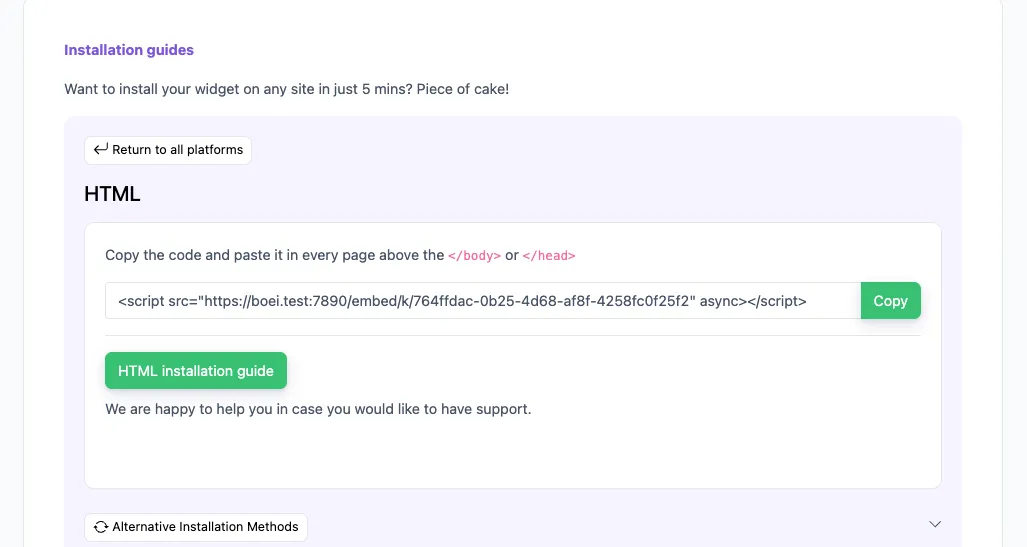
In your Boei dashboard, open your widget and click the Install tab. Select Other / Script and copy the installation code.

Tip: The Install tab also offers a landing page link, QR code, and iframe embed.

Copy installation code
2

Open Tilda Site Settings

Log in to Tilda and open your project. Click Site Settings in the top menu, then go to the More tab.

3

Add the script

Scroll down to HTML code for the section or Custom code before . Paste the Boei script code into the code area.

4

Republish your site

Click Save and then republish your site pages for the changes to take effect. Visit your site to confirm the chatbot appears.

Congrats, you are done! You now have the Boei AI chatbot installed on Tilda.

Tilda Features

Built for Tilda Sites

Everything your Tilda website needs

🧩

Zero Block Compatible

Works perfectly alongside Tilda's Zero Blocks and custom layouts. No conflicts with advanced design elements.

πŸ“„

All Templates Supported

Compatible with every Tilda template and block type. One script covers your entire site automatically.

🌐

Multilingual 95+

Auto-detects visitor language. Responds fluently in 95+ languages, ideal for Tilda's global user base.

πŸ“‹

Lead Flow

Capture leads with structured question flows. Ask for name, email, phone, and company inside the chat conversation.

🧠

Choose AI Model

Pick from OpenAI, Anthropic, Google, or Mistral. Switch models anytime from your dashboard.

βœ…

Exact Answers

Override AI responses for specific questions. Bulk-import Q&A pairs via Excel template.

πŸ“Š

Analytics

Track conversations, popular questions, and lead conversions. Understand what your visitors ask most.

πŸ’¬

50+ Channels

WhatsApp, email, contact forms, social media, and more. All from one lightweight widget on your Tilda site.

πŸ”’

GDPR Compliant

EU servers in Amsterdam. No visitor data used for AI training. Cookieless mode available. DPA provided.

Compare Options

Boei vs Other Tilda Chatbots

See how we compare to popular alternatives

Feature Boei Tidio tawk.to Chatra
Starting price €14/mo €39/mo Free (branded) €21/mo
AI messages included 2,000/mo 50-1,000 None None
Train on your site ✓ Yes ✗ Limited
50+ channels ✓ Yes
Tilda compatible ✓ Yes ✓ Yes ✓ Yes ✓ Yes
GDPR compliant (EU servers) ✓ Yes

Bottom line: Boei gives you AI chat with automatic site training and 50+ channels for €14/mo. Tidio starts at €39/mo with limited AI. tawk.to is free but has no AI and adds branding. Perfect for Tilda users who want powerful features at a fair price.

Pro Tips

Get More From Your Tilda Chatbot

1

Add via Site Settings

Paste the script in Site Settings β†’ More β†’ custom code. This applies to all pages at once β€” no need to add it page by page.

2

Train on All Pages

Include your full site URL when training the AI for complete coverage. The chatbot learns your services, portfolio, and FAQ content automatically.

3

Match Your Brand

Customize chatbot colors to complement your Tilda design. Use your exact brand hex codes for a seamless look.

4

Use for Portfolio Inquiries

Great for agencies and freelancers getting project requests. The chatbot qualifies leads by asking about scope, budget, and timeline.

What Tilda Users Say

See AI Chatbot in Action

Real websites using Boei's AI chatbot

Related Resources

Explore more platforms

Tilda Chatbot Pricing

Simple, transparent pricing with AI chatbot included

Vance
Vance: " Helps me to convert website visitors to warm leads " β˜…β˜…β˜…β˜…β˜…

$8 /month

Billed annually at $96 β€’ Cancel anytime

Number of websites β“˜

Optional Add-ons

Optional

Enhance your plan with these extras

What's included

  • βœ“Show 50+ contact channels β“˜
  • βœ“Shared inbox included β“˜
  • βœ“Unlimited leads & conversations β“˜
  • βœ“Smart visitor targeting β“˜

βœ“ No contracts β€’ Cancel anytime βœ“ Trusted by 14.368 businesses

Start 7-Day Free Trial

Prices exclude VAT, calculated at checkout

Need an Agency or Enterprise Solution?

Get custom pricing, priority support, and advanced features such as custom domains and mailers

Contact Sales

Questions?

Tilda AI Chatbot FAQ

How do I install the AI chatbot on Tilda?

Go to Site Settings β†’ More β†’ scroll to the custom code section. Paste the Boei script in the HTML code area (before is recommended). Save and republish all pages.

Does it work with Zero Blocks?

Yes. The chatbot widget loads independently and works perfectly alongside Tilda's Zero Blocks and all other block types. No conflicts.

Can the AI learn all my Tilda pages?

Yes. Add your site URL and the AI crawls all published pages automatically. It learns your content, services, portfolio, and FAQ sections.

Will it slow down my Tilda site?

No. The Boei script is under 50KB and loads asynchronously after your page content. It won't affect your site's loading speed.

Does it work with custom domains on Tilda?

Yes. The chatbot works with Tilda's custom domains and subdomains. No additional configuration needed.

Which AI models power the chatbot?

Boei supports OpenAI, Anthropic, Google, and Mistral models. You can switch models anytime from your dashboard settings. All models train on your website content automatically.

Can I capture leads through the chatbot?

Yes. Use Lead Flow to collect names, emails, phone numbers, and company details during conversations. Leads are sent to your inbox, email, or CRM automatically.

Is it GDPR compliant?

Yes. All data stays on EU servers in Amsterdam. No visitor conversations are used for AI training. Cookieless mode available. DPA provided on request.

Does the AI chatbot work on WhatsApp too?

Yes. Boei's AI chatbot works on your website and on WhatsApp. Incoming WhatsApp messages get automatic AI replies, and all conversations land in your shared inbox with AI summaries.

Does it work on Tilda's Free plan?

Yes. Boei works on all Tilda plans including the Free plan. As long as you can add custom code in Site Settings, the chatbot will work on your site.

Ready to Add AI Chat to Your Tilda Site?

Join thousands of Tilda creators using Boei. Setup takes 5 minutes.

7-day free trial β€’ No credit card required β€’ Works with all Tilda templates
Andrew Lee David S. Vance W. Grant Nitesh Manav
from 159 reviews