Drupal logo

Best AI Chatbot for Drupal

AI Chatbot for Drupal

Add an AI chatbot to your Drupal site in minutes. Automate visitor support for government portals, universities, and enterprise websites. Works with Drupal 9, 10, and 11. No module required.

Trusted by 14,368 websites

Works with Drupal 9, 10, and 11

Andrew Lee David S. Vance W. Grant Nitesh Manav
from 159 reviews

Also available for:

Try the Drupal AI Chatbot

Why Add an AI Chatbot to Drupal?

Drupal powers some of the most complex websites on the internet β€” government agencies, universities, healthcare systems, and large enterprises. These sites often have deep content architectures with hundreds or even thousands of pages, custom content types, and layered taxonomies. Visitors get lost. An AI chatbot for Drupal helps them find exactly what they need, instantly.

Boei's Drupal chatbot learns directly from your website content. It crawls your pages, articles, and custom content types automatically. When visitors have questions, they get accurate answers based on what you've already published β€” no manual training required.

Why Drupal teams choose Boei:

  • Learns all content types and taxonomies: The AI indexes your entire site, including custom content types, views, and taxonomy pages
  • Handles complex multi-site setups: Deploy separate chatbots for each site in your Drupal multisite environment
  • Meets enterprise security requirements: EU-hosted servers, GDPR compliant, no training on your conversations
  • No Drupal module needed: Just a script tag β€” no module conflicts, no update dependencies, no security patches to track

Your Drupal site already manages complex content brilliantly. Now make it conversational. See all available features, explore use cases, or learn how it works for healthcare organizations.

Key Benefits

Why Drupal Teams Love Boei

🧠

Content-Aware AI

Learns all your content types, taxonomies, and views. The AI understands your entire Drupal content architecture and delivers accurate answers.

πŸ”’

Enterprise Security

EU-hosted servers (Amsterdam), GDPR compliant, no training on your conversations. Meets the security standards government and enterprise sites require.

⚑

Zero Module Risk

No module to install, update, or maintain. No conflicts with contributed modules, no security advisories to track. Just a lightweight script tag.

🌐

Multilingual Support

Works seamlessly with Drupal's built-in translation system. Auto-detects visitor language and responds in 95+ languages.

Quick Setup

Install on Drupal

Get your AI chatbot live on Drupal in under 5 minutes β€” no module required

1

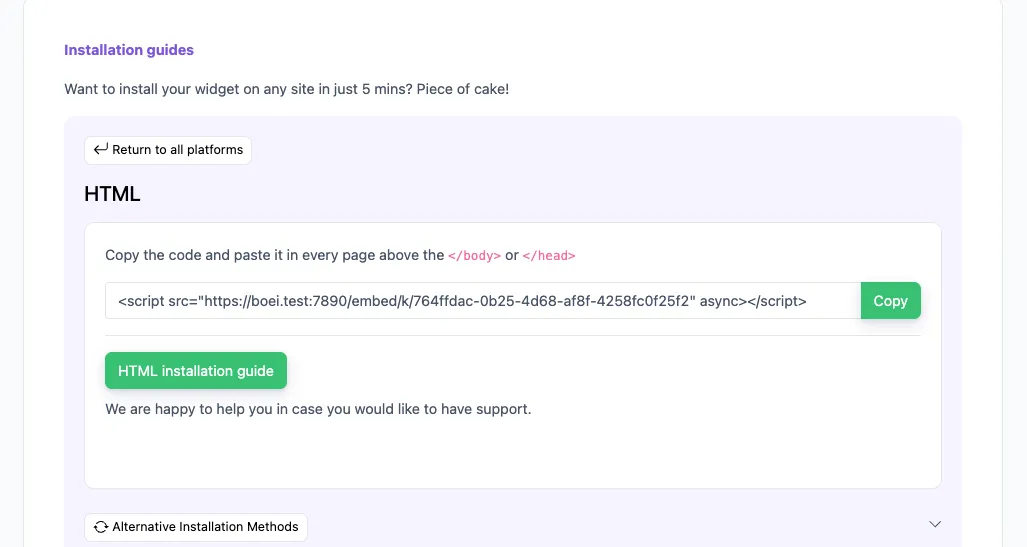
Copy installation code

In your Boei dashboard, open your widget and click the Install tab. Select Other / Script and copy the installation code.

Tip: The Install tab also offers a landing page link, QR code, and iframe embed.

Copy installation code
2

Log in to Drupal

Open your Drupal admin panel and navigate to Configuration β†’ Development β†’ Asset Injector (if you have the Asset Injector module). Alternatively, you can edit your theme's template directly.

3

Add the script

Option A β€” Asset Injector module: Click Add JS Injector, give it a label like "Boei Chatbot", paste the script code, and set it to appear on all pages.

Option B β€” Theme template: Open your active theme's html.html.twig file (usually in themes/your_theme/templates/). Paste the Boei script code just before the closing </body> tag.

4

Clear cache

Go to Configuration β†’ Performance and click Clear all caches. Visit your site to confirm the chatbot appears.

Congrats, you are done! You now have the Boei AI chatbot installed on Drupal.

Drupal Features

Built for Drupal

Works perfectly with your Drupal website

πŸ“¦

Content Type Awareness

Learns from all your Drupal content types β€” articles, pages, custom types. Understands your full content model.

πŸ—‚οΈ

Taxonomy Navigation

Indexes your taxonomy terms and vocabulary. Helps visitors navigate complex category structures conversationally.

🌐

Multi-Language 95+

Works with Drupal's native translation system. Auto-detects visitor language and responds accordingly.

πŸ“‹

Lead Flow

Capture leads with structured question flows. Ask for name, email, phone, and company inside the chat conversation.

πŸ€–

Choose AI Model

Pick from OpenAI, Anthropic, Google, or Mistral. Switch models anytime from your dashboard.

βœ…

Exact Answers

Override AI responses for specific questions. Bulk-import Q&A pairs via Excel template.

πŸ“Š

Analytics

Track conversations, popular questions, and content gaps. Push lead data to Google Analytics and Meta Pixel.

πŸ’¬

50+ Channels

Combine AI chatbot with WhatsApp, Facebook Messenger, email, phone, and 50+ other contact channels.

πŸ”’

GDPR & Security

EU servers in Amsterdam, no training on conversations, cookieless mode available. Enterprise-grade compliance.

Compare Options

Boei vs Other Drupal Chatbots

See how we compare to alternatives

Feature Boei Tidio Intercom Zendesk Chat
Starting price €14/mo €39/mo €74/mo €55/agent
AI messages included 2,000/mo 50-1,000 Add-on ✗ Limited
Train on your site ✓ Yes ✗ Limited
50+ channels ✓ Yes Add-on
No module needed ✓ Yes ✓ Yes ✓ Yes ✓ Yes
Enterprise security Yes (EU) ✓ Yes ✓ Yes
GDPR / EU servers ✓ Yes Add-on

Bottom line: Boei gives you enterprise-grade AI chatbot features at a fraction of the cost β€” starting at €14/mo with 2,000 AI messages, EU servers, and no Drupal module required.

Pro Tips

Get More From Your Drupal Chatbot

1

Train on All Content Types

Submit your sitemap URL so the AI crawls every content type, taxonomy page, and view. This gives the most thorough coverage of your Drupal site.

2

Use for Internal Knowledge Bases

Deploy the chatbot on your Drupal intranet to help staff find policies, procedures, and internal documentation instantly.

3

Set Up Department Routing

Use Lead Flow to route visitor inquiries to the right team β€” admissions, IT support, HR, or customer service β€” based on their responses.

4

Monitor Content Gaps

Use the analytics dashboard to spot questions the AI can't answer. These reveal missing content on your Drupal site that you should create.

What Drupal Site Owners Say

See AI Chatbot in Action

Real websites using Boei's AI chatbot

Related Resources

Learn more about AI chatbots for CMS platforms

Drupal Chatbot Pricing

Simple, transparent pricing with AI chatbot included

Vance
Vance: " Helps me to convert website visitors to warm leads " β˜…β˜…β˜…β˜…β˜…

$8 /month

Billed annually at $96 β€’ Cancel anytime

Number of websites β“˜

Optional Add-ons

Optional

Enhance your plan with these extras

What's included

  • βœ“Show 50+ contact channels β“˜
  • βœ“Shared inbox included β“˜
  • βœ“Unlimited leads & conversations β“˜
  • βœ“Smart visitor targeting β“˜

βœ“ No contracts β€’ Cancel anytime βœ“ Trusted by 14.368 businesses

Start 7-Day Free Trial

Prices exclude VAT, calculated at checkout

Need an Agency or Enterprise Solution?

Get custom pricing, priority support, and advanced features such as custom domains and mailers

Contact Sales

Questions?

Drupal AI Chatbot FAQ

Do I need to install a Drupal module?

No. Boei works with a simple script tag β€” no Drupal module required. You can add it via the Asset Injector module or directly in your theme's html.html.twig template. No module conflicts, no security patches to track.

Does it work with Drupal 9, 10, and 11?

Yes. Boei is compatible with Drupal 9, 10, and 11. Since it's just a JavaScript snippet, it works with any Drupal version that renders HTML pages.

Can the AI learn all my content types?

Yes. The AI crawls your entire site, including custom content types, taxonomy pages, views, and any publicly accessible page. Submit your sitemap for the most thorough coverage.

Will it slow down my Drupal site?

No. The Boei script is under 50KB and loads asynchronously. It works alongside Drupal's caching layers (page cache, Varnish, CDN) without any performance impact.

Can I use it on a Drupal multisite setup?

Yes. Create separate chatbots for each site in your multisite environment. Each chatbot learns from its own site's content independently.

Which AI models does Boei use?

Boei supports OpenAI, Anthropic, Google, and Mistral models. You can switch models anytime from your dashboard. All models train on your website content automatically.

Can it capture leads from visitors?

Yes. Use Lead Flow to collect name, email, phone, and company through natural conversation flows. Leads are pushed to your inbox, and optionally to Google Analytics, Meta Pixel, or Mailchimp.

Is it GDPR compliant?

Yes. EU servers in Amsterdam, no training on conversations, cookieless mode available. Meets the compliance requirements for government and enterprise Drupal sites.

Does the AI chatbot work on WhatsApp too?

Yes. Boei's AI chatbot works on your website and on WhatsApp. Incoming WhatsApp messages get automatic AI replies, and all conversations land in your shared inbox with AI summaries.

Is it suitable for government and education websites?

Yes. Boei meets enterprise security and privacy requirements. EU-hosted data, GDPR compliance, no third-party data sharing, and no training on your conversations. Many government and university Drupal sites use chatbots to help citizens and students find information faster.

Ready to Add AI Chat to Drupal?

Join thousands of websites using Boei. Setup takes 5 minutes.

7-day free trial β€’ No credit card required β€’ No module needed
Andrew Lee David S. Vance W. Grant Nitesh Manav
from 159 reviews