Shopify logo

Messenger Chat Widget

Facebook Messenger Widget for Shopify

Add Facebook Messenger to your Shopify store. AI answers product questions, captures leads, and routes conversations to your team. 5-minute setup.

Trusted by 14,368 websites

No Facebook API setup required

Andrew Lee David S. Vance W. Grant Nitesh Manav
from 159 reviews

Messenger Widget Demo on Shopify

Trusted by 14,000+ Online Stores

Facebook Messenger Chat on Your Shopify Store

When shoppers click the Messenger button on your Shopify store, they open a direct conversation with your Facebook page. Answer product questions, handle sizing inquiries, and close sales — all through a platform your customers already use daily. No API setup, no developer tools needed.

  • One-click Messenger conversations from product pages and checkout
  • Messages arrive in your Facebook Page inbox and Messenger app
  • Conversations persist across devices — shoppers pick up where they left off
  • Share product photos, sizing guides, and shipping details in chat
  • No Facebook SDK or API integration required
Messenger Chat
Hi! Is this jacket available in size M?
Yes! The Horizon Jacket is in stock in M. Want me to send you a direct link to order?
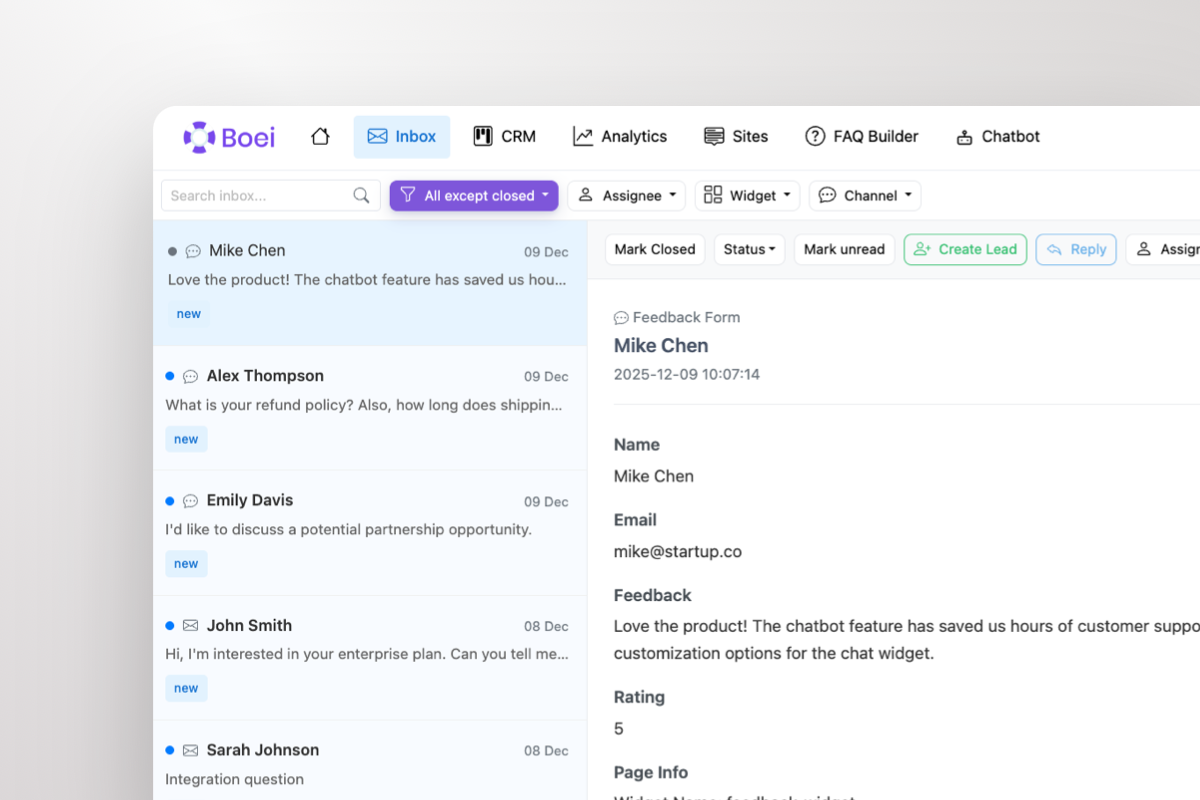
Shared inbox showing Messenger conversations from Shopify customers

Every Shopify Conversation in One Inbox

Stop checking Facebook Page inbox, email, and Instagram separately. Boei brings all Messenger conversations into a single shared inbox alongside WhatsApp, email, Instagram DM, and 50+ other channels. Your team handles every customer from one place.

  • All Messenger conversations in one team inbox
  • AI-generated summaries for quick context
  • Round-robin or department-based routing
  • One-click agent handoff with full chat history
  • Built-in CRM tracks every shopper interaction

Why Your Shopify Store Needs Facebook Messenger

Shoppers who message businesses are 63% more likely to complete a purchase. Facebook Messenger — with 3 billion monthly active users — gives your Shopify store a direct line to customers who are ready to buy but need one more answer before clicking 'Add to Cart'.

Product questions about sizing, materials, shipping times, and return policies are the #1 reason shoppers abandon carts. Messenger lets you answer instantly, share product photos, and close the sale conversationally. Unlike live chat that disappears when the tab closes, Messenger conversations persist — so customers come back days later and finish buying.

Facebook deprecated its official Chat Plugin in 2024. Boei provides a modern, lightweight alternative that works with all Shopify themes. No JavaScript SDK, no cookies, no App Bridge conflicts. Just your Facebook page ID and 5 minutes.

Combine Messenger with WhatsApp for European shoppers, Instagram DM for visual product discussions, and AI chatbot for 24/7 product answers — all in one floating button on your Shopify store.

Quick Setup

Install Messenger Widget on Shopify

From setup to your first Messenger conversation in under 5 minutes

1

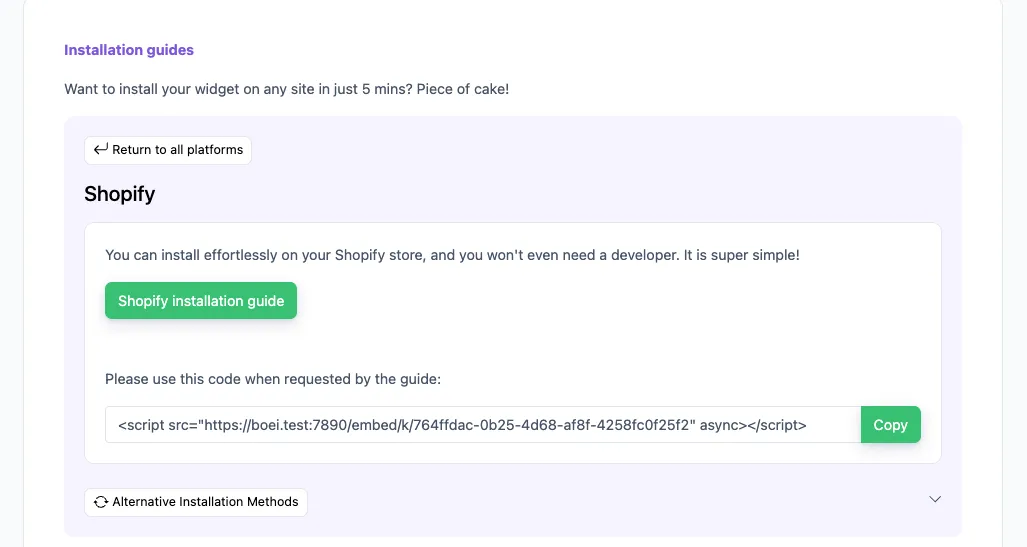
Copy installation code

In your Boei dashboard, open your widget and click the Install tab. Select Shopify and copy the installation code.

Tip: The Install tab also offers a landing page link, QR code, and iframe embed.

Copy installation code
2

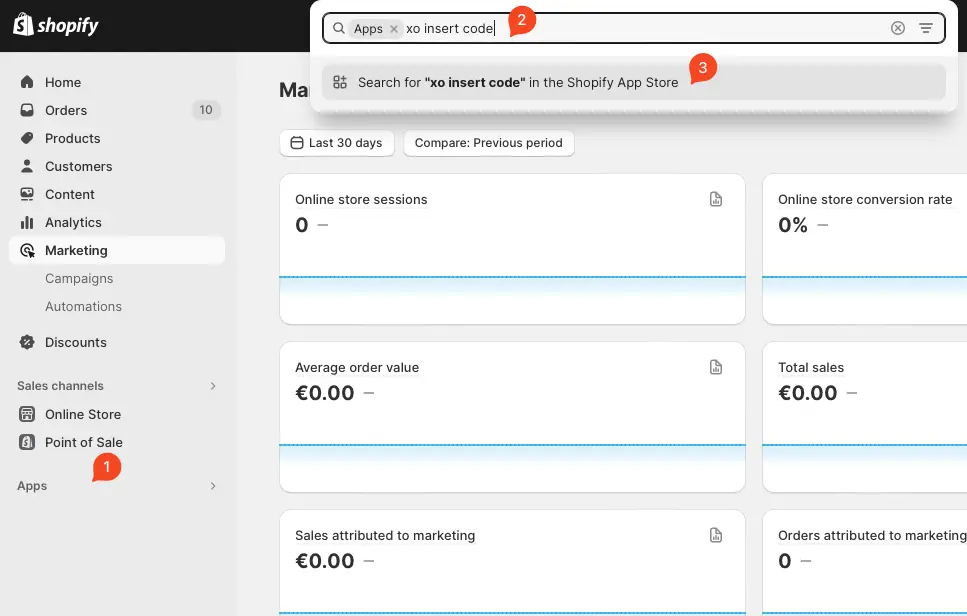
Log in to Shopify

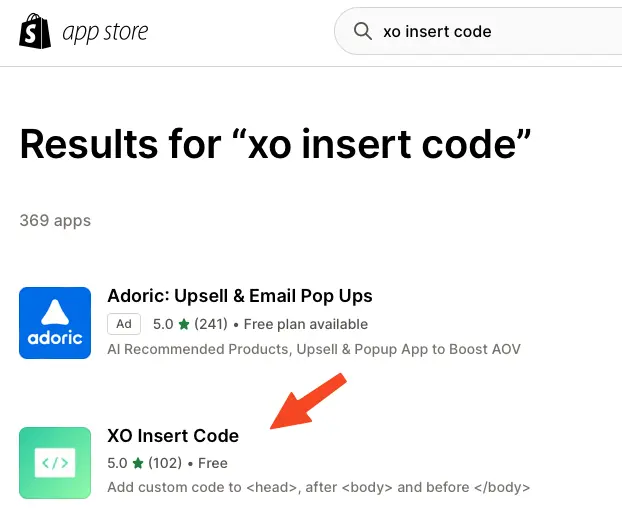
Open Shopify and click on "Apps" and search for "xo insert code".

We will use the plugin XO insert code to install Boei. It is a free and easy plugin.

Log in to Shopify
3

Install the plugin

Press install.

Confirm installation in Shopify.

Install the plugin
4

Install the Boei code

Click add new code

Name the code "Boei" and enable it on the entire store.

Place the script from step two in place of the "code in footer" textbox.

Press save.

Install the Boei code
5

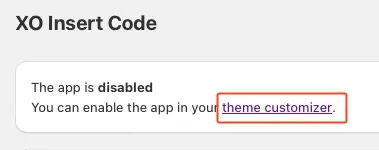
Enable the plugin

Now, we enable the plugin by clicking the theme customizer link.

Enable the checkbox and press save.

Congrats, you are done! You now have the Boei live chat Shopify installed.

Enable the plugin

Shopify Features

Built for Shopify Stores

Messenger chat widget designed for e-commerce

💬

Messenger Deep Links

No Facebook SDK or API setup. Uses reliable Messenger deep links that work across all devices. Modern replacement for the deprecated Chat Plugin.

🤖

AI Product Answers

AI chatbot answers sizing, shipping, and product questions 24/7. Trained on your Shopify product catalog, FAQs, and policies.

📥

Shared Team Inbox

All Messenger conversations in one inbox alongside WhatsApp, email, and 50+ channels. AI summaries help your team respond faster.

🛒

Cart & Checkout Ready

Messenger widget on product pages, cart, and checkout reduces abandonment. Shoppers get instant answers right when they need them.

🎨

All Themes Compatible

Works with Dawn, Debut, Impulse, Prestige, and all Shopify themes. No conflicts with Shopify's Online Store 2.0.

🔒

GDPR Compliant

Dutch company, Amsterdam servers. Zero cookies before click. Full GDPR compliance for EU customers. DPA available on request.

Compare Options

Boei vs Other Shopify Messenger Apps

See why Shopify merchants choose Boei for Messenger chat

Feature Boei Tidio Chaty Facebook Chat Plugin (Deprecated)
AI chatbot included ✗ Limited
Shared team inbox
Lead capture & CRM ✗ Limited
Channels included 50+ 5 25 Messenger only
No Facebook SDK needed
GDPR compliant (no cookies)
Price €14/mo €29/mo €59/year Deprecated
Setup time 5 minutes 15 min 10 min N/A

Bottom line: Most Shopify Messenger apps either add a basic button or require complex SDK setup. Boei gives you a modern Messenger widget with AI chatbot, shared inbox, and 50+ channels — for €14/month flat. See all features.

What Shopify Merchants Say

Questions?

Shopify Messenger Widget FAQ

How does the Messenger widget work on Shopify?

When a shopper clicks the Messenger button on your Shopify store, it opens a direct conversation with your Facebook page. On mobile it opens the Messenger app, on desktop it opens Messenger.com. You respond from your Facebook Page inbox, Messenger app, or Boei's shared inbox.

How do I install it on Shopify?

Sign up at Boei (free trial), add your Facebook page ID, and copy the widget code. In Shopify, go to Online Store → Themes → Edit code → paste the snippet in theme.liquid before the closing tag. Your Messenger widget is live in 5 minutes. See our Shopify installation guide.

Does it work on product pages and checkout?

Yes. The Messenger widget appears on all Shopify pages including product pages, cart, and checkout. Shoppers can ask about sizing, shipping, and stock right when they need answers — reducing cart abandonment.

Does it replace the deprecated Facebook Chat Plugin?

Yes. Facebook deprecated its official Chat Plugin in 2024. Boei provides a modern alternative using Messenger deep links — no SDK, no cookies, no breakage. Works with all Shopify themes.

Can I combine Messenger with other channels?

Yes. Add Messenger alongside WhatsApp, Instagram DM, Telegram, phone, email, AI chatbot, and 50+ other channels — all in one floating button.

Does it work with Shopify Online Store 2.0?

Yes. Boei is compatible with all Shopify themes including Online Store 2.0 themes like Dawn. No app embed blocks needed — just a simple code snippet. Also works with Hydrogen and headless Shopify setups.

Is it GDPR compliant?

Yes. Boei is a Dutch company with servers in Amsterdam (EU). No cookies, full GDPR compliance, DPA available on request. The widget collects no personal data before a visitor clicks.

How much does it cost?

Boei Pro is €14/month and includes the Messenger widget, AI chatbot with 2,000 messages, shared inbox, built-in CRM, 50+ channels, and unlimited team seats. Start with a 7-day free trial — no credit card required.

Messenger Widget for Every Platform

Add Facebook Messenger to any website builder

Add Facebook Messenger to Your Shopify Store

Modern replacement for deprecated Chat Plugin. AI chatbot, shared inbox, and 50+ channels included.

7-day free trial • No credit card required • 5-minute setup • Works with all themes
Andrew Lee David S. Vance W. Grant Nitesh Manav
from 159 reviews