Lead Management CRM Built for Conversions

Turn website visitors into customers with a visual sales pipeline. Drag-and-drop leads through custom stages, assign to team members, and never lose track of a conversation.

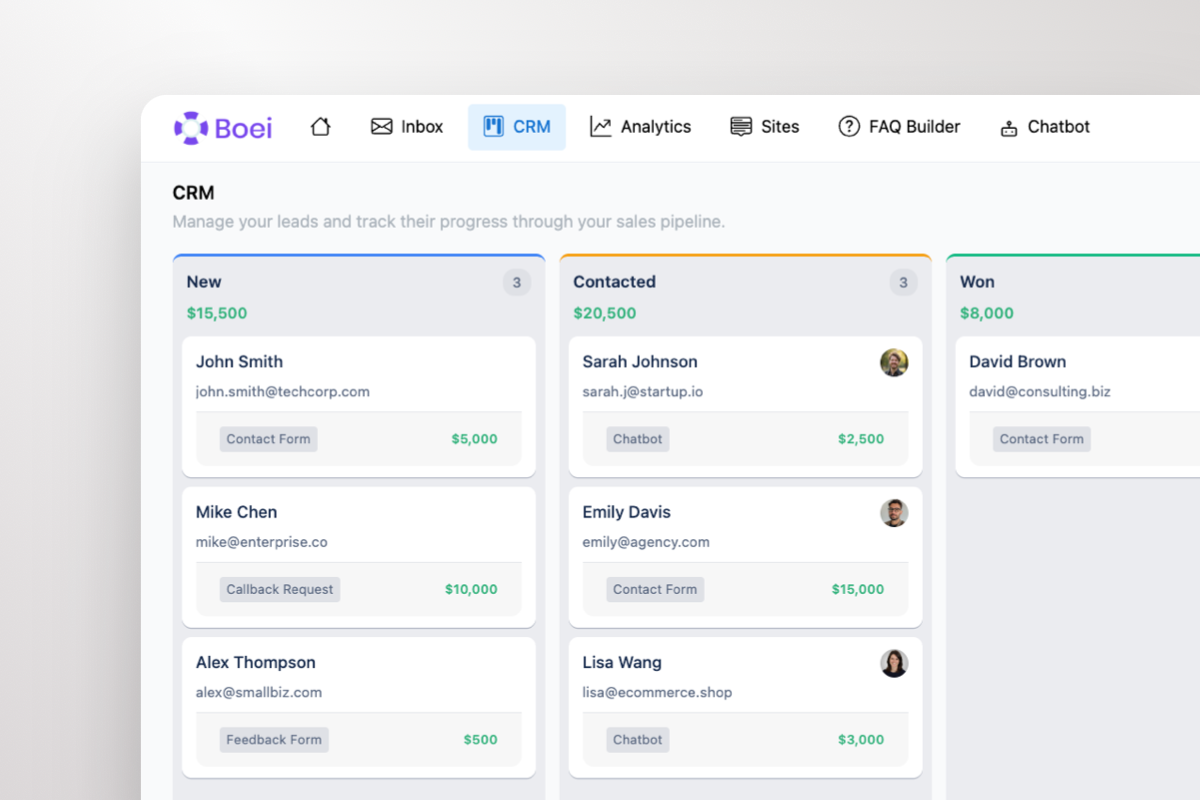
Visual sales pipeline with Kanban board
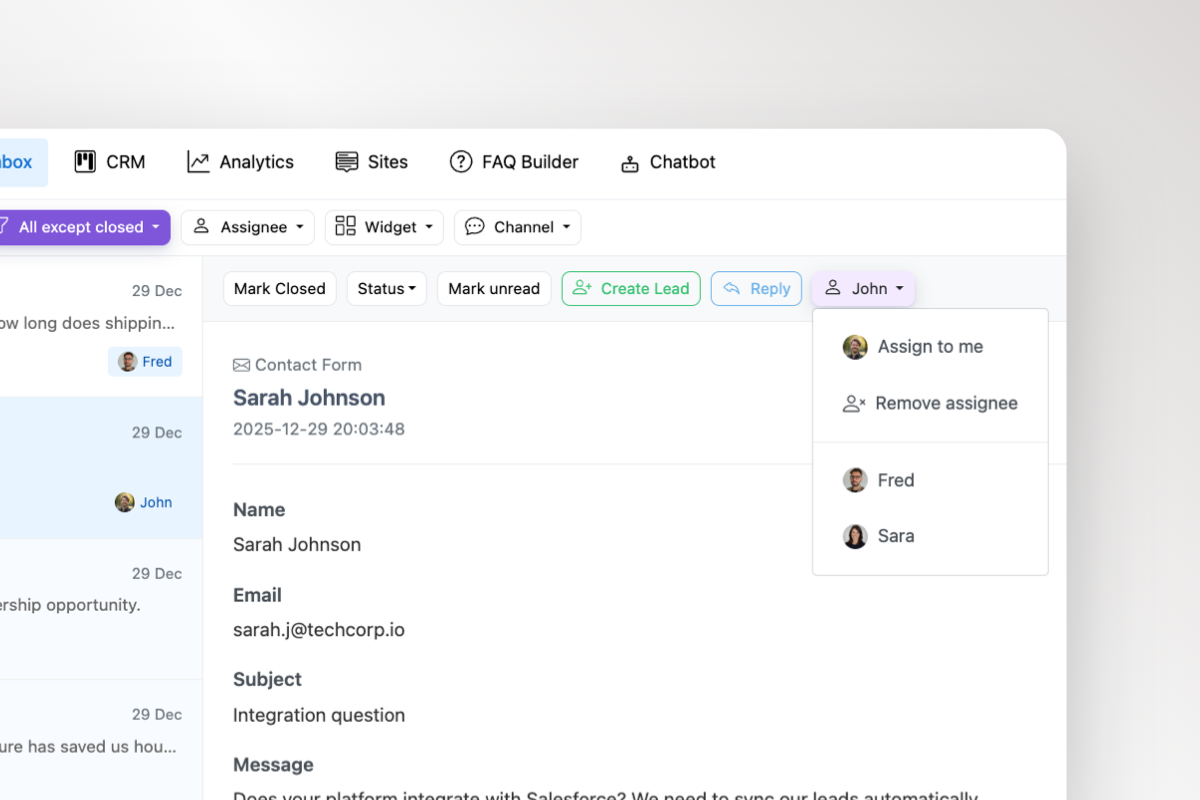
Assign leads to team members
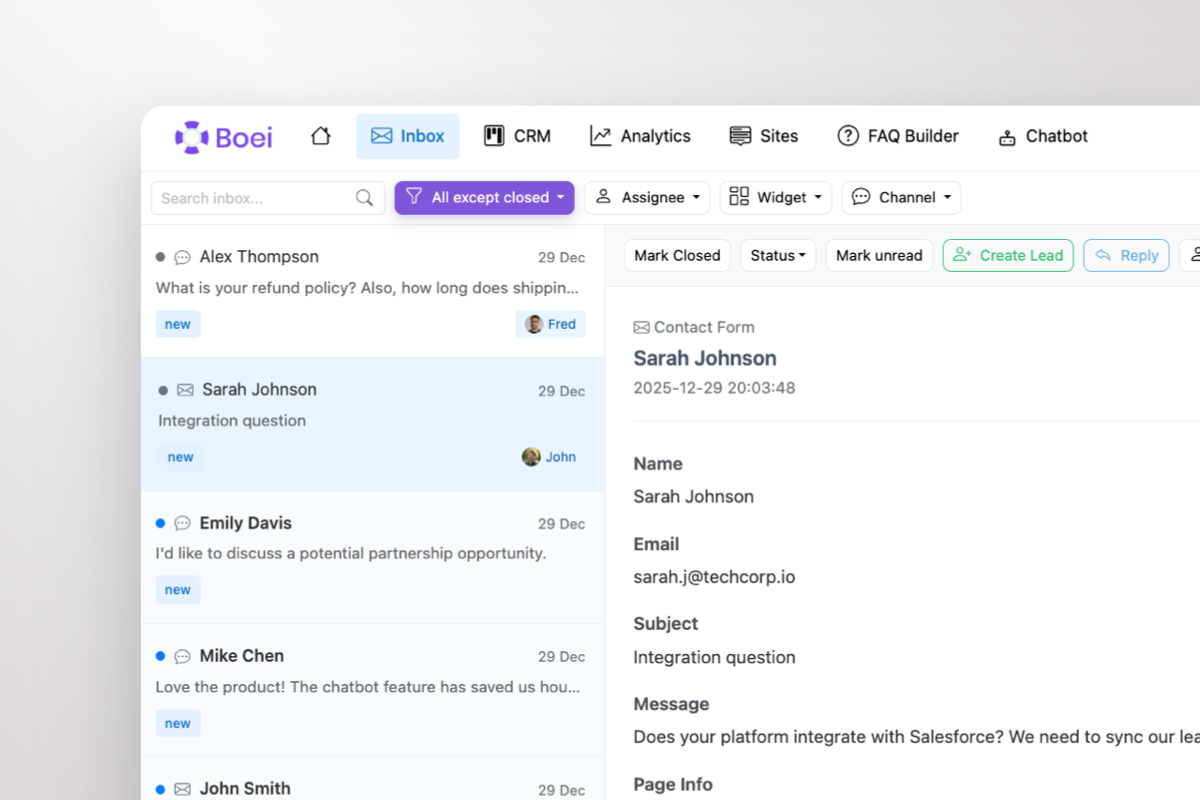
Unified inbox for all conversations
Andrew Lee David S. Vance W. Grant Nitesh Manav
from 159 reviews

Visual Sales Pipeline That Actually Works

Stop losing leads in spreadsheets. Our Kanban-style lead management CRM gives you instant visibility into every deal. See exactly where each lead is in your sales process and what needs attention.

  • Unlimited custom columns for your sales stages
  • Group leads by business line, product, or region
  • Color-coded status indicators at a glance
  • Filter and search across your entire pipeline
CRM visual pipeline with Kanban view
Unified inbox, single inbox with AI chatbot and WhatsApp leads

Unified Inbox: All Conversations in One Place

Your leads contact you through WhatsApp, email, chat, contact forms, and more. Our lead management CRM connects to your unified inbox so you can see and reply to every conversation without switching tools.

  • View complete conversation history per lead
  • Reply to customers from within the CRM
  • Works with 50+ contact channels
  • Never miss a follow-up opportunity

Trusted by 10,000+ Businesses Worldwide

10,000+

Businesses use Boei CRM

160+

Five-star reviews

50+

Integrated channels

5 min

Setup time

Everything You Need in a Lead Management CRM

A complete sales pipeline CRM that helps you capture, organize, and convert leads into paying customers

Visual Kanban Pipeline

Drag and drop leads through custom stages - New, Contacted, Qualified, Won. Organize by groups, assign to team members, and see your entire sales process at a glance

Lead Details & Notes

Store contact info, add follow-up notes, and track every interaction. Assign leads to team members so nothing falls through the cracks

Linked Conversations

See the full conversation history with each lead. Reply directly via WhatsApp, email, or chat - all from within your CRM

Team Collaboration Made Simple

Assign leads to team members, add internal notes, and track who's working on what. See when AI chatbots capture new leads in real-time. Perfect for sales teams of any size.

  • Assign leads to specific team members
  • Add private notes for internal follow-up
  • See team activity and lead ownership
  • Collaborate without stepping on toes
CRM team collaboration with assigning team members

What Our Customers Say

Get Your Sales Pipeline Running in Minutes

Set up your lead management CRM in three simple steps - no technical skills required

1

Set Up Your Pipeline

Create custom stages and groups that match your sales process. Add columns like New, Contacted, Qualified, Proposal, Won - whatever works for your business.

2

Capture Leads Automatically

Connect your website with Boei's widget. Every contact form, WhatsApp message, or chat becomes a lead card in your CRM with full conversation history.

3

Close More Deals

Drag leads through your pipeline, assign to team members, add notes, and never lose track of a follow-up. Watch your conversion rate grow.

Perfect For Every Business Type

Our lead management CRM adapts to how you work

E-commerce

Track product inquiries, manage pre-sales questions, and convert browsers into buyers

Agencies

Organize clients by project or service line, assign account managers, track proposals

Real Estate

Manage property inquiries, track viewings, and close deals faster with visual pipeline

Healthcare

Handle patient inquiries, track appointments, and manage referrals professionally

Frequently Asked Questions

What is a lead management CRM?

A lead management CRM is a system that helps you track and organize potential customers (leads) through your sales process. Boei's CRM uses a visual Kanban board where you can create custom stages, drag leads between columns, and never lose track of a sales opportunity.

How many pipeline stages can I create?

You can create unlimited custom stages (columns) in your sales pipeline. Common stages include New, Contacted, Qualified, Proposal Sent, Negotiation, Won, and Lost - but you can name them anything that fits your sales process.

Can I organize leads into different groups?

Yes! You can create multiple rows/groups to segment your leads however you want - by business line, product category, region, lead source, priority level, or any other criteria. This makes it easy to manage leads across different parts of your business.

How does lead assignment work?

You can assign any lead to a specific team member. They'll see their assigned leads in the CRM, and you can filter to see who's working on what. This ensures every lead has a clear owner responsible for follow-up.

Can I see conversation history with leads?

Absolutely! Every lead card shows the full conversation history from when they first contacted you. Whether they reached out via WhatsApp, email, AI chatbot, or contact form - you can see the complete history right from the CRM.

Does the CRM work with the Boei widget?

Yes, they're fully integrated. When someone contacts you through your Boei widget, they automatically become a lead in your CRM with all their contact details and conversation history attached. No manual data entry needed.

How do I add notes to a lead?

Click on any lead card to open it, then add notes, contact information, or any details you need for follow-up. Notes are saved instantly and visible to your team members who have access to the lead.

Is there a mobile app for the CRM?

Boei's CRM works great on mobile browsers - fully responsive so you can check your pipeline, update leads, and respond to customers from anywhere. No app installation required.


Ready to Organize Your Sales Pipeline?

Join 10,000+ businesses using Boei's lead management CRM. Start your 7-day free trial - no credit card required!

7-day free trial • No credit card required • Unlimited pipeline stages • Full conversation history