Shopify logo

Instagram DM for Shopify Ecommerce

Instagram DM for Shopify

Your customers discover products on Instagram, then visit your Shopify store. When they have a question about sizing, color, or shipping, they want to DM you. Not fill out a form. Add an Instagram DM button to your product pages. AI answers their questions instantly. More conversations, more sales.

Trusted by 17,000+ websites

Works with Instagram Shopping

Andrew Lee David S. Vance W. Grant Nitesh Manav
from 159 reviews

Try the Shopify Instagram DM AI

The Shopify-Instagram Sales Loop

Instagram is not just a marketing channel for Shopify stores. It is the entire top of the funnel. Your followers see a Reel of your product, tap through Instagram Shopping, and land on your Shopify store. They like what they see, but they have a question. "Does this run small?" "Is the navy more blue or more grey?" "Can you ship by Friday?"

Right now, most Shopify stores offer live chat or a contact form at this point. Both feel wrong. The customer just came from Instagram. They are comfortable there. They want to DM you.

Boei completes the loop. Instagram DM button on your Shopify product pages. One tap, the customer is back in their Instagram app, typing a message to your brand. AI answers sizing, stock, and shipping questions instantly. Your team sees every conversation in one inbox.

For fashion, beauty, jewelry, and lifestyle brands, this is the difference between a bounce and a sale. The shopper who DMs you about sizing is 44% more likely to buy than the one who reads your size chart and leaves.

Instagram DM on Every Shopify Product Page

Shoppers browsing your Shopify store see the Instagram DM button right where they need it. On product pages, collection pages, cart, and checkout. When they tap it, they land in your Instagram DMs with context about what they were looking at.

  • Show on product pages, collections, cart, and checkout separately
  • AI trained on your Shopify product descriptions and FAQs
  • Handles sizing, shipping, returns, and stock questions automatically
  • Product cards with images and prices appear in AI responses
  • Capture email before opening Instagram for abandoned cart follow-up
Boei Instagram DM button on a Shopify product page

Shopify Stores That Win with Instagram DM

Fashion and Apparel

Your Instagram feed is your lookbook. Followers tap shoppable posts and visit your Shopify store. The DM button lets them ask about fit, fabric, and styling. Send them outfit photos, behind-the-scenes content, and early access drops via DM. Conversational commerce at its best.

Beauty and Skincare

Customers want to know if a product works for their skin type, if ingredients are vegan, or which shade matches them. These are DM conversations, not FAQ reads. The AI handles ingredient questions. You handle the personalized shade matching.

Jewelry and Accessories

Custom orders, engraving options, gift wrapping. Instagram DM is perfect for these conversations. Customers send inspiration photos, you reply with product suggestions. The visual thread becomes the order brief.

Food and Beverage

Subscription boxes, specialty foods, dietary questions. Shoppers DM about allergens, delivery schedules, and gift options. AI answers the common questions. Your team handles the custom requests.

Quick Setup

Install Instagram DM on Shopify

No Liquid editing. No theme code. Live in 5 minutes

1

Copy installation code

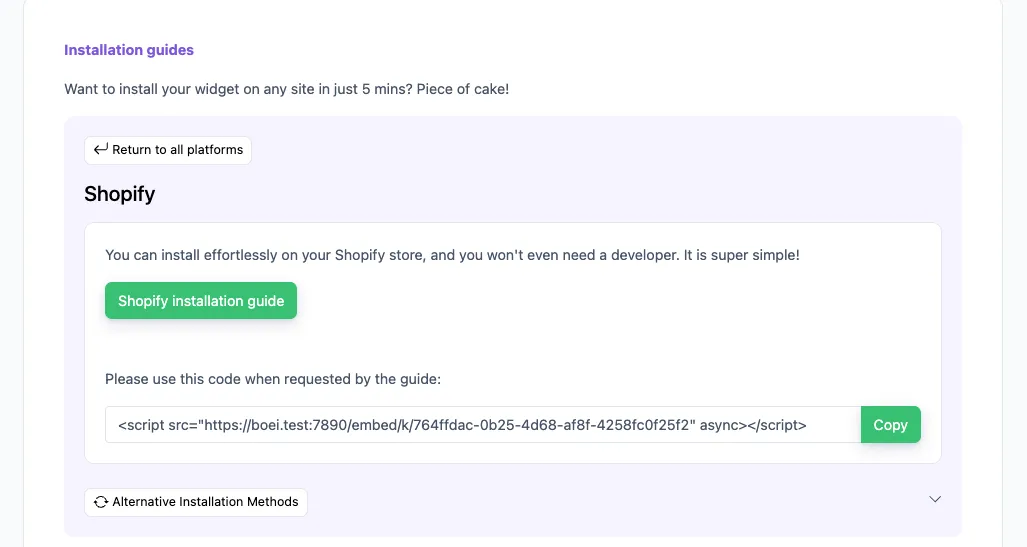
In your Boei dashboard, open your widget and click the Install tab. Select Shopify and copy the installation code.

Tip: The Install tab also offers a landing page link, QR code, and iframe embed.

Copy installation code
2

Log in to Shopify

Open Shopify and click on "Apps" and search for "xo insert code".

We will use the plugin XO insert code to install Boei. It is a free and easy plugin.

Log in to Shopify
3

Install the plugin

Press install.

Confirm installation in Shopify.

Install the plugin
4

Install the Boei code

Click add new code

Name the code "Boei" and enable it on the entire store.

Place the script from step two in place of the "code in footer" textbox.

Press save.

Install the Boei code
5

Enable the plugin

Now, we enable the plugin by clicking the theme customizer link.

Enable the checkbox and press save.

Congrats, you are done! You now have the Boei live chat Shopify installed.

Enable the plugin

Shopify Features

Built for Shopify Ecommerce

Instagram DM as a sales channel, not just a social link

🛍️

Shoppable Post to DM Flow

Customer taps a product in your Instagram feed, visits your Shopify store, and DMs you about it. Full circle. AI knows which product they are asking about.

📐

AI Sizing Assistant

Train the AI on your size charts and fit guides. When a shopper asks 'Will this fit me?', AI replies with specific measurements. Fewer returns, more confident buyers.

📦

Shipping and Stock Answers

AI answers 'When will it arrive?', 'Do you ship to Spain?', and 'Is this in stock in blue?' automatically. Trained on your Shopify shipping settings and inventory.

📸

Visual DM Conversations

Shoppers send photos of what they want. You reply with product matches. Share lookbooks, styling tips, and behind-the-scenes content. Selling through conversation.

🔄

Reels to Revenue

Post a Reel showing your product. Followers visit your Shopify store. DM button catches them at the moment of interest. The conversation that converts.

🔒

GDPR for EU Shoppers

Dutch company, Amsterdam servers. No cookies. No personal data before the click. Important if you sell to European customers on Shopify.

Boei vs Shopify Instagram Apps

Feed apps show your posts. Boei opens DM conversations that lead to sales

Boei Instafeed Shopify Inbox Chaty
Opens Instagram DM Yes (direct) No (shows feed) No (own chat) ✓ Yes
AI trained on products ✓ Yes Basic
Pre-sale Q&A via DM Yes (AI-powered) Manual only
Lead capture ✓ Yes ✓ Yes
50+ channels ✓ Yes ✗ Limited 25
Shared team inbox ✓ Yes ✓ Yes
Price From $11/mo $5.99/mo Free $15/mo

Bottom line: Instafeed displays your Instagram grid on Shopify. Pretty, but it does not start conversations. Shopify Inbox is live chat, not Instagram DM. Boei opens actual Instagram DM conversations from product pages, with AI that knows your catalog.

Shopify Tips

Maximize Instagram DM Revenue on Shopify

1

Tag Products in Reels, Then Catch DMs on Shopify

Post Reels with tagged Shopify products. When followers tap through to your store, the DM button is waiting. They came from Instagram, they trust Instagram. Let them message you there.

2

Use DM for High-AOV Products

Show the Instagram DM button only on products over a certain price. Cheap items sell themselves. Expensive items need a conversation. Target the DM button where it matters most.

3

Capture Email Before Opening DM

Set up a quick lead form before Instagram opens. You get their email for abandoned cart sequences even if the DM conversation goes cold. Double your chances of converting.

4

Reply to Story Mentions with Product Links

When customers tag your Shopify store in their Instagram Stories, reply via DM with a discount code. The DM button on your store keeps this cycle going.

Shopify Store Owners on Boei

Instagram DM on Shopify: FAQ

How do I add an Instagram DM button to my Shopify store?

Sign up at Boei (free trial), add your Instagram handle, customize the look, and install on Shopify with one line of code in Online Store > Themes > Edit code > theme.liquid. No Liquid knowledge needed. Shopify install guide.

Does it work with Instagram Shopping?

Yes. Customers who tap shoppable posts in your Instagram feed and land on your Shopify store see the DM button right there. The conversation continues on the platform they started on.

Can the AI answer product questions?

Yes. The AI trains on your Shopify product pages, descriptions, and FAQs. It answers sizing, shipping, stock, and return questions automatically. Product cards with images and prices appear in responses.

Will it work with my Shopify theme?

Yes. Works with Dawn, Debut, Refresh, and every free and premium Shopify theme. No theme editing or Liquid code changes. Loads independently.

Can I show the DM button on product pages only?

Yes. Control visibility by page type: product pages, collection pages, cart, checkout, blog, or any URL pattern. Show it where pre-sale questions happen most.

How does this help with Instagram Shopping conversions?

Instagram Shopping gets people to your store. But many leave without buying because they have unanswered questions. The DM button catches those hesitant shoppers and starts a conversation that leads to a sale.

What is the pricing?

From $11/month (annual billing). Includes Instagram DM, AI with 2,000 messages, shared inbox, lead capture, 50+ channels, unlimited seats. 7-day free trial, no credit card.

Can I use it alongside Shopify Inbox?

Yes. Shopify Inbox handles on-site chat. Boei handles Instagram DM (plus WhatsApp, Messenger, and 50+ other channels). Different tools for different conversations. They work side by side.

Is it GDPR compliant for EU customers?

Yes. Dutch company, EU servers in Amsterdam. No cookies. Works with Shopify's built-in cookie banner. DPA available. Important for stores selling to European shoppers.

Can I track DM conversions?

Yes. Every DM button click fires events in Google Analytics, Meta Pixel, and other trackers you have connected. See which products and pages drive the most DM conversations.

Instagram DM Widget for Every Platform

Same widget, same features. On your platform of choice

Your Shopify Customers Are Already in Your Instagram DMs

Now let them DM you from your product pages too. AI handles the pre-sale questions. You handle the revenue.

7-day free trial • No credit card required • Works with Instagram Shopping • All Shopify themes supported