AI-Powered Live Chat for Framer

Your Framer portfolio looks incredible — but visitors leave without reaching out. AI live chat engages every visitor instantly, qualifies leads, and routes warm prospects to your team on WhatsApp or Messenger. Turn design-first websites into revenue machines.

AI trained on your Framer site content
Paste once in Framer custom code
AI-to-human handover
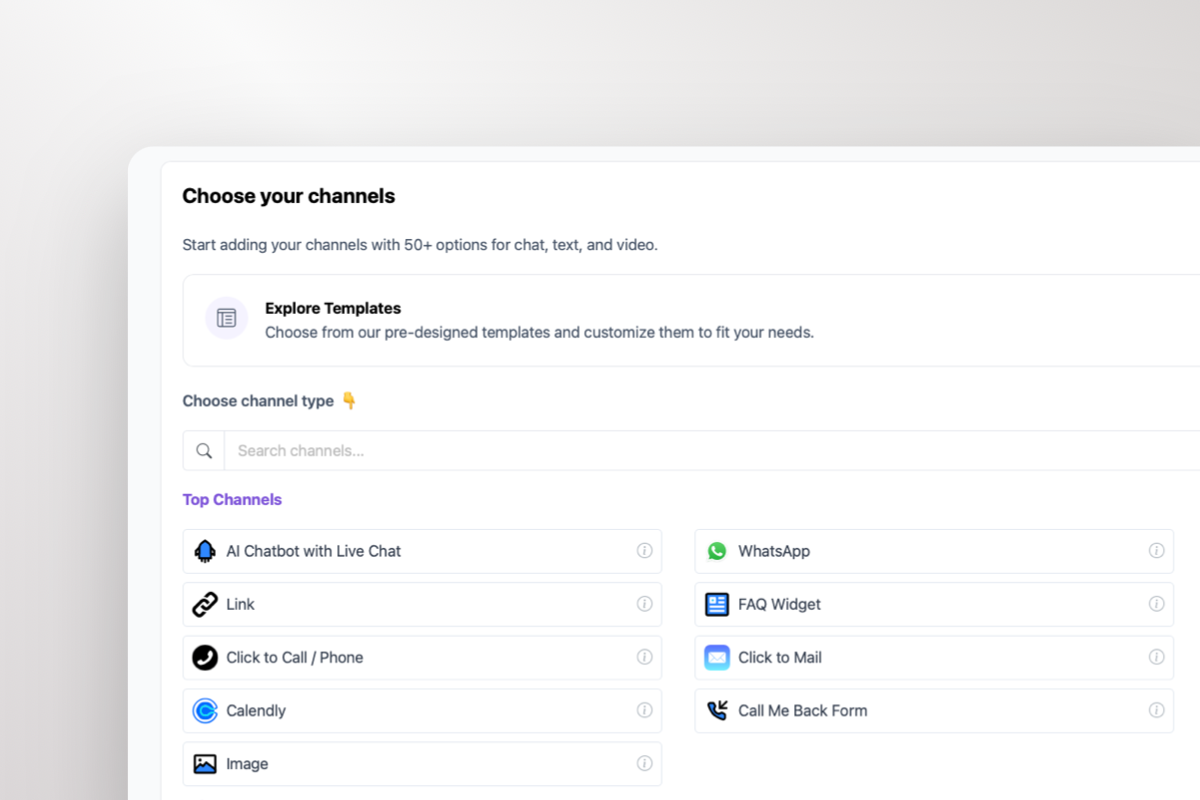
50+ channels from one widget
Andrew Lee David S. Vance W. Grant Nitesh Manav
from 159 reviews

Try It Yourself

10,000+

Websites using Boei

30%

More leads captured

3x

Higher conversion rates

5 min

Custom code install time

Boei Lead Inbox for Framer

Every Framer Conversation Becomes a Qualified Lead

AI live chat does what a beautiful Framer contact page never could — qualify visitors automatically. Your AI asks about budget, timeline, and project scope, scores every conversation, and delivers complete lead profiles to your inbox or CRM. Portfolio browsers become pipeline. Case study readers become booked calls.

  • AI asks qualifying questions: budget, timeline, project type, company size
  • Every lead scored by engagement level and buying intent
  • Leads delivered instantly via email, webhook, or directly to your CRM
  • Complete AI conversation transcript included with every lead
  • Source tracking shows which Framer page they came from

Seamless AI-to-Human Handover

When a Framer visitor is ready to hire or needs a detailed proposal, your AI escalates to your team on WhatsApp, Messenger, or any channel they already use. The handover includes full conversation history, lead score, and contact details — your team picks up right where AI left off.

  • Escalation triggers: high lead score, human request, pricing negotiation
  • Full conversation history and AI-generated summary included
  • Routes to WhatsApp, Messenger, Telegram, email, or Slack
  • Smart routing: round-robin, random, or manual claim
  • Unlimited team seats at no extra cost
Boei AI-to-Human Handover on Framer

50+ Channels, One AI Engine

Framer visitors choose how they want to reach you — your AI qualifies them on every channel

WhatsApp Business

AI auto-replies on WhatsApp, not just your Framer site. Conversations continue even after visitors leave. All WhatsApp conversations land in your shared inbox.

Facebook Messenger & Instagram DM

Meet social-first clients where they already spend time. AI qualifies visitors and captures leads across Meta's messaging platforms.

Telegram, Signal, Viber

Privacy-conscious users get the same AI-powered experience. Every channel feeds into one inbox with full conversation context.

Contact Forms, Callback, Email & 40+ More

Structured inquiries, click-to-call, SMS, Slack, Discord, WeChat — every channel your clients use, connected to one AI-powered pipeline.

Live Chat Is Just One Entry Point to Your AI Sales Agent

Live chat captures visitors on your Framer site. But your AI Sales Agent works across WhatsApp, Messenger, Telegram, and 50+ channels from a single widget. Every conversation — regardless of channel — feeds into one pipeline with AI qualification, lead scoring, and team routing built in.

One AI engine. Multiple entry points. Every lead tracked and qualified.

Learn More About AI Live Chat Explore Boei AI Sales Agent

Why Your Framer Site Needs AI Live Chat

Framer gives designers full creative control — but zero native chat or lead capture tools:

  • No built-in live chat — Framer has no chat widget, no messaging, and no way to engage visitors in real-time. Beautiful portfolios lose leads silently.
  • Contact forms convert at 2-3% — Static forms buried on a /contact page miss the 97% who browse your work and leave without reaching out.
  • Third-party tools break the design — Most chat widgets look generic and clash with Framer's polished aesthetic. They load heavy scripts that hurt performance.
  • No follow-up after the tab closes — Visitors impressed by your portfolio leave, and there's no way to continue the conversation on WhatsApp or Messenger.

Boei fixes this for Framer: paste one script in Site Settings, train AI on your pages, and let it qualify every visitor. AI routes warm prospects to your team on WhatsApp — conversations continue even after they close the tab. See the Framer installation guide.

How AI Live Chat Drives Revenue on Framer

Lead Generation

3-5x higher conversion than static contact forms. AI engages Framer visitors browsing your portfolio, asks qualifying questions about budget and timeline, captures contact details, and routes warm leads to your inbox with full context. Every case study page becomes a lead magnet.

Sales Assistance

AI answers project scope questions, shares your process and pricing tiers, handles common objections, and escalates high-intent prospects to your team with the full conversation history. You close deals instead of answering the same questions in email.

Customer Support

AI resolves 60-80% of questions instantly using your Framer site content. Existing clients get answers about project status, deliverables, and next steps without waiting for a reply.

Appointment Booking

AI qualifies prospects and schedules discovery calls. Visitors book when they're most excited about your work — no back-and-forth emails that cool down interest.

How It Works

From signup to AI-qualified leads in three steps

1

Enter Your Website URL

Boei's crawler reads your Framer site automatically. Your AI learns your services, portfolio, and pricing — no manual data entry. Add PDFs or custom content for deeper training.

2

Configure Your AI & Channels

Set your brand colors to match your Framer design, define your welcome message, and set qualification criteria. Add WhatsApp, Messenger, or other channels as escalation paths.

3

Go Live with Framer Custom Code

Open Framer Site Settings, go to Custom Code, and paste the Boei script in the End of tag section. Publish your site — your AI starts qualifying visitors immediately. No Framer components or plugins needed.

Framer Installation Guide

Step-by-step instructions to add AI live chat to Framer

1

Copy installation code

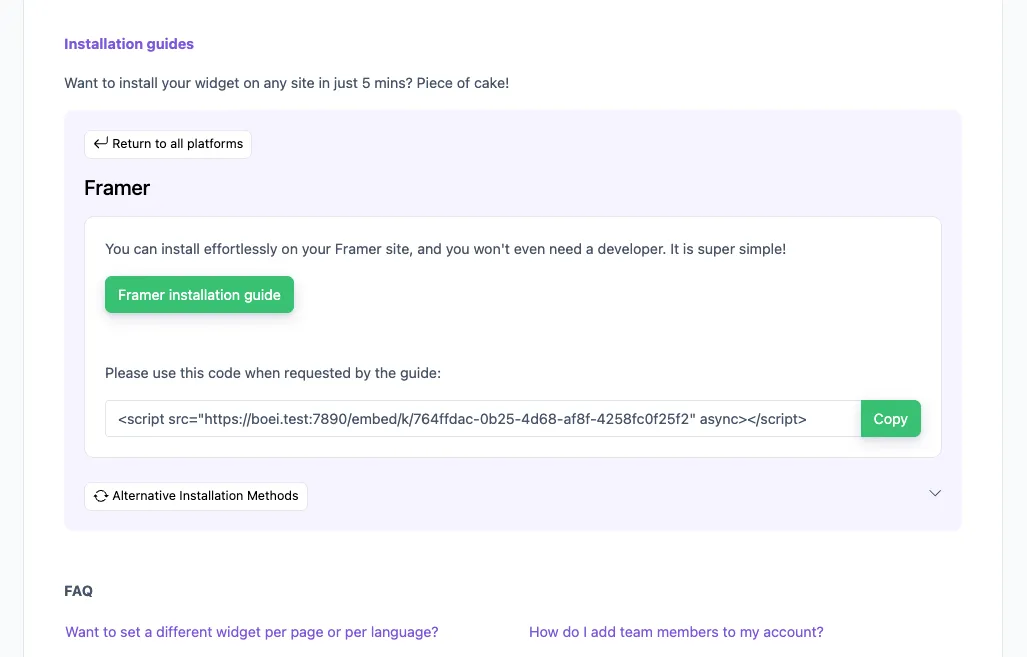
In your Boei dashboard, open your widget and click the Install tab. Select Framer and copy the installation code.

Tip: The Install tab also offers a landing page link, QR code, and iframe embed.

Copy installation code
2

Go to Framer

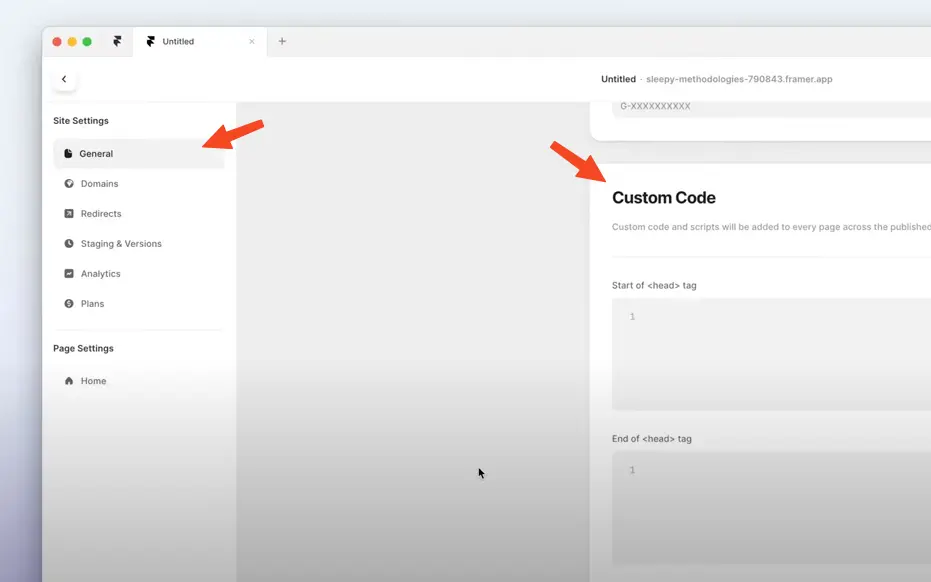
  1. Log in to your Framer account.
  2. Go to Settings by clicking the cog on the right top.
  3. Click General and scroll down to Custom Code.
  4. Paste the Boei code from step 2 in the End of <body> tag area. If there is already some code there, paste the Boei code below that.

Click Save and then Publish to see the changes on your live site.

Note that Framer does not load Boei in the Preview mode.

Congrats, you are done!

Go to Framer

Framer Live Chat Compared: How Boei Stacks Up

AI included, more channels, lower price

Boei Intercom Crisp Tidio
Starting price €14/mo €74/mo €25/mo €39/mo
AI chatbot included Yes (2,000 msgs) No (add-on) No (add-on) No (add-on)
Team seats Unlimited 1 4 3
WhatsApp, Telegram, 50+ channels Included Extra cost ✗ Limited Extra cost
AI-to-human handover ✓ Yes Yes (extra cost) ✗ Limited
Automatic lead qualification ✓ Yes ✗ Limited
Framer install method Custom code Custom code Custom code Custom code
Lightweight & async loading ✓ Yes ✓ Yes
GDPR compliant (EU servers) ✓ Yes ✓ Yes

Bottom line: Boei gives you AI chatbot + live chat + 50 channels + unlimited team seats for €14/month. Intercom charges €74+/agent with AI as a paid add-on. Crisp and Tidio lack AI qualification entirely.

Designers and Agencies Love Boei

Framer AI Live Chat FAQ

Does Boei include an AI chatbot for Framer?

Yes — AI is included in every Boei plan, not a paid add-on. Your AI chatbot handles first responses, answers questions from your Framer site content, qualifies leads automatically, and escalates warm prospects to your team on WhatsApp or Messenger. 2,000 AI messages included per month.

How do I install live chat on Framer?

Open your Framer project, go to Site Settings, then Custom Code. Paste the Boei script in the End of <body> tag section and publish. Takes under 5 minutes, no Framer components or code overrides required. See the full Framer installation guide.

Do I need to be online 24/7?

No — your AI handles it. It answers visitor questions instantly, qualifies leads, and captures contact details around the clock. When your team is available, AI escalates warm leads directly to them. When you're offline, AI continues working and queues qualified leads for follow-up.

Will live chat slow down my Framer site?

No. Boei loads asynchronously after your page content, has no heavy dependencies, and uses CDN delivery. Zero impact on page load times or Core Web Vitals. Your Framer animations and interactions remain buttery smooth.

Will the chat widget match my Framer design?

Yes — customize brand colors, position, welcome message, and widget style to match your Framer site's aesthetic. The widget is minimal and unobtrusive by default, designed to complement design-first websites.

How does AI-to-human handover work?

You define the rules: escalate when a lead is qualified, when AI can't answer, when the visitor asks for a human, or when pricing negotiations start. Your team gets the full conversation history and lead score on WhatsApp, Messenger, or email.

Can I use multiple team members?

Yes — unlimited team seats at no extra cost. Perfect for design agencies. Configure smart routing for escalated conversations: round-robin, random assignment, or manual claim. AI handles qualification, your team handles closing.

What channels does it support besides live chat?

50+ channels including WhatsApp, Messenger, Telegram, Instagram DM, contact forms, email, phone, SMS, and more. Your AI works across all channels from one Framer widget.

Does it work with Framer's CMS and multi-page sites?

Yes — because the script is installed at the site level via Site Settings, it automatically appears on every page including CMS collection pages, portfolio pages, and landing pages. No per-page setup needed.

Is Boei GDPR compliant?

Yes. Boei is built by a Dutch company with all servers in Amsterdam. The widget runs cookieless by default — no consent banner needed for the chat widget itself. We provide a DPA for agencies handling client data.

What's included for €14/month?

AI chatbot (2,000 messages), unlimited conversations, unlimited team seats, all 50+ channels, lead scoring, analytics, CRM inbox, and use on unlimited Framer sites. One flat price — no per-agent fees like Intercom or Tidio.

Can I try it free?

Yes — 7-day trial with full AI access. Install on your Framer site, train AI on your pages, and watch it qualify visitors in real-time. No credit card required.

Ready to Turn Framer Visitors into Revenue?

Join 10,000+ websites using Boei. 5-minute setup — AI included.

7-day free trial • No credit card required • AI chatbot included • Works on every Framer site