WordPress logo

WhatsApp AI Agent

WhatsApp AI Agent & Chat Widget for WordPress

Turn your WhatsApp into an AI agent that answers questions, qualifies leads, and routes warm prospects to your team — automatically. Works with WooCommerce, Elementor, and all WordPress themes.

Trusted by 14,368 websites

No WhatsApp Business API required

Andrew Lee David S. Vance W. Grant Nitesh Manav
from 159 reviews

Also available for:

A WhatsApp AI Agent That Qualifies Leads Automatically

Your WhatsApp chat widget comes with a built-in AI agent. It doesn't wait for questions — it qualifies visitors, asks about budget, timeline, and needs, captures contact details, and scores lead intent. Warm prospects get routed to your team with a full conversation summary. Cold leads stay nurtured automatically.

  • Asks qualifying questions based on your sales process
  • Captures name, email, phone, and company details mid-conversation
  • Scores lead intent so your team focuses on hot prospects
  • Hands warm leads to agents with full context + AI summary
  • Trained on your website, PDFs, pricing, and FAQs
WhatsApp AI
Hi! I'm looking for a solution for my team of 12.
Great! What's your main goal — lead capture, customer support, or both? I'll match you with the right plan.
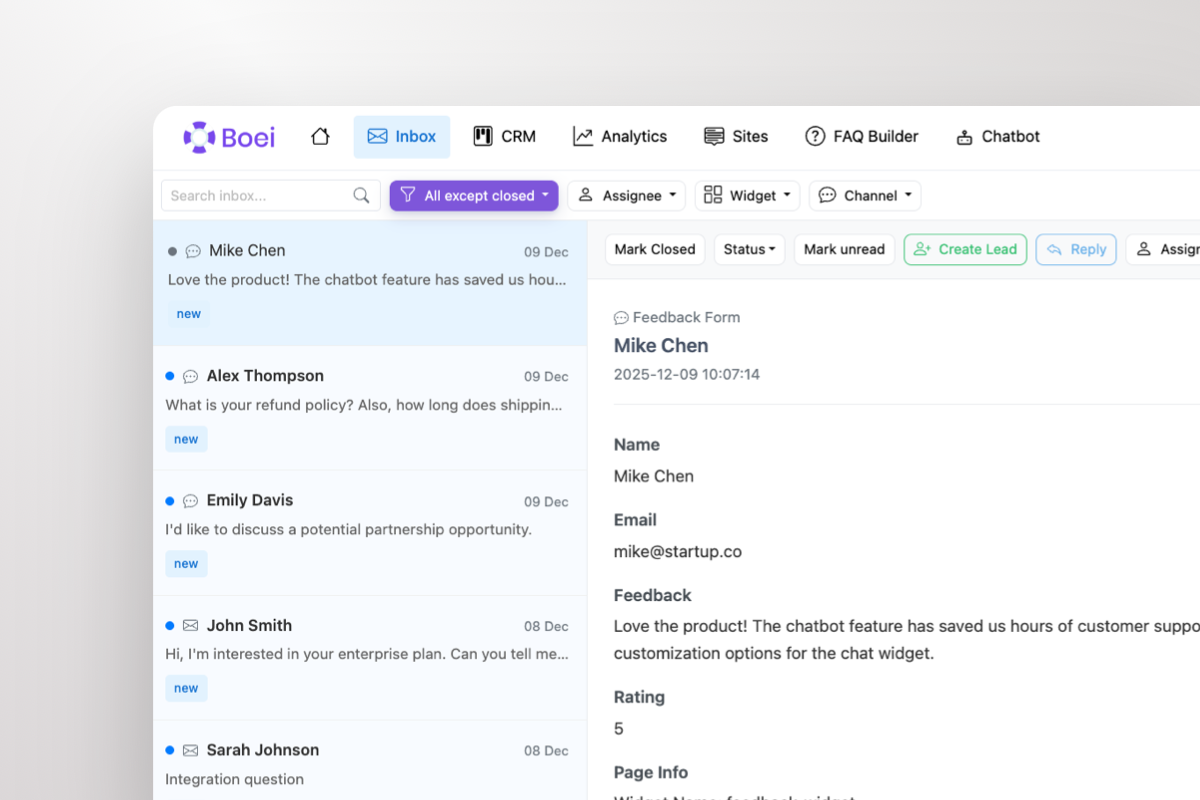
Shared inbox showing WhatsApp conversations with AI summary and agent handoff

Warm Leads Go Straight to Your Team

When a prospect is ready to buy, the AI doesn't keep chatting — it escalates. Your sales team gets the lead in a shared inbox with the full WhatsApp conversation and an AI-generated summary: who they are, what they need, and how warm they are. One click to take over.

  • AI escalates warm leads to your team automatically
  • Agents see full conversation + AI summary in shared inbox
  • Take over any WhatsApp chat with one click
  • Round-robin or department-based routing across agents
  • Leads flow into built-in CRM pipeline automatically

What WordPress Users Say

Your WhatsApp Widget, Your Brand

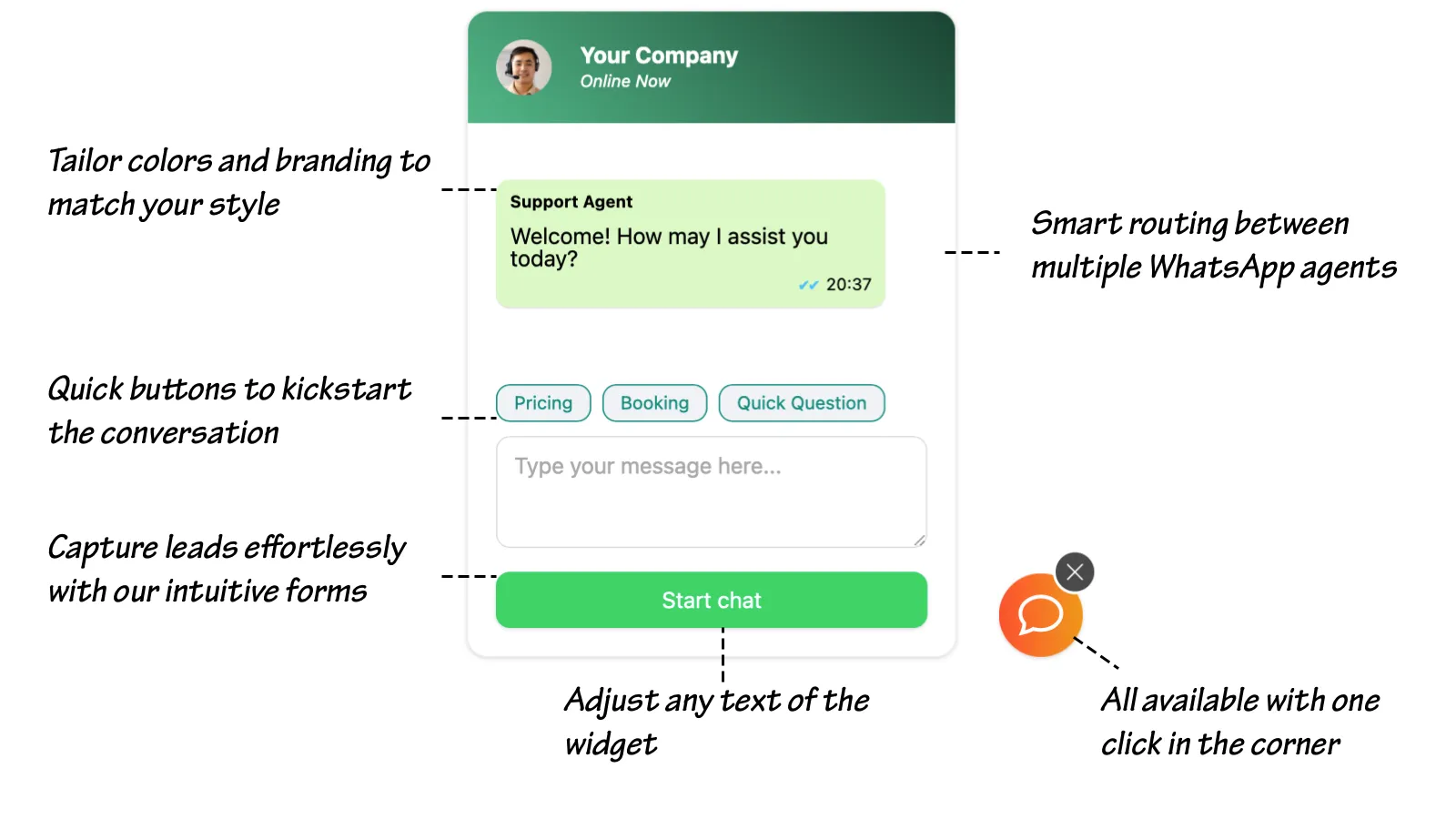
WhatsApp chat widget showing branding options, quick-reply prompts, lead capture form, and agent routing

Compare Options

Boei vs Other WordPress WhatsApp Plugins

See why 14,000+ websites choose Boei over Chaty, Click to Chat, and WP Chat App

Feature Boei Chaty Click to Chat WP Chat App
AI agent
Lead qualification & scoring
Shared team inbox
Agent escalation with AI summary
Built-in CRM
Channels included 50+ 25 WhatsApp only WhatsApp only
Price €14/mo €59/year Free $25 one-time
Setup time 5 minutes 10-30 min 5 minutes 15 minutes
Auto-translation 95+ languages

Bottom line: Chaty, Click to Chat, and WP Chat App add a basic WhatsApp link — no AI, no lead qualification, no inbox, no CRM. Boei gives you an AI agent that qualifies leads, a shared inbox for your team, and a built-in CRM — all for €14/month. See full comparison.

Quick Setup

Install WhatsApp AI Agent on WordPress

From setup to your first qualified lead in under 5 minutes

1

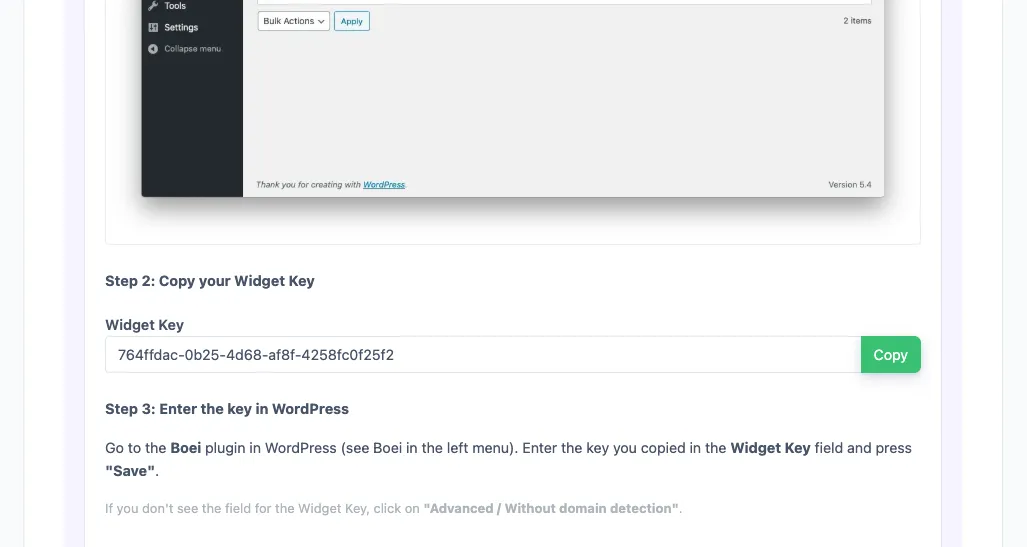
Copy WordPress key

In your Boei dashboard, open your widget and click the Install tab. Select WordPress and copy the WordPress plugin key.

Tip: The Install tab also offers a landing page link, QR code, and iframe embed.

Copy WordPress key
2

Log in to WordPress

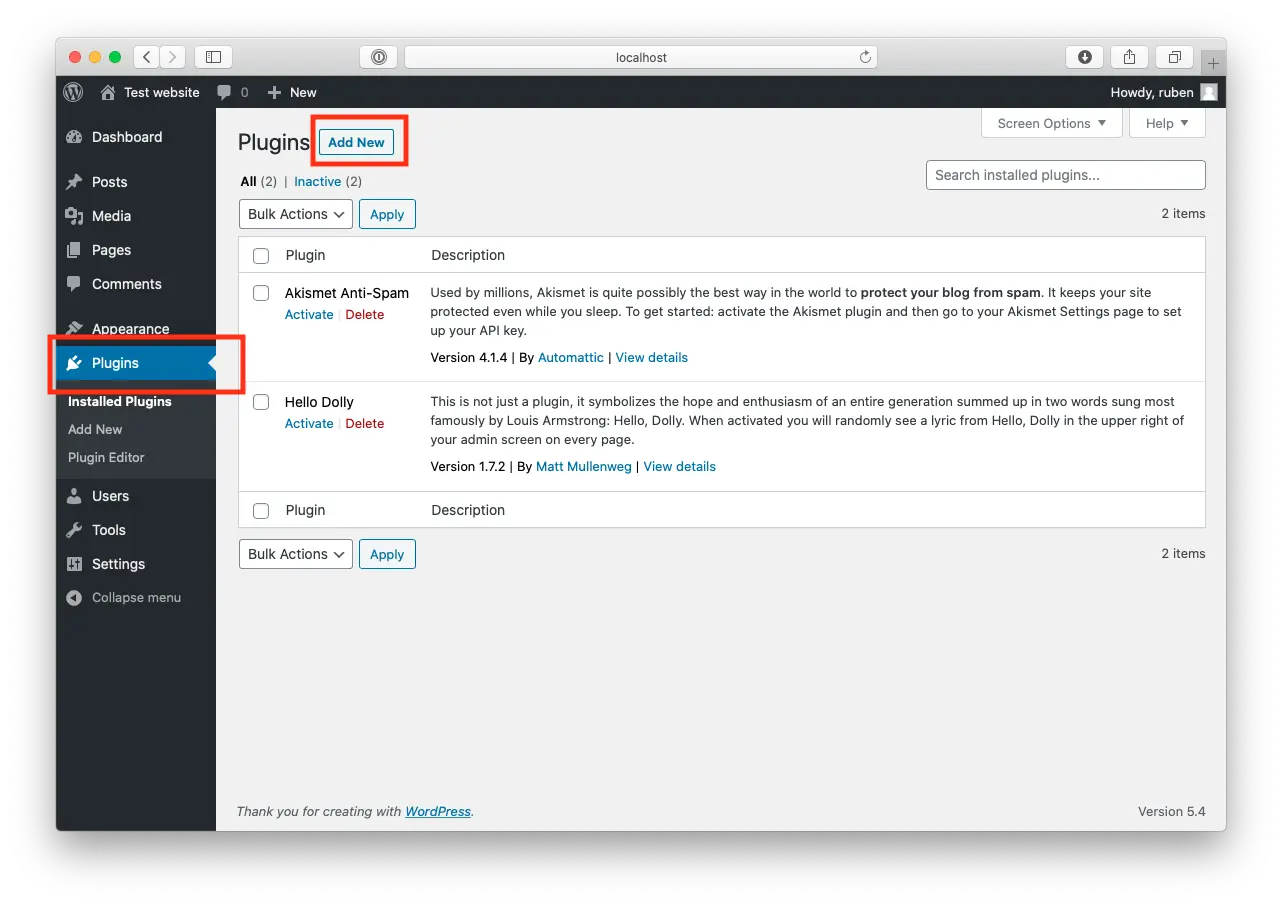
Open WordPress and click on "Plugins".
Now, click "Add New" at the top of the page.

Log in to WordPress
3

Install Boei Plugin

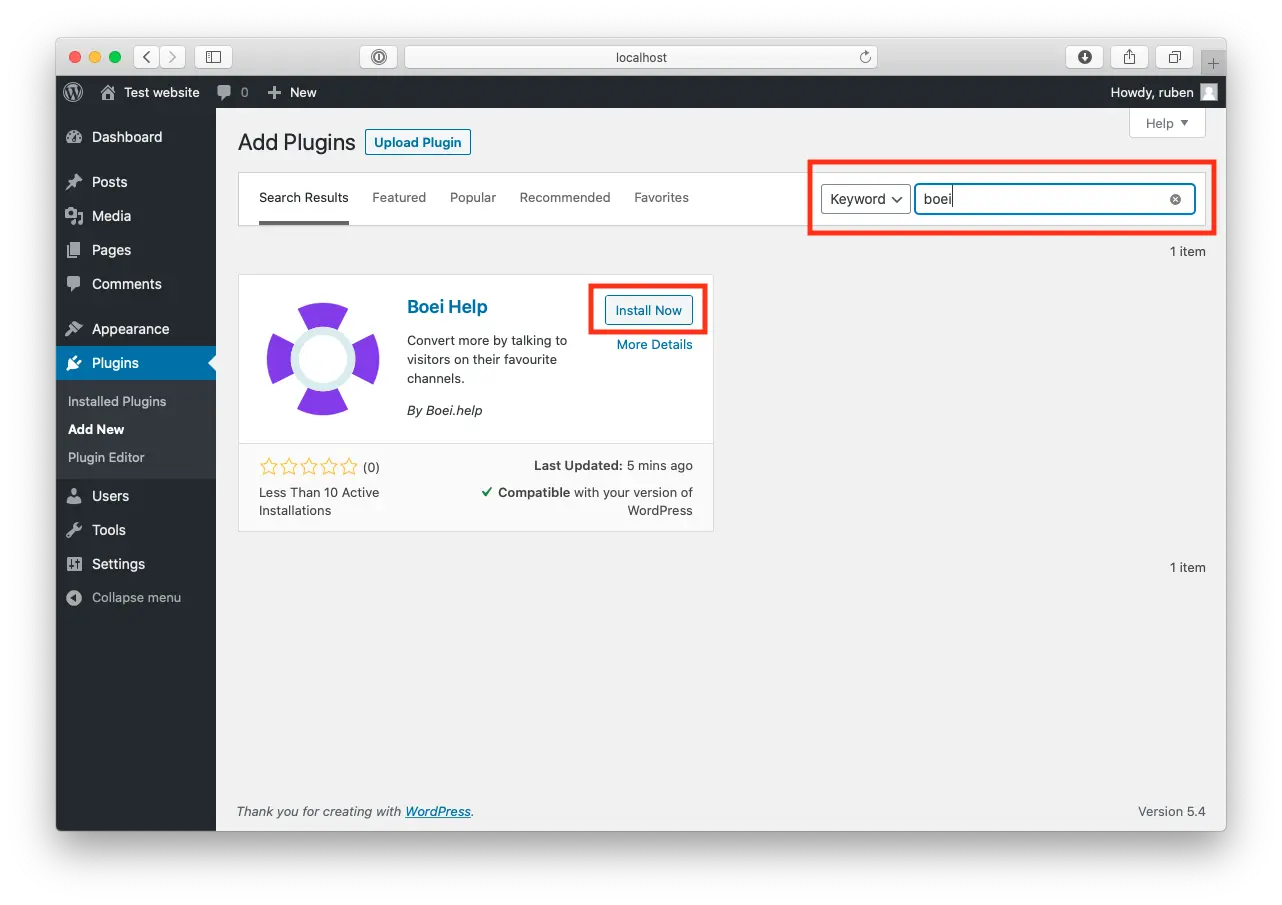
Search for "Boei" and find our plugin.

Click "Install Now".

Install Boei Plugin
4

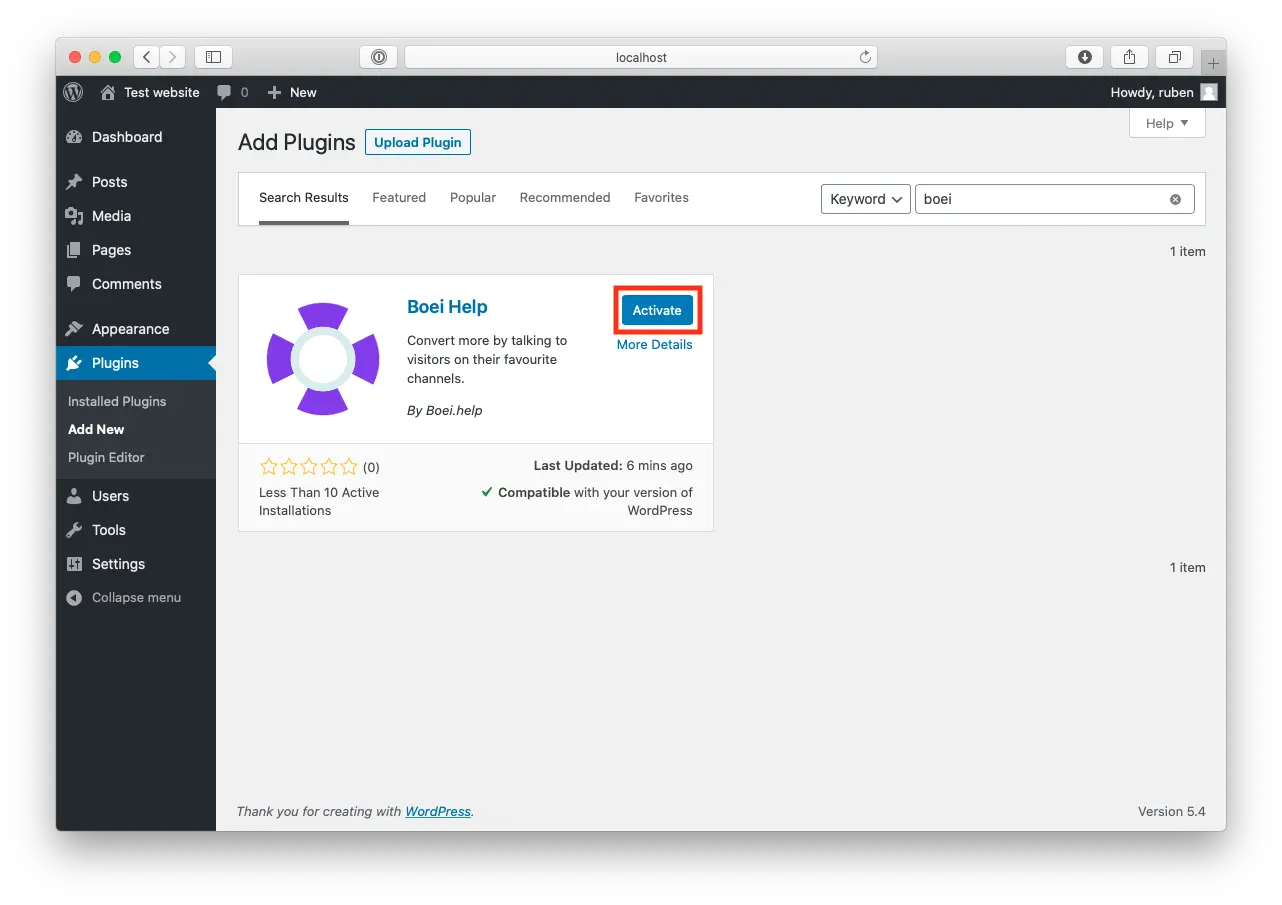
Activate

When the plugin is installed, press "Activate".

Activate
5

Paste key in Boei's WordPress Plugin

Go to the Boei plugin in WordPress (see Boei in the left menu).

Enter the key you copied in the Widget Key field and press "save".

If you don't see the field for the Widget Key, click on "Advanced / Without domain detection".

6

Finished coffee

Congrats, you are done!

WordPress Features

Built for WordPress

AI agent that works perfectly with your WordPress setup

🤖

AI Lead Qualification

AI asks qualifying questions, captures contact details, and scores lead intent. Trained on your website content, FAQs, and pricing.

📥

Shared Team Inbox

All WhatsApp conversations in one inbox. AI escalates warm leads with full context and AI summary. Agents take over with one click.

📊

Built-in CRM Pipeline

Leads flow into CRM automatically. Track every deal from first message to close without third-party tools.

🛒

WooCommerce Integration

AI on product pages, cart, and checkout. Detects purchase intent, answers specs and shipping questions, and routes hot buyers to your team with product interest attached.

🎨

Page Builder Compatible

Works with Elementor, Divi, Beaver Builder, WPBakery, Gutenberg, and all WordPress themes.

📱

50+ Channels Included

WhatsApp, Messenger, Telegram, Instagram DM, SMS, phone, contact forms — all in one widget, one inbox.

🔒

GDPR Compliant

Dutch company, Amsterdam servers. No cookies, full GDPR compliance. Works with WP Rocket, LiteSpeed, and all caching plugins.

🌍

WPML & Auto-Translation

Works with WPML and Polylang. AI conversations auto-translate to 95+ languages for international visitors.

How WordPress Sites Convert with WhatsApp AI

AI qualifies leads and routes them to your team — across industries

WooCommerce Stores

AI detects purchase intent, recommends products, and routes hot buyers to sales. Abandoned cart follow-ups on WhatsApp convert 3x better than email.

  • AI qualifies purchase intent on product pages
  • Answers sizing, shipping, and stock questions
  • Routes ready-to-buy shoppers to your team
  • Leads flow into CRM with product interest

Service Businesses

AI pre-qualifies leads by asking about scope, budget, and timeline. Warm prospects are routed to consultants with a full brief — ready for a proposal.

  • AI asks about budget, timeline, and requirements
  • Captures contact details mid-conversation
  • Escalates warm leads to the right consultant
  • CRM tracks every lead through your pipeline

Local Businesses

AI handles booking requests, pricing questions, and availability checks 24/7. Warm leads get routed to staff with full context — no lead repeats themselves.

  • AI answers pricing and availability instantly
  • Booking requests captured and routed to staff
  • QR codes for offline marketing materials
  • Multi-language support for diverse communities

Pro Tips

Get More Qualified Leads on WordPress

1

Customize Qualifying Questions

Configure what your AI asks — budget range, timeline, team size, specific needs. The better the questions, the warmer the leads your team receives.

2

Use Quick-Reply Prompts for Intent

Prompts like 'Get Quote', 'Book Demo', 'Compare Plans' signal buyer intent immediately. Your AI tailors the conversation based on what they click.

3

Set Up Department Routing

Route sales inquiries to sales, support to support, WooCommerce orders to fulfillment. Each team sees only their leads in the shared inbox.

4

Track Revenue from WhatsApp

Enable Google Analytics conversion tracking to see which WhatsApp leads become customers. Measure exact ROI from your AI agent.

Your AI Sells on 50+ Channels

Same AI, same inbox, same CRM — across every channel your customers use

Questions?

WordPress WhatsApp AI Agent FAQ

How does the WhatsApp AI agent work on WordPress?

When a visitor messages your WhatsApp from your WordPress site, the AI engages immediately — asking qualifying questions, capturing contact details, and scoring intent. When a lead is warm, it escalates to your team in the shared inbox with the full conversation and an AI-generated summary.

How do I install it on WordPress?

Go to Plugins → Add New, search for 'Boei', install and activate. Sign up at Boei (free trial), add your WhatsApp number, copy your widget key, and paste it in Settings → Boei. Your AI agent is live in 5 minutes. See our WordPress installation guide.

Does it work with WooCommerce?

Yes. AI qualifies purchase intent on product pages, answers product questions (specs, shipping, returns), and routes hot buyers to your sales team with full context. Leads flow into the built-in CRM automatically.

How does agent escalation work?

The AI handles conversations automatically. When a lead is qualified or asks for a human, it escalates to your team. Agents see the full conversation plus an AI summary — who the lead is, what they need, and how warm they are. One click to take over.

What does it cost?

Boei Pro is €14/month and includes the WhatsApp AI agent, 2,000 AI messages, shared inbox, built-in CRM, 50+ channels, and unlimited team seats. Start with a 7-day free trial — no credit card required.

Does it work with Elementor, Divi, and other page builders?

Yes. Boei works with all WordPress themes and page builders: Elementor, Divi, Beaver Builder, WPBakery, Gutenberg, Astra, GeneratePress, and custom themes.

Can multiple agents handle WhatsApp messages?

Yes. All WhatsApp conversations appear in the shared inbox. Multiple agents can view, claim, and respond. Set up round-robin or department-based routing to distribute leads evenly across your team. Unlimited team seats included.

Is it GDPR compliant?

Yes. Boei is a Dutch company with servers in Amsterdam (EU). No cookies, full GDPR compliance, DPA available on request. Compatible with Wordfence and Sucuri.

Put Your WhatsApp AI Agent to Work on WordPress

AI qualifies leads on WhatsApp 24/7, shared inbox for your team, built-in CRM — from €14/month.

7-day free trial • No credit card required • 5-minute setup • Works with all themes
Andrew Lee David S. Vance W. Grant Nitesh Manav
from 159 reviews