Weebly logo

Best Weebly Chat Widget

Live Chat for Weebly

Weebly made it easy to build a website. But talking to visitors? That part was never solved. The Weebly App Center is shrinking since Square took over, and most chat apps there are gone or broken. Boei skips the App Center completely. Add an embed code to your Weebly footer, and your site gets AI live chat that answers questions around the clock. Works on Weebly and Square Online.

Trusted by 17,000+ websites

Works on Weebly + Square Online

Andrew Lee David S. Vance W. Grant Nitesh Manav
from 159 reviews

Also available for:

Try the Weebly Live Chat

17,000+

Websites using Boei

24/7

AI answers visitors

0

Weebly apps to install

$11/mo

Starting price

The Reality of Running a Weebly Site in 2026

Weebly was acquired by Square in 2018. Since then, development has shifted to Square Online. The Weebly App Center stopped getting new apps. Many existing apps were removed or stopped working. If you search for "live chat" in the Weebly App Center today, you'll find a handful of options, most with outdated reviews and no recent updates.

This creates a real problem for Weebly site owners:

  • The App Center is a dead end. Square is investing in Square Online, not Weebly. New tools and integrations go to Square's ecosystem, not Weebly's
  • Weebly's built-in contact form is passive. It sits on a page and waits. Most visitors never navigate to your contact page. They browse, have a question, and leave
  • Small businesses can't staff live chat. Weebly's audience is solopreneurs, local businesses, and side projects. You're not hiring a support team for your photography portfolio or bakery website
  • Square Online migration uncertainty. If you move to Square Online later, you want your chat solution to work on both platforms without starting over

Boei is built for exactly this situation. No Weebly app needed. Paste an embed code into your footer, train the AI on your Weebly pages, and visitors get instant answers. If you migrate to Square Online tomorrow, the same code works there too.

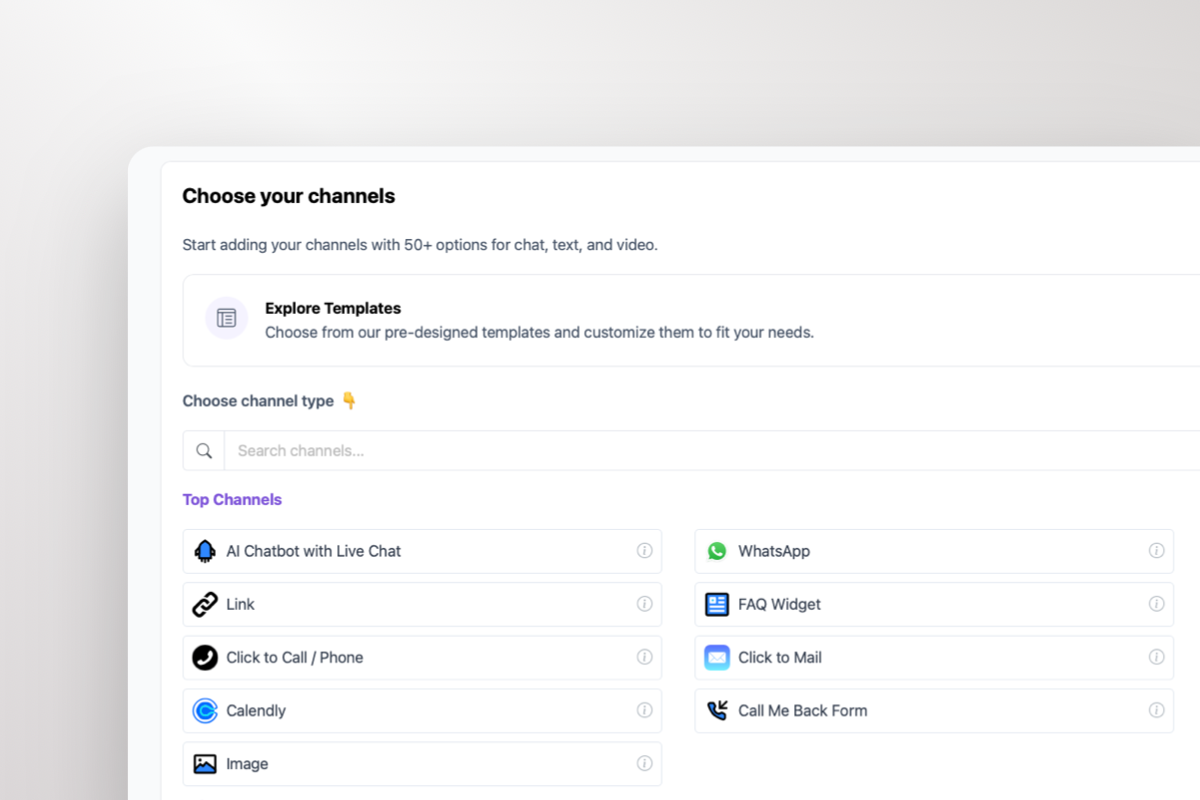
Boei live chat on a Weebly website

How to Add Live Chat to Weebly (No App Center Needed)

Weebly gives you two places to paste custom code. Both work for Boei. The entire install takes about 3 minutes, and your Weebly site gets AI chat on every page.

  • Option 1: Weebly Editor > drag an Embed Code element to your footer area and paste the Boei script
  • Option 2: Settings > SEO > Footer Code. Paste the script there to add it sitewide automatically
  • Works on Weebly Free, Personal, Professional, and Performance plans
  • Also works on Square Online if you migrate later
  • No technical skills needed. If you can copy and paste, you can install Boei on Weebly

Perfect for the Businesses That Use Weebly

Weebly's strength was always simplicity. The people who chose Weebly wanted a website without the complexity. Live chat should be the same way. Here's how different Weebly businesses use Boei:

Local Service Businesses

Plumbers, photographers, tutors, cleaning services. Your Weebly site lists what you do. AI answers questions about availability, pricing, and service areas. Captures phone numbers and emails from interested visitors while you're out on a job.

Small Online Stores

Weebly's ecommerce features are basic but functional. AI helps shoppers find products, answers questions about shipping times and return policies, and reduces the "I'll think about it" exits by answering objections in real time.

Portfolio and Creative Businesses

Designers, writers, consultants. Your Weebly portfolio shows your work. AI answers questions about your process, pricing, and availability. Turns portfolio browsers into booked clients by capturing leads during the conversation.

Side Projects and New Businesses

You picked Weebly because you wanted to launch fast and cheap. AI live chat fits that approach: $11/month, 5-minute install, and your site has professional customer engagement without hiring anyone.

Weebly Installation Steps

Step-by-step guide to add live chat to your Weebly site

1

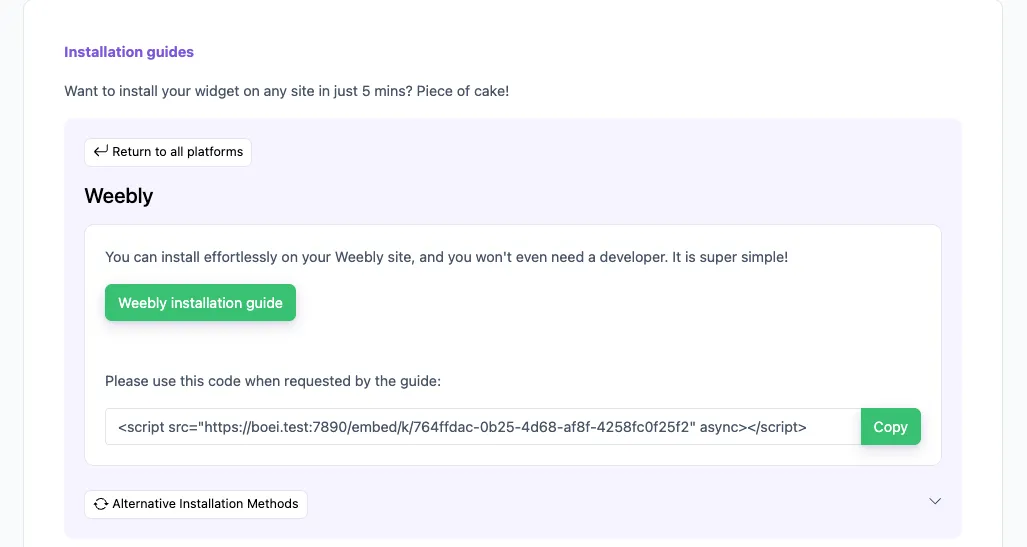
Copy installation code

In your Boei dashboard, open your widget and click the Install tab. Select Weebly and copy the installation code.

Tip: The Install tab also offers a landing page link, QR code, and iframe embed.

Copy installation code
2

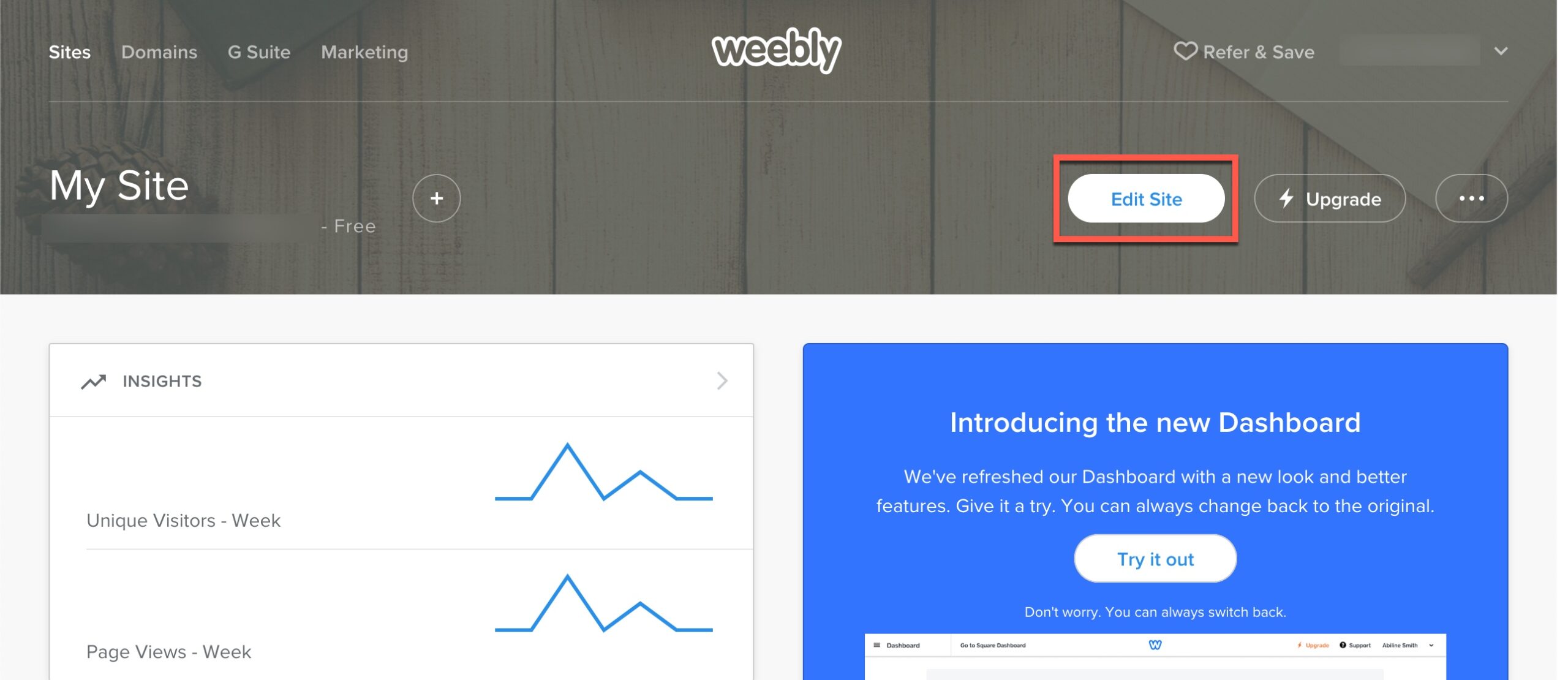
Go to Weebly

  1. Log in to your Weebly account.

  2. Click Edit Site.

  3. Click Settings.

  4. Click SEO.

  5. Copy the Boei code from step 2 and paste it into the "Footer Code" box in the Weebly. If there already is data, add the Boei code at the bottom.

Click Save and then Publish to apply the changes. Congrats, you are done!

Go to Weebly

Weebly Features

What Weebly Site Owners Get

Everything works on Weebly and Square Online

🤖

AI Learns Your Weebly Pages

Enter your Weebly URL. The AI reads every page, product, and blog post. Then it answers visitor questions using your actual content. No manual training.

🔄

Weebly to Square Online Ready

Same embed code works on both platforms. If Square migrates you to Square Online, your chat, AI training, and leads carry over. Nothing to reconfigure.

📱

WhatsApp for Mobile Visitors

Many Weebly visitors browse on mobile. Let them continue on WhatsApp after leaving your site. AI auto-replies on WhatsApp too.

📋

Lead Capture Without Forms

Weebly's contact form gets 2-3% response rates. AI chat captures leads naturally during conversations. Name, email, phone, and what they need.

💬

No More 'Offline' Messages

Traditional live chat shows 'offline' when you're busy. Boei's AI is never offline. It answers visitors at 3am on a Sunday with the same quality.

💰

Built for Small Budgets

Weebly site owners chose simple and affordable. Boei starts at $11/month. No per-agent fees. No enterprise pricing. Just AI chat that works.

Live Chat Options for Weebly Compared

What's actually available for Weebly site owners

Boei tawk.to Tidio Crisp
Price From $11/mo Free (branded) From $29/mo From $25/mo
AI chatbot included Yes (2,000 msgs) No ($29/mo add-on) No (add-on) No (add-on)
Weebly install method Embed code Embed code Embed code Embed code
Works on Square Online ✓ Yes ✓ Yes ✓ Yes ✓ Yes
Branding on free plan No free plan Yes (tawk.to logo) Yes (Tidio logo) Yes (Crisp logo)
WhatsApp + 50 channels Included Extra cost ✗ Limited
Answers when you're offline Yes (AI) No (offline form) ✗ Limited No (offline form)
EU servers (GDPR) Yes (Amsterdam) Yes (France)

Bottom line: Most "free" Weebly chat widgets put another company's logo on your site and go offline when you do. Boei's AI never goes offline, doesn't show third-party branding, and includes 50+ channels for $11/month.

Small Business Owners Love Boei

Weebly Live Chat FAQ

Do I need to install a Weebly app from the App Center?

No. Boei works with a simple embed code. Paste it into Weebly's footer code section (Settings > SEO > Footer Code) or use an Embed Code element in the Weebly editor. No App Center download needed.

What happens if I switch from Weebly to Square Online?

The same Boei embed code works on Square Online. Your AI training, leads, team settings, and conversation history all carry over. Just paste the code into your new Square Online site.

I'm a solopreneur. Can AI handle chat when I'm busy?

That's exactly what it's built for. The AI answers visitor questions using your Weebly site content. It captures leads and sends them to your email or WhatsApp. You follow up when you have time.

Does it work with Weebly's online store?

Yes. The AI trains on your Weebly product pages and can answer questions about items, pricing, shipping, and returns. It works on every page of your Weebly site, including the store.

Will it slow down my Weebly site?

No. The Boei script is under 50KB and loads after your page content. It runs asynchronously so it never blocks your Weebly pages from loading.

Can visitors reach me on WhatsApp through the Weebly widget?

Yes. The Boei widget on your Weebly site shows WhatsApp as a channel option. Visitors can start a WhatsApp conversation directly. The AI even auto-replies on WhatsApp when you're away.

Does it work on Weebly's free plan?

Yes. Boei works on all Weebly plans including the free tier. You just need access to the embed code element or the footer code section, which is available on all Weebly plans.

How much does Boei cost for a small Weebly site?

From $11/month with annual billing. That includes AI with 2,000 messages, unlimited team members, and 50+ channels. There's a 7-day free trial to test it on your Weebly site first.

Is it GDPR compliant?

Yes. Boei is a Dutch company with servers in Amsterdam. No cookies by default. No consent banner needed for the chat widget. Good for Weebly site owners in Europe.

What if the AI gives a wrong answer on my Weebly site?

The AI only uses your Weebly content to answer questions. Every answer includes source links. You can also set exact answers for specific questions that override the AI, and monitor conversations in real time.

Live Chat for Other Platforms

Give Your Weebly Site a Voice

Your visitors have questions. AI answers them while you run your business. 5-minute install.

7-day free trial • No credit card required • Works on Weebly + Square Online • No Weebly app needed