Framer logo

WhatsApp AI Agent

WhatsApp AI Agent & Chat Widget for Framer

Turn your WhatsApp into an AI agent that answers questions, qualifies leads, and routes warm prospects to your team — automatically. Perfect for SaaS and agency landing pages.

Trusted by 14,368 websites

No WhatsApp Business API required

Andrew Lee David S. Vance W. Grant Nitesh Manav
from 159 reviews

A WhatsApp AI Agent That Qualifies Leads Automatically

Your WhatsApp chat widget comes with a built-in AI agent. It doesn't wait for questions — it qualifies visitors, asks about budget, timeline, and needs, captures contact details, and scores lead intent. Warm prospects get routed to your team with a full conversation summary. Cold leads stay nurtured automatically.

  • Asks qualifying questions based on your sales process
  • Captures name, email, phone, and company details mid-conversation
  • Scores lead intent so your team focuses on hot prospects
  • Hands warm leads to agents with full context + AI summary
  • Trained on your website, PDFs, pricing, and FAQs
WhatsApp AI
Hi! I'm looking for a solution for my team of 12.
Great! What's your main goal — lead capture, customer support, or both? I'll match you with the right plan.
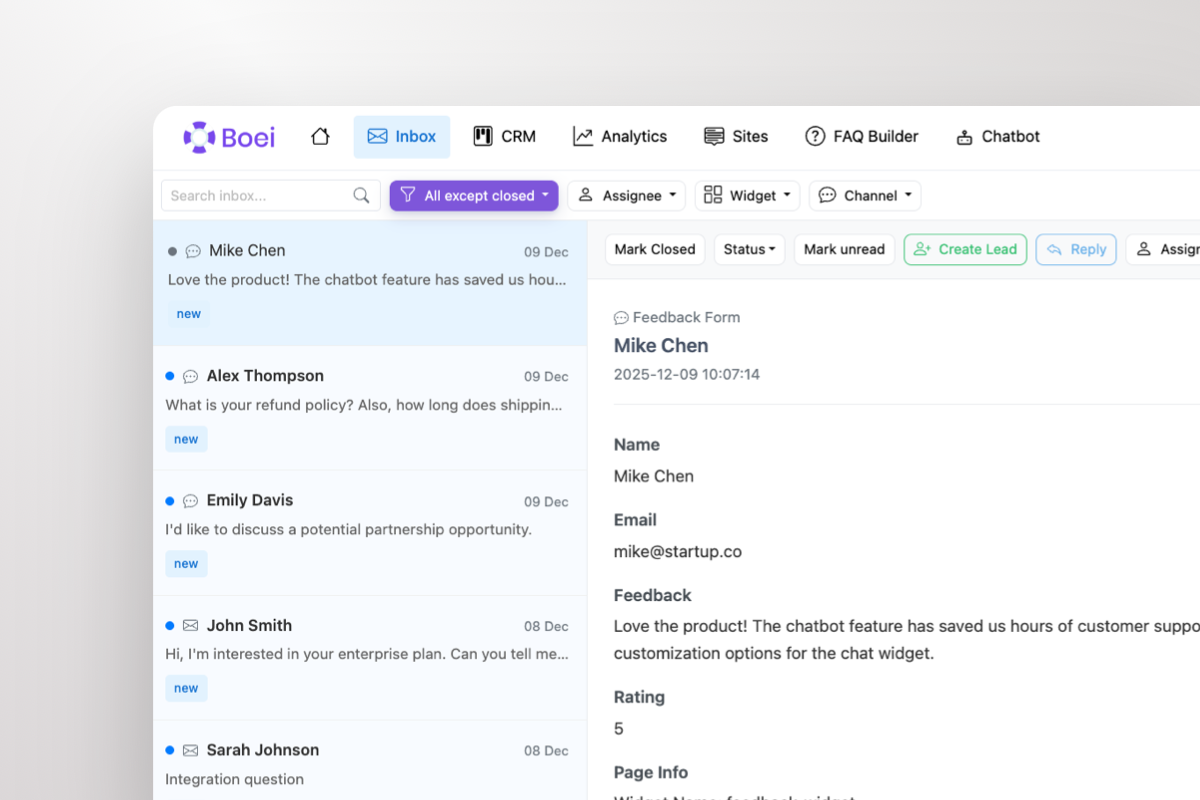
Shared inbox showing WhatsApp conversations with AI summary and agent handoff

Warm Leads Go Straight to Your Team

When a prospect is ready to buy, the AI doesn't keep chatting — it escalates. Your sales team gets the lead in a shared inbox with the full WhatsApp conversation and an AI-generated summary: who they are, what they need, and how warm they are. One click to take over.

  • AI escalates warm leads to your team automatically
  • Agents see full conversation + AI summary in shared inbox
  • Take over any WhatsApp chat with one click
  • Round-robin or department-based routing across agents
  • Leads flow into built-in CRM pipeline automatically

What Framer Users Say

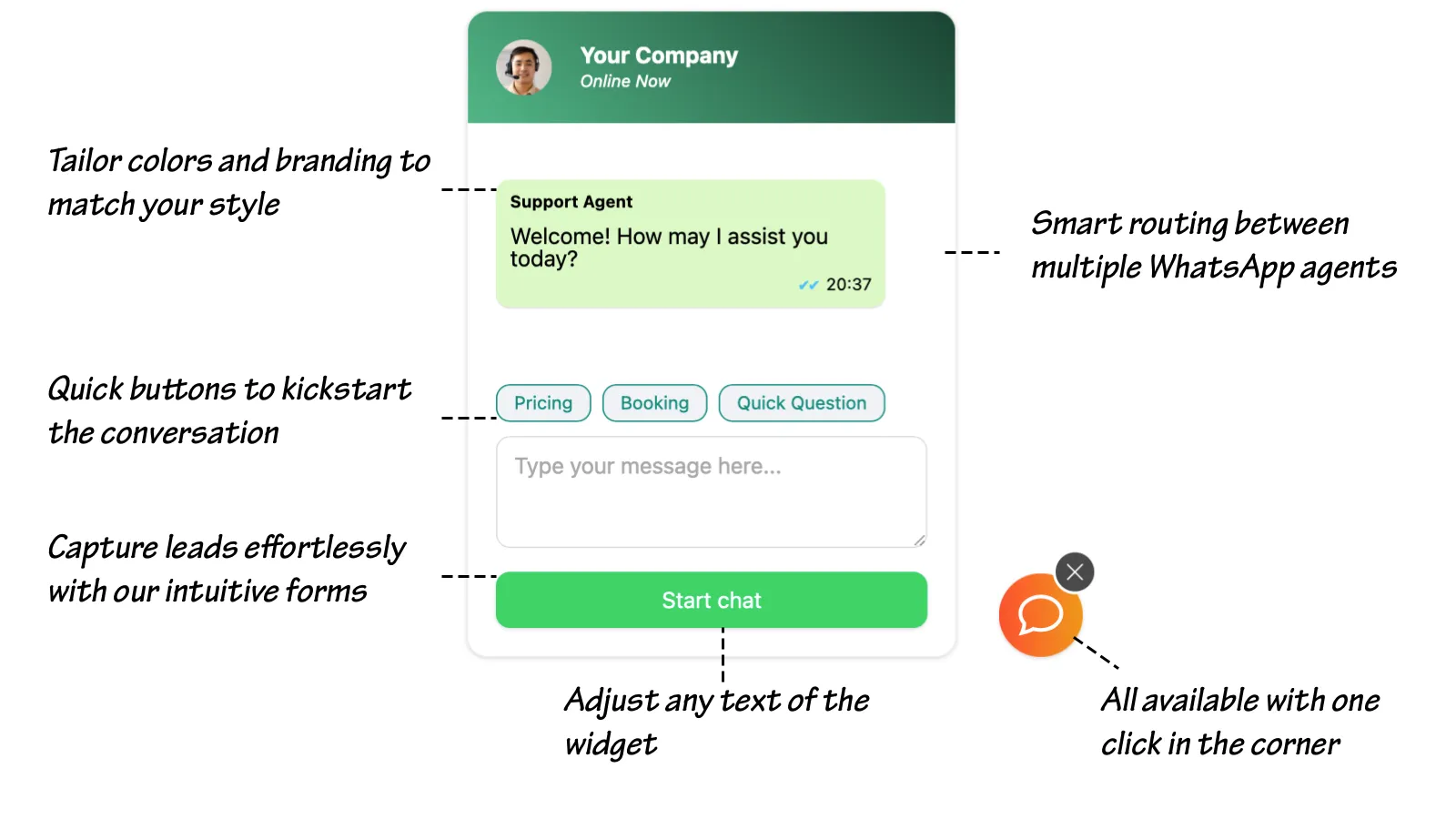
Your WhatsApp Widget, Your Brand

WhatsApp chat widget showing branding options, quick-reply prompts, lead capture form, and agent routing

Compare Options

Boei vs Other Options for Framer

Framer has no native WhatsApp or chat solution — here's how Boei compares

Feature Boei Crisp Embed Intercom Embed No Solution
AI agent ✓ (Fin, $$$)
Lead qualification & scoring ✗ Limited
Shared team inbox
Agent escalation with AI summary Basic
Built-in CRM ✓ (complex)
WhatsApp channel WhatsApp add-on
Channels included 50+ Live chat Add-ons 0
Price €14/mo Free-€95/mo $74+/seat/mo Free
Startup-friendly pricing Expensive at scale

Bottom line: Intercom offers AI (Fin) but costs $74+/seat/month — overkill for most Framer sites. Crisp is affordable but lacks AI qualification and WhatsApp. Boei gives you AI lead qualification, WhatsApp + 50 channels, shared inbox, and CRM for €14/month flat — startup-friendly pricing without per-seat costs.

Quick Setup

Install WhatsApp AI Agent on Framer

From setup to your first qualified lead in under 5 minutes

1

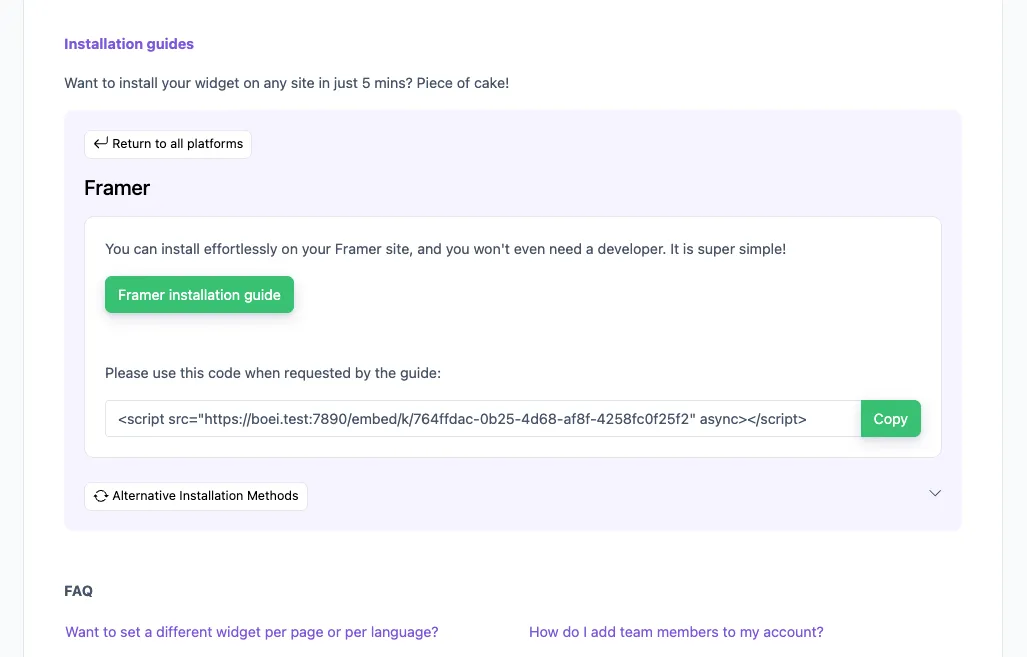
Copy installation code

In your Boei dashboard, open your widget and click the Install tab. Select Framer and copy the installation code.

Tip: The Install tab also offers a landing page link, QR code, and iframe embed.

Copy installation code
2

Go to Framer

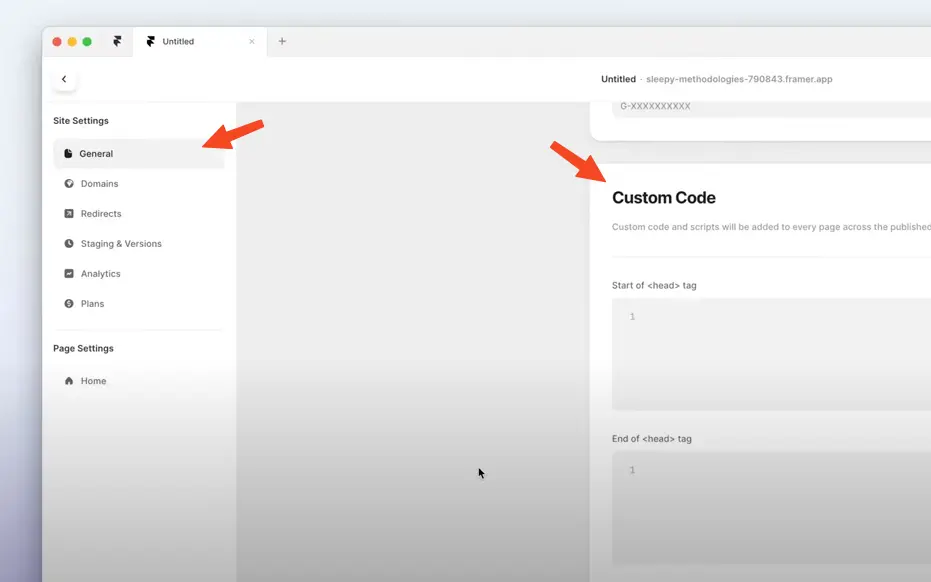
  1. Log in to your Framer account.
  2. Go to Settings by clicking the cog on the right top.
  3. Click General and scroll down to Custom Code.
  4. Paste the Boei code from step 2 in the End of <body> tag area. If there is already some code there, paste the Boei code below that.

Click Save and then Publish to see the changes on your live site.

Note that Framer does not load Boei in the Preview mode.

Congrats, you are done!

Go to Framer

Framer Features

Built for Framer Sites

AI agent that matches your high-converting landing page

🤖

Product-Qualified Leads

AI asks about team size, use case, current tools, and budget. Scores intent and routes only product-qualified leads to your sales team.

📥

Shared Team Inbox

All WhatsApp conversations in one inbox with AI summaries. Perfect for small startup teams that need shared visibility on every lead.

📊

Built-in CRM Pipeline

Track deals from first WhatsApp message to close. No need to connect Pipedrive or HubSpot — unless you want to.

🎯

Launch Day Ready

Product Hunt launch? Waitlist page? Add WhatsApp AI to capture and qualify the surge. Handle hundreds of leads without adding headcount.

📱

50+ Channels Included

WhatsApp, Messenger, Instagram DM, email, phone, Slack connect — all in one widget, one inbox, one CRM.

Zero Performance Impact

Loads async, under 50KB. Won't affect your Framer page speed, Core Web Vitals, or motion animations.

🌍

Auto-Translation

Going global? AI qualifies leads in 95+ languages. International prospects get the same qualifying experience, all flowing into one CRM.

🔒

GDPR Compliant

EU servers (Amsterdam), no cookies, DPA available. Launch in Europe with confidence.

How Framer Sites Convert with WhatsApp AI

AI qualifies leads and routes them to your team — across Framer use cases

SaaS Products

AI handles demo requests, trial questions, and pricing inquiries. Qualifies by team size and use case, then routes product-qualified leads to sales with a lead score.

  • Qualifies demo requests by team size and use case
  • Answers pricing and feature questions from your site
  • Routes enterprise leads to senior sales
  • Tracks conversion from visitor to paying customer

Product Hunt Launches

Launch day generates a surge of interest. AI qualifies every lead on WhatsApp while you focus on engagement. Hundreds of conversations, zero missed opportunities.

  • Handles launch-day conversation surge
  • Qualifies by use case and buying timeline
  • Captures contact details from every visitor
  • Warm leads get priority routing to founders

Freelancer & Agency Portfolios

AI pre-qualifies project inquiries by scope, budget, and timeline. Serious clients get routed with a full brief — before the discovery call.

  • AI qualifies by project scope and budget
  • Captures requirements from portfolio pages
  • Routes warm leads with AI-written brief
  • CRM tracks every inquiry to close

Built for SaaS and Startup Landing Pages

Your Framer page is optimized for conversions. Boei takes it further — AI qualifies every WhatsApp lead before your team touches them. Demo requests, trial questions, enterprise inquiries — each gets a tailored qualifying flow that ends with a scored lead in your inbox.

  • AI qualifies demo requests by team size, use case, and timeline
  • Trial users get onboarding help via WhatsApp AI
  • Enterprise inquiries scored and routed to senior sales
  • Pricing questions answered accurately from your page content
  • Waitlist and Product Hunt surges handled without adding team
  • All leads tracked from first message to signed contract in CRM
Framer SaaS WhatsApp AI Agent

Pro Tips

Convert More Framer Visitors into Revenue

1

Match Your Qualifying Flow to Your Funnel

Landing page visitors → AI asks about use case and team size. Pricing page visitors → AI asks about budget and timeline. Tailor qualifying questions to visitor intent.

2

Use Quick-Reply Prompts for Intent Signals

Widgets like 'Book Demo', 'View Pricing', 'Enterprise Inquiry' signal intent immediately. AI tailors the conversation based on what they click.

3

Prepare for Launch Surges

Product Hunt or social media launch? AI handles the surge on WhatsApp while you focus on community. Every lead qualified, scored, and tracked in CRM.

4

Connect to Your Existing Stack

Boei CRM works standalone. But if you use HubSpot, Pipedrive, or Salesforce — connect via native integrations, Zapier, or Make for bi-directional sync.

Your AI Sells on 50+ Channels

Same AI, same inbox, same CRM — across every channel your prospects use

Questions?

Framer WhatsApp AI Agent FAQ

How does the AI agent work on Framer?

When a visitor messages your WhatsApp from your Framer site, the AI engages immediately — asking qualifying questions about team size, use case, and budget. It captures contact details and scores intent. Warm leads are escalated to your team in the shared inbox with the full conversation and an AI summary.

How do I install it on Framer?

In Framer, go to Site Settings → General → Custom Code. Paste the Boei snippet in the Head section, publish, and your AI agent is live. Takes under 5 minutes. See our Framer installation guide.

Will it slow down my Framer page or break animations?

No. Boei loads asynchronously after your page content and is under 50KB. It won't affect your Framer animations, transitions, or Core Web Vitals score.

Is it better than Intercom for Framer?

Intercom costs $74+/seat/month with AI (Fin) as an add-on. Boei is €14/month flat — AI agent, shared inbox, CRM, 50+ channels, unlimited seats. For most Framer sites, Boei delivers the same result at a fraction of the cost.

What does it cost?

Boei Pro is €14/month and includes the WhatsApp AI agent, 2,000 AI messages, shared inbox, built-in CRM, 50+ channels, and unlimited team seats. Start with a 7-day free trial — no credit card required.

Can it handle Product Hunt launch traffic?

Yes. AI qualifies every WhatsApp lead automatically — even during surges. Hundreds of concurrent conversations, each one qualified and scored. Warm leads get priority routing to your team.

Can multiple team members handle leads?

Yes. All conversations appear in the shared inbox. Set up round-robin or department routing. Unlimited team seats included — no per-seat pricing.

Is it GDPR compliant?

Yes. Dutch company, EU servers (Amsterdam). No cookies, full GDPR compliance, DPA available on request.

Put Your WhatsApp AI Agent to Work on Framer

AI qualifies leads on WhatsApp 24/7, shared inbox for your team, built-in CRM — from €14/month.

7-day free trial • No credit card required • 5-minute setup • No plugins needed
Andrew Lee David S. Vance W. Grant Nitesh Manav
from 159 reviews