AI Chatbot for Webnode

Add an AI chatbot to your Webnode website in 5 minutes. Answer visitor questions in any language, capture leads around the clock, and grow your business — no coding required.

Trusted by 14,368 websites

Works with any Webnode template

Andrew Lee David S. Vance W. Grant Nitesh Manav
from 159 reviews

Try the Webnode AI Chatbot

Why Add an AI Chatbot to Webnode?

Webnode makes it easy to create multilingual websites. But serving visitors in multiple languages is challenging — especially when they have questions. An AI chatbot for Webnode answers visitor questions in their own language, 24/7, without you needing to be multilingual yourself.

Boei's AI chatbot learns your entire Webnode website automatically — all pages and all language versions. It understands your content deeply and responds to visitors in 95+ languages, making it the perfect companion for Webnode's multilingual capabilities.

Why Webnode users choose Boei:

  • Multilingual AI — Responds in 95+ languages, perfect for Webnode's multi-language website feature
  • European & GDPR-compliant — EU servers in Amsterdam, matching Webnode's European roots
  • Simple setup — Add the chatbot through Webnode's custom code area in minutes
  • Lead capture — Collect visitor emails and inquiries in any language
  • Affordable — Just €14/mo for AI chat with 2,000 conversations included

Webnode websites serve international audiences best when visitors can get instant answers in their language. Check our transparent pricing and explore all AI chatbot features.

Key Benefits

Why Webnode Users Love Boei

🌍

Multilingual by Default

Your Webnode site speaks multiple languages. So does Boei's AI chatbot — 95+ languages with auto-detection. No translation work needed.

🇪🇺

European & Privacy-First

Both Webnode and Boei are European. EU servers, GDPR-compliant, DPA available. Privacy that matches your values.

📧

Capture International Leads

Collect visitor information from any country. The chatbot handles inquiries in the visitor's language automatically.

Quick & Easy Setup

Add the chatbot through Webnode's custom HTML area. No coding skills needed — just paste and publish.

Quick Setup

Simple Setup

Get your AI chatbot live on Webnode in under 5 minutes

1

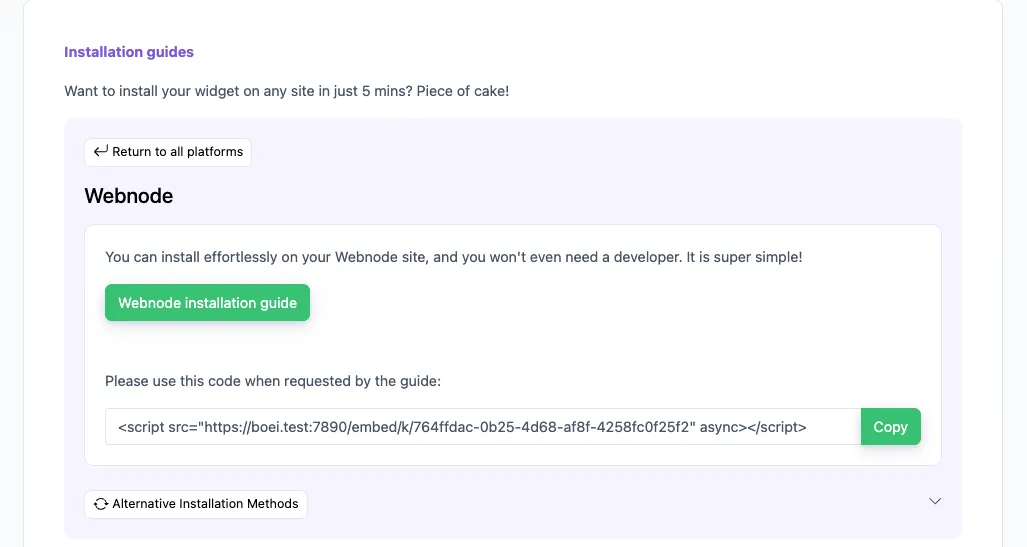
Copy installation code

In your Boei dashboard, open your widget and click the Install tab. Select Webnode and copy the installation code.

Tip: The Install tab also offers a landing page link, QR code, and iframe embed.

Copy installation code
2

Log in to Webnode

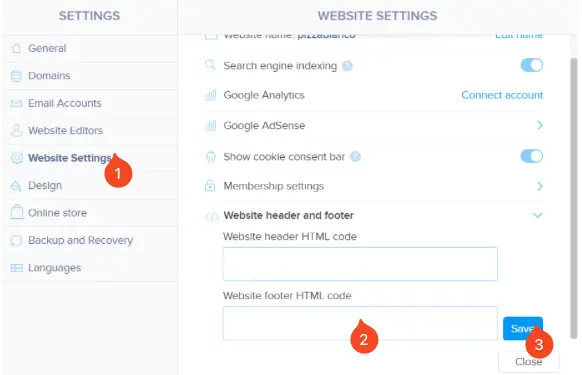
  1. Open Webnode and click Settings.
  2. Click Website Settings.
  3. Below Website header and footer, find the Website footer HTML code field.

  4. Paste the Boei code from step 2 in this field.

Note that Webnode does not allow code scripts on all account types; you may need to upgrade.

Log in to Webnode
3

Save

Click the "Save" button in Webnode.

4

Finished coffee

Congrats, you are done!

Webnode Features

Built for Multilingual Sites

Everything your Webnode site needs

🌐

Learns All Languages

AI reads all language versions of your Webnode site. Responds to visitors in their preferred language.

📱

Mobile Responsive

Looks perfect on every device. Mobile visitors get the same instant multilingual support.

🛒

Webnode Shop Support

Running a Webnode online store? The chatbot learns your products and answers questions about items and shipping.

📊

Visitor Insights

See which languages visitors use and what they ask about. Optimize your content for your actual audience.

🎨

Template Compatible

Works with all Webnode templates. Matches your brand colors and doesn't interfere with your design.

📩

Lead Notifications

Get email alerts for every new lead. Never miss an inquiry from any language.

Compare Options

Boei vs Other Webnode Chat Options

See how we compare to popular alternatives

Feature Boei Tidio tawk.to Crisp
Starting price €14/mo €39/mo Free (with branding) Free (limited)
AI conversations 2,000/mo 50-1,000 AI Assist $29/mo ✗ Limited
Train on your site ✓ Yes ✗ Limited ✗ Limited
WhatsApp, forms, 50+ channels ✓ Yes ✗ Limited ✗ Limited
Multilingual AI (95+ languages) ✓ Yes ✗ Limited ✗ Limited ✗ Limited
European servers (GDPR) Yes (Amsterdam) Yes (EU)

Bottom line: Boei offers multilingual AI chat with EU hosting for €14/mo. Perfect for Webnode's international audience and European privacy standards.

Your Multilingual Business Assistant

Imagine having a team member who speaks every language your visitors do, knows everything on your website, and works 24/7. That's what Boei's AI chatbot does for your Webnode site.

  • Answer visitor questions in their own language automatically
  • Share information about your services and business
  • Collect leads from visitors in any country
  • Guide visitors to the right page on your site
  • Handle common inquiries while you focus on your work
Webnode AI Multilingual Assistant

Pro Tips

Get More From Your Webnode Chatbot

1

Complete All Language Versions

The AI learns from all your Webnode language pages. Complete translations help the chatbot give better answers in each language.

2

Add Detailed Service Pages

More detail about your services helps the chatbot answer specific questions accurately across all languages.

3

Create FAQ Content

Add frequently asked questions to your site. The chatbot uses this as a reliable source for common inquiries.

4

Enable WhatsApp Channel

International visitors often prefer WhatsApp. Add it alongside AI chat for maximum accessibility.

Need Help?

Troubleshooting Common Issues

Widget not showing on my Webnode site?
Add the Boei script through Webnode's custom HTML feature. Go to your page settings and add the script in the footer code area. Publish your site after adding.
Chatbot not learning all language versions?
Add all your language-specific URLs to Boei's training section. The AI will crawl each language version separately for complete multilingual support.
Do I need a paid Webnode plan?
Custom HTML code requires a paid Webnode plan (Mini or higher). The free plan has limited custom code support.
Widget conflicts with Webnode elements?
The Boei widget uses a floating position that works with all Webnode templates. Adjust position (left/right) in the Boei dashboard if needed.

What Website Owners Say

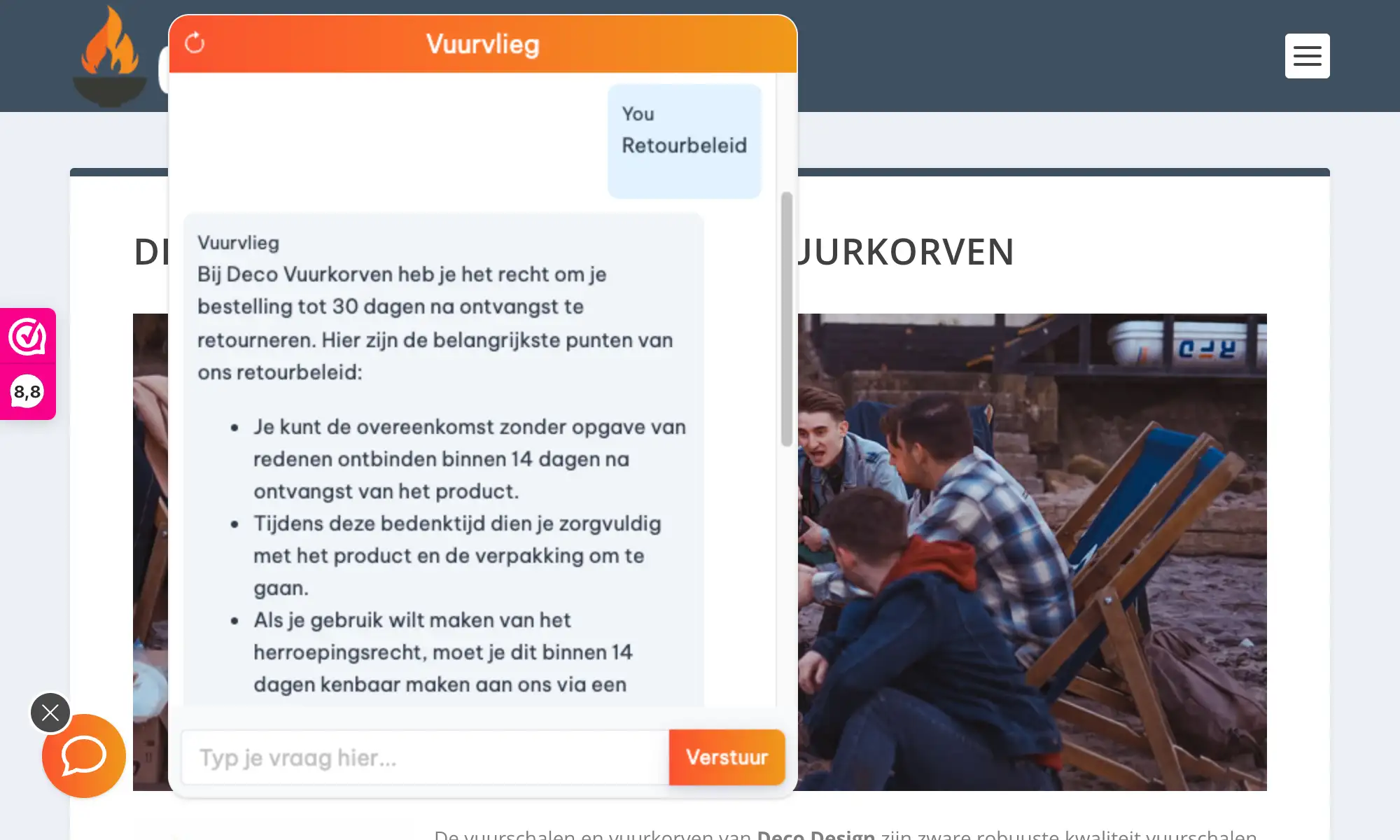
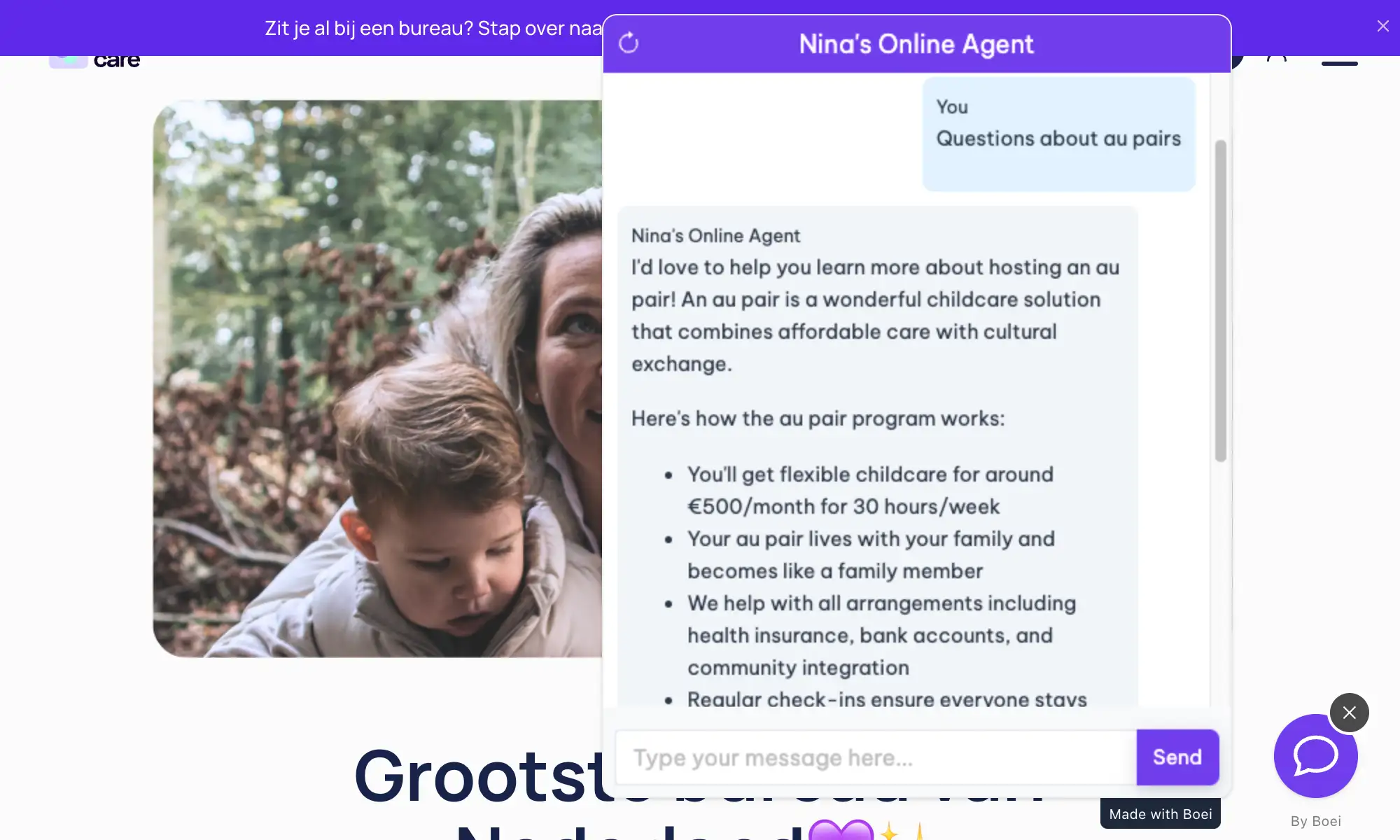
See AI Chatbot in Action

Real websites using Boei's AI chatbot

Add More Contact Channels

Combine AI chatbot with other ways for visitors to reach you

Related Resources

Learn more about AI chatbots

Multilingual

Multilingual AI chatbot features

Pricing

Transparent AI chatbot pricing

Webnode Chatbot Pricing

Simple, transparent pricing with AI chatbot included

Vance
Vance: " Helps me to convert website visitors to warm leads " ★★★★★

$8 / month

Billed annually at $96Cancel anytime

Number of websites

Optional Add-ons

Optional

Enhance your plan with these extras

What's included

    No contractsCancel anytime Trusted by 14.368 businesses

    Start 7-Day Free Trial

    Prices exclude VAT, calculated at checkout

    Need an Agency or Enterprise Solution?

    Get custom pricing, priority support, and advanced features such as custom domains and mailers

    Contact Sales

    Questions?

    Webnode AI Chatbot FAQ

    How do I install the AI chatbot on Webnode?

    Add the Boei script through Webnode's custom HTML area in your page settings. Paste the code in the footer section and publish your site.

    Will it slow down my Webnode site?

    No. The Boei script is under 50KB and loads asynchronously after your page content. It won't affect your site's loading speed.

    Does it support multiple languages?

    Yes. The AI auto-detects visitor language and responds in 95+ languages. It also learns from all language versions of your Webnode site.

    Does it work with Webnode's online store?

    Yes. The chatbot learns your product pages and can answer questions about items, pricing, and shipping in any language.

    How does the AI handle multiple languages?

    Boei uses GPT-5 and Claude which natively understand 95+ languages. A visitor can ask a question in Czech on your German Webnode page, and the AI responds in Czech using your German content as the source.

    Will answers be accurate across languages?

    Yes. The AI translates concepts, not just words. It understands your content meaning and conveys it accurately regardless of which language the visitor uses.

    Do I need a paid Webnode plan?

    Custom code features require Webnode Mini plan or higher. The free plan has limited support for third-party scripts.

    Does it meet EU privacy requirements?

    Fully. Data processed exclusively in the EU (Amsterdam). No cross-border data transfers, no AI training on conversations, cookieless mode for minimal consent requirements. Compliant across all EU member states.

    Does the AI chatbot work on WhatsApp too?

    Yes. Boei’s AI chatbot works on your website and on WhatsApp. Incoming WhatsApp messages get automatic AI replies, and all conversations land in your shared inbox with AI summaries.

    Ready to Go Global With Your Webnode Site?

    Join thousands of multilingual websites using Boei. Setup takes 5 minutes.

    7-day free trial • No credit card required • 95+ languages supported
    Andrew Lee David S. Vance W. Grant Nitesh Manav
    from 159 reviews